
Sarrera
The Vivitar 450PZ is a compact 35mm camera designed for ease of use, featuring fully automatic operation. This manual provides essential information for setting up, operating, maintaining, and troubleshooting your camera to ensure optimal performance.
The camera incorporates automatic focusing and exposure, a 38 to 70mm zoom lens, an automatic flash with red-eye reduction, and motorized film handling. An electronic self-timer is also included for convenience.
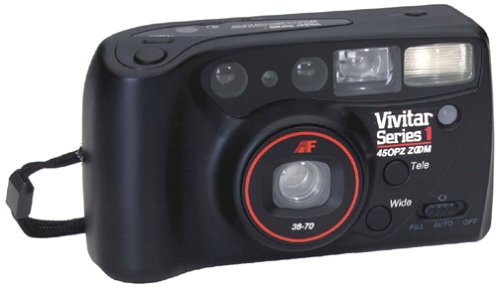
Irudia: Aurrealdea view of the Vivitar 450PZ 35mm Camera, showcasinbere diseinu trinkoa eta lentea esker.
Konfigurazioa
1. Bateriaren instalazioa
- Bilatu bateriaren konpartimentuaren estalkia kameraren gorputzean.
- Open the cover by sliding or lifting it according to the indicator.
- Insert the required CR123A type batteries, ensuring correct polarity (+/-) as indicated inside the compartment.
- Itxi bateriaren konpartimenduaren estalkia ondo.
2. Filmaren kargatzea
- Ireki kameraren atzealdea giltza irristatuz.
- Place a 35mm film cartridge into the film chamber.
- Pull the film leader across to the film take-up spool, aligning it with the start mark.
- Itxi kameraren atzealdea. Kamerak automatikoki aurreratuko du filma lehenengo fotogramara.
3. Wrist Strap Attachment
Attach the provided wrist strap to the designated loop on the camera body. This helps prevent accidental drops and provides a secure grip during use.
Kameraren funtzionamendua
1. Piztu/Itzali
Locate the power button or switch, typically near the shutter button. Press or slide it to turn the camera on or off.
2. Argazkiak ateratzea
- Begiratu viewbilatzailea zure argazkia konposatzeko.
- Press the shutter button halfway down to activate the autofocus and exposure systems. The camera will automatically set the focus and exposure.
- Sakatu obturadore-botoia guztiz argazkia ateratzeko. Filma automatikoki aurreratuko da hurrengo fotogramara.
3. Zoom funtzioa
Use the zoom control (usually a lever or buttons near the shutter) to adjust the focal length between 38mm (wide-angle) and 70mm (telephoto). This allows you to bring subjects closer or capture a wider scene.
4. Flasharen funtzionamendua
- Flash automatikoa: The flash will automatically fire in dimly lit conditions to ensure proper exposure.
- Begi gorrien murrizketa: When activated, the camera emits a series of pre-flashes before the main flash to reduce the red-eye effect in portraits.
- Flash Off Mode: For situations where flash is not desired (e.g., museums, theater), locate the flash mode button and select the 'flash off' setting.
5. Tenporizadorea
To use the self-timer, press the self-timer button. A flashing LED indicator will typically signal the countdown. After a set delay (e.g., 10 seconds), the camera will automatically take the picture, allowing the photographer to be included in the shot.
6. Filmaren atzerakada
When the film roll is complete, the camera will automatically rewind the film back into the cartridge. A mid-roll rewind function may also be available, allowing you to rewind the film before the roll is finished by pressing a specific button (refer to camera markings if available).
Mantentzea
Kamera garbitzea
- Use a soft, lint-free cloth to gently wipe the camera body.
- Lentearentzat, erabili lenteak garbitzeko oihal espezializatu bat eta lenteak garbitzeko soluzio bat. Saihestu lentearen gainazala hatzekin ukitzea.
- Do not use abrasive cleaners or solvents, as these can damage the camera's finish and optical components.
Biltegiratzea
- Erabiltzen ez duzunean, gorde kamera leku fresko eta lehor batean, eguzki-argitik eta muturreko tenperaturetatik babestuta.
- Kamera denbora luzez erabiliko ez bada, kendu bateriak isuririk ekiditeko.
Arazoak konpontzea
Kamera ez da pizten
- Egiaztatu bateriak behar bezala sartuta dauden, polaritate egokia kontuan hartuta.
- Ordeztu bateria zaharrak edo agortuak berriekin.
- Ziurtatu etengailua 'On' posizioan dagoela.
Film Not Advancing
- Verify that the film is correctly loaded and the leader is engaged with the take-up spool.
- Check if the film door is securely closed.
- Ensure there is enough power from the batteries for the motor to operate.
Flash Not Firing
- Confirm that the flash is not set to 'Flash Off' mode.
- Allow sufficient time for the flash to charge (indicated by a flash ready lamp).
- Ensure ambient light conditions are dark enough for the automatic flash to activate.
Zehaztapenak
| Ezaugarri | Xehetasuna |
|---|---|
| Marka | Vivitar |
| Ereduaren izena | 450PZ |
| Film Formatu Mota | 35 mm |
| Lentea | 38-70mm Zoom |
| Esposizio Kontrola | Automatikoa |
| Fokatze Sistema | 14-zone Autofocus |
| Flasha | Automatic with Red-Eye Reduction |
| Filmen manipulazioa | Motorized Loading, Advance, and Rewind |
| Ezaugarri bereziak | Built-In Flash, Compact Design, Electronic Self-Timer |
| Elementuaren pisua | 15.2 ontza |
| Dakarten osagaiak | Kameraren gorputza eta lentea |
Bermea eta Laguntza
Bermearen informazioa
The Vivitar 450PZ camera comes with a warranty covering one year on parts and 90 days on labor from the date of purchase. Please retain your proof of purchase for warranty claims.
Bezeroarentzako Arreta
For technical assistance, service, or further inquiries regarding your Vivitar 450PZ camera, please refer to the contact information provided with your product packaging or visit the official Vivitar weblaguntza baliabideen gunea.