
Segurtasun informazio garrantzitsua
Please read all safety and operating instructions carefully before using this VCR. Retain this manual for future reference.
- Energia iturria: Connect the VCR only to the power supply indicated on the label.
- Aireztapena: Ziurtatu aireztapen egokia dagoela. Ez blokeatu aireztapen-irekidurak.
- Ura eta hezetasuna: Do not expose the VCR to rain or moisture. Do not place objects filled with liquids on the VCR.
- Garbiketa: Unplug the VCR from the wall outlet before cleaning. Use a dry cloth.
- Zerbitzua: Ez saiatu produktu hau zuk zeuk ematen. Bidali zerbitzu guztiak zerbitzu kualifikatuko langileengana.
Produktua amaituview
The Sharp VC-A422 is a 4-head VCR designed for reliable playback and recording of VHS tapes. It features a user-friendly interface for easy operation.
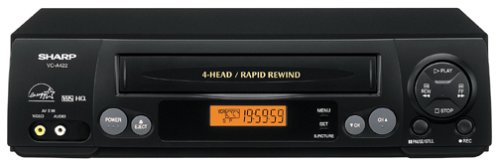
Irudia: Aurrealdea view of the Sharp VC-A422 4-Head VCR, showing the tape slot, display, and control buttons.
Konfigurazioa
1. Desontziratzea eta kokatzea
- Carefully remove the VCR from its packaging.
- Place the VCR on a stable, level surface. Ensure there is adequate space around the unit for ventilation.
- Avoid placing the VCR near heat sources, direct sunlight, or areas with high humidity.
2. Telebistara konektatzea
To connect your VCR to a television, you will typically use RCA audio/video cables (red, white, yellow) or a coaxial cable.
- RCA Connection (Recommended for best quality):
- Connect the yellow video output jack on the VCR to the yellow video input jack on your TV.
- Connect the white audio output jack on the VCR to the white audio input jack on your TV.
- Connect the red audio output jack on the VCR to the red audio input jack on your TV.
- Select the corresponding AV input on your television (e.g., Video 1, AV1, Input 1).
- Koaxial konexioa:
- Connect a coaxial cable from the "RF Out" or "Antenna Out" jack on the VCR to the "Antenna In" or "RF In" jack on your TV.
- Connect your antenna or cable TV signal to the "RF In" or "Antenna In" jack on the VCR.
- Tune your television to channel 3 or 4 (depending on the VCR's output setting) to receive the VCR signal.
3. Energia-konexioa
- Konektatu bideo-grabagailuaren elikatze-kablea entxufe elektriko estandar batera.
- The VCR should enter standby mode, indicated by a clock display or power light.
Funtzionamendu-argibideak
1. Oinarrizko erreprodukzioa
- Ensure the VCR is powered on and your TV is set to the correct input.
- Insert a VHS tape into the tape slot. The VCR will automatically load the tape.
- Sakatu JOLASTU button on the VCR or remote control.
- Erreprodukzioa gelditzeko, sakatu GELDITU botoia.
- Erreprodukzioa eteteko, sakatu PAUSENA botoia. Sakatu berriro jarraitzeko.
- Aurreratzeko edo atzera egiteko, sakatu tekla FF (Aurrerapen azkarra) edo REW (Rewind) button. Press JOLASTU erreprodukzio normalari ekiteko.
- Zinta kanporatzeko, sakatu botoia EJECTU botoia.
2. Programak grabatzea
The Sharp VC-A422 allows for recording television programs. Ensure a blank or recordable VHS tape is inserted and its safety tab is intact.
- Tune the VCR to the desired channel using the VCR's tuner.
- Sakatu GRABATU button. The VCR will begin recording.
- Grabaketa gelditzeko, sakatu GELDITU botoia.
- For timed recordings, refer to the VCR's on-screen programming guide (if available) or consult the full manual for detailed timer recording instructions.
Mantentzea
Proper maintenance ensures the longevity and optimal performance of your VCR.
- Kanpoko garbiketa: Wipe the exterior of the VCR with a soft, dry cloth. Do not use liquid cleaners or abrasive materials.
- Buru garbiketa: If picture quality degrades (e.g., snowy picture, lines), the video heads may be dirty. Use a dry-type VCR head cleaning cassette sparingly. Excessive use can wear down the heads.
- Zintaren zaintza: Store VHS tapes in their cases, away from dust, direct sunlight, and strong magnetic fields. Avoid exposing tapes to extreme temperatures.
- Aireztapena: Keep the VCR's ventilation slots clear of obstructions to prevent overheating.
Arazoak konpontzea
If you encounter issues with your Sharp VC-A422 VCR, refer to the following common problems and solutions:
| Arazoa | Kausa posiblea | Irtenbidea |
|---|---|---|
| Botererik ez | Kable elektrikoa deskonektatuta; entxufea ez dago aktibo. | Egiaztatu kablearen konexioa. Probatu entxufea beste gailu batekin. |
| Ez dago irudi edo soinurik | Telebistako sarrera okerra hautatu da; A/V kableak solte edo gaizki konektatuta daude. | Select correct TV input (e.g., AV1, Video 1). Ensure A/V cables are securely connected to matching color ports. |
| Snowy or distorted picture | Dirty video heads; poor tape quality; incorrect channel for coaxial connection. | Use a VCR head cleaning cassette. Try a different tape. If using coaxial, ensure TV is on channel 3 or 4. |
| Zinta ez da kanporatuko | Power failure; mechanical issue. | Ensure VCR is powered on. If problem persists, seek professional service. |
| Ezin da grabatu | Tape's safety tab removed; VCR not tuned to a channel. | Check if the safety tab on the VHS tape is intact (cover the notch with tape if removed). Ensure VCR tuner is set to the desired channel. |
Zehaztapenak
- Marka: Zorrotza
- Eredua: VC-A422
- Buruak: 4-Head (Video)
- Elementuaren pisua: 6 kilo
- Paketearen neurriak: 15.55 x 11.02 x 5.24 hazbete
- ASIN: B00005LABU
- Lehen eskuragarri dagoen data: 4ko irailaren 1999a
Oharra: zehaztapenak aldatu egin daitezke, jakinarazi gabe.
Bermearen informazioa
This Sharp product is covered by a limited warranty. For specific details regarding warranty coverage, duration, and terms, please refer to the warranty card included with your purchase or visit the official Sharp webgunea. Gorde erosketaren egiaztagiria bermearen erreklamazioetarako.
Bezeroarentzako Arreta
For further assistance, technical support, or service inquiries, please contact Sharp customer support. You can find contact information on the official Sharp webgunean edo zure produktuarekin batera emandako dokumentazioan.
Visit the official Sharp store for more information: Sharp Denda Ofiziala
Lege-oharra
KONTSUMITZAILEAREN ALERTA: Telebista hargailu honek emisio sintonizatzaile analogikoa baino ez du eta 2009ko otsailaren 17tik aurrera bihurgailu-kaxa bat beharko du antena batekin aireko emisioak jasotzeko, AEBek emisio digitalerako trantsizioa egin baitute. Telebista analogikoek lehen bezala funtzionatzen jarraitu beharko lukete kable eta satelite bidezko telebista zerbitzuekin, joko kontsolekin, bideo-grabagailuekin, DVD erreproduzitzaileekin eta antzeko produktuekin. Informazio gehiago lortzeko, deitu Komunikazio Batzorde Federalera 1-888-225-5322 telefono zenbakira (TTY: 1-888-835-5322), edo bisitatu batzordearen telebista digitalaren webgunea. Web gunea: www.dtv.gov.