
1. Sarrera
This manual provides instructions for the setup, operation, and maintenance of your Bose MediaMate Computer Speakers. These speakers are designed to enhance the audio experience for your computer, whether for music, movies, or gaming. The compact design and upward-angled sound projection optimize audio delivery for desktop use, occupying minimal desk space.
2. Segurtasun informazioa
Please read and follow all safety instructions before using this product to prevent electric shock, fire, or injury. Keep this manual for future reference.
- Do not expose the speakers to water or moisture.
- Do not place the speakers near heat sources such as radiators, heat registers, stoves, or other apparatus (including ampberoa sortzen duten argitzaileak).
- Erabili fabrikatzaileak zehaztutako eranskinak/osagarriak soilik.
- Deskonektatu aparatu hau tximista-ekaitzetan edo denbora luzez erabiltzen ez duzunean.
- Jarri zerbitzu-zerbitzu guztiak zerbitzu-pertsonal kualifikatuari. Zerbitzua behar da aparatua edozein modutan hondatu denean, hala nola, elikatze-kablea edo entxufea hondatuta dagoenean, likidoa isuri denean edo objektuak aparatura erori direnean, aparatua euria edo hezetasuna jasan duenean, ez du normalean funtzionatzen. , edo erori egin da.
3. Paketearen edukia
Egiaztatu elementu guztiak zure paketean daudela:
- Bose MediaMate Computer Speakers (2 units)
- Elikatze-moldagailua
- Audio Cable (3.5mm stereo jack)
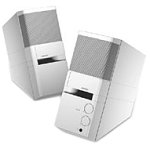
Image: The Bose MediaMate Computer Speakers in Gray. The image shows two compact speakers, one with visible volume and mix controls, and a headphone jack.
4. Konfigurazioa
Follow these steps to set up your Bose MediaMate Computer Speakers:
- Lekua: Place the speakers on a flat, stable surface on either side of your computer monitor. Ensure they are angled slightly upward towards your listening position for optimal sound.
- Konektatu audio kablea: Connect the 3.5mm audio cable from the back of the primary speaker (the one with controls) to the audio output jack on your computer.
- Konektatu energia: Plug the power adapter into the power input on the primary speaker, then plug the adapter into a wall outlet.
- Piztu: Turn on the speakers using the volume knob. The power indicator light should illuminate.
5. Funtzionamendu-argibideak
Once set up, operating your MediaMate speakers is straightforward:
- Bolumen kontrola: Use the large knob labeled "VOLUME" on the front of the primary speaker to adjust the overall sound level.
- Nahasketaren kontrola: The "MIX" knob allows you to blend audio from two different sources if you have a second device connected to the auxiliary input.
- Aurikularrak Jack: For private listening, plug your headphones into the headphone jack located on the front of the primary speaker. This will mute the speakers.
- Sarrera bikoitzak: The speakers feature dual inputs, allowing you to connect and mix two audio sources simultaneously. For example, you can connect your computer and a portable music player.
6. Mantentzea
To ensure the longevity and optimal performance of your speakers:
- Garbiketa: Use a soft, dry cloth to clean the exterior surfaces of the speakers. Do not use liquid cleaners or aerosols.
- Hautsa: Regularly dust the speaker grilles to prevent accumulation that could affect sound quality.
- Biltegiratzea: Bozgorailuak denbora luzez gordetzen badituzu, deskonektatu itzazu korrontetik eta gorde leku fresko eta lehor batean.
7. Arazoak
If you encounter issues with your Bose MediaMate speakers, refer to the following common problems and solutions:
| Arazoa | Kausa posiblea | Irtenbidea |
|---|---|---|
| Soinurik ez |
|
|
| Soinu distortsionatua |
|
|
| Bozgorailu bakarra lanean |
|
|
8. Zehaztapenak
- Marka: Bose
- Eredua: MediaMate
- Konektibitatea: 3.5mm Audio Input, AC Power
- Audio irteera: Estereoa
- Hizlari mota: Multimedia
- Materiala: Metala
- Bozgorailuaren tamaina: 6 Centimeters (Audio Driver)
- Elementuaren pisua: 3 kilo
- Kolorea: Grisa
9. Bermea eta Laguntza
Bose MediaMate Computer Speakers come with a limited warranty. For specific warranty details and duration, please refer to the warranty card included with your product or visit the official Bose webgunea.
For technical support, product registration, or service inquiries, please contact Bose customer service:
- Telefonoa: 800-444-2673
- Webgunea: www.bose.com
Please have your product model number (MediaMate) and purchase date available when contacting support.