
NETGEAR GS108GE
NETGEAR ProSafe GS108 Ethernet Switch
Erabiltzailearen eskuliburua
1. Sarrera
The NETGEAR ProSafe GS108 is an 8-port Gigabit Ethernet Switch designed to expand your network connectivity with high-speed performance. This unmanaged switch provides a simple, cost-effective, and reliable solution for extending network connections to multiple devices. Its compact and durable design makes it suitable for various environments, from home offices to small businesses.
2. Paketearen edukia
Mesedez, egiaztatu elementu guztiak zure paketean daudela:
- NETGEAR ProSafe GS108 8-port Gigabit Ethernet Switch
- Horman muntatzeko kit
- AC egokitzailea
- Instalazio gida
- Berme txartela
- Laguntza informazio txartela
3. Konfigurazioa
The NETGEAR ProSafe GS108 is a plug-and-play device, requiring minimal setup. Follow these steps for quick installation:
- Potentzia-konexioa: Connect the provided AC adapter to the switch's power input and then to a power outlet. The 'Power' LED on the front panel should illuminate.
- Sare-konexioak: Connect your network devices (e.g., computers, printers, network-attached storage) to any of the 8 RJ-45 Ethernet ports using standard Ethernet cables. The switch features auto-sensing ports, meaning any port can be used for uplink to a router or modem.
- Egiaztatu konexioa: Once connected, the corresponding Link/Act LED for each active port will light up, indicating a successful connection.

3.1. irudia: Goikoa view of the NETGEAR ProSafe GS108 Ethernet Switch, showing its compact design and the NETGEAR branding.
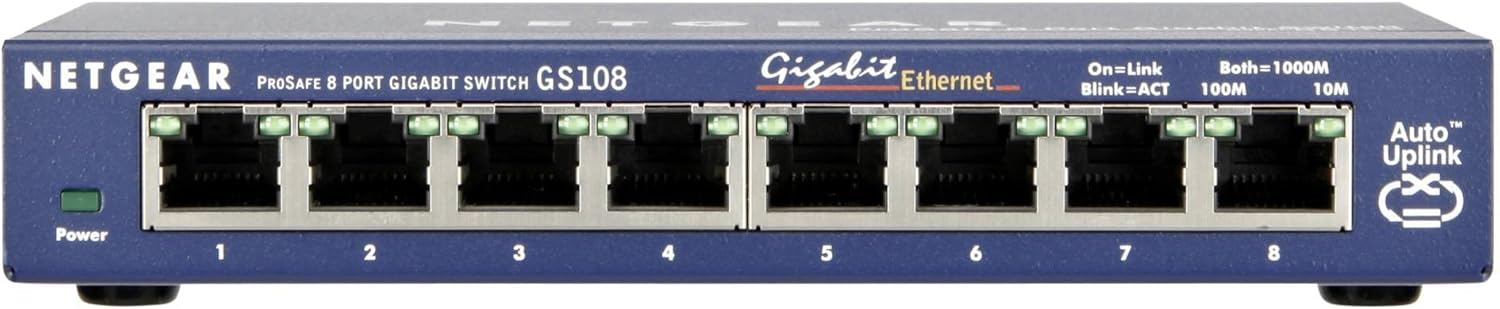
3.2. irudia: Aurrealdea view of the NETGEAR ProSafe GS108 Ethernet Switch, highlighting the 8 Gigabit Ethernet ports and LED indicators for power, link/activity, and speed.
For wall-mounting, use the provided wall-mount kit and refer to the installation guide for detailed instructions.
4. Etengailuaren funtzionamendua
The GS108 is an unmanaged switch, meaning it operates automatically without requiring user configuration. Simply connect your devices, and the switch will handle network traffic efficiently.
LED adierazleak:
- Power LED: Berde pizten da etengailua piztuta dagoenean.
- Lotura/Ekintza LEDak (portu bakoitzeko):
- Solid Green: Indicates a valid network link.
- Blinking Green: Indicates network activity (data transmission).
- Speed LEDs (per port):
- Solid Green (1000M): Indicates a Gigabit (1000 Mbps) connection.
- Solid Amber (100M): Indicates a Fast Ethernet (100 Mbps) connection.
- Off: Indicates a 10 Mbps connection.
Piztu/Itzali etengailua:
The switch features a convenient on/off power switch located at the rear. This allows you to power down the device without needing to unplug the AC adapter, which is useful for maintenance or temporary shutdowns.
Auto-Uplink (Auto MDI/MDIX):
All ports on the GS108 support Auto MDI/MDIX, eliminating the need for crossover cables. The switch automatically detects the type of cable (straight-through or crossover) and adjusts accordingly, simplifying network connections.
5. Mantentzea
The NETGEAR ProSafe GS108 is designed for reliable, long-term operation with minimal maintenance. Consider the following for optimal performance and longevity:
- Garbiketa: Keep the switch clean and free of dust. Use a soft, dry cloth for cleaning. Do not use liquid or aerosol cleaners.
- Aireztapena: Ensure proper airflow around the device to prevent overheating. Do not block ventilation openings.
- Ingurumen-baldintzak: Operate the switch within its specified temperature and humidity ranges. Avoid exposing it to direct sunlight, excessive heat, or moisture.
- Segurtasun abisua: OHARRA: The solder used in this product contains lead, a chemical known to the State of California to cause birth defects and other reproductive harm. Please wash hands after handling internal components and circuit boards and avoid inhalation of fumes if heating the solder.
6. Arazoak
If you encounter issues with your NETGEAR ProSafe GS108, try the following basic troubleshooting steps:
- Potentziarik gabe: If the Power LED is off, ensure the AC adapter is securely connected to both the switch and a working power outlet. Try a different outlet or power strip.
- Esteka/jarduerarik ez: If a Link/Act LED is off for a connected device, check the Ethernet cable connection at both ends. Try a different Ethernet cable or port. Ensure the connected device is powered on and functioning correctly.
- Sarearen abiadura motela: Verify that both the switch and the connected device support Gigabit Ethernet for optimal speeds. Check the Speed LED for the port; if it's amber (100M) instead of green (1000M), there might be a cable issue or a device limitation. Ensure your network adapter drivers are up to date.
- Etengabeko konexioa: Check for loose cable connections. Ensure the switch is placed in a well-ventilated area and not overheating.
If problems persist, consult the detailed support information card included in your package or visit the official NETGEAR support webgunea.
7. Zehaztapenak
| Ezaugarri | Deskribapena |
|---|---|
| Eredua | GS108GE |
| Portu kopurua | 8 x RJ-45 Gigabit Ethernet (10/100/1000Base-T) |
| Datuen transferentzia-tasa | 1 Gbps (Gigabit per second) |
| Neurriak (LxWxH) | 3.98 x 6.22 x 1.06 hazbete |
| Elementuaren pisua | 1.15 kilo (gutxi gorabehera 520 gramo) |
| Fabrikatzailea | NETGEAR |
| Potentzia Sarrera | AC adapter (Input Voltage Range: 5V) |
| Ezaugarriak | Auto MDI/MDIX, Non-blocking architecture, On/Off power switch |
8. Bermea eta Laguntza
Your NETGEAR ProSafe GS108 Ethernet Switch comes with a limited warranty. Please refer to the 'Warranty Card' included in your package for specific terms and conditions, including warranty period and coverage details.
For technical support, product registration, and additional resources, please consult the 'Support Information Card' provided with your product or visit the official NETGEAR support website. Online resources often include FAQs, driver downloads, and community forums.
Ohar garrantzitsua: Product specifications and support policies are subject to change without notice. Always refer to the latest information available on the official NETGEAR website for the most up-to-date details.