
Sarrera
The Dualit Classic Toaster combines simplicity and sophistication, offering a timeless design with modern functionality. Engineered and hand-assembled in the UK, this toaster is built for durability and performance. It features extra-wide slots to accommodate various bread types, including a convenient bagel function. The unique ejector system ensures your toast stays warm until you are ready to retrieve it. With its robust construction and user-friendly controls, the Dualit Classic Toaster is designed to provide perfectly browned toast every time.

Image: The Dualit Classic 2 Slice NewGen Toaster, showcasing its sleek metallic charcoal finish and two slots with toasted bread.
Segurtasun informazio garrantzitsua
- Ziurtatu beti tostagailua gainazal egonkor eta beroarekiko erresistente batean jartzen dela, material sukoietatik urrun.
- Do not operate the toaster without the crumb tray correctly inserted.
- Unplug the toaster from the power outlet when not in use and before cleaning.
- Ez sartu inoiz metalezko objektuak tostadorearen zirrikituetan.
- Supervise children closely when the toaster is in use.
- Ez sartu txigorgailua, kablea edo entxufea uretan edo beste likido batean.
Konfigurazioa
- Carefully unpack the toaster and remove all packaging materials.
- Place the toaster on a clean, dry, and stable countertop or table. Ensure there is adequate clearance around the toaster for ventilation.
- Verify that the removable crumb tray is fully inserted at the bottom of the toaster.
- Entxufatu korronte-kablea lurreko hartune elektriko batean.

Image: A detailed diagram highlighting the key components of the Dualit toaster, including the removable crumb tray and manual ejector.
Funtzionamendu-argibideak
Oinarrizko txigortzea
- Insert your desired bread slices into the extra-wide 28mm slots.
- Use the top selector switch to activate the desired number of slots (e.g., 1 or 2 slices).
- Adjust the mechanical timer dial (bottom dial) to your preferred browning level. Settings range from light to dark.
- Press the manual ejector lever down to initiate the toasting cycle. The elements will begin to glow.
- To check the toast's progress without interrupting the cycle, gently lift the ejector lever. The toast will remain warm until the lever is fully pushed up to eject.

Irudia: Gertutik view of the toaster's mechanical controls, including the energy-efficient slot selector and the browning control dial.
Desizozteko funtzioa
For frozen bread, use the defrost setting (indicated by a snowflake icon) on the mechanical timer dial. This function will gently thaw the bread before beginning the toasting process, ensuring even results.
Bagel funtzioa
The toaster features a bagel function that toasts the cut side of the bagel while gently warming the outer side. Place the bagel with the cut side facing the active heating elements for optimal results.
Bideoa: Ofizial bat amaitu daview of the Dualit Classic NewGen Toaster, demonstrating its features and operation.
Video: A look into the manufacturing process of the Dualit Classic Toaster, highlighting its hand-built quality.
Mantentzea eta Garbiketa
- Deskonektatu beti tostagailua eta utzi guztiz hozten garbitu aurretik.
- Apur-erretilua: Regularly remove and empty the crumb tray. Wipe it clean with a damp cloth and ensure it is dry before reinserting.
- Kanpoaldea: Garbitu tostadorearen kanpoaldea oihal leun eta lehor batekinamp oihalik. Ez erabili garbitzaile urratzailerik, estropagailurik edo produktu kimiko gogorrik, hauek akabera kaltetu baitezakete.
- ProHeat Elements: The patented ProHeat elements are designed for durability and longevity. In the unlikely event of an element needing replacement, this can be done by a qualified electrician, ensuring the toaster's long lifespan.

Image: A hand holding a Dualit ProHeat element, emphasizing the toaster's repairable design and long-lasting components.

Image: The removable crumb tray being pulled out from the bottom of the Dualit toaster, illustrating ease of cleaning.
Arazoak konpontzea
| Arazoa | Kausa posiblea | Irtenbidea |
|---|---|---|
| Toaster not turning on | Ez dago behar bezala konektatuta; arazoa entxufearekin. | Ensure the toaster is securely plugged into a working power outlet. Check the circuit breaker if necessary. |
| Txigortu irregularra | Incorrect slice selection; first use on a cold toaster. | Confirm the correct number of slots are selected. For the first use of the day, a slightly higher browning setting or a brief preheat may be needed. |
| Bread stuck in slots | Ogia lodiegia edo zati txikiak. | Use the manual ejector lever to lift the toast. Do not use metal utensils. For smaller items, consider using a Dualit sandwich cage (sold separately). |
| Kea edo erre usaina | Crumbs accumulated in the tray or inside the toaster. | Unplug immediately. Allow to cool, then remove and clean the crumb tray. Gently shake out any remaining crumbs from the toaster. |
Zehaztapenak
- Marka: Dualita
- Modelo zenbakia: 27154
- Kolorea: Metallic Charcoal
- Materiala: Altzairu herdoilgaitza
- Produktuaren neurriak: 8.6" L x 10.2" W x 8.2" H
- Wattage: 1250 watt
- Xerra kopurua: 2
- Ezaugarri berezia: Fully Repairable
- Elementuaren pisua: 7 kilo
- liburukiatage: 120V
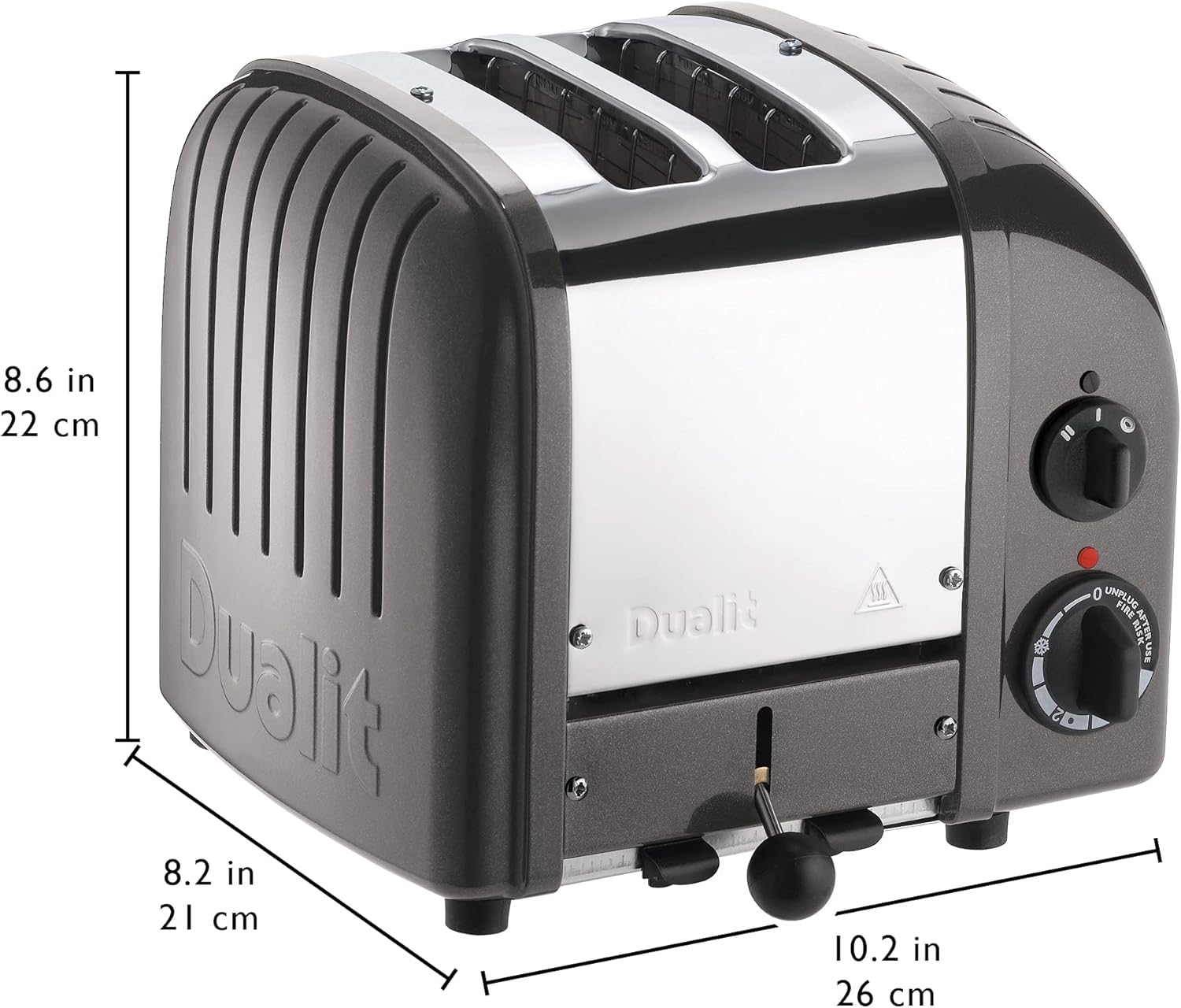
Image: The Dualit toaster with its key dimensions (depth, width, height) clearly marked for reference.
Bermea eta Laguntza
The Dualit Classic 2 Slice NewGen Toaster typically comes with a one-year warranty from the manufacturer. For specific warranty details, product registration, or technical support, please refer to the official user manual or contact Dualit customer service.
Erabiltzailearen eskuliburu ofiziala (PDF): Deskargatu Hemen
Visit the Dualit Store: Dualit Store on Amazon