
Canon SD600
Canon PowerShot SD600 Digital Elph erabiltzailearen eskuliburua
Model: SD600 (1079B001) | Brand: Canon
1. Sarrera
This manual provides essential information for the safe and effective use of your Canon PowerShot SD600 Digital Elph camera. Please read it thoroughly before using the camera and keep it in a safe place for future reference.
The Canon PowerShot SD600 is a 6.0-megapixel digital camera equipped with a 3x optical zoom lens, designed for ease of use and high-quality imaging. It features a large 2.5-inch LCD screen for convenient shooting and playback, along with advanced imaging technologies like DIGIC II Image Processor and iSAPS Technology for enhanced performance.
Ezaugarri nagusiak:
- 6.0-megapixel CCD sensor for detailed images.
- 3x zoom optikoa duen lentea.
- 2.5-inch high-resolution LCD display.
- DIGIC II Image Processor for fast performance and vibrant colors.
- ISO 800 and High ISO Auto settings for low-light shooting.
- Widescreen (16:9) stills recording option.
- Fast Frame Rate Movie Mode (QVGA at 60 fps).
- Direct printing via Print/Share button with PictBridge-compatible printers.
2. Konfigurazioa
2.1. Bateria kargatzea
Before first use, fully charge the included Lithium-ion battery pack (NB-4L) using the battery charger (CB-2LV). Insert the battery into the charger, ensuring proper orientation. The charging indicator light will show the charging status.
2.2. Bateria eta memoria txartela sartzea
Open the battery/card compartment cover located at the bottom of the camera. Insert the charged battery pack, ensuring it clicks into place. Then, insert the SD memory card (16 MB card included) into its slot until it locks. Close the compartment cover securely.

2.2.1. Irudia: Behea view of the camera, illustrating the battery and SD card compartment. Ensure both are inserted correctly before closing the cover.
2.3. Eskumuturreko uhala lotzea
Attach the included wrist strap (WS-600) to the camera's strap lug to prevent accidental drops.
3. Kameraren funtzionamendua
3.1. Piztu/Itzaltzea
Sakatu ON/OFF Kameraren goialdean dagoen botoia pizteko edo itzaltzeko. Lentea luzatuko da piztean.

3.1.1. irudia: Goikoa view of the camera, highlighting the ON/OFF button and the shutter button with zoom control.
3.2. Oinarrizko tiroketa
To take a picture, ensure the camera is in shooting mode (indicated by the mode switch on the back). Frame your shot using the LCD screen or optical viewfinder. Press the shutter button halfway to focus, then press it fully to capture the image.

3.2.1. irudia: Aurrealdea view of the Canon PowerShot SD600, showing the lens, flash, and viewbilatzailea.
3.3. LCD pantaila eta kontrolak erabiltzea
The 2.5-inch LCD screen displays your composition, captured images, and menu options. Navigate menus and settings using the directional pad and FUNC./SET button on the back of the camera. The mode switch allows you to toggle between shooting, playback, and movie modes.

3.3.1. Irudia: Atzealdea view of the camera, showing the LCD screen displaying a sample image and the surrounding control buttons for navigation and settings.
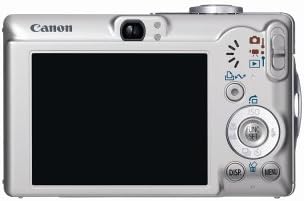
Figure 3.3.2: A diagram illustrating the layout and function of the control buttons on the back of the Canon PowerShot SD600.
3.4. Filmatzeko moduak
The PowerShot SD600 offers various shooting modes to optimize your photos for different scenes:
- Auto: Kamerak automatikoki hautatzen ditu ezarpen guztiak.
- eskuliburua: Allows control over ISO speed, exposure compensation, and white balance.
- Erretratua: Atzeko planoa lausotzen du subjektua nabarmentzeko.
- Hostoa: Enhances greens and other natural colors.
- Elurra: Elur-eszena distiratsuetan esposizio gutxiegi izatea saihesten du.
- Hondartza: Optimizes for bright, sunny beach environments.
- Su artifizialak: Captures brilliant fireworks displays.
- Ur azpian: For use with optional waterproof case (WP-DC2).
- Indoor: Barruko lausotasuna murrizten du eta koloreen zehaztasuna hobetzen du.
- Haurrak eta maskotak: Reduces focusing time for fast-moving subjects.
- Gaueko argazkia: Gaueko argazki naturalak lortzeko, flasha giro-argiarekin orekatzen du.
- Kolore azentua: Kolore bat mantentzen du, besteak monokromo bihurtzen diren bitartean.
- Kolore aldaketa: Hautatutako kolorea beste batekin ordezkatzen du.
- Makro digitala: Muturreko argazkilaritzarako.
- Jostura laguntza: Aids in creating panoramic images.
- Nire koloreak: Includes Vivid Blue, Vivid Green, Vivid Red, Neutral, Sepia, Black and White, Positive Film, Lighter Skin Tone, Darker Skin Tone, Custom Color.
3.5. Movie Recording
The camera supports various movie recording modes, including Fast Frame Rate Movie Mode (QVGA at 60 fps) for smooth video. Select the movie mode using the mode switch and press the shutter button to start/stop recording.
3.6. Connecting to a Computer/Printer
Use the included USB interface cable (IFC-400PCU) to connect the camera to a computer for image transfer. The Print/Share button simplifies direct printing to PictBridge-compatible printers (e.g., Canon CP, SELPHY, PIXMA Photo Printers) or transferring images to a computer.
4. Mantentzea
4.1. Kamera garbitzea
- Kameraren gorputza: Garbitu zapi leun eta lehor batekin. Zikinkeria egoskorra bada, erabili zapi leun bat.ampurarekin garbitu, eta gero lehortu.
- Lentea: Use a lens brush or blower to remove dust. For smudges, use a lens cleaning cloth with a small amount of lens cleaning fluid. Avoid touching the lens surface directly.
- LCD pantaila: Garbitu astiro zapi leun eta lehor batekin. Saihestu pantailan gogor sakatzea.
4.2. Bateria zaintzea
- Gorde bateriak leku fresko eta lehor batean erabiltzen ez dituzunean.
- Saihestu bateriak tenperatura altuetan jartzea.
- Kamera denbora luzez erabiliko ez baduzu, kendu bateria.
4.3. Biltegiratzea
When storing the camera for long periods, remove the battery and memory card. Store the camera in a dry, well-ventilated area, away from direct sunlight and extreme temperatures.
5. Arazoak
If you encounter issues with your Canon PowerShot SD600, refer to the following common problems and solutions:
| Arazoa | Balizko Kausa / Irtenbidea |
|---|---|
| Kamera ez da pizten. | Battery may be depleted or incorrectly inserted. Ensure battery is charged and inserted correctly. |
| Irudiak lausoak dira. | Camera shake, subject movement, or incorrect focus. Hold the camera steady, use a faster shutter speed, or ensure proper focus. |
| SD card error / Cannot save images. | SD card may be full, corrupted, or incorrectly inserted. Try reinserting the card, using a different card, or formatting the card (this will erase all data). Ensure the card is not write-protected. |
| LCD screen is blank or damaged. | Check if the display is turned off. If physically damaged (as seen in some product images), repair may be required. |
| Camera feels fragile or parts are loose. | This model has been noted for potential build quality concerns over time. Handle with care. If parts are detached, professional repair may be necessary. |
| SD card difficult to eject. | Ensure the card is pushed in fully to engage the spring mechanism for ejection. Avoid forcing the card. |
If the problem persists after trying these solutions, please contact Canon customer support or a qualified service center.
6. Zehaztapenak
| Ezaugarri | Xehetasuna |
|---|---|
| Ereduaren izena | SD600 |
| Modelo zenbakia | 1079B001 |
| Ebazpen finko eraginkorra | 6 megapixelekoa |
| Zoom optikoa | 3x |
| Zoom digitala | 4x |
| Argazki sentsoreen teknologia | CCD |
| Pantailaren tamaina | 2.5 hazbete |
| Bistaratzeko mota | LCDa |
| Onartua File Formatua | RAW, JPEG |
| Flash memoria mota | SD/MMC txartela |
| Konektibitate Teknologia | USBa |
| Bateria mota | Litio ioia (NB-4L) |
| Elementuaren pisua | 5.92 ontza (167.8 gramo) |
| Neurriak (gutxi gorabehera) | 2.13 hazbete (altuera) |
| Bideo Ebazpena | 480p (QVGA at 60 FPS) |
| Viewaurkitzailea | Optikoa |
| UPC | 013803062755 |
7. Bermea eta Laguntza
The Canon PowerShot SD600 typically comes with a manufacturer's warranty covering defects in materials and workmanship for a specified period (e.g., one year from purchase). Please refer to the warranty card included with your product for specific terms and conditions.
Important Note: This product may be subject to specific sales conditions, such as "No Returns" and "Product is 'as-is'" as per some retailers. Please verify the return policy and condition of sale with your vendor at the time of purchase.
For technical support, service, or to inquire about replacement parts, please visit the official Canon support website or contact their customer service. Keep your purchase receipt and camera's serial number handy when seeking support.
You can find more information and support resources on the official Canon webgunea: www.usa.canon.com/support
Ask a question about this manual
Ask about setup, troubleshooting, compatibility, parts, safety, or missing instructions. Manuals+ will review the question and use this page’s manual context to help answer it.