
1. Sarrera
The Gardner Bender GDT-3190 Digital Multimeter is a versatile and essential tool designed for testing various electrical parameters in household appliances and electrical systems. This manual provides detailed instructions for the safe and effective use of your multimeter, covering setup, operation, maintenance, and troubleshooting.
2. Segurtasun informazioa
Always prioritize safety when working with electrical devices. This multimeter is rated CAT III 600V and conforms to UL 61010-1 standards, certified to CAN/CSA C22.2. Adhere to the following safety guidelines:
- Neurketarik egin aurretik, ziurtatu multimetroa funtzio eta tarte zuzenetarako konfiguratuta dagoela.
- Ez saiatu bolumena neurtzentagZehaztutako gehienezko balorazioak gainditzen dituzten korronteak edo korronteak.
- Always disconnect power to the circuit before connecting or disconnecting test leads, especially when measuring resistance or continuity.
- Erabili aurretik, egiaztatu proba-kableak kalterik ez dagoen ikusteko. Ordeztu kaltetutako kableak berehala.
- Wear appropriate personal protective equipment (PPE), such as safety glasses and insulated gloves, when working with electricity.
- Do not use the multimeter in wet conditions or if the device itself is wet.
- Mantendu hatzak proba-zunden hatz-babesleen atzean neurketak egiten ari zaren bitartean.
3. Produktua amaitu daview
The Gardner Bender GDT-3190 Digital Multimeter features a robust design with a clear digital display and intuitive controls. Key components include:
- 3.5 hazbeteko pantaila digitala: Provides clear, easy-to-read measurements.
- 14-Position Manual Ranging Rotary Dial: Nahi den neurketa-funtzioa eta -tartea hautatzen ditu.
- Test Lead Input Jacks: Securely connect the included positive (red) and negative (black) test leads.
- Durable Rubber Boot: Offers drop resistance (up to 6 ft.) and a comfortable, steadfast grip.
- Wrap-around Lead Holders: Convenient storage for test leads.
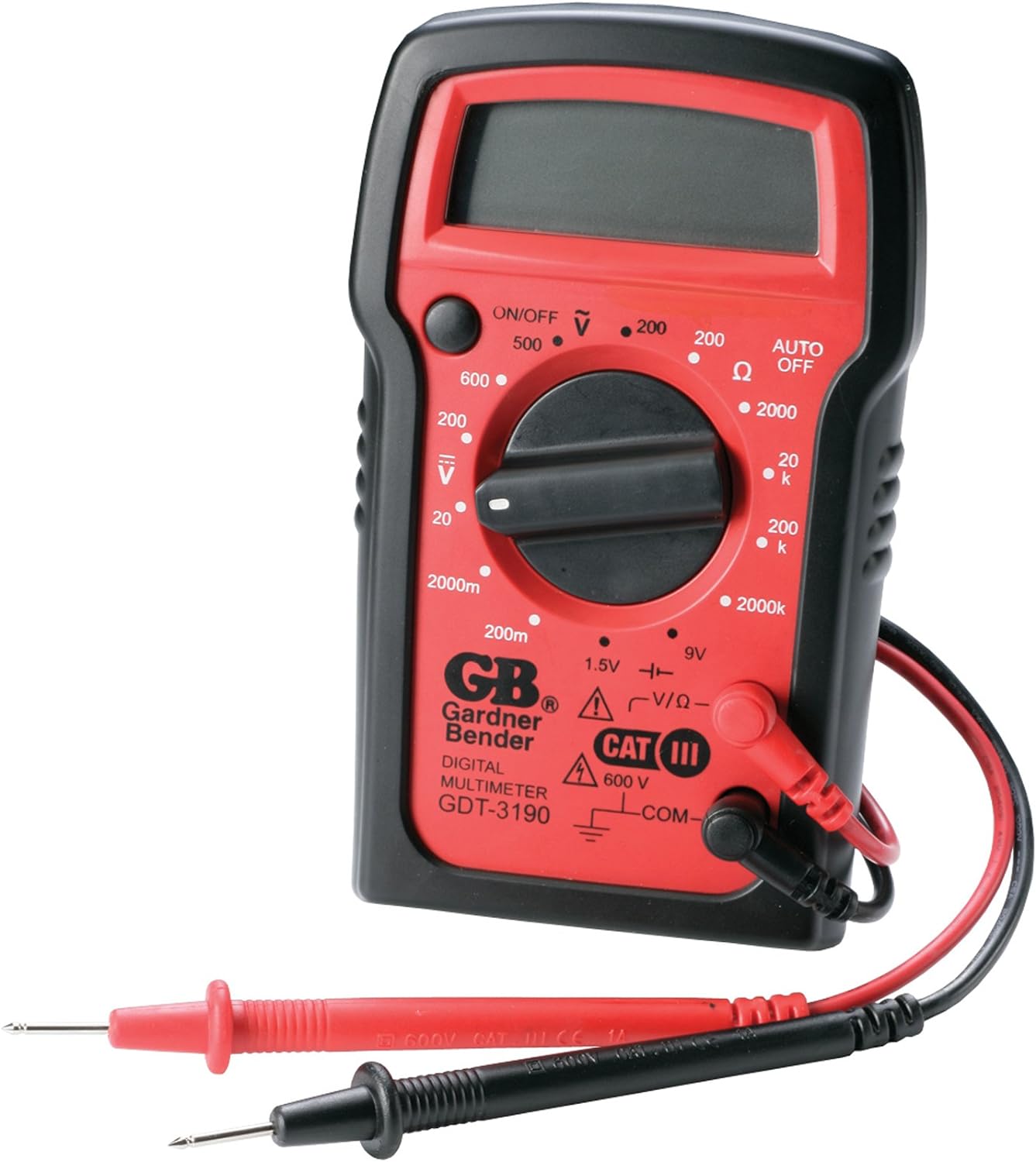
Figure 3.1: The Gardner Bender GDT-3190 Digital Multimeter with its red and black test leads.

Figure 3.2: Testing a switch for continuity or resistance using the multimeter's probes.

3.3. irudia: Bolumenaren neurketatage within a circuit breaker panel using the multimeter.

Figure 3.4: Checking the voltage of a car battery with the multimeter's test leads.
4. Konfigurazioa
4.1 Bateriaren instalazioa
The GDT-3190 Digital Multimeter requires one 9V battery (not included) for operation. To install the battery:
- Bilatu bateriaren konpartimentuaren estalkia multimetroaren atzealdean.
- Use a small Phillips head screwdriver to remove the screw securing the cover.
- Kendu arretaz bateriaren estalkia.
- Connect a new 9V battery to the battery clips, ensuring correct polarity (+ to + and - to -).
- Place the battery inside the compartment.
- Jarri bateriaren estalkia eta lotu torlojuarekin.
4.2 Proba-kableak konektatzea
The multimeter comes with a set of positive (red) and negative (black) electrical test leads. To connect them:
- Sartu proba-kable beltza 'COM' (komuna) sarrera-hartunean.
- Insert the red test lead into the 'VΩmA' input jack for voltage, erresistentzia eta bateriaren neurketak.
- Ziurtatu kableak dagokien konektoreetan ondo sartuta daudela.
5. Funtzionamendu-argibideak
The GDT-3190 is a manual ranging multimeter, meaning you must select the appropriate range for your measurement. Always start with the highest range setting and work your way down if the reading is too low.
5.1 Piztu/Itzaltzea
Turn the rotary dial from the 'OFF' position to any desired measurement function to power on the device. The multimeter features an auto-off function to conserve battery life after a period of inactivity.
5.2 AC Vol. neurtzeatage (ACV)
AC vol. neurtzekotage (e.g., household outlets, AC circuits):
- Set the rotary dial to the desired ACV range (e.g., 500V).
- Carefully touch the red and black test probes to the two points in the circuit where you want to measure AC voltage.
- Irakurri liburukiatage balioa pantaila digitalean.
5.3 DC Vol. neurtzeatage (DCV)
DC bolumena neurtzekotage (e.g., batteries, DC power supplies):
- Set the rotary dial to the desired DCV range (e.g., 600V).
- Touch the red test probe to the positive (+) point and the black test probe to the negative (-) point in the circuit.
- Irakurri liburukiatage value on the digital display. A negative sign indicates reversed polarity.
5.4 Erresistentzia neurtzea (Ω)
To measure resistance (e.g., components, wires):
- Ziurtatu zirkuitua erabat deskonektatuta dagoela erresistentzia neurtu aurretik.
- Set the rotary dial to the desired Ohm (Ω) range (e.g., 2MΩ).
- Touch the test probes across the component or wire you wish to measure.
- Read the resistance value on the digital display. An 'OL' (Overload) reading indicates the resistance is higher than the selected range; select a higher range.
5.5 Bateriaren azterketa
The multimeter can test 1.5V and 9V batteries:
- Set the rotary dial to the '1.5V' or '9V' battery test function.
- Connect the red probe to the positive terminal of the battery and the black probe to the negative terminal.
- Irakurri bateria voltage on the digital display. A low reading indicates a weak or dead battery.
6. Mantentzea
6.1 Garbiketa
To maintain the accuracy and longevity of your multimeter:
- Garbitu unitatea zapi lehor eta leun batekin. Ez erabili garbitzaile edo disolbatzaile urratzailerik.
- Keep the test leads clean and free of debris.
6.2 Bateria ordezkatzea
Bateria baxuaren adierazlea pantailan agertzen denean, ordezkatu 9V-ko bateria 4.1 atalean azaltzen den bezala.
6.3 Biltegiratzea
Store the multimeter in a cool, dry place away from direct sunlight and extreme temperatures. Utilize the wrap-around lead holders for neat storage of the test leads.
7. Arazoak
If you encounter issues with your GDT-3190 Digital Multimeter, refer to the following common problems and solutions:
| Arazoa | Kausa posiblea | Irtenbidea |
|---|---|---|
| Pantailarik ez edo pantaila iluna | Dead or weak battery; incorrect battery installation. | Replace the 9V battery; ensure correct polarity. |
| 'OL' (Overload) reading | Measurement exceeds selected range; open circuit (for resistance/continuity). | Select a higher range; check for breaks in the circuit or component. |
| Irakurketa okerrak | Incorrect function/range selected; poor contact with probes; damaged leads. | Verify function/range; ensure firm contact; inspect and replace damaged leads. |
| Multimeter turns off unexpectedly | Auto-off function activated; low battery. | This is normal behavior for auto-off; replace battery if low battery indicator is on. |
8. Zehaztapenak
Below are the technical specifications for the Gardner Bender GDT-3190 Digital Multimeter:
- Marka: Gardner Bender
- Modelo zenbakia: GDT-3190
- Estiloa: Manual 4 Function / 14 Range
- Kolorea: Red With Black Rubber Boot
- Energia iturria: Battery Powered (Requires 9V battery, not included)
- Neurketa mota: Multimetroa
- AC Boltage: 500V arte
- DC bolumenatage: 600V arte
- Erresistentzia: Up to 2 meg Ohms
- Bateria probak: 1.5V eta 9V
- Elementuaren pisua: 9.6 ontza
- Produktuaren neurriak (L x W x H): 1.75 x 7 x 11.5 hazbete
- Materiala: Plastikoa
- Neurketaren zehaztasuna: ± % 2
- Segurtasunaren balorazioa: CAT III 600V, UL 61010-1, CAN/CSA C22.2
- Jatorrizko herrialdea: Txina
- UPC: 032076068370, 100058666460
9. Bermea eta Laguntza
9.1 Bermearen informazioa
The Gardner Bender GDT-3190 Digital Multimeter comes with a 1 urteko berme mugatua erosketa-datatik aurrera. Berme honek materialen eta fabrikazioaren akatsak estaltzen ditu erabilera normalaren pean. Gorde erosketaren egiaztagiria berme-erreklamazioetarako.
9.2 Bezeroarentzako laguntza
For technical assistance, troubleshooting beyond this manual, or warranty inquiries, please contact Gardner Bender customer support. Visit the official Gardner Bender webharremanetarako informazioa eta baliabide gehigarriak lortzeko gunea.
Informazio eta laguntza gehiago aurki dezakezu hemen: Gardner Bender Store on Amazon.