
1. Sarrera
Thank you for choosing the Casio PQ-31-1EF Digital Wake Up Timer. This manual provides detailed instructions for the proper setup, operation, and maintenance of your new digital alarm clock. Please read this manual thoroughly before using the product to ensure correct usage and to prevent damage.
2. Segurtasun-neurriak
- Ez jarri unitatea tenperatura altuen, eguzki-argiaren eraginpean edo hezetasun handiaren eraginpean.
- Saihestu unitatea erortzea edo kolpe bortitzen eraginpean jartzea.
- Ez saiatu unitatea desmuntatzen edo aldatzen. Horrek bermea baliogabetuko du.
- Mantendu bateriak haurren eskura. Irensten baduzu, bilatu berehala medikuaren arreta.
- Bota erabilitako bateriak tokiko araudiaren arabera.
3. Paketearen edukia
Mesedez, egiaztatu elementu guztiak zure paketean daudela:
- 1 x Casio PQ-31-1EF Digital Wake Up Timer
- 2 x Lithium Metal batteries (pre-installed or included separately)
- 1 x Erabiltzailearen eskuliburua (dokumentu hau)
4. Produktua amaitu daview
The Casio PQ-31-1EF is a compact digital alarm clock designed for reliability and ease of use. It features a clear digital display, an integrated alarm function, and a light for visibility in low-light conditions. The sturdy case provides impact resistance for daily use.
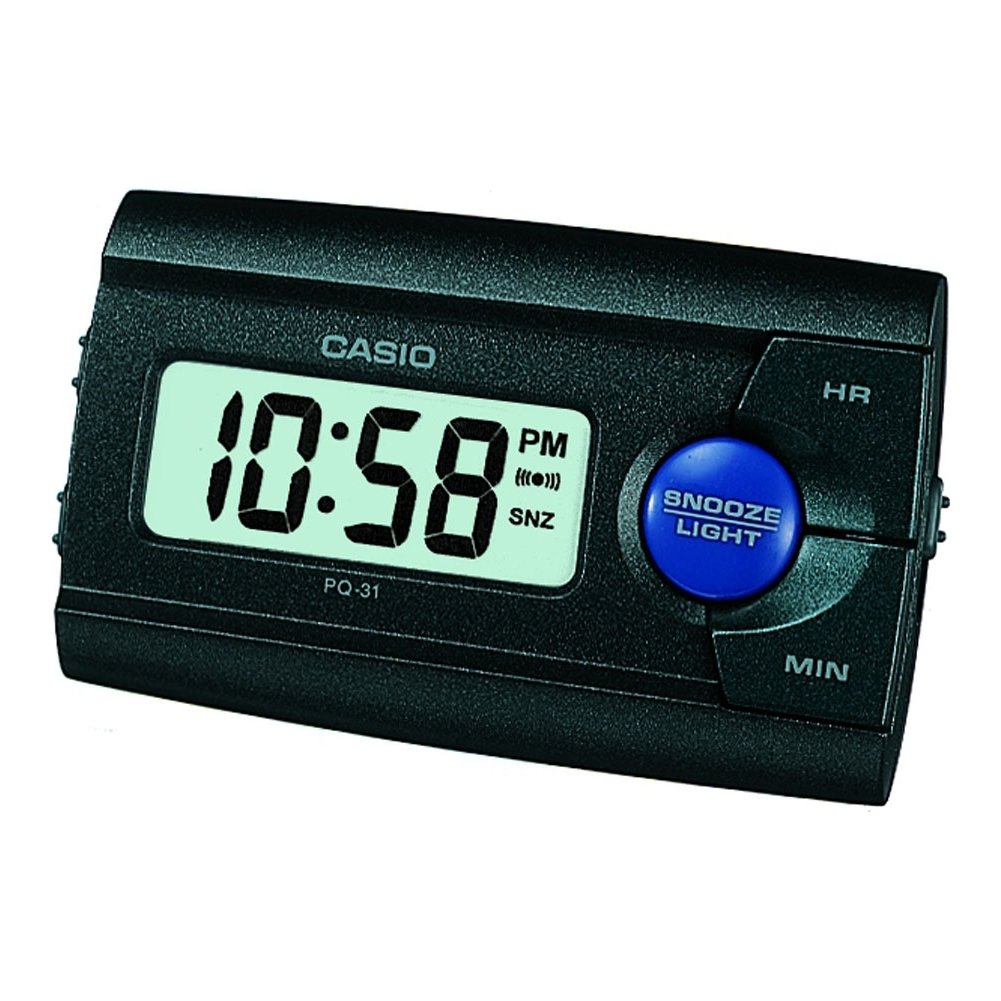
1. irudia: Aurrealdea view of the Casio PQ-31-1EF Digital Wake Up Timer. Shows the digital display and general shape of the device.
Button Functions (Typical Layout - Refer to actual device for exact labels):
- MODE/SET Button: Used to switch between time, alarm, and timer modes, and to confirm settings.
- ADJUST/+/H Button: Used to increase values (hours) or move forward in settings.
- ADJUST/-/M Button: Used to decrease values (minutes) or move backward in settings.
- ARGI botoia: Activates the backlight for a few seconds.
- ALARM ON/OFF Switch: Toggles the alarm function.
- SNOOZE botoia: Temporarily silences the alarm and activates snooze function.
5. Konfigurazioa
5.1 Bateriaren instalazioa
Your Casio PQ-31-1EF requires 2 Lithium Metal batteries. These are typically included with the product.
- Bilatu bateriaren konpartimentuaren estalkia unitatearen atzealdean edo behealdean.
- Open the cover by sliding it or unscrewing it (if applicable).
- Insert the 2 Lithium Metal batteries, ensuring the positive (+) and negative (-) terminals are aligned correctly according to the diagram inside the compartment.
- Jarri bateriaren konpartimenduaren estalkia ongi.
The clock display should now activate. If not, check battery orientation or replace with fresh batteries.
5.2 Hasierako orduaren ezarpena
- Ordua bistaratzeko moduan, luze sakatu MODUA/EZAR button for a few seconds until the hour digits begin to flash.
- Erabili ADJUST/+ or ADJUST/- buttons to set the correct hour. Pay attention to AM/PM indicators if your clock uses a 12-hour format.
- Sakatu MODUA/EZAR button again to move to the minute setting. The minute digits will flash.
- Erabili ADJUST/+ or ADJUST/- buttons to set the correct minutes.
- Sakatu MODUA/EZAR button one more time to exit the time setting mode. The time will now be set.
6. Funtzionamendu-argibideak
6.1 Alarma ezartzea
The daily alarm reminds you of events that recur every day.
- Ordu-pantaila arruntetik, sakatu MODUA/EZAR button once to enter alarm setting mode. The alarm time will be displayed, and the hour digits may flash.
- Erabili ADJUST/+ or ADJUST/- botoiak nahi duzun alarmaren ordua ezartzeko.
- Sakatu MODUA/EZAR button again to move to the minute setting.
- Erabili ADJUST/+ or ADJUST/- botoiak nahi dituzun alarmaren minutuak ezartzeko.
- Sakatu MODUA/EZAR button one more time to confirm the alarm setting and return to normal time display.
6.2 Alarma aktibatzea/desaktibatzea
To turn the alarm ON or OFF, locate the ALARMA ON / OFF switch (usually on the side or back of the unit) and slide it to the desired position. An alarm icon will typically appear on the display when the alarm is active.
6.3 Using the Snooze Function
Alarmak jotzen duenean, sakatu SNOOZE button (often a large button on top of the unit). The alarm will temporarily stop and sound again after a few minutes (typically 5-10 minutes, depending on the model).
6.4 Atzeko argia erabiltzea
To illuminate the clock face in dark environments, press the ARGIA button. The light-emitting diode (LED) will illuminate the display for a short period, then automatically turn off.
7. Mantentzea
7.1 Unitatea garbitzea
To clean the Casio PQ-31-1EF, wipe it gently with a soft, dry cloth. Do not use abrasive cleaners, solvents, or chemical sprays, as these can damage the casing eta pantaila.
7.2 Bateria ordezkatzea
When the display becomes dim or the clock functions erratically, it is time to replace the batteries. Follow the steps in Section 5.1 Battery Installation to replace the 2 Lithium Metal batteries. Ensure proper disposal of old batteries.
8. Arazoak
| Arazoa | Kausa posiblea | Irtenbidea |
|---|---|---|
| Pantaila hutsik edo ilun dago. | Pilak agortuta daude edo gaizki instalatuta daude. | Ordeztu bateriak beste batzuekin, polaritate zuzena ziurtatuz. |
| Alarmak ez du jotzen. | Alarm is not activated or volume is too low (if adjustable). | Ensure the ALARM ON/OFF switch is in the ON position. Check alarm settings. |
| Ordua ez da zuzena. | Time was not set correctly or batteries were removed. | Reset the time following instructions in Section 5.2. |
| Botoiek ez dute erantzuten. | Softwarearen aldi baterako akatsa edo bateria baxua. | Remove and reinsert batteries to reset the unit. Replace batteries if necessary. |
9. Zehaztapenak
| Ezaugarri | Xehetasuna |
|---|---|
| Modelo zenbakia | PQ-31-1EF |
| Marka | Casio |
| Bistaratzeko mota | Digitala |
| Kolorea | Black (Unit color, display is typically grey/LCD) |
| Energia iturria | Bateriaren bidez |
| Bateria mota | 2 x Lithium Metal batteries |
| Produktuaren neurriak (Z x A) | 8.6W x 5H centimetres |
| Elementuaren pisua | 45.4 gramo |
| Ezaugarri bereziak | Alarm, Backlight (LED), Impact Resistance |
| Muntatze Mota | Mahai gaineko euskarria |
| Barruan/Kanpoan erabilera | Barruan |
10. Bermea eta Laguntza
Casio products are manufactured to high-quality standards and are backed by a manufacturer's warranty. For specific warranty terms and conditions, please refer to the warranty card included with your purchase or visit the official Casio webzure eskualderako gunea.
If you encounter any issues or require technical assistance, please contact Casio customer support through their official website or the contact information provided in your product packaging. Please have your model number (PQ-31-1EF) and proof of purchase ready when contacting support.
Oharra: Bermearen baldintzak eskualdearen arabera alda daitezke.