
SAMSON R5a
Samson Rubicon R5a Active Ribbon Studio Monitors User Manual
Model: R5a
Sarrera
The Samson Rubicon R5a Active Ribbon Studio Monitors are designed to provide accurate and natural sound reproduction for professional audio environments. This manual provides essential information for the proper setup, operation, and maintenance of your R5a monitors.
Each R5a monitor features a bi-amplified design, delivering 50 watts to a 5-inch inverted cone low-frequency driver and 25 watts to a 2-inch Velocity Ribbon high-frequency transducer. The monitors are housed in a shelf-ported wood enclosure and offer balanced 1/4-inch and XLR input connections. A 4-segment high-frequency lift control allows for precise adjustment of the ribbon tweeter output.
Segurtasun-argibide garrantzitsuak
Please read these instructions carefully before operating your Samson Rubicon R5a monitors. Keep this manual for future reference.
- Energia iturria: Connect the unit only to a power supply of the type described in this operating instruction or marked on the unit.
- Aireztapena: Ez blokeatu aireztapen-irekidurak. Instalatu fabrikatzailearen argibideen arabera.
- Beroa: Ez instalatu bero-iturri inongo ondoan, esate baterako, erradiadoreak, bero-erregistroak, sukaldeak edo beste aparatu batzuk (barne ampberoa sortzen duten argitzaileak).
- Ura eta hezetasuna: Ez erabili aparatu hau uraren ondoan.
- Garbiketa: Garbitu zapi lehor batekin bakarrik.
- Zerbitzua: Jarri zerbitzu-zerbitzu guztiak zerbitzu-pertsonal kualifikatuari. Zerbitzua behar da aparatua edozein modutan hondatu denean, hala nola, elikatze-kablea edo entxufea hondatuta dagoenean, likidoa isuri denean edo objektuak aparatura erori direnean, aparatua euria edo hezetasuna jasan duenean, ez du normalean funtzionatzen. , edo erori egin da.
Paketearen edukia
Egiaztatu zure paketeak elementu hauek dituela:
- Samson Rubicon R5a Active Ribbon Studio Monitors (Pair)
- Power Cables (2)
- Erabiltzailearen eskuliburua (dokumentu hau)
Konfigurazioa
Kokatzea
Proper placement of your studio monitors is crucial for accurate sound reproduction. Position the monitors to form an equilateral triangle with your listening position. The tweeters should be at ear level. Avoid placing monitors directly against walls or in corners, as this can exaggerate bass frequencies.
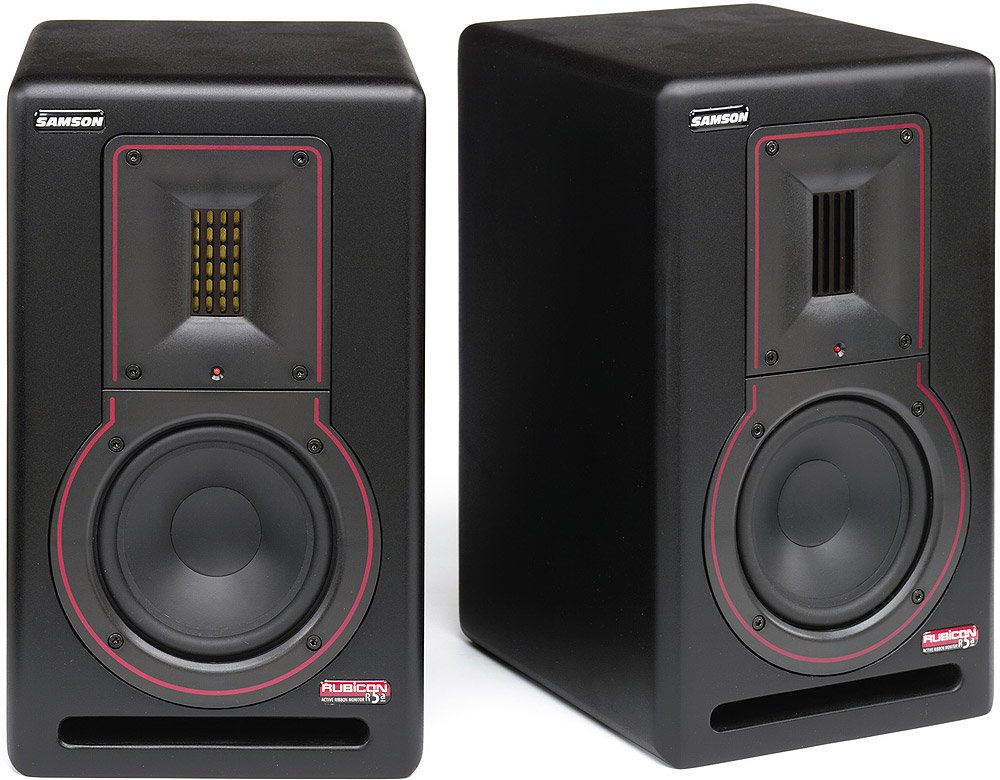
Irudia: Aurrealdea view of a Samson Rubicon R5a Active Ribbon Studio Monitor. It shows the 5-inch woofer, the 2-inch ribbon tweeter, and the Samson logo.
Konexioak
The Rubicon R5a monitors offer balanced 1/4-inch and XLR input connections. Use high-quality shielded cables to connect your audio source (e.g., audio interface, mixer) to the monitors.
- Ensure both the monitors and your audio source are powered off before making any connections.
- Connect the audio output from your source to the XLR or 1/4-inch input on each R5a monitor.
- Connect the supplied power cables to the IEC power inlets on the rear of each monitor and then to a suitable AC power outlet.
- Once all connections are secure, you can proceed to power on your equipment. It is recommended to power on your audio source first, then the monitors. When powering off, turn off the monitors first, then the audio source.
Funtzionamendu-argibideak
Piztu/Itzali
Locate the power switch on the rear panel of each monitor. Flip the switch to the "ON" position to power on the monitor. An indicator light on the front panel will illuminate. To power off, flip the switch to the "OFF" position.
Bolumen kontrola
Each R5a monitor has a volume control knob on the rear panel. Start with the volume set to a low level before playing audio. Gradually increase the volume to your desired listening level. It is generally recommended to control the overall system volume from your audio source (e.g., audio interface, mixer) and use the monitor's volume control for fine-tuning or balancing.
High-Frequency Lift Control
The R5a monitors feature a 4-segment high-frequency lift control. This allows you to adjust the output level of the ribbon tweeter to compensate for room acoustics or personal preference. Experiment with the different settings to find the optimal balance for your listening environment.
The settings typically include:
- 0 dB: Erantzun laua.
- +2 dB: Slight boost in high frequencies.
- +4 dB: Moderate boost in high frequencies.
- -2 dB: Slight cut in high frequencies.
Mantentzea
To ensure the longevity and optimal performance of your Samson Rubicon R5a monitors, follow these maintenance guidelines:
- Garbiketa: Dust the monitors regularly with a soft, dry cloth. Do not use liquid cleaners or solvents, as these can damage the finish or internal components.
- Aireztapena: Ensure that the ventilation openings on the rear of the monitors are not obstructed. Adequate airflow is essential to prevent overheating.
- Biltegiratzea: If storing the monitors for an extended period, keep them in a dry, temperature-controlled environment, ideally in their original packaging or a protective case.
- Saihestu gainkargatzea: Do not operate the monitors at excessively high volumes for prolonged periods, as this can cause damage to the drivers.
Arazoak konpontzea
| Arazoa | Kausa posiblea | Irtenbidea |
|---|---|---|
| No sound from monitor. |
|
|
| Soinu distortsionatua. |
|
|
| Hum or buzz. |
|
|
If the problem persists after trying these solutions, please contact Samson customer support or a qualified service technician.
Zehaztapenak
| Ezaugarri | Xehetasuna |
|---|---|
| Ereduaren izena | Rubicon R5a |
| Hizlari mota | Active Ribbon Studio Monitor |
| Maiztasun baxuko kontrolatzailea | 5-inch inverted cone |
| Maiztasun handiko transduktorea | 2-inch Velocity Ribbon |
| LF Amppotentzia biziagoa | 50 Watt |
| HF Amppotentzia biziagoa | 25 Watt |
| Irteera Potentzia osoa | 75 Watts (Bi-amped) |
| Konektibitate Teknologia | XLR, 1/4-inch (balanced) |
| Energia iturria | Kable elektrikoa |
| Itxitura Mota | Shelf-ported wood enclosure |
| High-Frequency Control | 4-segment lift control |
| UPC | 809164005148 |
Bermearen informazioa
Samson Technologies warrants its products to be free from defects in materials and workmanship for a period of one (1) year from the date of original purchase. This warranty is non-transferable and applies only to the original purchaser.
This warranty does not cover damage resulting from accident, misuse, abuse, alteration, or unauthorized service. For full warranty terms and conditions, please refer to the official Samson webwebgunean edo jarri harremanetan bezeroarentzako laguntzarekin.
Bezeroarentzako Arreta
For technical support, service, or warranty inquiries, please contact Samson Customer Service:
- Webgunea: www.samsontech.com/laguntza
- Telefonoa: Refer to the Samson webeskualdeko harremanetarako zenbakietarako gunea.
- Helbidea: Samson Technologies Corp., 278-B Duffy Ave, Hicksville, NY 11801, USA
When contacting support, please have your product model (Rubicon R5a) and serial number available.
Ask a question about this manual
Ask about setup, troubleshooting, compatibility, parts, safety, or missing instructions. Manuals+ will review the question and use this page’s manual context to help answer it.