
Sarrera
Thank you for choosing the TFA Dostmann 30.3016.01 Wave Radio Thermometer. This device provides accurate indoor and outdoor temperature readings, along with time and date display. It utilizes a wireless outdoor sensor to transmit temperature data to the main unit. Please read this manual carefully to ensure proper setup and operation.
The main unit measures indoor temperature, while the wireless outdoor transmitter measures outdoor temperature. This system helps monitor your living climate and can contribute to energy saving by optimizing heating. The device also stores minimum and maximum temperature values and displays the current time and date.
Segurtasun Informazioa
- Mantendu gailua eta bateriak haurren eskura.
- Ez jarri gailua muturreko tenperatura, bibrazio edo kolpeetara.
- Saihestu zuzeneko eguzki-argia eta hezetasuna.
- Ez sartu gailua uretan.
- Replace batteries promptly when indicated to prevent leakage. Dispose of used batteries according to local regulations.
- Ez saiatu gailua konpontzen edo aldatzen. Jarri harremanetan langile kualifikatuekin zerbitzua jasotzeko.
Konfigurazioa
1. Bateriaren instalazioa
The main unit requires 2 x 1.5V AA batteries, and the outdoor transmitter requires 2 x 1.5V AA batteries. Batteries are included with the product.
- Ireki unitate nagusiaren atzealdean dagoen bateriaren konpartimentuaren estalkia.
- Insert 2 AA batteries, observing the correct polarity (+/-).
- Itxi bateriaren konpartimenduaren estalkia.
- Repeat the process for the outdoor transmitter.
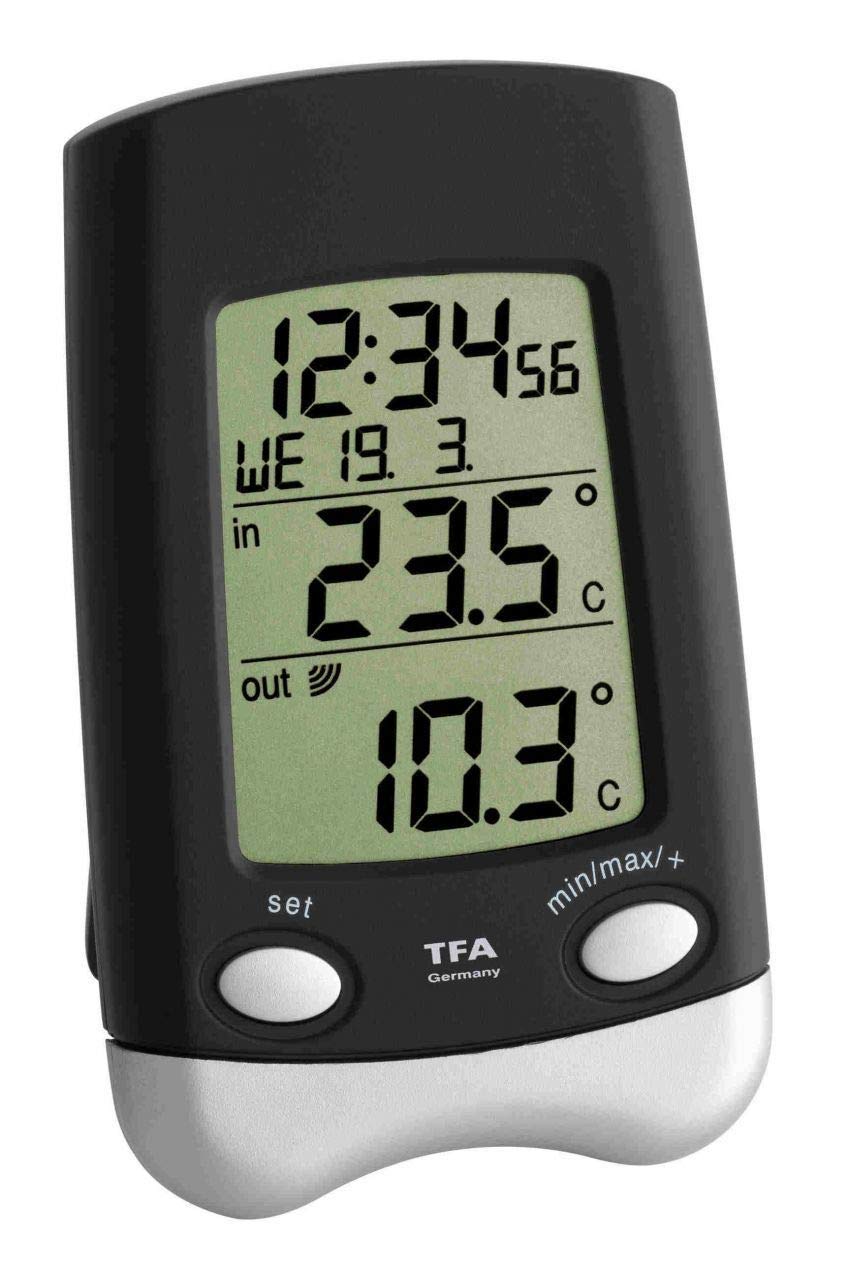
Image: Main unit of the TFA Dostmann 30.3016.01 Wave Radio Thermometer. This shows the front display and overall design.

Image: The wireless outdoor sensor (model 30.3159.IT) for the TFA Dostmann Wave Radio Thermometer. This sensor transmits outdoor temperature data to the main unit.
2. Initial Synchronization and Placement
After battery insertion, the main unit will automatically search for the outdoor sensor and the radio time signal. This process may take a few minutes.
- Place the outdoor transmitter in a sheltered location, away from direct sunlight and rain, to ensure accurate readings and prolong its lifespan. Ensure it is mounted vertically as designed to prevent water ingress into the battery compartment.
- Position the main unit indoors, away from electronic devices that might cause interference (e.g., TVs, computers).
- Ensure the distance between the main unit and the outdoor sensor is within the effective transmission range (typically up to 100 meters in open air, less with obstacles).
- The time and date will automatically synchronize via the radio signal.
Funtzionamendu-argibideak
Bistaratu informazioa
Pantailak informazio hau erakusten du:
- Barruko tenperatura: Measured by the main unit's internal sensor.
- Kanpoko tenperatura: Received from the wireless outdoor transmitter.
- Ordua: Automatically synchronized via radio signal.
- Date and Day of the Week: Automatically synchronized via radio signal.
Viewing Minimum and Maximum Values
The device stores the highest (maximum) and lowest (minimum) temperatures recorded since the last reset. To view balio hauek:
- Press the "MAX/MIN" button (or similar, refer to device buttons) once to display the maximum recorded indoor and outdoor temperatures.
- Press the "MAX/MIN" button again to display the minimum recorded indoor and outdoor temperatures.
- To clear the recorded maximum and minimum values, press and hold the "MAX/MIN" button for a few seconds while the respective values are displayed.
Manual Time and Date Setting (if automatic synchronization fails)
In rare cases where the radio time signal is not received, you may need to set the time and date manually. Refer to the specific buttons on your device (e.g., "SET", "MODE", "UP", "DOWN").
- Press and hold the "SET" or "MODE" button until the time display starts flashing.
- Use the "UP" or "DOWN" buttons to adjust the hour, then press "SET" or "MODE" to confirm and move to the minutes.
- Errepikatu minutuetarako, urterako, hilabeterako eta egunerako.
- Press "SET" or "MODE" one last time to exit the setting mode.
Mantentzea
Garbiketa
Garbitu gailua leun batekin, damp oihalik. Ez erabili garbitzaile edo disolbatzaile urratzailerik. Ziurtatu hezetasunik ez dela gailuan sartzen.
Bateria ordezkatzea
When the battery indicator appears on the display, replace the batteries in both the main unit and the outdoor sensor. Always replace all batteries at the same time to ensure optimal performance.
- Ireki bateriaren konpartimendua.
- Kendu bateria zaharrak eta bota behar bezala.
- Insert new 1.5V AA batteries, observing correct polarity.
- Itxi bateriaren konpartimendua.
- After replacing batteries, the units may need to re-synchronize. This usually happens automatically within a few minutes.
Arazoak konpontzea
| Arazoa | Kausa posiblea | Irtenbidea |
|---|---|---|
| No outdoor temperature display or "---" shown. |
|
|
| Incorrect time or date display. |
|
|
| Buttons are unresponsive or erratic. |
|
|
| Temperature readings fluctuate significantly or are inaccurate. |
|
|
Zehaztapen Teknikoak
- Eredua: 30.3016.01
- Marka: TFA Dostmann
- Outdoor Temperature Measurement Range: -40 eta +60 °C artean (-40 eta +140 °F)
- Indoor Temperature Measurement Range: -10 eta +60 °C artean (+14 eta +140 °F)
- Tenperaturaren zehaztasuna: 1 °C
- Materiala: Plastikoa
- Transmisio-maiztasuna: 868 MHz
- Outdoor Transmitter Model: 30.3159.IT
- Muntatzeko aukerak: Wall hanging or freestanding
- Neurriak (unitate nagusia): (L) 70 x (W) 30 (66) x (H) 115 mm
- Batteries (Main Unit): 2 x 1.5V AA (included)
- Batteries (Transmitter): 2 x 1.5V AA (included)
- Pisua: 101 g (main unit, without batteries)
- Konektibitate Teknologia: Irrati maiztasuna (RF)
Bermea eta Laguntza
TFA Dostmann produktuak kalitatez eta zehaztasunez fabrikatzen dira. Bermeari buruzko informazioa eta laguntza teknikoa lortzeko, jo ezazu TFA Dostmann ofizialera. website or contact their customer service directly. The contact details can usually be found in the packaging or on the manufacturer's webgunea.
Fabrikatzailea: TFA Dostmann
Ofiziala Webgunea: www.tfa-dostmann.de (This is a general link, specific support pages may vary by region).