
1. Sarrera
This manual provides essential information for the safe and efficient operation of your Sharp Aquos LC42D64U 42-Inch 1080p LCD HDTV. Please read these instructions thoroughly before using your television and retain them for future reference. The Sharp Aquos D64 series offers a slim design, Full HD 1080p resolution, and advanced features for an enhanced viewesperientzia.
2. Segurtasun informazio garrantzitsua
Jarraitu beti oinarrizko segurtasun neurriak telebista hau erabiltzean sute, deskarga elektriko eta lesio arriskua murrizteko.
- Energia iturria: Konektatu telebista etiketa adierazten den elikatze-iturrira soilik.
- Aireztapena: Ziurtatu aireztapen egokia dagoela. Ez blokeatu aireztapen-irekidurak.
- Ura eta hezetasuna: Ez jarri telebista euripean edo hezetasunean. Ez jarri likidoz betetako objekturik telebistaren gainean.
- Garbiketa: Deskonektatu telebista hormako entxufetik garbitu aurretik. Erabili zapi leun eta lehor bat.
- Zerbitzua: Ez saiatu produktu hau zuk zeuk ematen. Bidali zerbitzu guztiak zerbitzu kualifikatuko langileengana.
- Muntaketa: If wall-mounting, ensure the mount is compatible and installed by qualified personnel.
- Haurrak: Zaindu haurrak telebistara igo edo harekin jolastu ez dezaten.
3. Zer dago kutxan
Konfigurazioarekin jarraitu aurretik, egiaztatu osagai guztiak daudela.
- Sharp Aquos LC42D64U 42-Inch LCD HDTV
- Urruneko Kontrola
- Mahai-postua
- Elikatze kablea
- Erabiltzailearen eskuliburua (dokumentu hau)
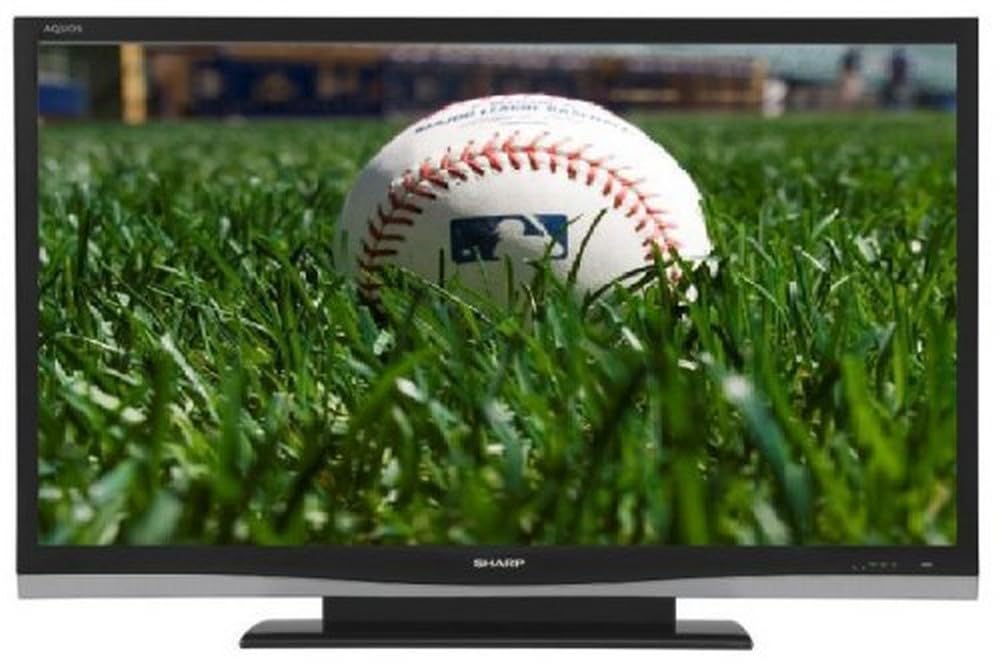
Irudia: Aurrealdea view of the Sharp Aquos LC42D64U 42-Inch LCD HDTV with its included table stand.
4. Konfigurazioa
4.1 Mahai-euskarria lotzea
If you are not wall-mounting the television, attach the included table stand. Refer to the separate assembly guide for detailed instructions on securing the stand to the TV. Ensure all screws are tightened securely.
4.2 Kanpoko gailuak konektatzea
Connect your external devices (e.g., cable box, Blu-ray player, game console) to the appropriate input terminals on the rear or side of the TV.
- HDMI: For high-definition digital video and audio. The TV features three HDMI 1.3 inputs (two rear, one side).
- Component Video (Y, Pb, Pr): For high-definition analog video. Two inputs are available.
- Composite Video (A/V): For standard-definition analog video and audio. One side and one rear input.
- S-bideoa: For standard-definition video. One side and one rear input.
- PC Input (D-Sub 15-pin): Konektatu ordenagailu bat monitore gisa erabiltzeko.
- RF Antenna Inputs: Two inputs for connecting an antenna or cable TV.
- Ethernet ataka: For network connectivity (DLNA).
4.3 Energia-konexioa
After connecting all desired devices, plug the power cord into the TV's power inlet and then into a wall outlet. The TV will enter standby mode.
5. Funtzionamendu-argibideak
5.1 Initial Power On and Channel Setup
- Sakatu BOTEREA button on the remote control or the TV to turn it on.
- The first time you power on, the TV will guide you through the initial setup process, including language selection and channel scanning.
- Select your preferred language (English, Spanish, or French).
- Perform an "Easy Setup" or "Channel Setup" scan to detect available digital (ATSC, QAM) and analog (NTSC) channels.
5.2 Oinarrizko urrutiko agintearen funtzioak
- POTENTZIA: Turns the TV on or off (standby).
- Sarrera: Cycles through available input sources (HDMI, Component, PC, etc.).
- CH +/-: Kanalak aldatzen ditu.
- VOL +/-: Bolumena doitzen du.
- MENUA: Accesses the on-screen menu for settings adjustments.
- GEZI BOTOIAK: Nabigatu menuko aukeretan.
- SARTU: Hautaketak berresten ditu.
- EXIT/RETURN: Menuetatik irteten da edo aurreko pantailara itzultzen da.
5.3 Menuko nabigazioa eta ezarpenak
Sakatu MENUA button to access various settings categories:
- Irudia: Adjust brightness, contrast, color, tint, sharpness, and backlight. The OPC function automatically adjusts brightness based on room conditions.
- Audioa: Control volume, bass, treble, balance, and select audio modes.
- Kanala: Rescan channels, add/delete channels, and set up favorite channels.
- Konfigurazioa: General settings like language, time, sleep timer, and parental controls (V-Chip).
- Ezaugarri aurreratuak: Access settings for DLNA, Picture-in-Picture, and AQUOS LINK.
6. Ezaugarri aurreratuak
6.1 AQUOS LINK (HDMI-CEC)
AQUOS LINK allows convenient control of compatible Sharp devices connected via HDMI using just your AQUOS TV remote. Ensure connected devices also support HDMI-CEC (Consumer Electronics Control) and are enabled in their respective settings.
6.2 DLNA Compatibility
The TV is DLNA-compatible, enabling interoperability with other DLNA-certified electronics, computers, and mobile devices. Connect the TV to your home network via the Ethernet port to access and share digital content (photos, videos, music) from compatible devices on your network.
6.3 Picture-in-Picture (PIP)
The Picture-in-Picture function allows simultaneous viewing of a TV program and a video or PC source. Consult the on-screen menu for PIP activation and source selection.
6.4 V-Chip System
The V-Chip system allows you to block TV and movie programs based on their rating, providing parental control over objectionable content. Access V-Chip settings through the TV's setup menu.
7. Mantentzea
7.1 Pantaila garbitzea
Garbitu pantaila astiro-astiro zapi leun eta pelusik gabeko batekin. Orbanik egoskorrak izanez gero, garbitu astiro-astiro.ampGarbitu oihal bat urarekin edo pantaila-garbitzaile espezializatu batekin. Ez use harsh chemicals, abrasive cleaners, or spray liquids directly onto the screen.
7.2 Armairua garbitzea
Wipe the TV cabinet with a soft, dry cloth. Avoid using solvents or abrasive materials.
7.3 Arreta orokorra
- Deskonektatu telebista tximista-ekaitzetan edo denbora luzez erabili gabe dagoenean.
- Mantendu telebista eguzki-argitik, bero-iturrietatik eta hauts gehiegizkotik urrun.
- Ensure adequate space around the TV for proper ventilation.
8. Arazoak
Bezeroarentzako arreta-zerbitzura deitu aurretik, saiatu arazo ohikoenetarako irtenbide hauekin:
| Arazoa | Irtenbide posiblea |
|---|---|
| Botererik ez | Egiaztatu elikatze-kablea telebistara eta hormako entxufean ondo konektatuta dagoela. Ziurtatu entxufeak korrontea duela. |
| Ez dago irudirik, baina soinua badago | Egiaztatu sarrera-iturri zuzena hautatuta dagoela. Egiaztatu kanpoko gailuetarako kable-konexioak. |
| Soinurik ez, baina irudia badago | Check the volume level and mute setting. Ensure audio cables are correctly connected. |
| Urruneko kontrola ez dabil | Aldatu bateriak. Ziurtatu ez dagoela oztoporik urrutiko agintearen eta telebistaren IR sentsorearen artean. |
| "Hotel Mode" issue (as per customer review) | If the TV is stuck in a limited functionality mode, contact Sharp customer support for assistance in disabling "Hotel Mode." This typically requires a specific service menu sequence. |
9. Zehaztapenak
| Ezaugarri | Xehetasuna |
|---|---|
| Modelo zenbakia | LC42D64U |
| Pantailaren tamaina | 42 hazbete |
| Bistaratzeko Teknologia | LCDa |
| Ebazpena | 1080p (HD osoa) |
| Kontraste-erlazioa | 10,000:1 Dynamic |
| Erantzun Denbora | 4 milisegundo |
| HDMI atakak | 3 (2 atzeko, 1 albo) |
| Osagaien bideo sarrerak | 2 |
| Bideo Konposatu Sarrerak | 3 (1 albo, 2 atzeko) |
| S-Video Inputs | 2 (1 albo, 1 atzeko) |
| PC Sarrera | 1 (D-Sub 15-pin) |
| Ethernet ataka | Bai |
| Sintonizatzaile mota | ATSC, QAM, NTSC |
| Gurasoen Kontrola | V-Txipa |
| Pisua | 70.2 kilo (gutxi gorabehera) |
| Eredu Urtea | 2008 |
10. Bermea eta Laguntza
10.1 Berme mugatua
This Sharp Aquos LC42D64U television comes with a 1 Year Parts and 1 Year Labor Warranty from the date of original purchase. This warranty covers manufacturing defects in materials and workmanship under normal use. It does not cover damage caused by misuse, accident, modification, or unauthorized repair.
Mesedez, gorde zure erosketa-froga berme-erreklamazioetarako.
10.2 Bezeroarentzako laguntza
For technical assistance, troubleshooting beyond this manual, or warranty service, please contact Sharp Customer Support. Refer to the contact information provided with your product documentation or visit the official Sharp webwebgunean laguntza-xehetasun eguneratuenak lortzeko.
When contacting support, please have your model number (LC42D64U) and serial number ready.