
Produktua amaituview
The Western Digital My Book Essential external hard drive provides 1 terabyte (1TB) of storage capacity. Designed for data backup and archiving, this device features a high-speed USB 2.0 interface for broad compatibility and efficient data transfer. Its design allows it to power on and off in conjunction with your computer, contributing to energy efficiency.
Ezaugarri nagusiak:
- Instalazio sinplea: Berehala erabiltzeko konektatu eta erabili funtzionalitatea.
- Diseinu trinkoa: Occupies minimal desk space, similar to a paperback book.
- Energia eraginkorra: Automatically enters standby mode after 10 minutes of inactivity to conserve power.
- USB 2.0 interfazea: Offers convenient and compatible connectivity with various computers.
- PC and Mac Compatible: Supports Windows 2000/XP/Vista and Mac OS X 10.4.8 or later.
Kutxan dagoena
Egiaztatu elementu hauek guztiak zure produktuaren paketean sartuta daudela:
- Western Digital My Book Essential WDBAAF0010HBK Hard Drive
- USB kablea
- AC egokigailua
- Instalazio azkarreko gida
Konfigurazio Argibideak
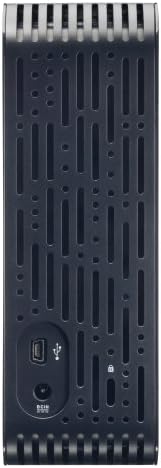
- Konektatu AC egokigailua: Plug the AC adapter into the power port on the back of the My Book Essential drive. Connect the other end of the AC adapter to a power outlet.
- Konektatu USB kablea: Connect one end of the supplied USB cable to the USB 2.0 port on the back of the My Book Essential drive. Connect the other end of the USB cable to an available USB port on your computer.
- Piztu: The drive is designed to power on automatically with your computer. Ensure your computer is powered on. The drive's indicator light will illuminate.
- Hasierako aitorpena: Your operating system (Windows or Mac OS) should automatically detect and install the necessary drivers for the drive. This process may take a few moments.
- Unitatera sartzea: Once installed, the drive will appear as a new storage device in 'My Computer' (Windows) or 'Finder' (Mac OS). You can now begin transferring files.
Note: For detailed operating system-specific instructions or if the drive is not recognized, refer to the included Quick Install Guide or the Western Digital support webgunea.
Funtzionamendu-argibideak
The Western Digital My Book Essential drive functions as an external storage device for your computer. It is ideal for backing up important files, storing large media libraries, and freeing up space on your computer's internal hard drive.
Datuen transferentzia:
- Transferitzeko files, simply drag and drop them to and from the My Book Essential drive icon in your computer's file esploratzailea.
- For optimal performance, ensure the USB cable is securely connected to a USB 2.0 port on your computer.
Energia kudeaketa:
- The drive is designed to turn on and off with your computer. When your computer is shut down or put to sleep, the drive will also enter a low-power state.
- After 10 minutes of inactivity, the drive will automatically enter standby mode to save energy. It will resume normal operation when accessed.
Seguru kentzea:
Always use the "Safely Remove Hardware" option (Windows) or drag the drive icon to the Trash/Eject (Mac OS) before disconnecting the USB cable to prevent data corruption.
Mantentzea
Proper maintenance ensures the longevity and reliable performance of your external hard drive.
- Zaintza fisikoa: Keep the drive in a stable, well-ventilated area. Avoid exposing it to extreme temperatures, direct sunlight, or moisture. Do not block the ventilation slots.
- Garbiketa: Use a soft, dry cloth to clean the exterior of the drive. Do not use liquid cleaners or aerosols.
- Datuen babeskopia: Regularly back up critical data stored on the external drive to another location (e.g., cloud storage, another hard drive) to prevent data loss in case of unforeseen issues.
- Firmware eguneraketak: Periodically check the Western Digital support webwebgunea zure modeloarentzako firmware eguneratze eskuragarri dauden ikusteko.
Arazoak konpontzea
If you encounter issues with your My Book Essential drive, try the following steps:
- Unitatea ez da detektatu:
- Ensure the AC adapter is securely connected to both the drive and a working power outlet.
- Verify the USB cable is firmly connected to both the drive and your computer's USB port. Try a different USB port or cable if available.
- Berrabiarazi ordenagailua.
- Check your computer's Disk Management (Windows) or Disk Utility (Mac OS) to see if the drive is recognized but unformatted or unallocated.
- Datuen transferentzia motela:
- Ensure you are using a USB 2.0 port. While compatible with USB 1.1, performance will be significantly slower.
- Saihestu hainbat aplikazio zorrotz exekutatzea denbora luzez file transferentziak.
- Check for background processes that might be using system resources or disk I/O.
- Gidatzeko argia ez dago piztuta:
- Confirm the AC adapter is connected and the power outlet is active.
- If connected to a computer, ensure the computer is powered on and not in sleep mode.
For further assistance, consult the Quick Install Guide or visit the Western Digital support webgunea.
Zehaztapenak
| Ezaugarri | Xehetasuna |
|---|---|
| Ereduaren izena | My Book Essential Edition 2.0 |
| Modelo zenbakia | WDH1U10000N |
| Biltegiratze Digitalaren Ahalmena | 1024 GB (1 TB) |
| Disko gogorraren interfazea | USB 2.0 |
| Konektibitate Teknologia | USBa |
| Disko gogorraren forma-faktorea | 3.5 hazbete |
| Disko gogorraren deskribapena | Mahaigaina |
| Gailu bateragarriak | Mahaigaina |
| Instalazio mota | Entxufatu |
| Kolorea | Beltza |
| Disko gogorraren biraketa-abiadura | 7200 RPM |
| Irakurri Abiadura | 60 Megabyte segundoko |
| Media Abiadura | 30 MB/s |
| Itxituraren Materiala | Hard Plastic or Metal |
| Elementuaren pisua | 3.3 kilo |
| Sistemaren eskakizunak | Available USB port, Windows 2000/XP/Vista, Mac OS X 10.4.8 or later |
Bermea eta Laguntza
The Western Digital My Book Essential drive comes with a 1 urteko berme mugatua. For warranty claims, technical support, or to access additional resources such as drivers and software, please visit the official Western Digital support webgunea.
Lineako laguntza: support.wdc.com
Produktuen Irudiak




Produktuen bideoak
WD Hard Drives: Essential vs. Home Edition Comparison
This video provides a comparison between the Western Digital My Book Essential and Home Edition hard drives, highlighting their physical differences and connectivity options. It helps users understand the specific features of the Essential model in context.