
KLH KL-300i
KLH AUDIO KL-300i Nostalgia 5-n-1 System
Model: KL-300i
Sarrera
Eskerrik asko erosketagatik.asing the KLH AUDIO KL-300i Nostalgia 5-n-1 System. This integrated audio system combines classic and modern audio playback capabilities, including a turntable, CD player, cassette player, AM/FM radio, and an iPod dock. This manual provides essential information for setting up, operating, and maintaining your system to ensure optimal performance and longevity.
Segurtasun Informazioa
Produktu hau erabili aurretik, irakurri arretaz segurtasun-argibide guztiak. Gorde eskuliburu hau etorkizunean erreferentzia gisa.
- Energia iturria: Konektatu unitatea zehaztutako bolumeneko korronte alternoko entxufe batera soilik.tage.
- Aireztapena: Ziurtatu aireztapen egokia dagoela. Ez blokeatu aireztapen-irekidurak.
- Ura eta hezetasuna: Ez jarri unitatea euripean edo hezetasunean. Ez jarri likidoz betetako objekturik, hala nola loreontziak, unitatearen gainean.
- Beroa: Ez jarri unitatea bero-iturrien ondoan, hala nola erradiadoreen, bero-erregistroen, sukaldeen edo beste aparatuen ondoan (adibidez, ampberoa sortzen duten argitzaileak).
- Garbiketa: Garbitu aurretik, deskonektatu unitatea hormako entxufetik. Erabili zapi lehor bat soilik.
- Zerbitzua: Ez saiatu produktu hau zuk zeuk ematen. Bidali zerbitzu guztiak zerbitzu kualifikatuko langileengana.
Paketearen edukia
Egiaztatu behean zerrendatutako elementu guztiak paketean sartuta daudela:
- KLH AUDIO KL-300i Main Unit
- Urruneko Kontrola
- Sarrerako kable laguntzailea
- AM/FM Antenna Wire
- Argibide eskuliburua (dokumentu hau)
Produktua amaituview
Familiarize yourself with the various components and controls of your KLH AUDIO KL-300i system.
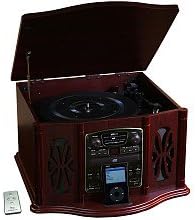
This image displays the KLH AUDIO KL-300i Nostalgia 5-n-1 System. The unit features a dark wood finish. The top lid is open, revealing a turntable. Below the turntable, the front panel includes controls for the CD player, AM/FM radio tuner, and an iPod dock. A small remote control is visible to the left of the main unit.
Aurreko paneleko kontrolak:
- Pizteko botoia: Unitatea pizten edo itzaltzen du.
- Funtzio hautatzailea: Switches between Phono, CD, Radio, iPod, and Aux modes.
- Bolumen-eskulekua: Bolumen nagusiaren maila doitzen du.
- CD erreproduzitzailearen kontrolak: Erreproduzitu/Pausatu, Gelditu, Aurrera/Atzera salto egin.
- Irrati-sintonizatzailea: AM/FM band selector, Tuning knob.
- iPod Dock: Connector for iPod devices.
- Aux-Sarrerako Jack-a: 3.5 mm-ko sarrera kanpoko audio gailuetarako.
- Aurikularrak Jack: 3.5 mm-ko irteera entzute pribaturako.
Goiko panela:
- Birak: For playing vinyl records.
- Estalkia: Protects the turntable when not in use.
Alboko panela:
- Kasete-plataforma: Audio-kaseteak erreproduzitzeko.
Konfigurazioa
Follow these steps for initial setup of your audio system.
- Lekua: Place the unit on a stable, flat surface away from direct sunlight, heat sources, and excessive dust or moisture. Ensure there is adequate space around the unit for ventilation.
- Antena konektatu: For optimal AM/FM radio reception, connect the supplied antenna wire to the antenna terminal on the rear of the unit. Extend the wire fully for better reception.
- Potentzia-konexioa: Konektatu korronte alternoko kablea hormako hartune estandar batera.
- Hasierako piztea: Press the Power button on the front panel to turn on the unit.
Funtzionamendu-argibideak
Eragiketa orokorra:
- Piztu/Itzali: Sakatu pizteko botoia unitatea pizteko edo itzaltzeko.
- Funtzioa hautatzea: Use the Function Selector knob or buttons to choose your desired audio source (Phono, CD, Radio, iPod, Aux).
- Bolumenaren doikuntza: Rotate the Volume knob to increase or decrease the sound level.
Turntablearen funtzionamendua:
- Lift the lid of the unit.
- Jarri binilo-disko bat toska-plateran.
- Select the appropriate speed (33 1/3, 45, or 78 RPM) using the speed selector switch. For 45 RPM records, place the included adapter on the spindle if needed.
- Gently lift the tonearm and position the stylus over the desired starting groove of the record.
- Lower the tonearm slowly onto the record. Playback will begin automatically.
- To stop playback, gently lift the tonearm and return it to its rest.
CD erreproduzitzailearen funtzionamendua:
- Press the Function Selector to CD mode.
- Sakatu kanporatu botoia CDaren erretilua irekitzeko.
- Jarri CD bat erretiluan, etiketa gora begira duela.
- Press the Eject button again to close the tray. The CD will begin playing automatically or display the track count.
- Use the Play/Pause, Stop, and Skip buttons to control playback.
Kasete erreproduzitzailearen funtzionamendua:
- Sartu kasete-zinta bat unitatearen alboko kasete-zirrikituan.
- Sakatu Erreproduzitzeko botoia erreproduzitzen hasteko.
- Use the Fast Forward (FF) button to advance the tape quickly.
- To stop playback, press the Stop/Eject button. Pressing it halfway will eject the tape.
AM/FM irratiaren funtzionamendua:
- Press the Function Selector to Radio mode.
- Select either AM or FM band using the band selector switch.
- Rotate the Tuning knob to search for radio stations.
- Adjust the antenna wire for best reception.
iPod Dock Operation:
- Press the Function Selector to iPod mode.
- Carefully place your compatible iPod device onto the iPod dock connector.
- Use your iPod's controls to select and play music. Audio will be routed through the KLH AUDIO system's speakers.
Aux-In Operation:
- Press the Function Selector to Aux mode.
- Connect an external audio device (e.g., MP3 player, smartphone) to the Aux-In jack on the front panel using the supplied 3.5mm auxiliary cable.
- Play audio from your external device. The sound will be played through the KLH AUDIO system's speakers.
Urruneko kontrolaren erabilera:
The remote control primarily operates the CD player functions (Play, Pause, Stop, Skip). Note that the remote cannot turn the unit on or off.
Mantentzea
Proper care will ensure the longevity of your system.
- Unitatea garbitzea: Garbitu unitatearen kanpoaldea oihal leun eta lehor batekin. Ez erabili garbitzaile urratzailerik, argizaririk edo disolbatzailerik.
- Stylus zaintzea: Handle the turntable stylus with extreme care. Clean the stylus periodically with a soft brush, brushing from back to front.
- CD/Kaseteen Zaintza: Keep CDs and cassette tapes clean and free of dust. Store them in their cases when not in use.
Arazoak konpontzea
If you experience issues with your system, refer to the following common problems and solutions.
| Arazoa | Kausa posiblea | Irtenbidea |
|---|---|---|
| Botererik ez | Kable elektrikoa ez dago ondo konektatuta. | Egiaztatu kablearen konexioa unitatera eta hormako entxufera. |
| Soinurik ez | Bolumena baxuegia; Funtzio okerra hautatuta; Entzungailuak konektatuta. | Increase volume; Select correct function; Disconnect headphones. |
| Turntable ez da bira egiten | Unit not powered on; Belt dislodged. | Ensure unit is on; Contact service if belt issue suspected. |
| Irrati-harrera eskasa | Antena ez dago luzatuta edo behar bezala kokatuta. | Extend and adjust the antenna wire for better signal. |
| CDa ez da erreproduzitzen | CD inserted incorrectly; CD is scratched or dirty. | Ensure CD is label-side up; Clean or replace CD. |
Zehaztapenak
| Ezaugarri | Zehaztapena |
|---|---|
| Energia iturria | AC 120V ~ 60Hz |
| Neurriak (W x D x H) | Gutxi gorabehera 17" x 17" x 10.5" (43.2 cm x 43.2 cm x 26.7 cm) |
| Turntable Abiadurak | 33 1/3, 45, 78 RPM |
| Irrati-maiztasunen tartea | AM: 530-1710 kHz, FM: 88-108 MHz |
| CD bateragarritasuna | CDa, CD-R / RW |
| iPod dock-a | Compatible with older generation iPods (30-pin connector) |
Bermea eta Laguntza
This product is covered by a limited manufacturer's warranty. For specific warranty terms and conditions, please refer to the warranty card included with your purchase or contact KLH customer support. If you require technical assistance or have questions not covered in this manual, please contact KLH customer service through their official webgunea edo zure produktuarekin emandako harremanetarako informazioa.
Ask a question about this manual
Ask about setup, troubleshooting, compatibility, parts, safety, or missing instructions. Manuals+ will review the question and use this page’s manual context to help answer it.