
1. Sarrera
Eskerrik asko erosketagatik.asing the Karcher KA 350 Compact Stereo System. This versatile audio system combines modern design with a wide range of playback options, including a 3-disc CD changer, dual cassette deck, turntable, USB port, SD card reader, and an integrated radio. This manual provides essential information for safe operation, setup, and maintenance of your device. Please read it thoroughly before use and retain it for future reference.
2. Segurtasun-argibide garrantzitsuak
- Energia iturria: Ziurtatu elikadura hornidura boltage unitateko balorazio-etiketarekin bat dator.
- Aireztapena: Ez blokeatu aireztapen-irekidurarik. Utzi nahikoa leku unitatearen inguruan aire-fluxu egokia izan dadin.
- Ura eta hezetasuna: Do not expose the unit to rain, moisture, dripping, or splashing. Do not place objects filled with liquids, such as vases, on the apparatus.
- Beroa: Mantendu unitatea bero-iturrietatik urrun, hala nola erradiadoreetatik, bero-erregistroetatik, sukaldeetatik edo beste aparatu batzuetatik (adibidez, ampberoa sortzen duten argitzaileak).
- Garbiketa: Garbitu aurretik, deskonektatu unitatea hormako entxufetik. Erabili zapi leun eta lehor bat soilik.
- Zerbitzua: Ez saiatu produktu hau zuk zeuk ematen. Bidali zerbitzu guztiak zerbitzu kualifikatuko langileengana.
- Haurrak: Mantendu unitatea eta bere osagarriak haurren eskura ez dauden lekuetan.
- Laser segurtasuna: This product uses a laser. Use of controls or adjustments or performance of procedures other than those specified herein may result in hazardous radiation exposure.
3. Paketearen edukia
Mesedez, egiaztatu elementu guztiak bertan daudela eta egoera onean daudela:
- Karcher KA 350 Compact Stereo System (Main Unit)
- Urruneko Kontrola
- Argibide eskuliburua
- Stereo Speakers (2 units)
- Elikatze-kablea
- FM Antenna (wire type)
4. Produktua amaitu daview
4.1 Aurrealdeko panelaren kontrolak
The front panel provides access to all primary functions and controls for the KA 350 system.

4.1. irudia: Aurreko paneleko kontrolak
- ON/STANDBY botoia: Unitatea pizten edo itzaltzen du.
- FUNTZIO botoia: Selects between CD, Tuner (Radio), Phono (Turntable), Tape (Cassette), and USB/SD modes.
- BOLUMENaren botoia: Bolumen nagusiaren maila doitzen du.
- CD kontrolak: Play/Pause, Stop, Skip/Search (Forward/Backward), Open/Close CD tray.
- Kasete-plataformako kontrolak: Play, Record, Fast Forward, Rewind, Stop/Eject for Deck 1 and Deck 2.
- USB/SD Controls: Play/Pause, Stop, Skip/Search (Forward/Backward).
- Sintonizagailuaren kontrolak: Band selection (AM/FM), Tuning Up/Down, Memory presets.
- Pantaila: Shows current mode, track information, radio frequency, and time.
4.2 Atzeko panelaren konexioak
The rear panel houses all necessary input and output connections for the system.
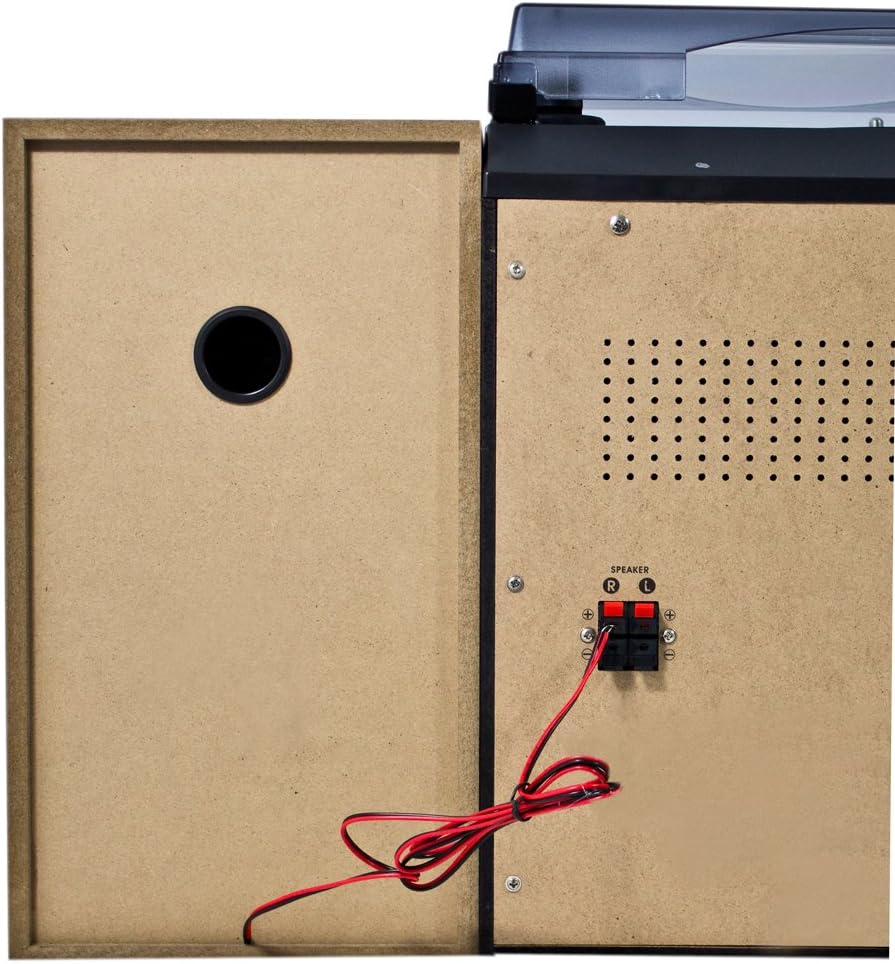
4.2 irudia: Atzeko panelaren konexioak
- Speaker Terminals (R/L): Connect the included stereo speakers. Ensure correct polarity (+ to + and - to -).
- CA potentzia sarrera: Konektatu elikadura-kablea hemen.
- FM antena terminala: Connect the supplied FM wire antenna for radio reception.
4.3 Osagai nagusiak

Figure 4.3: Karcher KA 350 Main Components
- Birak: Located on top, for playing vinyl records.
- 3-Disc CD Changer: Front-loading tray for multiple CDs.
- Dual Cassette Deck: Two cassette compartments for playback and recording.
- USB ataka: USB flash unitateak konektatzeko.
- SD txartelaren zirrikitua: SD memoria txartelak sartzeko.
- Bozgorailu estereoa: Two external speakers for audio output.
5. Konfigurazioa
5.1 Desontziratzea eta kokatzea
- Kontu handiz kendu osagai guztiak ontzitik.
- Jarri unitate nagusia gainazal egonkor eta lau batean.
- Position the speakers on either side of the main unit, ensuring they are at an equal distance for optimal stereo sound.
- Ziurtatu unitatearen inguruan aireztapen egokia dagoela.
5.2 Bozgorailuak konektatzea
Connect the supplied speakers to the speaker terminals on the rear of the main unit.

Figure 5.1: Speaker Unit
- Identify the speaker wires. Each wire typically has two strands, one marked for positive (+) and one for negative (-).
- Connect the positive (+) terminal of the left speaker to the 'L+' terminal on the main unit's rear panel.
- Connect the negative (-) terminal of the left speaker to the 'L-' terminal on the main unit's rear panel.
- Repeat the process for the right speaker, connecting it to the 'R+' and 'R-' terminals.
- Ensure all connections are secure to prevent sound distortion or damage.
5.3 Connecting the FM Antenna
For optimal radio reception, connect the supplied FM wire antenna.
- Insert the FM antenna plug into the FM antenna jack on the rear panel.
- Extend the wire antenna fully and position it for the best possible reception. You may need to experiment with its placement.
5.4 Energia-konexioa
- Konektatu korronte alternoko kablea unitate nagusiaren atzealdeko korronte alternoko sarreran.
- Entxufatu kablearen beste muturra hormako entxufe estandar batera.
6. Funtzionamendu-argibideak
6.1 Piztu/Itzali
Sakatu ON / STANDBY aurrealdeko paneleko edo urrutiko aginteko botoia unitatea pizteko edo itzaltzeko.
6.2 Modu hautaketa
Sakatu FUNTZIOA button repeatedly to cycle through the available modes: CD, Tuner (Radio), Phono (Turntable), Tape (Cassette), and USB/SD.
6.3 CD erreproduzitzailearen funtzionamendua

Figure 6.1: CD Changer Tray
- Sakatu FUNTZIOA botoia CD modua hautatzeko.
- Sakatu IREKI/ITXI CDaren erretilua irekitzeko botoia.
- Place up to three CDs onto the disc trays, label side up.
- Sakatu IREKI/ITXI botoia berriro erretilua ixteko.
- Sakatu JOLASTU/PAUSTU botoia erreproduzitzen hasteko.
- Erabili SALTU / BILATU buttons to navigate between tracks or fast forward/rewind.
6.4 Kasete erreproduzitzailearen/grabagailuaren funtzionamendua
- Sakatu FUNTZIOA botoia ZINTA modua hautatzeko.
- Sakatu GELDITU/KALTUZ button on either Deck 1 or Deck 2 to open the cassette compartment.
- Sartu kasete-zinta bat eta itxi konpartimendua.
- Sakatu JOLASTU botoia erreproduzitzen hasteko.
- To record, insert a blank tape into Deck 2 (for recording from Deck 1 or other sources) or Deck 1 (for recording from external sources if applicable). Press the GRABATU botoia.
6.5 Biragailuaren funtzionamendua
- Sakatu FUNTZIOA button to select PHONO mode.
- Ireki hautsaren estalkia.
- Jarri binilozko disko bat erretiluan.
- Hautatu abiadura egokia (33, 45 edo 78 RPM) abiadura hautatzaile etengailua erabiliz.
- Carefully lift the tone arm and place the stylus onto the desired groove of the record.
- At the end of the record, manually return the tone arm to its rest.
6.6 USB/SD erreprodukzioa
- Sakatu FUNTZIOA botoia USB/SD modua hautatzeko.
- Sartu USB flash unitate bat USB atakan edo SD txartel bat SD txartelaren zirrikituan.
- Unitateak automatikoki detektatuko du eta audio bateragarria erreproduzitzen hasiko da files (MP3, WMA, AAC).
- Erabili JOLASTU/PAUSTU eta SALTU / BILATU erreprodukzioa kontrolatzeko botoiak.
6.7 Irratiaren funtzionamendua
- Sakatu FUNTZIOA button to select TUNER mode.
- Sakatu BANDA button to select between FM and AM bands.
- Erabili TUNING botoiak irrati bat eskuz sintonizatzeko edo sakatu eta eutsi eskaneatzea automatikoki egiteko.
- Irrati bat gordetzeko, sakatu MEMORIA botoia eta, ondoren, erabili SALTU / BILATU botoiak aurrezarritako zenbaki bat hautatzeko, eta sakatu MEMORIA berriro baieztatzeko.
6.8 Urruneko kontrola
The included remote control allows convenient operation of all functions from a distance. Ensure batteries are correctly inserted.
7. Mantentzea
7.1 Unitatea garbitzea
- Deskonektatu beti unitatea korronte-hartunetik garbitu aurretik.
- Erabili zapi leun eta lehor bat kanpoko gainazalak garbitzeko.
- Ez erabili garbitzaile, argizari edo disolbatzaile urratzailerik, akabera kaltetu baitezakete.
7.2 Turntable Stylus Care
- Handle the stylus with extreme care. Only touch the tone arm, not the stylus itself.
- Garbitu boligrafoa aldian-aldian eskuila leun batekin, atzetik aurrera eskuilatuz.
- Replace the stylus when it shows signs of wear (e.g., distorted sound, skipping).
7.3 Cassette Deck Care
- Garbitu aldizka zinta-buruak, kabrestanea eta pintza-arrabola kotoi-zapi batekin, arinki garbituz.ampisopropil alkoholarekin egina.
- Demagnetize the tape heads periodically to maintain sound quality.
8. Arazoak
| Arazoa | Kausa posiblea | Irtenbidea |
|---|---|---|
| Botererik ez | Kable elektrikoa ez dago konektatuta; Entxufea ez dago aktibo | Egiaztatu kablearen konexioa; Saiatu beste entxufe batekin |
| Soinurik ez | Volume too low; Speakers not connected correctly; Incorrect function mode selected | Increase volume; Check speaker connections and polarity; Select correct function mode |
| CDa saltoka edo ez da erreproduzitzen | CD is dirty or scratched; CD inserted incorrectly | Clean or replace CD; Insert CD label side up |
| Irrati-harrera eskasa | Antenna not connected or poorly positioned; Weak signal | Connect and adjust FM antenna; Try repositioning the unit |
| Biraketa-plataformaren abiadura okerra | Abiadura okerra hautatu da | Adjust the speed selector switch (33/45/78 RPM) |
| USB/SD erreprodukzio arazoak | Bateraezina file format; USB/SD card not inserted correctly; Corrupted files | Ziurtatu files are MP3, WMA, or AAC; Reinsert USB/SD card; Try a different USB/SD card |
9. Zehaztapenak
| Ezaugarri | Zehaztapena |
|---|---|
| Marka | Karcher |
| Modelo zenbakia | KA 350 |
| Konektibitate Teknologia | FM/MW Tuner, USB, SD |
| Kolorea | Beltza |
| Hizlari mota | Stereo (2 speakers included) |
| Elementuaren neurriak (L x W x H) | 70.5 x 41 x 37.3 cm |
| Energia iturria | Kable elektrikoa |
| Gailu bateragarriak | Smartphone, Tablet, MP3 Player, Personal Computer |
| Elementuaren pisua | 10.8 kilogramo |
| Potentzia irteera (RMS) | 2 x 5 W (Total 50 W) |
| Supported Media Standards | MP3, CD, Cassette, USB, SD |
| Onartutako audio formatuak | CD-DA, MP3, WMA, AAC |
| Bluetooth euskarria | Ez |
| Hiztun kopurua | 2 |
| Audio irteera modua | Estereoa |
| Inguruko soinuaren konfigurazioa | 2.0 |
| Dakarten osagaiak | Compact system, Remote control, Instruction manual |
10. Bermea eta Laguntza
Bermeari buruzko informazioa eta laguntza teknikoa lortzeko, kontsultatu zure produktuarekin batera datorren berme-txartela edo bisitatu Karcherren webgune ofiziala. webgunea. Gorde erosketaren egiaztagiria berme-erreklamazioetarako.
Fabrikatzailea: Karcher