
Sarrera
Eskerrik asko erosketagatik.asing the Snakebyte Wireless Bluetooth Premium PS3 Controller. This manual provides detailed instructions for setting up, operating, maintaining, and troubleshooting your new controller. Please read this manual thoroughly before use to ensure optimal performance and longevity of your device.
Paketearen edukia
Mesedez, egiaztatu elementu guztiak paketean daudela:
- Snakebyte Wireless Bluetooth Premium PS3 Controller
- USB Charging Cable (approximately 3 meters)
- Argibide eskuliburua (dokumentu hau)

Image: The Snakebyte Wireless Bluetooth Premium PS3 Controller shown in its retail blister packaging, indicating the product and included cable.
Konfigurazioa
1. Kontrolatzailea kargatzea
Before initial use, fully charge the controller. Connect the supplied USB charging cable to the controller's charging port and the other end to a USB port on your PlayStation 3 console or a compatible USB power adapter. The indicator lights on the controller will show charging status and turn off or change color when fully charged.
2. Connecting to PlayStation 3
To connect the controller wirelessly to your PlayStation 3 console:
- Ensure your PlayStation 3 console is powered on.
- Connect the controller to the PS3 console using the supplied USB charging cable. This will register the controller with the console.
- Sakatu PS botoia (located in the center of the controller) once. The controller will power on and attempt to establish a connection.
- Once the controller is registered and connected, the indicator lights will illuminate, typically assigning a player number.
- You can now disconnect the USB cable for wireless gameplay. If the connection is lost, reconnect the USB cable and press the PS button again.

Irudia: Aurrealdea view of the Snakebyte Wireless Bluetooth Premium PS3 Controller, showing the button layout including the central PS button.
Funtzionamendu-argibideak
Kontrolatzailearen diseinua eta funtzioak
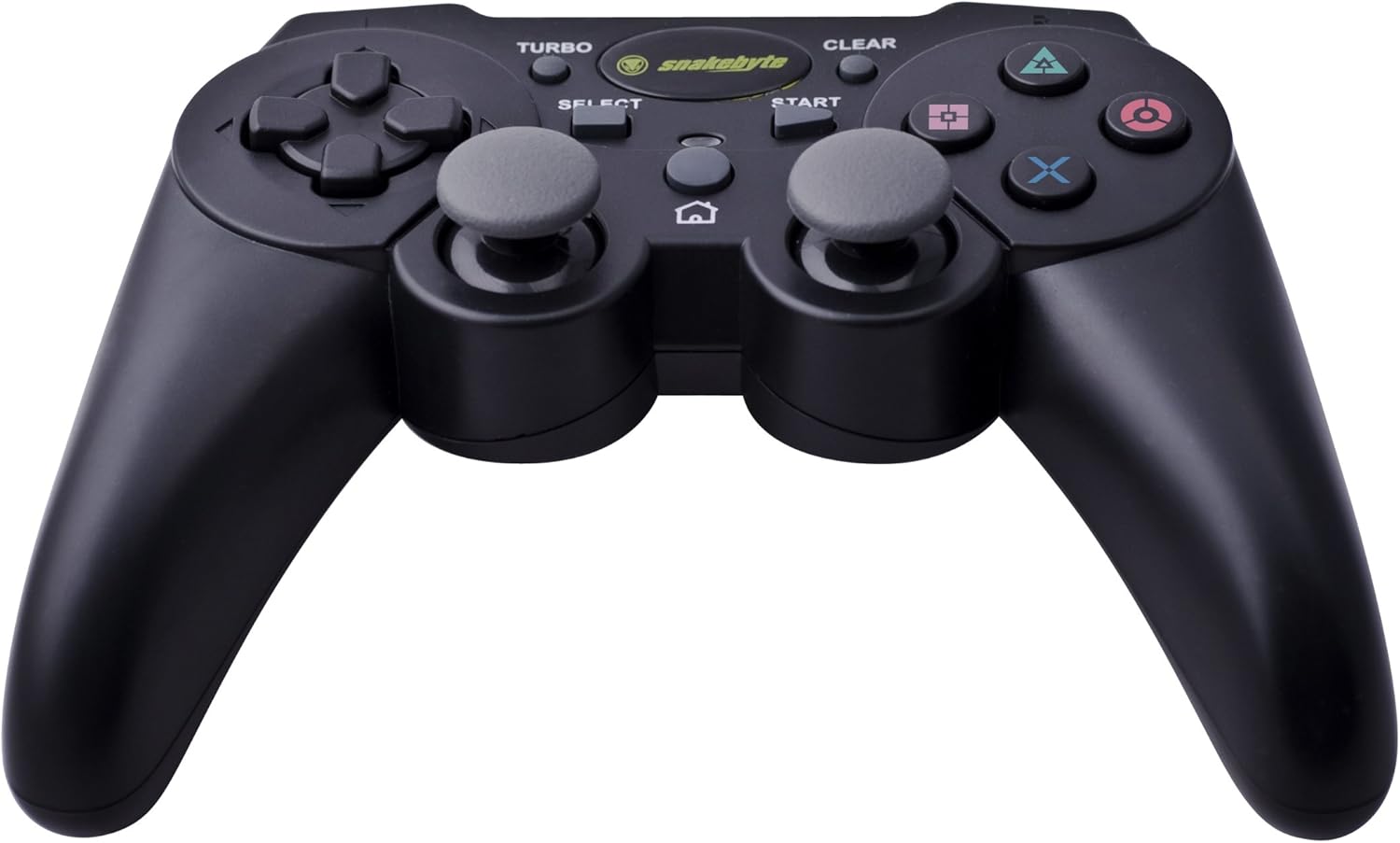
Image: The Snakebyte Wireless Bluetooth Premium PS3 Controller, highlighting the dual analog sticks and various buttons.
- Norabide-panel-a (D-Pad): For precise directional input in games.
- Ezkerreko analogiko joysticka: Mugimenduaren lehen mailako kontrola.
- Eskuineko analogiko joysticka: Kameraren kontrola edo bigarren mailako mugimendua.
- Ekintza botoiak (Triangelua, Zirkulua, Gurutzea, Karratua): Game-specific actions.
- L1/R1 botoiak: Shoulder buttons for various in-game functions.
- L2/R2 abiarazleak: Analog triggers for pressure-sensitive input, often used for acceleration/braking or aiming/firing.
- HASI botoia: Pauses games or opens menus.
- Aukeratu botoia: Opens in-game maps, inventories, or other menus.
- PS botoia: Powers on the controller, accesses the PS3 XMB (Cross Media Bar) menu, or turns off the controller/console.
- TURBO botoia: Activates the turbo function for other buttons.
- GARBITU botoia: Deactivates the turbo function.
Turbo Funtzioa
The controller features a TURBO function, allowing a selected button to register multiple presses rapidly with a single hold. This can be useful for certain game mechanics.
- To activate TURBO: Press and hold the TURBO botoia, then press the desired action button (e.g., Cross, Square, Circle, Triangle, L1, R1, L2, R2). Release both buttons. The selected button will now have the TURBO function enabled.
- To deactivate TURBO for a specific button: Press and hold the GARBITU botoia, then press the button for which TURBO is currently active. Release both buttons.
- To deactivate all TURBO functions: Press the GARBITU botoia once without holding it down.
Motion Sensing and Vibration Feedback
This controller supports motion sensing capabilities, allowing for intuitive control in compatible games. It also provides vibration feedback to enhance immersion during gameplay, reacting to in-game events such as impacts or explosions.
Piztu eta itzaltzea
- Pizteko: Sakatu botoia PS botoia.
- To power off: The controller will automatically enter sleep mode after a period of inactivity to conserve battery. Alternatively, you can hold the PS botoia for several seconds to bring up the PS3 menu, where you can choose to turn off the controller.
Mantentzea
- Garbiketa: Use a soft, dry cloth to clean the controller. Do not use abrasive cleaners or solvents.
- Biltegiratzea: Gorde kontrolatzailea leku fresko eta lehor batean, eguzki-argitik eta muturreko tenperaturetatik babestuta.
- Bateria zaintzea: Bateriaren iraupena luzatzeko, saihestu kontrolagailua maiz erabat deskargatzea. Kargatu aldizka, etengabe erabiltzen ez baduzu ere.
- Saihestu kalteak: Do not drop the controller or expose it to excessive force or moisture.
Arazoak konpontzea
| Arazoa | Irtenbide posiblea |
|---|---|
| Kontrolatzailea ez da haririk gabe konektatzen. |
|
| Botoiek edo joystick analogikoek ez dute erantzuten. |
|
| Controller does not charge. |
|
Kontrolagailua berrezartzea
If the controller behaves erratically or becomes unresponsive, you can perform a reset. Locate the small reset button on the back of the controller (often in a small hole). Use a thin, pointed object (like a straightened paperclip) to press and hold the reset button for a few seconds. This will restart the controller's internal electronics.
Zehaztapenak
- Marka: Snakebyte
- Modelo zenbakia: SB904714
- Plataforma bateragarria: Sony PlayStation 3
- Konektibitatea: Haririk gabeko (Bluetooth)
- Botoi kopurua: 16
- Neurriak (L x W x H): Gutxi gorabehera 23.01 x 16.31 x 8.51 cm (9.06 x 6.42 x 3.35 hazbete)
- Pisua: Gutxi gorabehera 419.99 g (0.93 lb)
- Kolorea: Beltza
Bermea eta Laguntza
For warranty information and technical support, please refer to the documentation provided with your purchase or contact your retailer. You may also visit the official Snakebyte webgunea laguntza gehiago eta produktuaren informazioa lortzeko.