
HEWLETT PACKARD J9450A
HP Procurve 1810G-24 Switch (J9450A) User Manual
Eredua: J9450A
Sarrera
The HP Procurve 1810G-24 Switch (J9450A) is a managed Gigabit Ethernet switch designed for small and medium-sized businesses. It provides reliable network connectivity with advanced features for enhanced performance and security. This manual provides essential information for the setup, operation, maintenance, and troubleshooting of your switch.

Figure 1: HP Procurve 1810G-24 Switch (J9450A) - Front Angled View
This image shows the overall design of the HP Procurve 1810G-24 Switch, highlighting its compact form factor and the arrangement of its ports and indicators.
Paketearen edukia
Egiaztatu elementu guztiak paketean daudela:
- HP Procurve 1810G-24 Switch (J9450A)
- Elikatze kablea
- Arraunean muntatzeko kit
- Kontsolaren kablea
Konfigurazioa
1. Instalazio fisikoa
The HP Procurve 1810G-24 Switch can be placed on a desktop or mounted in a standard 19-inch equipment rack using the included rack-mount kit.
- Rack muntatzea: Attach the rack-mount brackets to the sides of the switch using the provided screws. Secure the switch into the rack.
- Mahaigaineko kokapena: Ensure adequate ventilation around the switch. Do not block any ventilation openings.
2. Energia-konexioa
Connect the provided power cable to the power inlet on the rear of the switch and then to a grounded AC power outlet. The switch will power on automatically.

Figure 2: Rear Panel of the Switch
This image displays the rear panel of the HP Procurve 1810G-24 Switch, showing the power input and product labels.
3. Sare konexioak
Connect your network devices (computers, servers, other switches) to the RJ45 ports on the front panel of the switch using standard Ethernet cables. The switch supports 10/100/1000 Mbps connections.

Figure 3: Front Panel of the Switch
Irudi honek argi eta garbi erakusten du view of the front panel of the HP Procurve 1810G-24 Switch, detailing the 24 Gigabit Ethernet ports and indicator lights.
The switch also features dual-personality ports (ports 23 and 24) which can function as either 10/100/1000 RJ45 ports or mini-GBIC (SFP) slots for optional fiber connectivity (e.g., Gigabit-SX, -LX, -LH, or 100-FX).

Figure 4: Front Panel Indicators and Controls
This close-up image highlights the power indicator, fault locator, LED mode, and speed indicators on the front panel of the HP Procurve 1810G-24 Switch.
Etengailuaren funtzionamendua
Web Interfazearen kudeaketa
The HP Procurve 1810G-24 Switch features an intuitive web-based management interface for configuration, monitoring, and administration. To access the web interfazea:
- Ziurtatu zure ordenagailua etengailura konektatuta dagoela.
- Ireki a web browser and enter the default IP address of the switch (refer to the product documentation or sticker for the default IP).
- Log in using the default credentials (if applicable).
- -tik web interface, you can configure various settings, including:
- VLAN Support and Tagginga: Configure up to 64 port-based VLANs and dynamic IEEE 802.1Q VLAN tagging for network segmentation and security.
- Portuaren konfigurazioa: Adjust port speed, duplex settings, and enable/disable ports.
- Esteken agregazioa: Combine multiple ports for increased bandwidth and redundancy.
- Zerbitzuaren kalitatea (QoS): Lehentasuna eman sareko trafikoari aplikazio kritikoetarako.
LED adierazleak
Aurrealdeko paneleko LEDek etengailuaren eta bere portuen egoera bisuala ematen dute:
- Power LED: Potentzia-egoera adierazten du.
- Fault Locator LED: Sistemaren akatsak adierazten ditu.
- Esteka/Jarduera LEDak (portu bakoitzeko):
- Berde finkoa: Lotura ezarrita.
- Berde keinukaria: Jarduera portuan.
- Speed LEDs (per port):
- Off: 10 Mbps
- Flash: 100 Mbps
- On: 1000 Mbps (Gigabit)
Mantentzea
The HP Procurve 1810G-24 Switch is designed for low maintenance. It operates without internal fans, contributing to a quiet environment and reduced dust accumulation.
- Firmware eguneraketak: Periodically check the official HP website for firmware updates to ensure optimal performance and security. Follow the instructions provided with the firmware update package.
- Garbiketa: Erabili zapi leun eta lehor bat etengailuaren kanpoaldea garbitzeko. Ez erabili garbitzaile likido edo aerosolik.
- Aireztapena: Ziurtatu aireztapen-irekidurak ez daudela oztopatuta gehiegi berotzea saihesteko.
Arazoak konpontzea
Botererik ez
- Egiaztatu elikatze-kablea ondo konektatuta dagoela bai etengailura bai entxufera.
- Ziurtatu korronte-hartunea funtzionatzen duela beste gailu batekin probatuz.
No Link Light on Port
- Check the Ethernet cable connection at both ends (switch and connected device).
- Saiatu beste Ethernet kable batekin.
- Test the port with a known working device.
- Ziurtatu konektatutako gailua piztuta dagoela eta behar bezala funtzionatzen duela.
Connectivity Issues After Power Failure
In some rare instances, the switch may not fully restore network connectivity to all ports immediately after a power outage. If this occurs:
- Potentzia-zikloa: Disconnect the power cable from the switch, wait for approximately 30 seconds, and then reconnect it.
- Reseat Cables: Physically disconnect and reconnect the Ethernet cables for affected devices.
- Fabrikaren berrezarpena: If issues persist, a factory reset may be necessary. This will revert all settings to their default values. Consult the detailed product manual for the specific procedure, which often involves using a small pointed object (like a paperclip) to press a reset button.
Web Interface Inaccessible
- Verify your computer's IP address is in the same subnet as the switch's default IP address.
- Garbitu zure arakatzailearen cachea eta cookieak.
- Saiatu beste bat web arakatzailea.
- Perform a factory reset if you have forgotten the login credentials or if the interface remains unresponsive.
Zehaztapenak
| Ezaugarri | Deskribapena |
|---|---|
| Modelo zenbakia | J9450A |
| Aldatu mota | Gigabit Ethernet Switch kudeatua |
| Portu kopurua | 24 (22 x 10/100/1000BASE-T, 2 x Dual-Personality 10/100/1000BASE-T or SFP) |
| Datuen transferentzia-tasa | 1000 Megabit Segundoko (Gigabit) |
| Interfaze mota | RJ45, SFP |
| Kasu Materiala | Metala |
| Neurriak (L x W x H) | 17 x 7 x 2 hazbete (gutxi gorabehera) |
| Elementuaren pisua | 5 kilo |
| Potentzia Sarrera | 100-127V ~ 0.75A (0.75A), 200-240V ~ 0.4A (0.4A) |
| Funtzionamendu-tenperatura | 0°C eta 40°C (32°F eta 104°F) |
| Hoztea | Fanless |
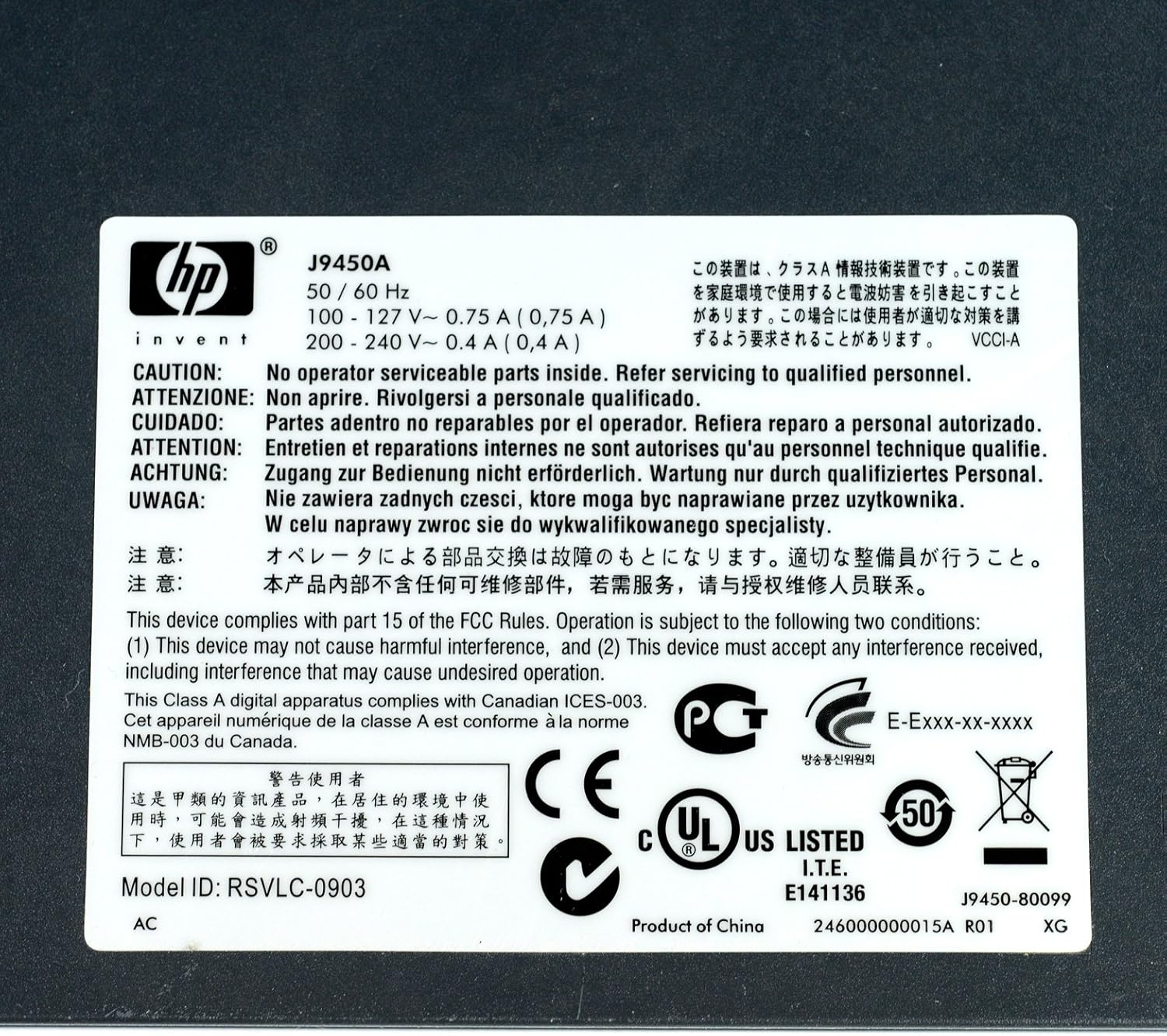
5. irudia: Produktuaren etiketa zehaztapenekin
This image displays the product label, which includes the model number, electrical ratings, and various compliance marks.
Bermea eta Laguntza
Bermearen informazioa
The HP Procurve 1810G-24 Switch typically comes with a Bizi osorako ordezko bermea for the original owner. Please refer to the official HP warranty documentation for complete terms and conditions, as warranty details may vary by region and purchase date.
Laguntza Teknikoa
For technical assistance, product registration, or to download the latest drivers and firmware, please visit the official HP support website. Have your product model number (J9450A) and serial number ready when contacting support.
Normalean laguntza baliabideak hemen aurki ditzakezu: www.hp.com/support