
Sarrera
The Nokia Bluetooth Stereo Headset BH-905 is designed to provide a superior audio experience with active noise cancellation and wide compatibility. This manual provides instructions for setting up, operating, and maintaining your headset to ensure optimal performance.
The headset features 10 microphones: 8 dedicated to capturing ambient noise for cancellation and 2 for capturing speech in noisy environments. It offers versatile connectivity, supporting both wireless Bluetooth and wired connections with various devices.
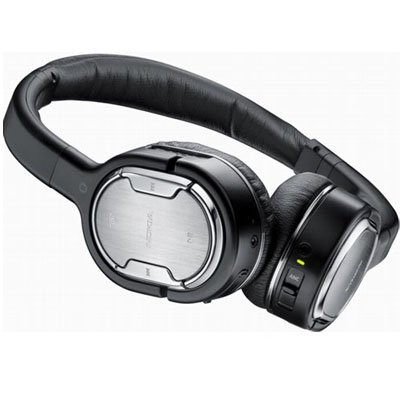
Image: The Nokia Bluetooth Stereo Headset BH-905, showcasing its sleek design and over-ear cups.
Ezaugarri nagusiak
- Zarata kentzea aktiboa (ANC): Significantly reduces ambient noise for an immersive listening experience.
- 10 Microphones: Utilizes 8 microphones for noise capture and 2 for clear speech transmission in loud surroundings.
- Bateragarritasun zabala: Connects wirelessly via Bluetooth or wired to a variety of mobile phones, music players, and other audio devices.
- Kontrol ezin hobea: Intuitive controls allow for easy switching between music and calls without needing to look at the device.
Konfigurazioa
Bluetooth parekatzea
- Ziurtatu entzungailuak kargatuta eta itzalita daudela.
- Aktibatu Bluetootha zure gailu mugikorrean.
- Press and hold the power button on the headset until the indicator light flashes blue rapidly, indicating pairing mode.
- On your device, search for Bluetooth devices and select "Nokia BH-905" from the list.
- If prompted, enter the passcode (usually "0000").
- Behin parekatuta, adierazle-argia urdin finko jarriko da edo poliki keinuka hasiko da.
Kablezko konexioa
For devices without Bluetooth or when battery is low, use the provided audio cables. The headset includes plugs for standard audio jacks and airplane adapters for versatile use.
- Connect one end of the audio cable to the headset's audio input port.
- Connect the other end to your audio source (e.g., mobile phone, MP3 player, airplane entertainment system).
Funtzionamendu-argibideak
Piztu/Itzali
- Pizteko, sakatu eta eutsi pizteko botoia adierazle-argia piztu arte.
- Itzaltzeko, sakatu eta eutsi pizteko botoia adierazle-argia itzali arte.
Zarata aktiboaren baliogabetzea (ANC)
The BH-905 features advanced Active Noise Cancellation technology. With 8 dedicated microphones, it captures ambient low-frequency noise and generates an inverse sound wave, effectively canceling out unwanted sounds. This allows for a clearer audio experience, especially in noisy environments like airplanes or busy streets.
- To activate ANC, locate the ANC switch on the headset and slide it to the 'On' position. A green indicator light will confirm activation.
- To deactivate ANC, slide the switch to the 'Off' position.
Deien Kudeaketa
The headset is equipped with 2 microphones specifically designed for speech. These microphones not only capture your voice clearly but also work to cancel out ambient noise, ensuring that the person you are speaking with hears you, not your surroundings.
- Deiak erantzutea / amaitzea: Use the dedicated call button on the headset.
- Switching between Music and Calls: The headset allows for seamless transitions between listening to music and taking calls. When a call comes in, your music will pause, and you can answer the call directly from the headset.
Musika erreproduzitzea
Control your music directly from the headset using the intuitive buttons. The design supports "blind usage," meaning you can operate the controls by feel without needing to look at them.
- Erreproduzitu/Pausatu: Use the play/pause button.
- Saltatu pistak: Use the forward/backward track buttons.
- Bolumen kontrola: Doitu bolumena bolumen-botoi espezifikoak erabiliz.
Video: An official Nokia video demonstrating the features and technology behind the BH-905 headset, including its active noise cancellation and multi-microphone system for clear audio and calls.
Mantentzea
- Garbitu entzungailuak aldizka zapi leun eta lehor batekin.
- Avoid exposing the headset to extreme temperatures, moisture, or direct sunlight.
- Erabiltzen ez duzunean, gorde entzungailuak bere zorro babeslean kalteak saihesteko.
- Ez saiatu entzungailuak desmuntatzen edo aldatzen, horrek bermea baliogabetuko baitu.
Arazoak konpontzea
- Potentziarik gabe: Ziurtatu entzungailuak guztiz kargatuta daudela.
- Ezin da parekatu: Make sure the headset is in pairing mode and within range of your device. Try restarting both devices.
- Soinurik ez / Soinu kalitate eskasa: Check volume levels on both the headset and your connected device. For wired connections, ensure cables are securely plugged in. For Bluetooth, ensure a stable connection.
- ANC-k ez du eraginkortasunez funtzionatzen: Ziurtatu ANC etengailua 'On' posizioan dagoela.
- Deitzaileek ezin naute argi entzun: Ensure the headset's microphones are not obstructed.
If issues persist, refer to the Nokia support webgunera edo jarri harremanetan bezeroarentzako arreta-zerbitzuarekin laguntza gehiago lortzeko.
Zehaztapenak
| Ezaugarri | Zehaztapena |
|---|---|
| Marka | Nokia |
| Modelo zenbakia | 02716J5 |
| Forma-faktorea | Over-ear (two_ear) |
| Zarata Kontrola | Zarata Deuseztatze Aktiboa |
| Konektibitate Teknologia | Bluetootha, kablea |
| Haririk gabeko Komunikazio Teknologia | Bluetootha |
| Ezaugarri gehigarriak | Microphone; Stereo |
| Kontrol mota | Komunikabideen kontrola |
| Elementuaren pisua | 0.32 kilo |
| UPC | 758478021477 |
| GTIN | 758478021477 |
Bermea eta Laguntza
The Nokia Bluetooth Stereo Headset BH-905 comes with a 12 hilabeteko bermea erosketa-datatik aurrera. Berme honek erabilera normalaren pean fabrikazio-akatsak estaltzen ditu. Gorde erosketaren egiaztagiria berme-erreklamazioetarako.
For technical support, warranty service, or additional information, please visit the official Nokia support website or contact your local Nokia customer service center.