
1. Sarrera
This manual provides essential information for the setup, operation, and maintenance of your InFocus IN102 Portable DLP Projector. The IN102 is designed for various presentation environments, including conference rooms and classrooms, offering a balance of performance and portability.
Ezaugarri nagusiak hauek dira:
- SVGA (800 x 600) native resolution, supporting up to UXGA (1600 x 1200).
- 2700 ANSI Lumens brightness (2200 lumens in Eco Mode) for clear images in various lighting conditions.
- 1500:1 contrast ratio for distinct visuals.
- DLP® technology with InFocus BrilliantColor™ for accurate color reproduction.
- 3D-ready capability for displaying 3D content.
- Lightweight design (approximately 5 pounds / 2.3 kg) for portability.
- Iraupen luzeko lamp and filter-free design for reduced maintenance.
2. Zer dago kutxan
Upon unpacking, please verify that all the following items are included with your InFocus IN102 projector:
- InFocus IN102 Projector
- Elikatze kablea
- VGA kablea
- Eramateko zorroa
- Urruneko Kontrola
- Segurtasun-argibideak
- CD Quick Start/User Guide
3. Produktua amaitu daview
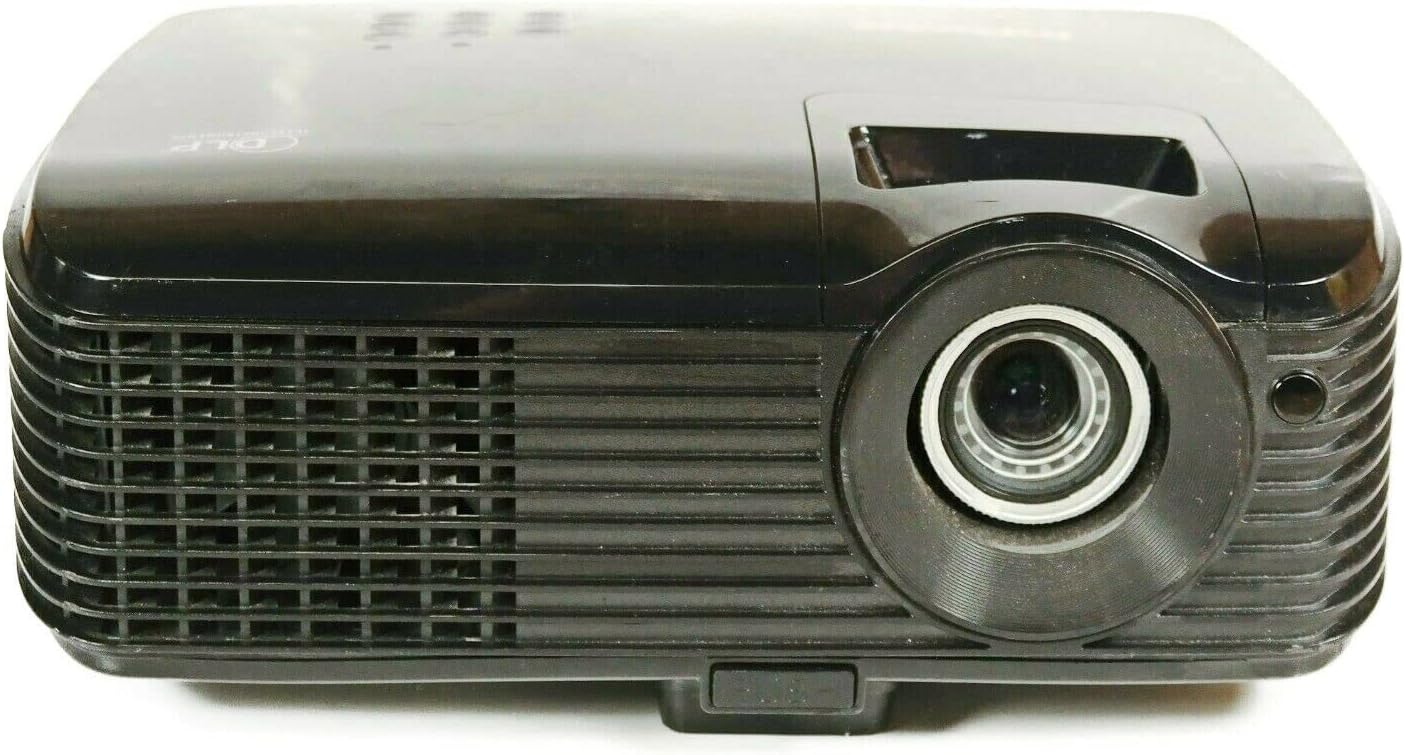
3.1. irudia: Aurrealdea View of the IN102 Projector. This image displays the projector's front, highlighting the projection lens and the primary ventilation grille.

3.2. Irudia: Atzealdea View of the IN102 Projector. This image illustrates the back panel, featuring the power input, two VGA ports, S-Video, and Composite video inputs.

3.3. irudia: Goikoa View of the IN102 Projector. This image shows the top surface, including the integrated control panel buttons and the manual focus/zoom adjustment rings.

3.4. Irudia: Behea View of the IN102 Projector. This image displays the underside, revealing the mounting points for ceiling installation and the adjustable feet for leveling.
4. Konfigurazioa
4.1 Jartzea
Position the projector on a stable, flat surface or mount it securely. Ensure adequate ventilation around the projector, keeping clear of any obstructions to the air intake and exhaust vents. The distance from the screen will determine the image size. Adjust the projector's angle to minimize keystone distortion.
4.2 Potentzia konektatzea
- Connect the power cord to the AC inlet on the rear of the projector.
- Entxufatu korronte-kablearen beste muturra lurreko hartune elektriko batean.
4.3 Bideo iturriak konektatzea
The IN102 offers multiple input options:
- VGA (Computer): Use the supplied VGA cable to connect your computer's VGA output to one of the VGA input ports (VGA1 or VGA2) on the projector.
- S-Bideoa: Connect devices with S-Video output (e.g., DVD players) to the S-Video port.
- Bideo Konposatua: Connect devices with Composite video output (e.g., VCRs, older game consoles) to the Composite video port.
Ensure all cables are securely connected before powering on the projector.
5. Funtzionamendu-argibideak
5.1 Piztu/Itzali
- Pizteko, sakatu Boterea Proiektorearen kontrol-paneleko edo urrutiko aginteko botoia. Pizteko adierazlearen argia piztuko da.
- Itzatzeko, sakatu Boterea botoia bi aldiz sakatu. Proiektoreak hozte-ziklo batean sartuko da erabat itzali aurretik. Ez deskonektatu proiektorea hozte-zikloan zehar.
5.2 Sarrera iturriaren hautaketa
Sakatu Iturria button on the projector or remote control to cycle through available input sources (VGA1, VGA2, S-Video, Composite) until your desired source is displayed.
5.3 Irudiaren doikuntza
- Focus eta Zoom: Rotate the focus and zoom rings on the projector lens until the image is sharp and fills the screen as desired.
- Keystone zuzenketa: If the projected image appears trapezoidal, use the keystone correction function (usually via buttons on the control panel or remote) to adjust the image geometry to a rectangular shape.
- Distira eta kontrastea: Access the on-screen display (OSD) menu to fine-tune brightness, contrast, and other image settings.
5.4 Modu ekologikoa
Activate Eco Mode to extend lamp life and reduce power consumption. This mode is ideal for presentations in dimly lit environments. Refer to the OSD menu for Eco Mode activation.
5.5 3D funtzionalitatea
The IN102 is 3D-ready. To project 3D content, ensure your source device is compatible and configured for 3D output, and use appropriate 3D glasses (sold separately). Consult your 3D source device's manual for specific setup instructions.
6. Mantentzea
6.1 lamp Ordezkoa
Proiektorea lamp bizitza mugatua du. Noiz lamp life indicator illuminates or the image brightness significantly decreases, the lamp needs replacement. The lamp door is conveniently located on the top of the projector for easy access, even when the unit is installed.
- Power off the projector and allow it to cool completely for at least 30 minutes.
- Deskonektatu korronte-kablea.
- Locate and open the lamp proiektorearen goiko aldean dagoen estalkia.
- Kontu handiz kendu l zaharraamp module and replace it with a new InFocus-approved lamp (SP-LAMP-060).
- Seguru lamp estali eta konektatu elikadura-kablea.
- Berrezarri lamp Proiektorearen OSD menuko tenporizadorea.
6.2 Garbiketa
The IN102 features a filter-free design, eliminating the need for filter cleaning or replacement. Periodically clean the projector's exterior with a soft, dry cloth. For the lens, use a lens cleaning cloth and solution specifically designed for optical surfaces.
6.3 Biltegiratzea
When not in use for extended periods, store the projector in its carrying case in a cool, dry environment, away from direct sunlight and extreme temperatures.
7. Arazoak
This section addresses common issues you might encounter with your InFocus IN102 projector.
7.1 No Image or Blank Screen
- Egiaztatu konexioak: Ensure all video cables (VGA, S-Video, Composite) are securely connected to both the projector and the source device.
- Select Correct Input: Erabili Iturria button on the projector or remote to select the correct input channel corresponding to your connected device.
- Ordenagailuaren pantaila ezarpenak: If connecting a laptop, ensure its display output is enabled. On many Windows laptops, pressing the Fn key simultaneously with a function key (often F4, F5, F7, edo F8, indicated by a monitor icon) toggles between display modes (laptop only, projector only, or both).
- L proiektoreaamp: Egiaztatu lamp indicator light. If it's red or blinking, the lamp ordezkoa beharko luke.
7.2 Projector Shuts Off Unexpectedly
- Gehiegi berotzea: Ensure the projector's ventilation vents are not blocked. Excessive heat can cause the projector to shut down automatically to prevent damage. Allow the unit to cool down in a well-ventilated area.
- Lamp Gaiak: An aging or faulty lamp can cause intermittent shutdowns. Consider replacing the lamp if it's nearing the end of its lifespan.
- Elikatze Hornidura: Check the power cord connection and ensure the power outlet is functioning correctly.
7.3 Irudiaren kalitatearen arazoak
- Irudi lausoa: Adjust the focus ring on the projector lens.
- Irudi distortsionatua (trapezioa): Use the keystone correction function to square the image.
- Poor Color/Brightness: Adjust brightness, contrast, and color settings via the OSD menu. Ensure the room lighting is appropriate for the selected display mode (e.g., Eco Mode for darker rooms).
- Resolution Mismatch: Ensure your source device's output resolution is compatible with the projector's native or supported resolutions.
7.4 Urrutiko agintea ez dabil
- Pilak: Ordeztu bateriak urrutiko agintean.
- Ikusmen-lerroa: Ensure there is a clear line of sight between the remote control and the projector's IR receiver.
8. Zehaztapenak
| Ezaugarri | Zehaztapena |
|---|---|
| Modelo zenbakia | IN102 |
| Bistaratzeko Teknologia | DLP |
| Berezko Ebazpena | SVGA (800 x 600) |
| Gehieneko Ebazpena | UXGA (1600 x 1200) |
| Distira | 2700 ANSI Lumens (2200 lumens Eco Mode) |
| Kontraste-erlazioa | 1500:1 |
| Lamp Life (Average) | 4,000 hours (Eco Mode), 3,000 hours (Normal Mode) |
| Konektibitate Teknologia | Wired (VGA, S-Video, Composite), Wireless (with optional LiteShow™ adapter) |
| Ezaugarri bereziak | 3D-Ready, Filter-free design |
| Produktuaren neurriak | 8.8 x 10.4 x 3.7 hazbete |
| Elementuaren pisua | 5.07 libra (2.3 kg) |
| Fabrikatzailea | Infocus |
| Eskuragarri dagoen lehen data | 1ko martxoaren 2010a |
9. Bermea eta Laguntza
9.1 Berme mugatua
All new DLP® projectors from InFocus, including the IN102, are backed by a comprehensive limited warranty:
- Proiektorea: 5 urteko berme mugatua
- Piezak eta Eskulana: 2-year coverage
- Lamp: 6 hilabeteko berme mugatua
Mesedez, gorde zure erosketa-froga berme-erreklamazioetarako.
9.2 Bezeroarentzako laguntza
For further assistance, technical support, or warranty inquiries, please refer to the contact information provided in your product's quick start guide or visit the official InFocus support webgunea.