
1. Produktua amaitu daview
The VIZIO M221NV is a 22-inch Full HD 1080p LED LCD TV designed to provide a high-quality viewing experience with integrated internet capabilities. This model features Razor LED backlighting for enhanced clarity and a slim design. It includes VIZIO Internet Apps (VIA) and built-in Wi-Fi for accessing online content.
Ezaugarri nagusiak
- VIZIO Internet Apps (VIA) for streaming and web content access.
- Built-in Wi-Fi (802.11n) for wireless network connectivity.
- 1080p Full HD resolution with Razor LED backlighting.
- 50,000 to 1 Dynamic Contrast Ratio for deep blacks and bright whites.
- SRS TruVolume and SRS TruSurroundHD audio technologies.
Kutxan dagoena
- VIZIO M221NV TV
- Telebista
- Remote Control (not explicitly listed but standard)
- Elikatze-kablea
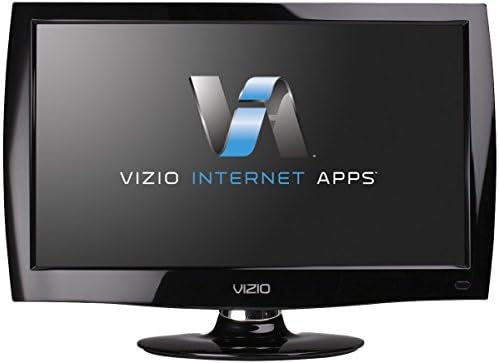
1. irudia: Aurrealdea view of the VIZIO M221NV 22-inch LED LCD TV, featuring a black bezel and stand. The screen displays the 'VIZIO INTERNET APPS' logo, highlighting its smart TV capabilities.
2. Konfigurazio gida
2.1 Standa lotzea
- Kontu handiz jarri telebistaren pantaila beherantz gainazal leun eta garbi batean, marradurak saihesteko.
- Lerrokatu telebistaren euskarria telebistaren behealdeko muntaketa-zuloekin.
- Lotu euskarria emandako torlojuak erabiliz. Ziurtatu torloju guztiak ondo estututa daudela.

2. irudia: Angelu bat. view of the VIZIO M221NV television, showcasing bere Slim Profile and the attached oval-shaped stand. This view helps in understanding the TV's physical dimensions and how it sits on a surface.
2.2 Gailuak konektatzea
The VIZIO M221NV offers various ports for connecting external devices. Refer to the images below for port identification.

3. irudia: The back panel of the VIZIO M221NV TV is shown, detailing the various input and output ports available for connecting external devices. These include HDMI, USB, Ethernet, DTV/TV (Antenna), RGB PC, Audio In, Audio Out (Optical), and Headphone jacks.

4. irudia: A detailed close-up of the VIZIO M221NV TV's connection panel, clearly labeling each port such as HDMI (1 and 2), USB, DTV/TV (Cable/Antenna), Ethernet, Power In, RGB PC, Audio (L/R), Video, Optical Audio Out, and Headphone. This helps users identify the correct ports for their devices.
- HDMI: Connect high-definition devices like Blu-ray players, game consoles, or cable/satellite boxes to HDMI 1 or HDMI 2.
- DTV/TV (Antenna): Connect an antenna or cable TV coaxial cable for over-the-air or basic cable channels.
- Ethernet: For a wired internet connection, connect an Ethernet cable from your router to the Ethernet port.
- USBa: Insert a USB drive for media playback (photos, music, videos).
- RGB PC: Connect a computer using a VGA cable for video and a 3.5mm audio cable for sound.
- AV (Good): Connect older devices using composite video (yellow) and stereo audio (red/white) cables.
- Audio irteera (optikoa): Konektatu soinu-barra edo etxeko zinema-sistema batera audio-irteera digitala lortzeko.
- Entzungailuak: Konektatu entzungailuak entzuteko modu pribatuan.
2.3 Energia-konexioa
Connect the power cable to the TV's power input and then plug it into a wall outlet. The TV is now ready for initial power-on.

5. irudia: A close-up of the power button located on the side of the VIZIO M221NV TV, showing its circular design and power symbol. This button is used for manually turning the TV on or off.
3. Funtzionamendu-argibideak
3.1 Oinarrizko telebista funtzioak
- Piztu/Itzali: Press the Power button on the remote control or on the side of the TV.
- Sarrera hautatzea: Press the 'Input' button on the remote to cycle through available video sources (HDMI, AV, TV, etc.).
- Bolumen kontrola: Use the 'Volume Up' and 'Volume Down' buttons on the remote.
- Kanalaren hautaketa: Use the 'Channel Up' and 'Channel Down' buttons or the number pad on the remote for TV channels.
3.2 VIZIO Internet Apps (VIA)
The VIZIO M221NV features VIZIO Internet Apps (VIA), which allow you to access a variety of online content directly on your TV. This includes streaming services, social media, news, and more.
- Ensure your TV is connected to the internet via Wi-Fi or Ethernet.
- Press the 'VIA' or 'V' button on your remote control to open the VIZIO Internet Apps dock.
- Navigate through the available apps using the arrow keys on your remote.
- Select an app to launch it. You may need to log in to certain services with your existing account credentials.
1. bideoa: Bideo honek gaina ematen duview of Yahoo! Connected TV, showcasing how VIZIO Internet Apps (VIA) integrate web content like social media, news, sports, and on-demand video services directly onto your television screen. It demonstrates the user interface and the variety of applications available.
4. Mantentzea
4.1 Pantaila garbitzea
- Itzali telebista eta deskonektatu korronte-hartunetik.
- Gently wipe the screen with a soft, dry microfiber cloth.
- Orban egoskorretarako, arinki garbituampen the cloth with distilled water or a specialized screen cleaner (avoid ammonia-based cleaners).
- Ez bota inoiz likidorik zuzenean pantailan.
4.2 Telebistaren gorputza garbitzea
- Use a soft, dry cloth to wipe dust and dirt from the TV's bezel and stand.
- Saihestu akabera kaltetu dezaketen garbitzaile edo disolbatzaile urratzaileak erabiltzea.
5. Arazoak
If you encounter issues with your VIZIO M221NV TV, refer to the following common troubleshooting steps:
- Potentziarik gabe: Ziurtatu kablea telebistara eta entxufe elektriko funtzional batera ondo konektatuta dagoela. Saiatu beste gailu bat entxufe berean konektatzen korrontea duela baieztatzeko.
- Irudirik ez/Pantaila beltza: Verify the correct input source is selected. Check all video cables (HDMI, AV, etc.) are firmly connected to both the TV and the source device. Try restarting the source device.
- Soinurik ez: Check the TV's volume level and ensure it is not muted. If using external audio equipment, verify its power and connections. Check the audio settings in the TV menu.
- Interneteko konexio arazoak: For Wi-Fi, ensure your router is on and within range. Re-enter your Wi-Fi password in the TV's network settings. For Ethernet, ensure the cable is securely connected to both the TV and the router. Try restarting your router and modem.
- Urruneko kontrola ez dabil: Ordeztu urrutiko agintearen pilak. Ziurtatu ez dagoela oztoporik urrutiko agintearen eta telebistaren IR sentsorearen artean.
For more complex issues, consult the VIZIO support webwebgunean edo jarri harremanetan bezeroarentzako zerbitzuarekin.
6. Zehaztapenak
Below are the technical specifications for the VIZIO M221NV 22-Inch Full HD 1080p LED LCD TV:
| Ezaugarri | Zehaztapena |
|---|---|
| Marka Izena | VIZIO |
| Modelo zenbakia | M221NV |
| Pantailaren tamaina | 22 hazbete |
| Bistaratzeko Teknologia | LED |
| Ebazpena | 1080p (HD osoa) |
| Aspektu-erlazioa | 16:9 |
| Freskatze tasa | 60 Hz |
| Kontraste-erlazio dinamikoa | 50,000tik 1ra |
| Konektibitate Teknologia | Ethernet, Wi-Fi (802.11n) |
| Onartutako Interneteko zerbitzuak | Amazon Instant Video, Netflix, VUDU, Hulu Plus, Facebook |
| Produktuaren neurriak | 2.1 x 21.75 x 13.56 hazbete |
| Elementuaren pisua | 7.71 kilo |
| Wattage | 65 watt |
| Kolorea | Beltza |
| Ezaugarri bereziak | Pantaila Laua |
7. Bermea eta Laguntza
For detailed warranty information and customer support, please visit the official VIZIO website. You can find information regarding product registration, warranty terms, and contact options for technical assistance.
Lege-oharra: This television does not include subscriptions to Netflix, Hulu Plus, Amazon, Amazon Prime, or any other entertainment media requiring a fee. Separate subscriptions or purchases may be required to access certain content.