
Sarrera
The GIGABYTE GM-M7600 is a wireless precision optical mouse designed for comfortable and reliable use. This manual provides instructions for setting up, operating, maintaining, and troubleshooting your device.
Paketearen edukia
Mesedez, egiaztatu paketearen edukia elementu guztiak daudela ziurtatzeko:
- GIGABYTE GM-M7600 Wireless Optical Mouse
- Portable Nano USB Receiver
- 2 x AAA bateria
Konfigurazioa
1. Pilak instalatzea
The GM-M7600 mouse requires two AAA batteries for operation. The batteries are included in the package.
- Bilatu bateriaren konpartimentuaren estalkia saguaren azpialdean.
- Irristatu edo altxatu estalkia astiro-astiro konpartimentua irekitzeko.
- Sartu bi AAA pilak, ziurtatu terminal positiboa (+) eta negatiboa (-) konpartimentuaren barruko markekin behar bezala lerrokatuta daudela.
- Itxi bateriaren konpartimenduaren estalkia ondo.
2. USB hargailua konektatzea
The mouse connects to your computer via a portable Nano USB receiver.
- Locate the Nano USB receiver. It may be stored inside the mouse's battery compartment or packaged separately.
- Plug the Nano USB receiver into an available USB port on your computer (Laptop or Personal Computer).
- Your operating system (e.g., Windows XP, Linux) should automatically detect and install the necessary drivers. This process may take a few moments.
- Behin kontrolatzaileak instalatuta, sagua erabiltzeko prest dago.
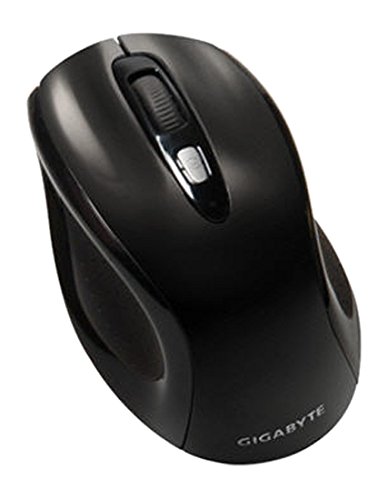
1. irudia: GIGABYTE GM-M7600 Wireless Optical Mouse. This image displays the ergonomic design of the mouse, highlighting its form factor and the location of its buttons. The Nano USB receiver is typically stored within the mouse or connected to a computer's USB port.
Funtzionamendu-argibideak
1. Piztu/Itzaltzea
The mouse typically has a power switch on its underside. Slide the switch to the 'ON' position to activate the mouse. Slide it to 'OFF' when not in use to conserve battery life.
2. DPI (Sentsibilitatea) doitzea
The GM-M7600 features an adjustable DPI switch, allowing you to change the mouse sensitivity between 800 DPI and 1600 DPI. This switch is usually located near the scroll wheel. Press the DPI button to toggle between the two sensitivity settings.
3. Saguaren oinarrizko funtzioak
- Ezkerreko klik: Elementuak hautatzeko, irekitzeko botoia nagusia files, eta softwarearekin elkarreraginean.
- Egin klik eskuineko botoiarekin: Bigarren mailako botoia testuinguru-menuetara eta aukera gehigarrietara sartzeko.
- Korritzeko gurpila: Dokumentuetan zehar nabigatzeko erabiltzen da eta web orrialdeak. Erdiko klik egiteko botoia ere erabil daiteke.
Mantentzea
1. Garbiketa
Errendimendu eta itxura optimoak mantentzeko:
- Disconnect the mouse from your computer and turn off the power switch.
- Erabili lipurrik gabeko zapi leun bat dampSaguaren gainazala urarekin edo garbiketa-soluzio leun batekin garbitu.
- Avoid using harsh chemicals, abrasive cleaners, or spraying liquids directly onto the mouse.
- Clean the optical sensor area on the underside of the mouse with a dry cotton swab to remove any dust or debris.
2. Bateria ordezkatzea
When the mouse performance degrades or it stops responding, it may be time to replace the batteries.
- Turn off the mouse using the power switch.
- Open the battery compartment as described in the 'Installing Batteries' section.
- Kendu AAA bateria zaharrak.
- Insert two new AAA batteries, observing the correct polarity (+/-).
- Close the battery compartment and turn the mouse back on.
Arazoak konpontzea
If you encounter issues with your GIGABYTE GM-M7600 mouse, try the following solutions:
- Saguak ez du erantzuten:
- Ziurtatu sagua piztuta dagoela.
- Egiaztatu bateriak behar bezala instalatuta dauden eta nahikoa karga duten. Beharrezkoa bada, ordezkatu itzazu.
- Ziurtatu Nano USB hargailua ondo konektatuta dagoela zure ordenagailuko USB ataka funtzional batera. Saiatu beste USB ataka batekin.
- Berrabiarazi ordenagailua.
- Kurtsorearen mugimendu irregularra:
- Garbitu saguaren azpialdeko sentsore optikoa.
- Ziurtatu sagua gainazal egoki batean erabiltzen ari zarela. Saihestu gainazal oso islatzaileak edo gardenak.
- Check for any wireless interference. Move the mouse closer to the receiver or away from other wireless devices.
- DPI switch not working:
- Ziurtatu sagua piztuta eta konektatuta dagoela.
- Sakatu DPI botoia gogor.
Zehaztapenak
| Ereduaren izena | GM-M7600 |
| Marka | GIGABYTE |
| Konektibitate Teknologia | 2.4GHz Radio Frequency Wireless |
| Mugimenduen detekzioa | Optikoa |
| DPI erregulagarria | 800 / 1600 DPI |
| Botoi kopurua | 3 (Ezkerra, Eskuina, Gurpilarekin/Erdiko klik) |
| Energia iturria | 2 x AAA bateria (barne) |
| Hartzaile mota | Portable Nano USB Receiver |
| Gailu bateragarriak | Ordenagailu eramangarria, Ordenagailu pertsonala |
| Sistema eragilearen euskarria | Linux, Windows XP |
| Itxituraren Materiala | Plastic with Rubberized Finish |
| Kolorea | Beltza |
Bermea eta Laguntza
For warranty information and technical support, please refer to the warranty card included with your product or visit the official GIGABYTE webgunea. Gorde erosketa-agiria berme-erreklamazioetarako.