Sarrera
Thank you for choosing the Solar Powered Home Address Sign Yard Stake. This product is designed to clearly display your house number, enhancing visibility for visitors and emergency services, especially during nighttime. It utilizes solar energy to illuminate your address automatically from dusk till dawn. Please read this manual carefully before installation and use to ensure optimal performance and longevity of your address sign.
Paketearen edukia
Mesedez, egiaztatu osagai guztiak paketean daudela:
- 1 x Solar Powered Address Sign Unit
- 1 x Ground Stake Assembly
- 1 x Set of Number Stickers (0-9, multiple copies)
- 1 x Set of Letter Stickers (A-Z, multiple copies, if applicable)
- 1 x Argibide eskuliburua (dokumentu hau)
Konfigurazioa eta Instalazioa
- Deskonprimitu osagaiak: Kontu handiz kendu elementu guztiak paketetik.
- Apply Address Numbers/Letters:
- Clean the surface of the address sign where the numbers will be applied.
- Peel off the desired number/letter stickers from the sheet.
- Carefully apply the stickers to the designated area on the sign, ensuring they are straight and evenly spaced. Press firmly to secure.
- Muntatu lurreko estaka:
- Connect the various sections of the ground stake by twisting or pushing them together until they are securely fastened.
- Attach the assembled stake to the back or bottom of the address sign unit according to the design.
- Hautatu instalazioaren kokapena: Choose a location in your yard that receives direct sunlight for at least 6-8 hours daily. This is crucial for the solar panel to charge the internal battery effectively. Ensure the sign is visible from the street and not obstructed by trees, bushes, or other structures. Avoid placing it directly under streetlights, as this may prevent the sign from illuminating automatically at night.
- Hasierako karga: Before first use, ensure the ON/OFF switch (usually located near the solar panel or battery compartment) is in the 'ON' position. Allow the sign to charge in direct sunlight for a full 24-48 hours to ensure the battery reaches its maximum capacity.
- Install the Sign: Firmly push the ground stake into the soil at your chosen location. Ensure the sign is stable and upright.
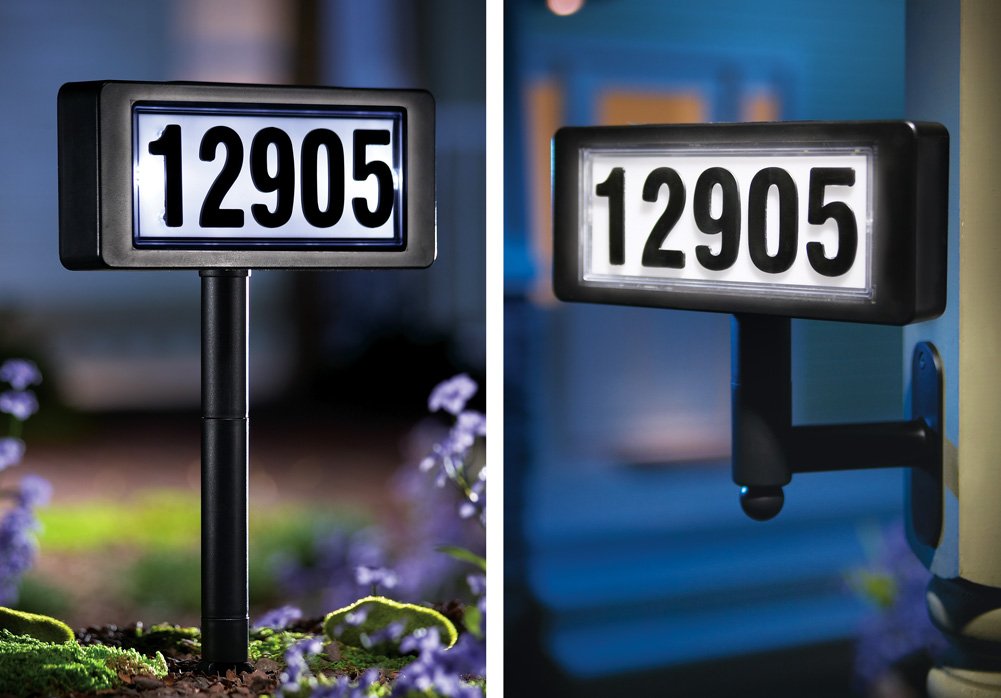
Figure 1: Assembly of the Solar Powered Home Address Sign, including number application and stake attachment.
Funtzionamendu-argibideak
The Solar Powered Home Address Sign is designed for automatic operation:
- Argiztapen automatikoa: Once fully charged and the ON/OFF switch is in the 'ON' position, the sign will automatically detect ambient light levels. It will illuminate at dusk and turn off at dawn.
- Eguzki-karga: During daylight hours, the integrated solar panel will convert sunlight into electrical energy, which is stored in the internal rechargeable battery.
- Errendimenduan eragina duten faktoreak: The duration and brightness of illumination at night are directly dependent on the amount of direct sunlight the solar panel receives during the day. Cloudy weather, shaded locations, or short winter days may result in reduced illumination time.
Mantentzea
Regular maintenance ensures optimal performance of your address sign:
- Eguzki-panela garbia: Aldian-aldian garbitu eguzki-panela zapi leun batekin,amp zapi bat hautsa, zikinkeria, hostoak edo elurra kentzeko. Panel garbi batek eguzki-argia ahalik eta gehien xurgatzea eta kargatzea eraginkorra bermatzen ditu.
- Clean Sign Surface: Gently clean the address sign surface and numbers with a mild soap solution and a soft cloth to maintain visibility. Avoid abrasive cleaners.
- Bateria ordezkatzea: The rechargeable battery (typically Ni-MH AA) has a limited lifespan. If the sign's illumination time significantly decreases despite adequate sunlight, the battery may need replacement. Refer to the battery compartment for specific battery type and replacement instructions. Ensure the replacement battery is of the same type and rating.
- Egiaztatu konexioak: Occasionally check that the sign unit is securely attached to the ground stake and that the stake is firmly planted in the ground.
Figure 2: Cleaning the solar panel and accessing the battery compartment for maintenance.
Arazoak konpontzea
| Arazoa | Kausa posiblea | Irtenbidea |
|---|---|---|
| Sign does not light up at night. | 1. ON/OFF etengailua 'OFF' posizioan dago. 2. Kargatzeko eguzki-argia nahikoa ez. 3. Bateria agortuta edo akastuna dago. 4. Placed under a bright light source (e.g., streetlight). | 1. Ensure switch is in 'ON'. 2. Relocate sign to an area with direct sunlight for 6-8 hours daily. 3. Allow 24-48 hours of initial charge. Replace battery if old. 4. Move sign away from other light sources. |
| Argia ahula da edo denbora gutxi irauten du. | 1. Insufficient daily charge. 2. Eguzki-panela zikina dago. 3. Battery is old or not fully charging. | 1. Ensure optimal sunlight exposure. 2. Clean the solar panel surface. 3. Replace the rechargeable battery. |
| Numbers are not visible. | 1. Numbers are dirty or faded. 2. Sign is not illuminated. | 1. Clean the sign surface. Reapply new numbers if necessary. 2. Refer to 'Sign does not light up' troubleshooting steps. |
Zehaztapenak
- Eredua: B004IAD6QS
- Energia iturria: Eguzki-energia
- Bateria mota: Rechargeable (e.g., 1 x AA Ni-MH, specific type may vary)
- Argiztapena: Automatic Dusk-to-Dawn
- Materiala: Durable plastic/metal construction
- Paketearen neurriak: 10.2 x 6.8 x 4.4 hazbete inguru
- Elementuaren pisua: 1.3 kilo inguru
Bermea eta Laguntza
This product is typically covered by a limited manufacturer's warranty against defects in materials and workmanship. Please refer to the product packaging or contact your retailer for specific warranty terms and duration. For technical support, troubleshooting assistance, or to inquire about replacement parts, please contact the seller or manufacturer directly through the platform where the product was purchased.