
1. Sarrera
This manual provides essential instructions for the safe and efficient operation of your Sharp CD-DH950P 240W Mini-Component System. This system features a 5-disc CD changer, a cassette deck, an iPod/iPhone docking station, a USB host for digital audio playback, and an AM/FM tuner. Please read this manual thoroughly before using the system and retain it for future reference.
2. Segurtasun informazioa
- Energia iturria: Konektatu unitatea zehaztutako bolumeneko korronte alternoko entxufe batera soilik.tage.
- Aireztapena: Ziurtatu aireztapen egokia dagoela. Ez blokeatu aireztapen-irekidurak.
- Ura eta hezetasuna: Do not expose the unit to rain, moisture, or dripping/splashing liquids.
- Beroa: Mantendu unitatea bero-iturrietatik urrun, hala nola erradiadoreetatik, bero-erregistroetatik, sukaldeetatik edo beroa sortzen duten beste aparatu batzuetatik.
- Garbiketa: Unplug the unit from the wall outlet before cleaning. Use a soft, dry cloth.
- Zerbitzua: Ez saiatu produktu hau zuk zeuk ematen. Bidali zerbitzu guztiak zerbitzu kualifikatuko langileengana.
3. Paketearen edukia
Egiaztatu zure paketeak elementu hauek dituela:
- Main Unit (CD-DH950P)
- Ezkerreko bozgorailua
- Eskuineko Hizlaria
- Urruneko agintea pilekin
- AM Loop Antena
- FM Wire Antena
- Elikatze kablea
4. Konfigurazioa
4.1 Bozgorailuak konektatzea
Connect the speaker wires from the main unit to the corresponding terminals on the back of each speaker. Ensure correct polarity (red to red, black to black) for optimal sound quality. The left speaker connects to the left speaker output, and the right speaker to the right speaker output.
4.2 Connecting the Antennas
- FM Antena: Connect the supplied FM wire antenna to the FM antenna terminal on the rear of the main unit. Extend the wire for better reception.
- AM antena: Connect the supplied AM loop antenna to the AM antenna terminals on the rear of the main unit. Position the antenna for best reception.
4.3 Energia-konexioa
Plug the power cord into the AC IN jack on the rear of the main unit, then plug the other end into a standard AC wall outlet.
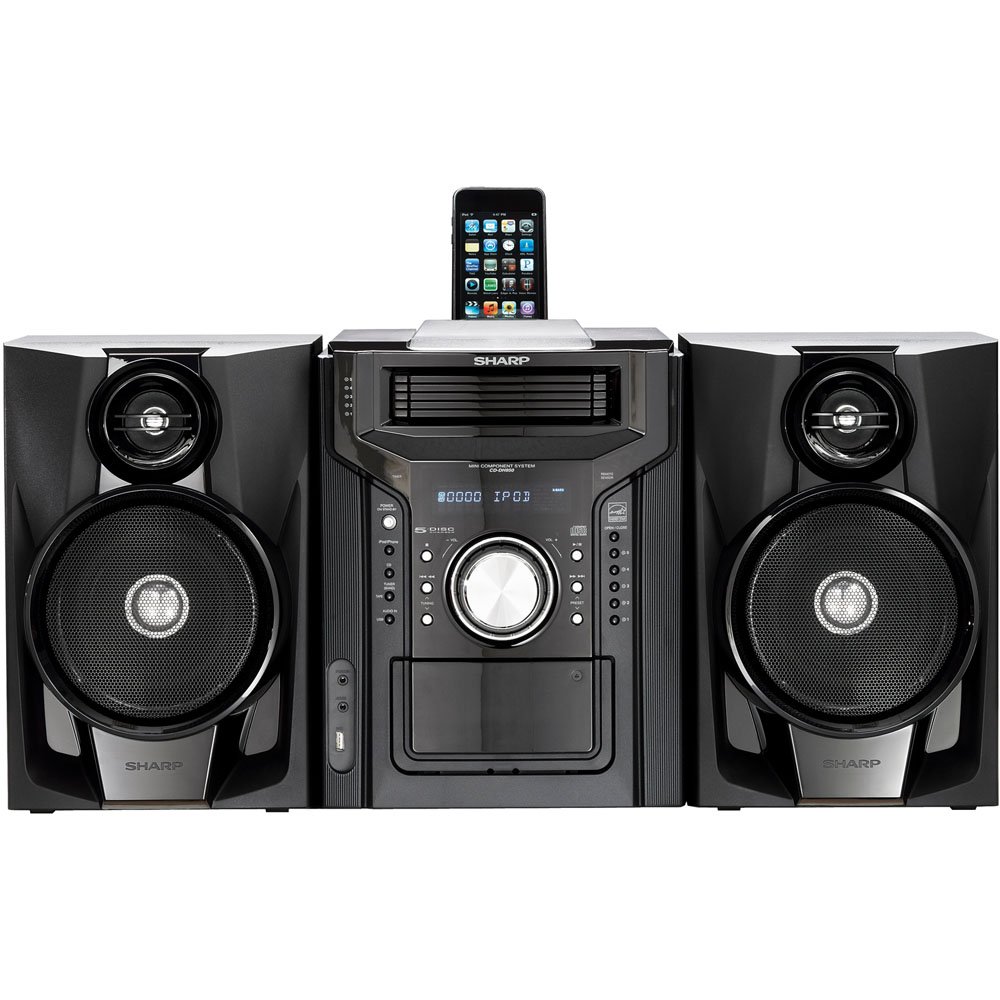
4.3.1. irudia: Orokorrean view of the Sharp CD-DH950P Mini-Component System, showing the main unit flanked by two speakers, with an iPhone docked on top of the main unit.
5. Funtzionamendu-argibideak
5.1 Piztea/Itzaltzea eta Bolumenaren Kontrola
- Sakatu BOTEREA aurrealdeko paneleko edo urrutiko aginteko botoia unitatea pizteko edo itzaltzeko.
- Biratu BOLUMENA aurrealdeko paneleko botoia edo erabili VOL +/- urrutiko agintearen botoiak soinu-maila doitzeko.
5.2 CD erreprodukzioa
This system features a 5-disc CD changer.
- Sakatu IREKI/ITXI CDaren erretilua irekitzeko botoia.
- Place up to five CDs on the disc trays, label side up.
- Sakatu IREKI/ITXI berriro erretilua ixteko.
- Sakatu CD botoia CD funtzioa hautatzeko.
- Sakatu JOLASTU/PAUSTU botoia erreproduzitzen hasteko.
- Erabili SALTATU buttons to navigate between tracks or discs.
5.3 Kasete-erreproduzigailuaren funtzionamendua
- Sakatu TAPE OPEN/CLOSE button to open the cassette deck.
- Sartu kasete-zinta bat.
- Sakatu TAPA botoia kasete funtzioa hautatzeko.
- Sakatu JOLASTU erreprodukzioa hasteko.
- To record, ensure the source is selected (e.g., CD, Tuner) and press the GRABATU button on the cassette deck.
5.4 iPod/iPhone-aren ainguratzea
The system includes a top-mounted docking slot for compatible iPod and iPhone devices (30-pin connector).
- Carefully place your iPod or iPhone into the docking slot.
- The system will automatically switch to iPod/iPhone mode or you may need to press the iPod / iPhone botoia.
- Use the system's controls or your device's controls to play music. The device will also charge while docked.
5.5 USB Host Playback
Connect a USB storage device containing MP3 or WMA audio files to the USB port on the front panel.
- Sartu USB gailua USB atakan.
- Sakatu USBa botoia USB funtzioa hautatzeko.
- Use the playback controls to navigate and play files.
5.6 AM/FM sintonizatzailea
- Sakatu Sintonizatzeko botoia AM edo FM irratia hautatzeko.
- Erabili TUNING +/- botoiak irrati bat eskuz sintonizatzeko.
- To auto-scan, press and hold the TUNING +/- botoiak.
- To store a preset, tune to the desired station, then press MEMORIA eta ondoren aurrez ezarritako zenbaki bat.
5.7 Audio-sarrera
Connect an external audio device (e.g., MP3 player, smartphone) to the AUDIO IN jack on the front panel using a 3.5mm stereo cable.
- Connect your device to the AUDIO IN jack.
- Sakatu AUDIO SARTU button to select this source.
- Kontrolatu erreprodukzioa konektatutako gailutik.
6. Mantentzea
6.1 Unitatea garbitzea
Wipe the exterior of the unit with a soft, dry cloth. Do not use abrasive cleaners, waxes, or solvents. Ensure the unit is unplugged before cleaning.
6.2 CD eta kaseteen zaintza
- CDak ertzetik heldu hatz-markak eta marradurak saihesteko. Garbitu diskoak oihal leun eta lihorik gabeko batekin, erdialdetik kanporantz.
- Store cassette tapes away from strong magnetic fields and direct sunlight.
7. Arazoak
| Arazoa | Kausa posiblea | Irtenbidea |
|---|---|---|
| Botererik ez | Kable elektrikoa ez dago konektatuta; Entxufea akastuna | Ziurtatu kablea ondo konektatuta dagoela; Saiatu beste entxufe batekin |
| Soinurik ez | Bolumena baxuegia; Bozgorailuak ez daude konektatuta; Iturri okerra hautatu da | Igo bolumena; Egiaztatu bozgorailuen konexioak; Hautatu sarrera-iturri zuzena |
| CDa ez da erreproduzitzen | Disc inserted incorrectly; Disc is dirty or scratched | Insert disc correctly (label side up); Clean or replace disc |
| Irrati-harrera eskasa | Antenna not positioned correctly; Weak signal | Adjust position of AM/FM antennas; Try auto-tuning or manual fine-tuning |
| iPod/iPhone not charging/playing | Device not properly docked; Device not compatible (e.g., newer connector) | Re-dock the device; Note that this system uses a 30-pin connector, newer devices may require an adapter (not included) |
8. Zehaztapenak
- Marka: Zorrotza
- Eredua: CD-DH950P
- Irteera potentzia osoa: 240 Watts RMS (85W/ch FTC)
- Bozgorailuaren konfigurazioa: 2.1 Kanala
- Onartutako audio formatuak: CD, MP3, WMA
- Seinaleztapen-zarata ratioa: 100 dB
- Gailu bateragarriak: MP3 Player, Smartphone (via 30-pin dock or USB/Audio In)
- Neurriak (L x W x H): 27.6 x 13.6 x 13.5 hazbete
- Elementuaren pisua: 24.4 kilo
- UPC: 074000369863, 074000369290
9. Bermearen informazioa
This product is covered by a 1-year limited warranty from the date of purchase. Please refer to the warranty card included with your product for full terms and conditions, or contact Sharp customer service for details.
10. Laguntza
For further assistance, technical support, or service inquiries, please contact Sharp customer service. Contact information can typically be found on the Sharp official webgunean edo zure produktuarekin batera emandako dokumentazioan.