
Sarrera
This manual provides detailed instructions for the safe installation, operation, and maintenance of your Utilitech 3-Light 123-Watt Bronze Dusk-to-Dawn Security Light. Please read all instructions carefully before beginning installation and retain this manual for future reference. This security light is designed for outdoor use and features a built-in motion sensor and photo-control for automated operation.
Segurtasun Informazioa
OHARRA: Deskarga elektrikoaren arriskua. Deskonektatu fusible edo etengailu elektrikotik instalazioa edo mantentze-lanak egin aurretik.
- Produktu hau instalazio-kode aplikagarriaren arabera instalatu behar du produktuaren eraikuntza eta funtzionamendua eta dakartzan arriskuak ezagutzen dituen pertsona batek.
- Ziurtatu hornidura boltage is 120 Volts AC, 60 Hz.
- Use only suitable bulbs as specified in the 'Specifications' section.
- Ez saiatu aparatua aldatzen. Edozein aldaketek bermea baliogabetu eta segurtasun arriskua sor dezakete.
- This fixture is UL Safety Listed, ensuring compliance with recognized safety standards.
Paketearen edukia
Before beginning installation, ensure all parts are present. If any part is missing or damaged, do not attempt to assemble, install, or operate the product.
- Security Light Fixture (1)
- Muntatzeko hardwarea (torlojuak, kable-azkoinak, etab.)
- Argibide eskuliburua (1)
Konfigurazioa eta Instalazioa
This security light is designed for wall mount installation and requires hardwiring to an existing electrical circuit.
1. Prestatu instalazioa
- Turn off power at the circuit breaker or fuse box to the outlet box where the fixture will be installed.
- Kontu handiz deskonprimitu gailua eta haren osagaiak.
2. Elementua muntatzea
- Attach the mounting bracket to the electrical junction box using the provided screws. Ensure it is securely fastened.
- Pasa kable elektrikoak konexio-kutxatik muntatzeko euskarriaren erdiko zulotik.
3. Kableatu konexioak
- Connect the bare copper ground wire from the fixture to the ground wire from the junction box using a wire nut.
- Konektatu aparatuaren kable zuria (neutroa) konexio-kutxaren kable zurira (neutroa) kable-torloju bat erabiliz.
- Konektatu argindarraren kable beltza (beroa) konexio-kutxaren kable beltzera (beroa) kable-torloju bat erabiliz.
- Kontu handiz sartu hari guztiak lotura-kutxan.
4. Lanpara finkatzea eta bonbillak instalatzea
- Align the fixture with the mounting bracket and secure it with the provided screws. Ensure a tight seal against the mounting surface to prevent water intrusion.
- Install three (3) Halogen or compact fluorescent bulbs (not included) into the sockets. Do not exceed the maximum wattage 'Zehaztapenak' atalean zehaztuta dago.
- Adjust the light heads to the desired direction.
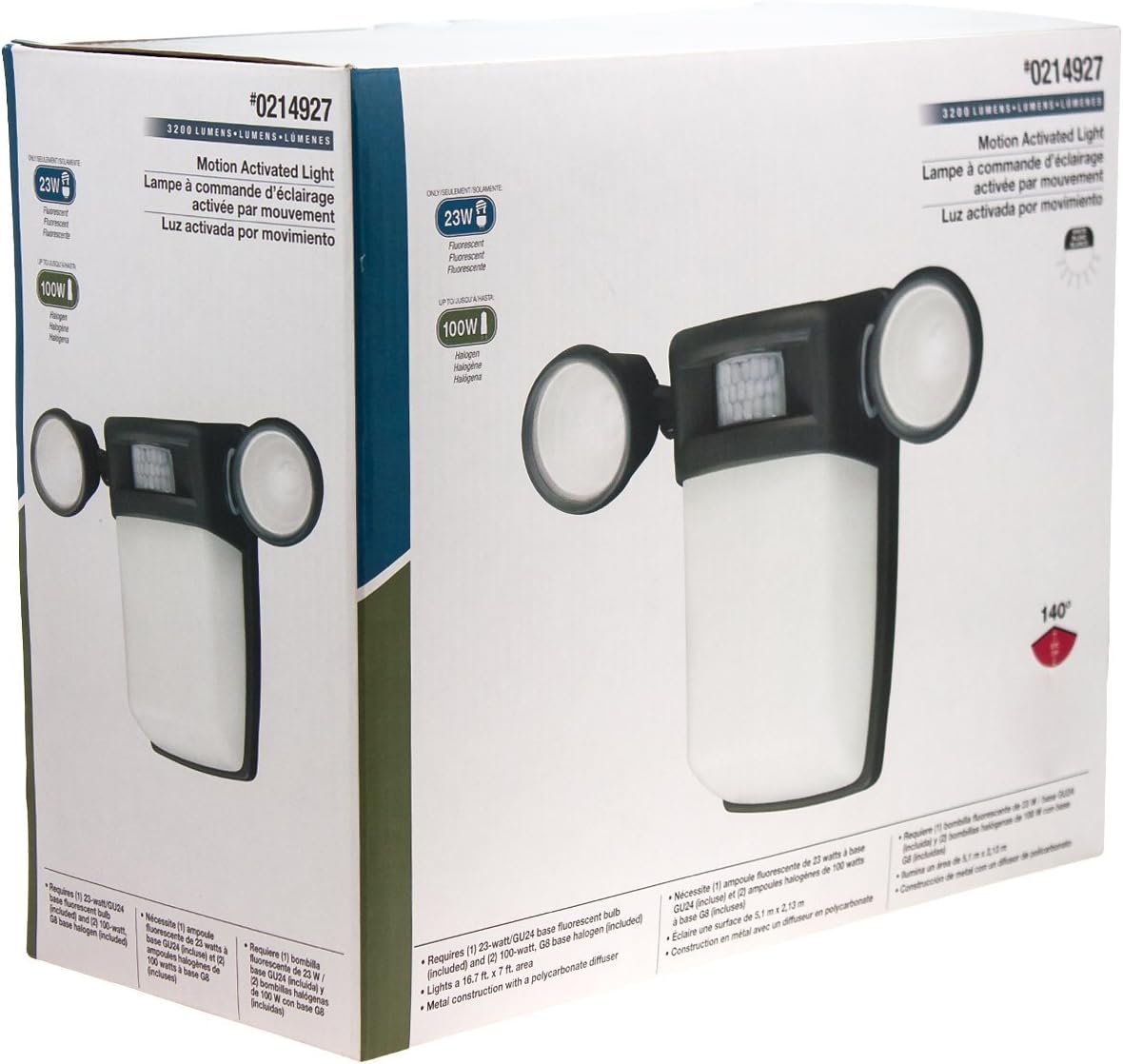
1. irudia: Aurrealdea view of the Utilitech 3-Light 123-Watt Bronze Dusk-to-Dawn Security Light in its retail packaging. This image shows the overall design with three adjustable light heads and the central motion sensor.

2. irudia: Aldea view of the Utilitech 3-Light 123-Watt Bronze Dusk-to-Dawn Security Light in its retail packaging. This perspective highlights the depth of the fixture and the positioning of the light heads relative to the main body.
Funtzionamendu-argibideak
This security light is equipped with both a photo-control sensor for dusk-to-dawn operation and a 140° automatic motion sensor for enhanced security.
Ilunabarreko eta Egunsentiko Ezaugarria
The integrated photo-control sensor detects ambient light levels. The light will automatically turn on at dusk and turn off at dawn, providing continuous illumination during nighttime hours. No manual adjustment is typically required for this feature.
Mugimendu-sentsorearen funtzionamendua
The 140° automatic motion sensor detects movement within its range. When motion is detected, the light will activate for a set duration. The fixture may include adjustable settings for sensitivity and duration. Refer to the specific controls on your fixture for adjustment. Some models may also feature remote control capabilities for these settings.
Argi-buruak doitzea
The three light heads are adjustable. Gently pivot each light head to direct illumination to your desired coverage area.
Mantentzea
Regular maintenance ensures optimal performance and extends the lifespan of your security light.
- Garbiketa: Aldian-aldian garbitu aparatua zapi leun batekin,amp zapirik. Ez erabili garbitzaile edo disolbatzaile urratzailerik, akabera edo osagai elektrikoak kaltetu baitezakete. Ziurtatu korrontea itzalita dagoela garbitu aurretik.
- Bonbillaren ordezkoa: Turn off power at the circuit breaker before replacing bulbs. Allow bulbs to cool completely before handling. Replace with three (3) Halogen or compact fluorescent bulbs of the specified wattage.
- Sentsoreen garbiketa: Keep the motion sensor lens and photo-control sensor free of dirt, dust, and obstructions to ensure proper operation.
Arazoak konpontzea
If your security light is not functioning as expected, refer to the following common issues and solutions:
| Arazoa | Kausa posiblea | Irtenbidea |
|---|---|---|
| Light does not turn on at all. | No power, faulty bulbs, wiring issue, or defective sensor. | Check circuit breaker. Ensure bulbs are correctly installed and not burnt out. Verify wiring connections. If issues persist, consult a qualified electrician. |
| Argia etengabe pizten da. | Motion sensor sensitivity too high, duration setting too long, or photo-control sensor obstructed/faulty. | Adjust motion sensor sensitivity and duration settings. Ensure photo-control sensor is not blocked by debris or external light sources. |
| Egunean zehar argia pizten da. | Photo-control sensor is obstructed or in a shaded area. | Ensure the photo-control sensor is exposed to natural daylight and not covered by dirt or obstructions. |
| Motion sensor does not detect movement. | Sensor sensitivity too low, obstructed view, or incorrect angle. | Increase sensor sensitivity. Clear any obstructions from the sensor's field of view. Adjust the sensor's angle to cover the desired area. |
Zehaztapenak
| Ezaugarri | Zehaztapena |
|---|---|
| Marka | Utilitech |
| Modelo zenbakia | 0214927 |
| liburukiatage | 120 Volts AC, 60 Hz |
| Wattage | 123 watt (guztira) |
| Bonbilla mota | Halogen or Compact Fluorescent (3 bulbs required) |
| Light Heads | 3, erregulagarria |
| Mugimendu-sentsorearen angelua | 140 gradu |
| Ilunabarreko eta Egunsentiko Ezaugarria | Yes, photo-control sensor |
| Materiala | Metala |
| Amaitu | Brontzea |
| Muntatze Mota | Hormako Muntaia |
| Neurriak (H x W x D) | 10.25 in x 13.5 in x 5.75 in |
| Elementuaren pisua | 3.5 kilo |
| Segurtasun zerrenda | UL zerrendatua |