
1. Sarrera
This manual provides essential information for the safe and efficient operation of your InFocus IN112 Portable DLP Projector. Please read these instructions thoroughly before using the projector and retain them for future reference.
The InFocus IN112 is designed for versatile use, offering high brightness and a strong contrast ratio. It incorporates BrilliantColor technology for clear image reproduction and is 3D-ready. Its compact and lightweight design facilitates easy portability and installation.
2. Zer dago kutxan
Egiaztatu behean zerrendatutako elementu guztiak zure produktuaren ontzian daudela:
- InFocus IN112 Projector
- Elikatze-kablea
- RGB cable (VGA cable)
- A/V cable (Composite Video cable)
- Segurtasun-argibideak
- Erabiltzailearen eskuliburua (dokumentu hau)
- Urruneko kontrola
3. Proiektorea Gainetikview

1. irudia: Goikoa View - Displays the control panel with buttons for power, source selection, menu navigation, and keystone adjustment, along with the focus ring for the lens.

2. irudia: Aldea View - Shows the ventilation grilles essential for heat dissipation during operation. Ensure these are not obstructed.
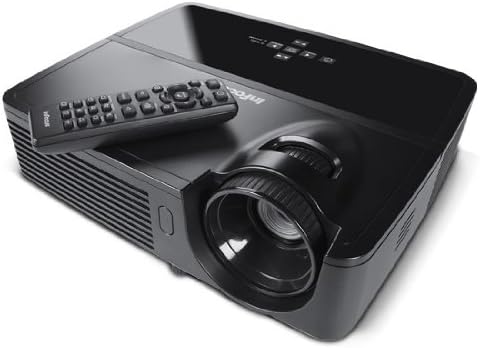
3. irudia: Angeludun View Urrutikoarekin - Illustrates the projector from an angle, highlighting the lens and the included remote control for convenient operation.

4. Irudia: Atzealdea View - Details the various input and output ports, including power, audio in/out, video, computer (VGA), RS232, and Mini USB.
4. Konfigurazioa
4.1 Jartzea
Position the projector on a stable, flat surface or mount it securely. Ensure adequate ventilation around the projector to prevent overheating. The distance from the screen will determine the image size. Adjust the projector's position to achieve the desired image size and clarity.
4.2 Energia-konexioa
- Konektatu emandako elikatze-kablea proiektorearen elikatze-sarrerara.
- Entxufatu korronte-kablearen beste muturra lurreko hartune elektriko batean.
4.3 Sarrera iturriak konektatzea
The IN112 projector offers multiple input options:
- VGA (Computer In 1 & 2): Use the RGB cable to connect to a computer's VGA output.
- Bideo konposatua: Use the A/V cable to connect to devices with composite video output.
- S-bideoa: Connect to devices with S-Video output.
- Audio Sarrera: Connect external audio sources using a 3.5mm stereo cable.
- RS232C: For control and automation systems.
- USB B Mini: For control and firmware updates.
Ensure all cables are securely connected before powering on the projector.
5. Funtzionamendu-argibideak
5.1 Piztu/Itzali
- Pizteko, sakatu Boterea button on the control panel or remote control. The power indicator light will illuminate.
- Itzatzeko, sakatu Boterea button again. Confirm shutdown if prompted. Allow the projector to cool down before unplugging.
5.2 Irudiaren doikuntza
- Fokua: Biratu proiektorearen lentearen fokatze-eraztuna irudia zorrotz eta garbi egon arte.
- Giltzarria: Erabili Giltzarria buttons on the control panel or remote to correct trapezoidal image distortion if the projector is not perfectly perpendicular to the screen.
5.3 Iturria hautatzea
Sakatu Iturria button on the control panel or remote control to cycle through available input sources (VGA1, VGA2, Video, S-Video).
5.4 Menu Nabigazioa
Sakatu Menua/Irteera botoia pantailan bistaratzeko (OSD) menura sartzeko. Erabili gezi-botoiak nabigatzeko eta Hautatu or Sartu button to confirm selections. Press Menua/Irteera berriro menua ixteko.
5.5 Modu ekologikoa
Activate Eco Mode to extend lamp life and reduce power consumption. This mode is suitable for environments with lower ambient light. The lamp life is approximately 6,000 hours in Eco Mode compared to 5,000 hours in normal mode.
5.6 3D Content Projection
The IN112 is 3D-ready. To project 3D content, you will need compatible 3D source material, a 3D-capable player, and active 3D glasses (sold separately). Refer to your 3D source device's manual for specific setup instructions.
6. Mantentzea
6.1 lamp Ordezkoa
Proiektorea lamp bizitza mugatua du. Noiz lamp adierazlea (Temp/Lamp) illuminates or the image brightness significantly decreases, the lamp ordezkatu behar izatea gerta daiteke. l-aamp door is conveniently located on the top of the projector for easy access, even when installed.
Kontuz: Ensure the projector is powered off and completely cooled before attempting lamp replacement. Refer to the detailed lamp replacement instructions in the full service manual for safety and proper procedure.
6.2 Garbiketa
The IN112 projector is designed without filters, eliminating the need for filter cleaning or replacement. Periodically wipe the exterior casing with a soft, dry cloth. For the lens, use a specialized lens cleaning cloth and solution to avoid scratches.
7. Arazoak
| Arazoa | Kausa posiblea | Irtenbidea |
|---|---|---|
| Ez da irudirik bistaratzen | Power cable disconnected, incorrect input source selected, source device not powered on. | Egiaztatu konexio elektrikoak. Sakatu botoia. Iturria button to select the correct input. Ensure the source device is on. |
| Irudia lausoa da | Lentea fokutik kanpo. | Doitu fokatze-eraztuna proiektorearen lentean. |
| Irudia trapezoidala da | Proiektorea ez dago pantailarekiko perpendikularra. | Erabili Giltzarria buttons to correct the image shape. |
| Colors appear incorrect or dull | Color settings require adjustment. | Access the OSD menu and navigate to image settings to adjust color, brightness, and contrast. |
| Proiektorea gehiegi berotu eta itzali egiten da | Ventilation obstructed, high ambient temperature. | Ensure clear airflow around the projector. Operate in a well-ventilated area. |
8. Zehaztapenak
| Ezaugarri | Xehetasuna |
|---|---|
| Modelo zenbakia | IN112 |
| Bistaratzeko Teknologia | DLP with BrilliantColor |
| Berezko Ebazpena | SVGA (800 x 600) |
| Distira (ANSI lumen) | 2700 (2200 in Eco Mode) |
| Kontraste-erlazioa | 3000:1 |
| Lamp Life (Average) | 5,000 hours (Normal), 6,000 hours (Eco Mode) |
| 3D prest | Bai |
| Konektibitatea | 2x VGA In, Composite Video, S-Video, 3.5mm Stereo In, RS232C, USB B Mini |
| Produktuaren neurriak | 13 x 5.5 x 12.5 hazbete |
| Elementuaren pisua | 4.78 libra (2.17 kg) |
| Hizkuntza eragilea | ingelesa |
9. Bermea eta Laguntza
9.1 Produktuaren bermea
The InFocus IN112 projector is backed by a comprehensive warranty:
- 5 urteko berme mugatua proiektorean.
- 2 urteko berme osoa piezak eta lana estaltzen.
- 6 hilabeteko bermea l gaineanamp.
Please retain your proof of purchase for warranty claims. For detailed terms and conditions, refer to the official InFocus warranty documentation or visit the InFocus webgunea.
9.2 Laguntza Teknikoa
For technical assistance, troubleshooting, or service inquiries, please contact InFocus customer support. Contact information can typically be found on the InFocus official webgunean edo barneko dokumentazioan.
10. Related Product Information (IN130 Series)
Hurrengo bideoak ikuspegi orokorra eskaintzen duview of features found in the InFocus IN130 Series projectors. While specific models may vary, many core functionalities and design principles are shared across InFocus projector lines, offering general insight into InFocus projector capabilities.
Video: InFocus IN130 Series Overview - This video highlights features such as HDMI + Power for streaming sticks, high brightness, vivid colors, long lamp life, 3D readiness, and various connectivity options. Note: This video is for the IN130 series, but demonstrates general InFocus projector features.