
1. Sarrera
Welcome to the user manual for your HP EliteBook 2560p laptop. This document provides essential information for setting up, operating, maintaining, and troubleshooting your device. Please read this manual thoroughly to ensure proper use and to maximize the lifespan of your laptop.
2. Segurtasun informazioa
To prevent injury, damage to the product, or loss of data, observe the following safety precautions:
- Use only the power adapter supplied with your laptop.
- Ez jarri ordenagailu eramangarria tenperatura altuen, hezetasunaren edo eguzki-argiaren eraginpean.
- Saihestu objektu astunak ordenagailu eramangarriaren gainean jartzea.
- Mantendu likidoak gailutik urrun.
- Ez saiatu ordenagailu eramangarria zeuk desmuntatzen edo konpontzen. Jarri harremanetan zerbitzu-langile kualifikatuekin.
- Ziurtatu aireztapen egokia gehiegi berotzea saihesteko.
3. Paketearen edukia
Egiaztatu elementu guztiak zure paketean daudela:
- HP EliteBook 2560p Laptop
- Korronte-egokitzailea eta elikatze-kablea
- Bateria paketea
- Dokumentazioa (eskuliburu hau, bermearen informazioa)
4. Produktua amaitu daview
Familiarize yourself with the components of your HP EliteBook 2560p.
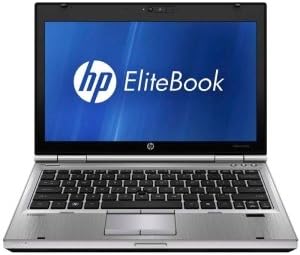
4.1. irudia: Aurrealdea view of the HP EliteBook 2560p laptop. This image shows the laptop open, revealing the 12.5-inch display, keyboard, and touchpad. The screen displays the "HP EliteBook" logo.
4.1. Front and Top Components
- 12.5-inch HD Anti-Glare LED Display: For visual output.
- Teklatua: Standard QWERTY layout for text input.
- Ukipen-panela: For cursor control and navigation.
- Webkamera: Integrated for video conferencing and imaging.
- Fingerprint Reader (FPR): For enhanced security.
4.2. Side and Rear Components
- USB 2.0 portuak: For connecting peripheral devices.
- DVD+/-RW Optical Drive: CDak/DVDak irakurtzeko eta grabatzeko.
- Energia konektorea: Korronte alternoko egokitzailea konektatzeko.
- Ethernet ataka: Kable bidezko sare konexiorako.
- Bistaratzeko atakak: Kanpoko monitoreak konektatzeko.
- Audio-konektoreak: Entzungailuetarako eta mikrofonorako.
5. Konfigurazioa
5.1. Energia-egokitzailea konektatzea
- Konektatu AC korronte kablea AC egokigailura.
- Entxufatu korronte-egokitzailea lurrera konektatutako entxufe elektriko batera.
- Connect the DC output plug of the AC adapter to the power connector on your laptop.
- Allow the battery to charge fully before initial use, or use the laptop while connected to power.
5.2. Initial Boot-Up and Operating System Setup
- Ireki ordenagailu eramangarriaren estalkia.
- Press the power button, typically located above the keyboard.
- Follow the on-screen instructions to complete the Windows 7 Professional setup, including language selection, user account creation, and network configuration.
6. Funtzionamendu-argibideak
6.1. Piztu eta itzaltzea
- Pizteko: Sakatu pizteko botoia.
- Itzateko: Click the Start button, then select "Shut Down."
- Berrabiarazteko: Click the Start button, then select "Restart."
- Lo egiteko: Close the lid or click the Start button and select "Sleep."
6.2. Ukipen-panela erabiltzea
The touchpad allows you to control the cursor on the screen.
- Sakatu: Single tap to click, double tap to double-click.
- Arrastatu: Tap and hold, then drag your finger across the touchpad.
- Korritu: Use two fingers to scroll vertically or horizontally.
6.3. Connecting to a Wireless Network (Wi-Fi)
- Click the network icon in the system tray (bottom-right corner of the screen).
- Hautatu nahi duzun Wi-Fi sarea zerrendatik.
- Egin klik "Konektatu" aukeran eta idatzi sareko segurtasun-gakoa (pasahitza) eskatzen bazaizu.
6.4. Using the Optical Drive
The integrated DVD+/-RW drive allows you to read and write CDs and DVDs.
- Sakatu unitateko kanporatzeko botoia erretilua irekitzeko.
- Place a disc gently onto the tray, label side up.
- Push the tray back into the laptop until it clicks shut.
7. Mantentzea
7.1. Ordenagailu eramangarria garbitzea
- Itzali eta deskonektatu beti ordenagailu eramangarria garbitu aurretik.
- Erabili lipurrik gabeko zapi leun bat dampUrarekin edo pantailarako garbitzaile espezializatu batekin garbitu.
- Teklatuarentzat eta xasisarentzat, erabili oihal leun bat. Saihestu produktu kimiko gogorrak.
- Erabili aire konprimatua hautsa aireztapen-zuloetatik eta teklatuko zirrikituetatik kentzeko.
7.2. Bateria zaintzea
- Saihestu bateria maiz erabat deskargatzea.
- Denbora luzez erabiltzen ez baduzu, gorde ordenagailu eramangarria leku fresko eta lehor batean.
- If the battery is removable, ensure it is securely seated.
7.3. Software eguneraketak
Regularly check for and install operating system updates (Windows Update) and driver updates from the HP support webgunea errendimendu eta segurtasun optimoa bermatzeko.
8. Arazoak
| Arazoa | Irtenbide posiblea |
|---|---|
| Ordenagailu eramangarria ez da pizten. | Ensure the AC adapter is securely connected and the power outlet is functional. Check battery charge. |
| Ez dago Wi-Fi konexiorik. | Verify Wi-Fi is enabled (check physical switch or function key). Restart router and laptop. Re-enter Wi-Fi password. |
| Pantaila hutsik dago. | Connect an external monitor to check if the display is faulty. Adjust brightness settings. Restart the laptop. |
| Sistema motela da edo ez du erantzuten. | Close unnecessary applications. Check for malware. Ensure sufficient free disk space. Restart the laptop. |
Arazo konplexuagoetarako, jo HPren laguntzara. webwebgunean edo jarri harremanetan bezeroarentzako zerbitzuarekin.
9. Zehaztapenak
| Ezaugarri | Xehetasuna |
|---|---|
| Eredua | HP EliteBook 2560p (LJ467UT#ABA) |
| Prozesadorea | Intel Core i5 2520M |
| Bistaratzea | 12.5-inch HD Anti-Glare LED (1366 x 768 pixels) |
| RAM | 4 GB DDR3 (1333 MHz) |
| Biltegiratzea | 320 GB-ko HDD |
| Unitate optikoa | DVD+/-RW |
| Grafikoak | Intel Graphics integratua |
| Haririk gabekoa | 802.11a/b/g/n, Bluetooth |
| Portuak | USB 2.0 (x1), DisplayPort, VGA, Ethernet, Audio Jacks |
| Sistema eragilea | Windows 7 Professional 64 biteko |
| Webkamara | Integratua Webkamara |
| Segurtasuna | Hatz-marken irakurgailua |
| Bateriaren iraupena | Gehienez 8.5 ordu (batez beste) |
| Neurriak (LxWxH) | 16.5 x 13.5 x 4.5 hazbete |
| Pisua | 6.8 kilo |
10. Bermea eta Laguntza
For information regarding your product's warranty, please refer to the warranty document included with your purchase or visit the official HP support webgunea.
HP provides various support resources, including online documentation, driver downloads, and customer service contact options.
- HP laguntza Webgunea: www.hp.com/support
- Jarri harremanetan laguntzarekin: Ikusi HPra website for regional contact numbers and chat options.


