
InFocus IN126
InFocus IN126 DLP proiektorearen erabiltzailearen eskuliburua
Model: IN126 | Brand: InFocus
1. Produktua amaitu daview
The InFocus IN126 is a DLP projector designed for various projection needs, offering high brightness and a clear image. This manual provides essential information for the proper setup, operation, and maintenance of your projector.
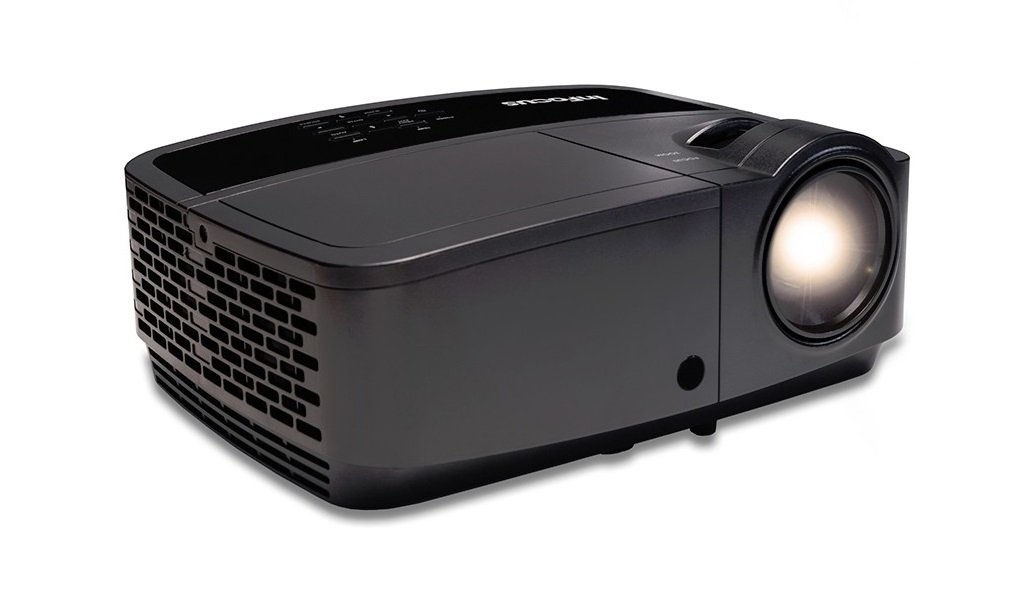
1.1. irudia: Aurrealdea view of the InFocus IN126 DLP Projector.
Ezaugarri nagusiak:
- High brightness of up to 3200 lumens for clear images in various lighting conditions.
- High 3000:1 contrast ratio for sharp detail.
- Compact and portable design, weighing approximately 4.8 lbs. (2.17 kg).
- 3D-Ready capability for immersive viewesperientziak egitea.
- HDMI connectivity for versatile input options.
2. Konfigurazioa eta instalazioa
2.1 Paketatzea
Carefully remove the projector and all accessories from the packaging. Verify that all components are present according to the packing list.
2.2 Proiektorearen kokapena
Place the projector on a stable, flat surface or mount it securely. Ensure adequate ventilation around the projector to prevent overheating. Position the projector at an appropriate distance from the screen to achieve the desired image size.
2.3 Gailuak konektatzea
Connect your video source (e.g., laptop, gaming console) to the projector using an HDMI cable. Ensure the cable is securely plugged into both the source device and the projector's HDMI input port.

Image 2.1: An InFocus projector set up for a business presentation, demonstrating typical usage.
2.4 Piztu/Itzaltzea
- Pizteko: Connect the power cord to the projector and a power outlet. Press the power button on the projector or remote control. The power indicator light will illuminate.
- Itzaltzeko: Press the power button twice. The projector will enter a cooling cycle before completely shutting down. Do not unplug the projector during the cooling cycle.
2.5 Irudiaren doikuntza
- Fokua: Biratu lentearen fokatze-eraztuna irudia zorrotz eta garbi egon arte.
- Keystone zuzenketa: Use the keystone adjustment feature (usually found in the projector's menu or via dedicated buttons) to correct trapezoidal image distortion if the projector is not perfectly perpendicular to the screen.
3. Proiektorearen funtzionamendua
3.1 Sarrera iturriaren hautaketa
Press the 'Source' or 'Input' button on the remote control or projector control panel to cycle through available input sources (e.g., HDMI, VGA). Select the input corresponding to your connected device.
3.2 Menu Nabigazioa
Use the arrow buttons on the remote or control panel to navigate the on-screen display (OSD) menu. Press 'Enter' or 'OK' to confirm selections and 'Menu' or 'Exit' to go back or close the menu.
3.3 Irudiaren doikuntzak
Within the OSD menu, you can adjust various picture settings:
- Distira: Irudiaren argitasun edo iluntasun orokorra doitzen du.
- Kontrastea: Irudiaren zati argienen eta ilunenen arteko aldea kontrolatzen du.
- Kolorea: Koloreen intentsitatea doitzen du.
- Aspektu-erlazioa: Pantaila-formatua hautatzen du (adibidez, 4:3, 16:9).
3.4 Audio ezarpenak
If your projector has built-in speakers or is connected to an external audio system, you can adjust the volume and other audio settings through the OSD menu.
3.5 3D Eragiketa
The IN126 projector is 3D-Ready. To view 3D content, you will need compatible 3D glasses, a 3D-enabled source device, and 3D content. Refer to your 3D glasses and source device manuals for specific instructions on enabling 3D mode.
4. Mantentzea
4.1 Lentea garbitzea
Erabili lente optikoetarako bereziki diseinatutako zapi leun eta lint-gabea proiektorearen lentea astiro-astiro garbitzeko. Saihestu garbitzaile urratzaileak edo indar gehiegi erabiltzea, lentea urra baitezake.
4.2 Cleaning the Projector Casing
Wipe the projector's exterior casing bigun batekin, damp oihal. Ez erabili produktu kimiko edo disolbatzaile gogorrak.
4.3 Aire-iragazkien mantentze-lanak
Regularly check and clean the air filter to ensure proper airflow and prevent overheating. Refer to the full product manual for instructions on locating and cleaning or replacing the air filter.
4.4 lamp Ordezkoa
Proiektorea lamp has an estimated operating life of up to 20,000 hours. When the lamp reaches the end of its life, a warning message may appear, or the image brightness may significantly decrease. Refer to the full product manual for detailed instructions on safe lamp replacement. Always use genuine InFocus replacement lamps.
5. Arazoak
This section addresses common issues you might encounter with your InFocus IN126 projector.
5.1 Ez dago irudirik pantailan
- Ziurtatu proiektorea piztuta dagoela eta pizteko adierazlearen argia finko dagoela.
- Egiaztatu kable guztien konexioak (HDMI, elikadura) ondo lotuta daudela.
- Egiaztatu sarrera-iturri zuzena hautatuta dagoela proiektorrean.
- Confirm the source device (laptop, etc.) is powered on and outputting a signal.
5.2 Image is Distorted or Blurry
- Doitu lentearen fokatze-eraztuna.
- Use keystone correction to fix trapezoidal distortion.
- Ensure the projector is placed on a stable surface and is not vibrating.
- Check the resolution settings of your source device; ensure it is compatible with the projector's native resolution (1280 x 720).
5.3 Soinurik ez
- Igo bolumena bai proiektorean bai iturburu-gailuarenan.
- Kanpoko bozgorailuak erabiltzen badituzu, ziurtatu behar bezala konektatuta eta piztuta daudela.
- Egiaztatu audio ezarpenak proiektorearen OSD menuan.
5.4 Proiektorearen gehiegi berotzea
- Ensure there is sufficient space around the projector for ventilation.
- Clean the air filter to remove any dust buildup.
- Ez blokeatu aireztapen-zuloak.
6. Zehaztapenak
The following table outlines the key technical specifications for the InFocus IN126 DLP Projector:
| Ezaugarri | Zehaztapena |
|---|---|
| Marka | Infocus |
| Ereduaren izena | IN126 DLP |
| Bistaratzeko mota | DLP |
| Berezko Ebazpena | 1280 x 720 |
| Gehienezko pantailaren bereizmena | 1920 x 1080 |
| Distira | 3200 lumens (ANSI) |
| Kontraste-erlazioa | 3000:1 |
| Argi-iturriaren funtzionamendu-bizitza | 20000 ordu |
| Lamp Wattage | 230 Watt |
| Konektibitate Teknologia | HDMI |
| Ezaugarri Berezia | 3D prest |
| Forma-faktorea | Eramangarria |
| Muntatze Mota | Mahai gaineko muntaia |
| Elementuaren pisua | 4.85 libra (2.2 kg) |
| Kanpoko Proba Ziurtagiria | UL, c-UL, FCC, CE |
7. Bermearen informazioa
The InFocus IN126 DLP Projector comes with a limited manufacturer's warranty. For specific details regarding warranty coverage, duration, and terms, please refer to the warranty card included with your product or visit the official InFocus webgunea. Gorde erosketaren egiaztagiria bermearen erreklamazioetarako.
8. Bezeroarentzako arreta
For further assistance, technical support, or to inquire about replacement parts, please visit the official InFocus support website or contact their customer service department. Contact information can typically be found on the InFocus website or in the documentation included with your projector.
Ask a question about this manual
Ask about setup, troubleshooting, compatibility, parts, safety, or missing instructions. Manuals+ will review the question and use this page’s manual context to help answer it.