
InFocus IN124
InFocus IN124 DLP proiektorea
Erabiltzailearen eskuliburua
1. Sarrera
This manual provides comprehensive instructions for the setup, operation, and maintenance of your InFocus IN124 DLP Projector. Please read this manual thoroughly before using the projector to ensure proper functionality and to maximize its lifespan.
The InFocus IN124 is designed to deliver clear and bright projections, suitable for various environments including home cinema and business presentations. Its compact design and robust features make it a versatile display solution.
2. Produktuaren osagaiak
Upon unboxing your InFocus IN124 DLP Projector, please verify that all the following components are included:
- InFocus IN124 DLP Projector Unit
- Urruneko Kontrola
- Elikatze-kablea
- VGA Cable (may vary by region/package)
- User Manual (this document, typically on CD or downloadable)
If any items are missing or damaged, please contact InFocus customer support immediately.
3. Konfigurazioa
3.1 Kokapen fisikoa
Position the projector on a stable, flat surface or mount it securely to a ceiling. Ensure adequate ventilation around the unit to prevent overheating. Maintain a clear path between the projector lens and the projection surface (screen or wall).
3.2 Gailuak konektatzea
The InFocus IN124 supports various input sources. Connect your source device (e.g., laptop, DVD player, gaming console) to the projector using the appropriate cable.
- HDMI: For high-definition digital video and audio. Connect an HDMI cable from your source device to the HDMI port on the projector.
- VGA: For analog video input, commonly used with computers. Connect a VGA cable from your computer's VGA output to the VGA input on the projector.
- Bideo konposatua: Definizio estandarreko bideoa lortzeko. Konektatu bideo konposatu kable bat (RCA horia) dagokion atakara.
- Audio sarrera/irteera: Konektatu kanpoko audio gailuak behar izanez gero.
3.3 Piztea
Beharrezko kable guztiak konektatu ondoren:
- Connect the power cable to the projector and then to a power outlet.
- Press the power button on the projector's control panel or the remote control. The power indicator light will change, and the projector lamp argituko du.
- Itxaron une batzuk proiektorea berotu eta irudia bistaratzeko.
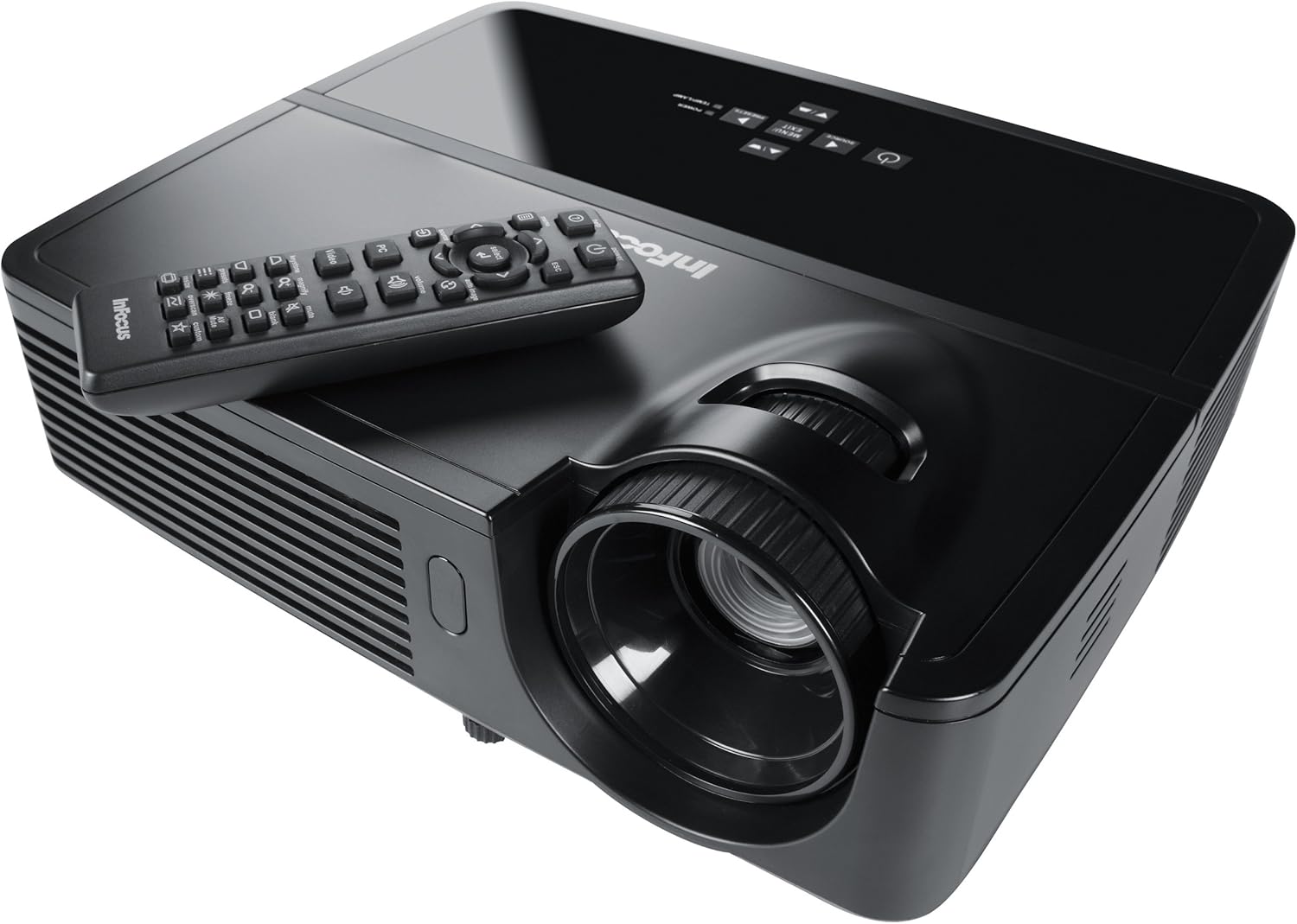
Figure 1: InFocus IN124 DLP Projector with its remote control. The image shows the top-down view of the black projector unit, highlighting the lens, ventilation grilles, and the control panel. The remote control is placed on top of the projector.
4. Proiektorearen funtzionamendua
4.1 Oinarrizko kontrolak
The projector can be operated using the control panel on the unit or the included remote control.
- Pizteko botoia: Proiektorea pizten edo itzaltzen du.
- Iturriaren botoia: Cycles through available input sources (HDMI, VGA, Video).
- Menuko botoia: Accesses the on-screen display (OSD) menu for settings adjustments.
- Gezi-botoiak: Nabigatu menuko aukeren artean eta doitu balioak.
- Sartu/Hautatu botoia: Menuko hautaketak berresten ditu.
- Bolumen-botoiak: Audio irteera-maila doitzen du.
- Keystone zuzenketa: Adjusts the image shape to correct trapezoidal distortion.
- Fokatzeko eraztuna: Manually adjust the lens to sharpen the image.
4.2 Menuko nabigazioa eta ezarpenak
Press the "Menu" button to open the On-Screen Display (OSD). Use the arrow keys to navigate through categories such as "Picture," "Display," "Setup," and "Advanced." Press "Enter" to select a category or option. Adjust settings like brightness, contrast, color temperature, aspect ratio, and resolution to optimize your viewesperientzia.
4.3 3D funtzionalitatea
The InFocus IN124 is 3D-ready. To experience 3D content, you will need compatible 3D source material, a 3D-capable player, and active DLP Link 3D glasses (sold separately). Refer to your 3D source device's manual for specific setup instructions.
5. Mantentzea
Mantentze-lan erregularrak proiektorearen errendimendu optimoa bermatzen du eta bizitza luzatzen du.
5.1 Lentea garbitzea
Use a soft, lint-free cloth specifically designed for optical lenses. Gently wipe the lens surface to remove dust or smudges. Avoid using abrasive cleaners or excessive force, which can scratch the lens.
5.2 Aire-iragazkiak garbitzea
The projector has air filters to prevent dust from entering the internal components. Locate the filter cover (refer to the diagram in the full manual if available) and remove it. Clean the filter using a small brush or a vacuum cleaner with a brush attachment. Replace the filter securely.
5.3 lamp Ordezkoa
Proiektorea lamp bizitza mugatua du. Noiz lamp adierazle-argia pizten bada edo irudia iluntzen bada, ordezkatzeko ordua daamp. Always allow the projector to cool down completely before attempting lamp replacement. Consult the full service manual or a qualified technician for detailed lamp replacement procedures specific to the IN124 model.
6. Arazoak
Atal honek zure proiektorearekin izan ditzakezun arazo ohikoenei buruzko informazioa ematen du.
| Arazoa | Kausa posiblea | Irtenbidea |
|---|---|---|
| Ez da irudirik bistaratzen | Incorrect input source selected; Loose cable connection; Projector not powered on. | Press the "Source" button to cycle inputs; Check all cable connections; Ensure projector is powered on and lamp piztuta dago. |
| Irudia lausoa da | Out of focus; Incorrect resolution setting. | Adjust the focus ring on the lens; Adjust the resolution setting in the OSD menu or on your source device. |
| Irudia trapezoidala da | Proiektorea ez dago pantailarekiko perpendikularra. | Use the keystone correction feature (digital or manual) to square the image. Reposition the projector if possible. |
| Audiorik ez | Volume too low; Incorrect audio input selected; Muted. | Increase volume; Check audio cable connections; Ensure projector or source device is not muted. |
| Proiektorea gehiegi berotu eta itzali egiten da | Aireztapena blokeatuta; Aire-iragazki zikina. | Ensure clear space around vents; Clean air filter as per maintenance section. |
For issues not listed here, please refer to the comprehensive online support resources or contact InFocus customer service.
7. Zehaztapenak
Below are the key technical specifications for the InFocus IN124 DLP Projector:
| Ezaugarri | Xehetasuna |
|---|---|
| Modelo zenbakia | IN124 |
| Bistaratzeko Teknologia | DLP |
| Berezko Ebazpena | 1280x720 (HD) |
| Distira | 3200 Lumenseraino |
| Kontraste-erlazioa | 3000:1 |
| Konektibitatea | HDMI, VGA, Composite Video |
| Ezaugarri bereziak | 3Drako prest |
| Produktuaren neurriak (L x W x H) | 12.99 x 12.99 x 5.9 hazbete |
| Elementuaren pisua | 4.78 libra (2.17 kg) |
| Elikatze Hornidura | 100-240 Volts at 50-60 Hz |
| Erabilera gomendatua | Home Cinema |
8. Bermea eta Laguntza
InFocus provides a limited warranty for the IN124 DLP Projector. For detailed warranty terms and conditions, please refer to the warranty card included with your product or visit the official InFocus webgunea. Gorde erosketa-agiria erosketaren frogagiri gisa berme-erreklamazioetarako.
For technical support, troubleshooting assistance beyond this manual, or service requests, please contact InFocus customer support through their official website or the contact information provided in your product documentation. Online resources, including FAQs and driver downloads, may also be available.
Ask a question about this manual
Ask about setup, troubleshooting, compatibility, parts, safety, or missing instructions. Manuals+ will review the question and use this page’s manual context to help answer it.