
Sarrera
This manual provides essential information for the safe and effective operation of your Laserliner SoundTest-Master 082.070A Noise Level Meter. Please read these instructions carefully before using the device and keep them for future reference. The SoundTest-Master 082.070A is designed for precise measurement of noise levels, featuring integrated long-term memory and PC connectivity for comprehensive documentation.
Segurtasun-argibideak
- Always operate the device within its specified environmental conditions.
- Ez jarri gailua muturreko tenperatura, hezetasun edo eguzki-argitara.
- Saihestu gailua erortzea edo kolpe gogorrak jasan.
- Ez saiatu gailua irekitzen edo aldatzen. Konponketak baimendutako langileek bakarrik egin behar dituzte.
- Mantendu gailua eremu magnetiko indartsuetatik urrun.
- Ensure the microphone is clean and free from obstructions for accurate measurements.
Produktua amaituview
The Laserliner SoundTest-Master 082.070A is a handheld noise level meter equipped with a sensitive electret condenser microphone and a clear, illuminated display. It features various controls for measurement settings and data management.

1. irudia: Aurrealdea view of the SoundTest-Master 082.070A, showing the display, microphone with windshield, and control buttons.
Funtsezko osagaiak:
- Electret Condenser Microphone: For capturing sound. Includes a removable windshield.
- Pantaila argiztatua: Shows measurement values, settings, and status.
- Kontrol-botoiak: Power, Setup, Max, Record, A/C weighting, Fast/Slow time weighting, Level adjustment, Data send.
- Irteera analogikoak: DC and AC outputs for external connections.
- RS232 interfazea: Optoisolated port for PC connection and data transfer.
Konfigurazioa
1. Bateriaren instalazioa
The device requires batteries for operation. Ensure correct polarity when inserting batteries into the compartment, typically located on the rear of the unit.
2. Hasierako piztea
Sakatu Boterea button to turn on the device. The display will illuminate and show initial readings.
3. Windshield Attachment
Attach the removable windshield to the microphone to minimize wind noise interference during outdoor measurements.
Funtzionamendu-argibideak
1. Oinarrizko neurketa
- Piztu gailua erabiliz Boterea botoia.
- Point the microphone towards the sound source.
- The current noise level will be displayed in decibels (dB).
2. Frequency Weighting (dB(A), dB(C))
Erabili A/C button to switch between frequency weighting curves:
- dB(A): Giza belarriaren soinuarekiko erantzuna simulatzen du, ingurumen-zarataren neurketetarako erabili ohi dena.
- dB(C): Provides a flatter response, suitable for measuring peak sound pressure levels or low-frequency noise.
3. Time Weighting (Fast/Slow)
Sakatu AZKAR/MOTSO button to select the desired time weighting:
- FAST (125 ms): For measuring rapidly changing noise levels.
- MOTO (1 segundo): For measuring average noise levels over a longer period, suitable for stable noise sources.
4. Data Logging and PC Connection
The device features a long-term recording function with 16,000 memory points and real-time logging capabilities when connected to a PC.
- Internal Data Logging: Sakatu GRABATU button to start/stop internal data recording. The device can store up to 16,000 measurement points.
- PC konexioa: Connect the device to a computer using the provided RS232 cable.
- Softwarea: Install the provided software on your PC. This software allows for real-time data display, analysis, and download of recorded data.
- Datuak bidaltzea: Erabili BIDALI DATUAK button to initiate data transfer to the connected PC.
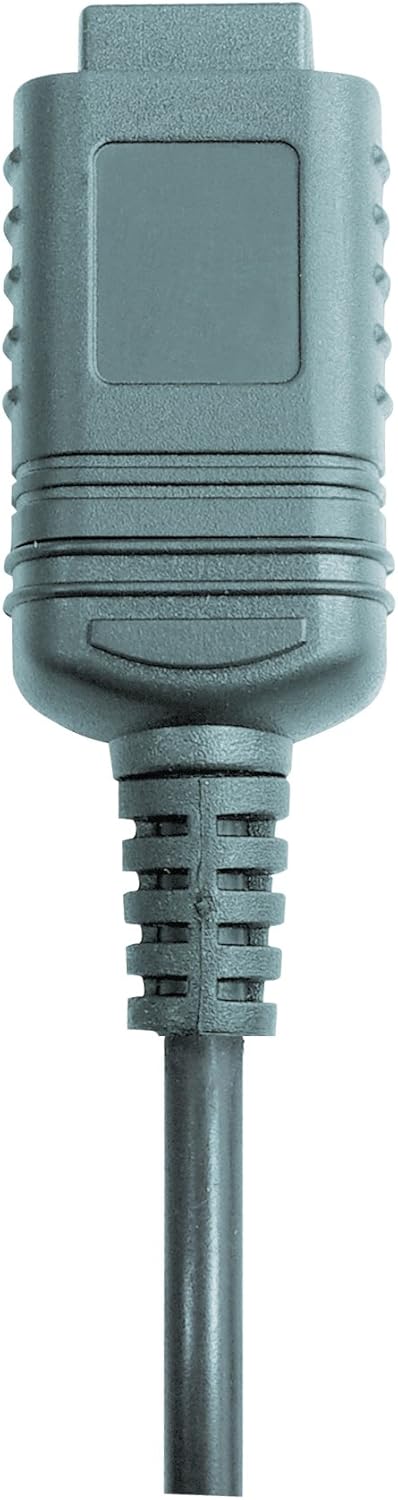

2. irudia: RS232 cable connectors used for connecting the SoundTest-Master to a PC.
5. Kalibrazioa
The device can be calibrated and adjusted using a standard noise level calibrator (94 dB / 1 kHz). Refer to the calibrator's instructions for the specific calibration procedure.
Mantentzea
1. Garbiketa
- Garbitu gailua casinoihal leun eta lehor batekin garbitu.
- Ez erabili garbitzaile edo disolbatzaile urratzailerik.
- Ensure the microphone is kept clean and free of dust or debris.
2. Biltegiratzea
When not in use, store the SoundTest-Master in its protective case in a cool, dry place, away from direct sunlight and extreme temperatures. Remove batteries if storing for extended periods.
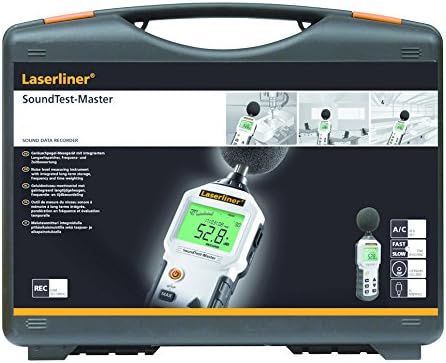
3. irudia: The SoundTest-Master 082.070A stored in its protective carrying case.
Arazoak konpontzea
| Arazoa | Kausa posiblea | Irtenbidea |
|---|---|---|
| Gailua ez da pizten. | Bateriak hilda edo gaizki instalatuta. | Ordeztu bateriak, polaritate zuzena ziurtatuz. |
| Irakurketa okerrak. | Microphone obstructed or dirty; device needs calibration. | Clean microphone; perform calibration with a standard calibrator. |
| No data transfer to PC. | Incorrect cable connection; software not installed or configured. | Check RS232 cable connection; ensure PC software is correctly installed and running. |
| Pantaila ilun dago edo irakurgaitza da. | Low battery power; display backlight off. | Replace batteries; check device settings for backlight control. |
Zehaztapenak
| Ezaugarri | Xehetasuna |
|---|---|
| Ereduaren izena | SoundTest-Master |
| Zati zenbakia | 082.070A |
| Fabrikatzailea | Umarex |
| Marka | Laserliner |
| Maiztasunaren haztapena | dB(A), dB(C) |
| Denbora ponderazioa | FAST (125 ms), SLOW (1 second) |
| Datuen Memoria | 16,000 neurketa puntu |
| Interfazea | Optoisolated RS232 |
| Irteera analogikoak | DC eta AC |
| Kalibrazioa | Adjustable with 94 dB / 1 kHz standard calibrator |
| Mikrofonoa | Sensitive electret condenser with removable windshield |
| Bistaratzea | Illuminated, clear display |
| Elementuaren pisua | 1.18 kilogramo (2.6 libra) |
| Produktuaren neurriak | 10.33 x 5.51 x 13.78 hazbete |
| Materiala | Metal (Frame, Barrel) |
| Kolorea | Beltza eta Grisa |
| Beharrezko bateriak | Yes (not included, type not specified in data) |
Bermea eta Laguntza
For warranty information and technical support, please refer to the documentation included with your purchase or visit the official Laserliner webgunea.