
Sarrera
Eskerrik asko erosketagatik.asing the Edifier Tick Tock Retro Multifunctional Alarm Clock. This device combines a retro design with modern functionality, offering an alarm clock, FM radio, and media playback from SD cards, USB drives, and auxiliary input. This manual provides detailed instructions for setup, operation, and maintenance to ensure optimal performance and longevity of your device.
Produktuaren Ezaugarriak
- SD card reader and USB input port for media playback.
- LCD display screen for time, date, alarm status, and input mode (SD/USB/FM/AUX).
- Alarm clock function with customizable audio sources: SD card, USB drive, FM radio, or Auxiliary input.
- Auxiliary 3.5mm input jack for connecting external audio devices.
- FM radio function with 24 preset channels for easy access to your favorite stations.
- Two 360° omni-directional full-range speakers for rich, multi-directional sound.
Kontrolak eta Portuak
Atzeko paneleko atakak
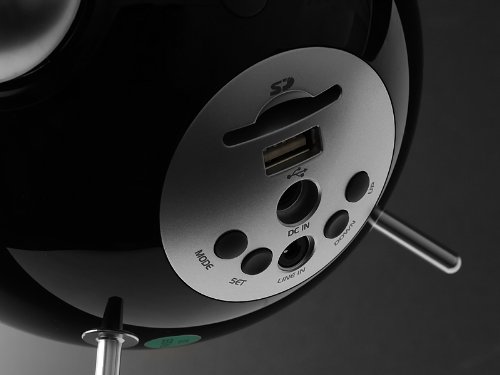
This image displays the rear panel of the Edifier Tick Tock alarm clock. Visible ports and buttons include:
- SD txartelaren zirrikitua: Insert an SD card for music playback.
- USB ataka: Connect a USB flash drive for music playback.
- DC IN: Power input for the included AC adapter.
- LERROA (AUX): 3.5 mm-ko audio sarrera kanpoko gailuetarako.
- MODE botoia: Cycles through input modes (SD, USB, FM, AUX).
- SET botoia: Used for entering settings menus (e.g., time, alarm).
- GORA/BEHERA botoiak: Navigate menus, adjust volume, or change settings.
Goiko paneleko kontrolak
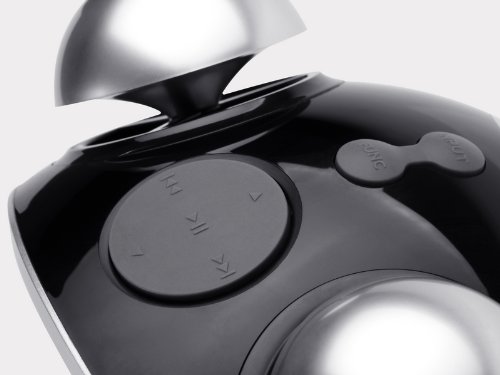
This image shows the top panel controls of the Edifier Tick Tock alarm clock. These include:
- Erreproduzitu/Pausatu botoia: Multimedia erreprodukzioa abiarazten edo pausatzen du.
- Aurreko/Hurrengo pistaren botoiak: Skips to the previous or next track during media playback. Also used for tuning FM radio.
- Bolumena igo / jaitsi botoiak: Audio irteerako bolumena doitzen du.
- ATZERATU/ARGI botoia: Alarma jotzen ari den bitartean atzerapena aktibatzen du edo pantailaren distira doitzen du.
Konfigurazioa
- Despaketatzea: Carefully remove the alarm clock and all accessories from the packaging. Ensure all components are present: the alarm clock unit, AC power adapter, and this user manual.
- Potentzia-konexioa: Connect the AC power adapter to the "DC IN" port on the rear of the alarm clock. Plug the adapter into a standard wall outlet. The display should illuminate.
- Hasierako piztea: The unit should power on automatically. If not, press the power button (if available, otherwise it's always on when plugged in).
- Antena (FM irratia): Extend the FM antenna located at the back of the unit for optimal radio reception.
Funtzionamendu-argibideak
Ordua eta data ezartzea
- Eduki sakatuta EZARTU botoia sakatu orduaren pantaila keinuka hasi arte.
- Erabili UP eta BEHERA botoiak ordua doitzeko. Sakatu EZARTU baieztatzeko eta minutuetara joateko.
- Doitu minutuak erabiliz UP eta BEHERA. Sakatu EZARTU baieztatzeko.
- Continue this process to set the year, month, and day. Press EZARTU to exit the time/date setting mode.
Alarma ezartzea
- Sakatu EZARTU button once (do not hold) to enter alarm setting mode. The alarm time will flash.
- Erabili UP eta BEHERA buttons to adjust the alarm hour. Press EZARTU baieztatzeko eta minutuetara joateko.
- Doitu minutuak erabiliz UP eta BEHERA. Sakatu EZARTU baieztatzeko.
- Next, select the alarm source (FM, SD, USB, AUX). Use UP eta BEHERA to cycle through options. Press EZARTU baieztatzeko.
- If FM is selected, use UP eta BEHERA to select a preset FM station (P01-P24).
- If SD or USB is selected, ensure a card/drive with audio is inserted. The alarm will play the first track.
- If AUX is selected, ensure an external device is connected and playing audio.
- Sakatu EZARTU again to activate the alarm. An alarm icon will appear on the display.
- To deactivate the alarm, press EZARTU alarmaren ikonoa desagertu arte.
- Alarmak jotzen duenean, sakatu SNOOZE / ARGIA button to activate snooze (typically 9 minutes). To turn off the alarm completely, press any other button.
FM Irratiaren funtzionamendua
- Sakatu MODUA botoia behin eta berriz sakatu pantailan "FM" agertu arte.
- Auto Scan and Preset: Eduki sakatuta JOLASTU/PAUSTU button. The radio will automatically scan for available stations and save them to presets (P01-P24).
- Eskuzko sintonizazioa: Erabili AURREKO/HURRENGO PISTA botoiak maiztasuna fintzeko.
- Aurrezarpenak hautatzea: In FM mode, briefly press the AURREKO/HURRENGO PISTA buttons to cycle through saved preset stations.
- Doitu bolumena UP eta BEHERA buttons on the rear panel.
SD Card / USB Playback
- Insert an SD card into the SD card slot or a USB flash drive into the USB port on the rear panel.
- Sakatu MODUA button repeatedly until "SD" or "USB" appears on the display. The device will automatically start playing audio files.
- Erabili JOLASTU/PAUSTU botoia erreprodukzioa eteteko edo berriro hasteko.
- Erabili AURREKO/HURRENGO PISTA buttons on the top panel to skip tracks.
- Doitu bolumena UP eta BEHERA buttons on the rear panel.
Auxiliary Input (LINE IN)
- Connect an external audio device (e.g., smartphone, MP3 player) to the "LINE IN" (3.5mm) port on the rear panel using an audio cable (not included).
- Sakatu MODUA botoia behin eta berriz sakatu pantailan "AUX" agertu arte.
- Hasi erreprodukzioa konektatutako kanpoko gailuan.
- Doitu bolumena UP eta BEHERA buttons on the rear panel, and also control volume from your external device.
Pantailaren distira
Sakatu labur SNOOZE / ARGIA button on the top panel to cycle through different display brightness levels.
Mantentzea
- Garbiketa: Use a soft, dry cloth to clean the surface of the alarm clock. Do not use abrasive cleaners, waxes, or solvents.
- Lekua: Place the unit on a stable, flat surface. Avoid direct sunlight, high temperatures, humidity, or dusty environments.
- Potentzia: Deskonektatu korronte-egokitzailea hormako entxufetik unitatea denbora luzez erabiliko ez baduzu.
Arazoak konpontzea
| Arazoa | Balizko Kausa / Irtenbidea |
|---|---|
| Argindarrik ez / Pantaila itzalita |
|
| Bozgorailuen soinurik ez |
|
| FM irratiaren harrera eskasa |
|
| Alarm does not sound or plays static |
|
| Pantaila oso distiratsua da gauez |
|
Zehaztapenak
| Marka | Edifikatzailea |
| Modelo zenbakia | MF240Reto |
| Bistaratzeko mota | LCDa |
| Konektibitate Teknologia | AUX, USB |
| Ezaugarri bereziak | Alarm, Radio, SD Card Reader, USB Playback |
| Energia iturria | Kable elektrikoa |
| Materiala | Plastikoa |
| Elementuaren pisua | 0.74 libra (gutxi gorabehera 0.34 kg) |
| Fabrikatzailea | Edifier USA |
Bermea eta Laguntza
This Edifier product comes with a 2 urteko fabrikatzailearen bermea. For warranty claims, technical support, or further assistance, please contact Edifier USA customer service. Please retain your proof of purchase for warranty validation.
For the most up-to-date support information, please visit the official Edifier webgunea.