
1. Sarrera
This manual provides essential information for the safe and efficient operation of your SANYO PLC-XK2200 XGA Ultra-Portable Multimedia Projector. Please read this manual thoroughly before using the projector and retain it for future reference.
The SANYO PLC-XK2200 is designed to deliver clear and bright images with 2200 lumens and a 2000:1 contrast ratio, suitable for various presentation environments.
2. Segurtasun informazioa
- Energia iturria: Use only the specified power supply. Ensure the power cord is securely connected.
- Aireztapena: Ez blokeatu aireztapen-irekidurak. Ziurtatu proiektorearen inguruan nahikoa leku dagoela aire-fluxu egokia izan dadin eta gehiegi berotzea saihesteko.
- Lamp Abisua: Proiektorea lamp operates at high temperatures and pressures. Allow the projector to cool down before moving or performing maintenance. Do not look directly into the lens when the lamp piztuta dago.
- Likidoaren esposizioa: Do not expose the projector to rain, moisture, or liquids.
- Zerbitzua: Konponketa guztiak zerbitzu-langile kualifikatuei eskatu. Ez saiatu proiektorea zeuk irekitzen edo konpontzen.
3. Produktua amaitu daview
3.1 Goiko paneleko kontrolak
The top panel provides access to essential controls for power, menu navigation, focus, and zoom adjustments.

Irudia: Goian view of the SANYO PLC-XK2200 projector. Visible controls include the focus and zoom rings, the power button, and buttons for menu navigation (Menu, Select, Volume, Auto Setup, Lamp Berrezarri).
3.2 Atzeko panelaren konexioak
The rear panel houses various input and output ports for connecting external devices.

Irudia: Atzealdea view of the SANYO PLC-XK2200 projector. Ports visible include Control Port, Computer In 1 (S-Video In/Component In), Computer In 2 (Monitor Out), Video In, Audio In/Out, and a network port.
3.3 Alboak eta behealdea Views
Alboan view shows the power input and ventilation, while the bottom view reveals mounting points and product labels.
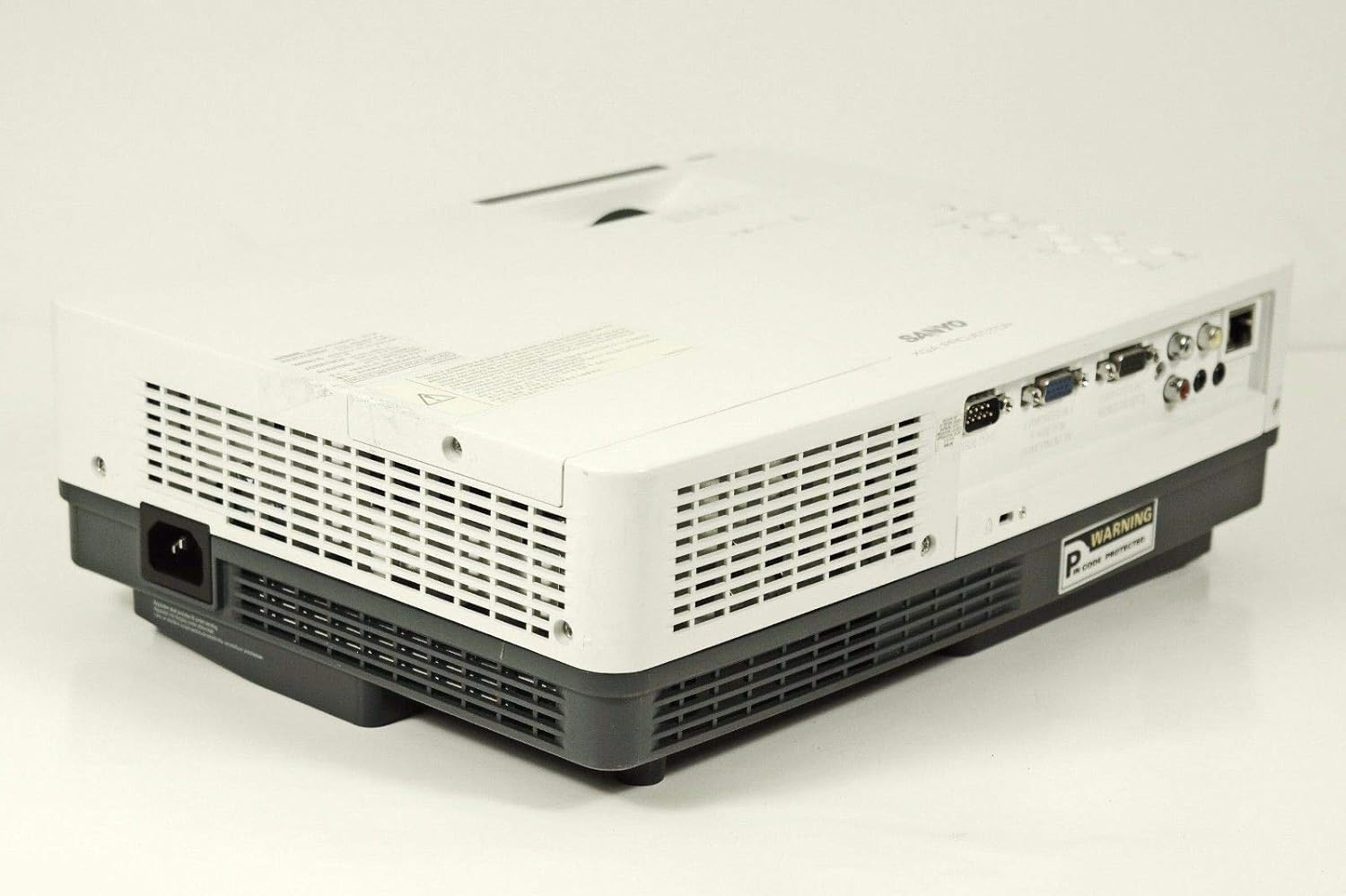
Irudia: Albokoa view of the SANYO PLC-XK2200 projector, highlighting the power input socket and exhaust vents.

Irudia: Behealdea view of the SANYO PLC-XK2200 projector, displaying screw holes for mounting, ventilation grilles, and the product information label.
4. Konfigurazioa
4.1 Proiektorearen kokapena
Place the projector on a stable, flat surface or mount it securely. Ensure there is sufficient space around the projector for ventilation. Avoid placing it in direct sunlight or near heat sources.
4.2 Potentzia konektatzea
- Konektatu elikatze-kablea proiektorearen korronte alternoko sarrerara.
- Entxufatu korronte-kablearen beste muturra lurreko hartune elektriko batean.
- The power indicator light will illuminate, typically in amber, indicating standby mode.
4.3 Sarrera iturriak konektatzea
Connect your video source (e.g., computer, DVD player) to the appropriate input port on the projector's rear panel. The PLC-XK2200 supports various inputs including VGA (Computer In 1/2), S-Video, and Composite Video.
- Ordenagailua: Use a VGA cable to connect your computer's video output to the COMPUTER IN 1 or COMPUTER IN 2 port.
- Bideo-gailuak: For S-Video, connect to the S-VIDEO IN port. For composite video, connect to the VIDEO IN port using an RCA cable.
- Audioa: Connect audio cables from your source device to the AUDIO IN ports if you wish to use the projector's internal speaker or audio output.
5. Funtzionamendu-argibideak
5.1 Piztu/Itzaltzea
- Pizteko: Press the POWER button on the projector's top panel or remote control. The power indicator will turn green, and the lamp argituko du.
- Itzaltzeko: Press the POWER button twice. The projector will enter cooling mode, and the power indicator will flash amber. Once cooled, it will return to standby mode (solid amber).
5.2 Irudia doitzea
- Fokua: Rotate the FOCUS ring on the lens until the image is sharp and clear.
- Zooma: Rotate the ZOOM ring on the lens to adjust the image size.
- Keystone zuzenketa: Use the AUTO SETUP button or navigate through the menu to adjust vertical keystone distortion, which corrects trapezoidal images.
5.3 Sarrera hautatzea
Press the INPUT button on the projector or remote control to cycle through available input sources (e.g., Computer 1, Computer 2, Video, S-Video).
5.4 Menu Nabigazioa
Press the MENU button to access the on-screen display (OSD) menu. Use the arrow buttons to navigate and the SELECT button to confirm choices. Press MENU again to exit.
6. Mantentzea
6.1 Proiektorea garbitzea
- Kanpoaldea: Erabili oihal leun eta lehor bat proiektorearen c garbitzeko.asing. Zikinkeria egoskorrerako, dampen the cloth with a mild detergent solution.
- Lentea: Gently wipe the lens with a lens cleaning cloth or lens paper. Avoid harsh chemicals or abrasive materials.
- Aire-iragazkia: Regularly clean the air filter to maintain proper ventilation and prevent overheating. Refer to the filter cover for removal instructions.
6.2 lamp Ordezkoa
Lamp bizitza mugatua du. Noiz lamp adierazlea pizten bada edo irudia iluntzen bada, lamp may need replacement. Always allow the projector to cool completely before attempting lamp replacement. Consult a qualified technician for lamp replacement if you are unsure.
Abisua: High pressure lamp. Risk of explosion if improperly handled. Refer to the service manual for detailed lamp ordezkatzeko prozedurak.
7. Arazoak
| Arazoa | Kausa posiblea | Irtenbidea |
|---|---|---|
| Ez da irudirik bistaratzen | Incorrect input selected; loose cable connection; projector in standby. | Press INPUT to select correct source; check cable connections; press POWER button to turn on. |
| Irudia lausoa da | Fokua ez dago doituta; proiektorea pantailatik gertuegi/urrunegi dago. | Adjust the FOCUS ring; reposition the projector or use the ZOOM ring. |
| Irudia trapezoidala da | Proiektorea ez dago pantailarekiko perpendikularra. | Use Auto Vertical Keystone correction or manually adjust. |
| Proiektorea gehiegi berotu eta itzali egiten da | Blocked ventilation; dirty air filter. | Ensure clear airflow around vents; clean or replace air filter. |
8. Zehaztapenak

Irudia: Albokoa view of the SANYO PLC-XK2200 projector, displaying the model number label (MODEL NO. PLC-XK2200).
- Ereduaren izena: PLC-XK2200
- Marka: SANYO
- Bistaratzeko teknologia: LCDa
- Distira: 2200 lumen
- Kontraste-erlazioa: 2000:1
- Berezko ebazpena: XGA (1024 x 768)
- Aspektu-erlazioa: 4:3 (Jatorrizkoa)
- Forma-faktorea: Eramangarria
- Muntatze mota: Mahai gaineko muntaia
- Sarrerako terminalak: VGA (x2), S-Video, Composite Video, Audio In (RCA)
- Irteerako terminalak: VGA (Monitor Out), Audio Out (RCA)
- Kontrol-ataka: RS-232C
- UPC: 086483079498
9. Bermea eta Laguntza
For warranty information, please refer to the warranty card included with your product or contact your local SANYO dealer. Technical support may be available through authorized service centers.
No official product videos were provided in the input data for this manual.


