
Utilitech 358707
Utilitech Mechanical Residential Plug-In Timer User Manual
Eredua: 358707
Sarrera
This manual provides detailed instructions for the safe and efficient operation of your Utilitech Mechanical Residential Plug-In Timer. Please read this manual thoroughly before use and retain it for future reference.
The Utilitech Mechanical Residential Plug-In Timer is designed to automate the on/off cycles of electrical devices, helping to conserve energy and enhance convenience. It features up to 48 on/off settings per day and includes 4 outlets for connecting multiple devices.
Produktua amaituview
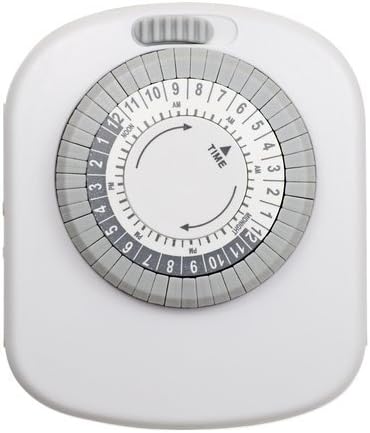
1. irudia: Aurrealdea view of the Utilitech Mechanical Residential Plug-In Timer, showing the central dial with time markings and surrounding pins.
The timer features a circular dial with hour markings (AM/PM) and a series of push-down pins around its circumference. These pins control the on/off cycles. A manual override switch is typically located on the top or side of the unit.
Ezaugarri nagusiak:
- Up to 48 on/off settings per 24-hour period.
- Non-removable pins for easy programming.
- Designed for energy saving.
- Equipped with 4 outlets for multiple device connections.
- Simple plug-in installation.
Konfigurazioa
Hasierako konfigurazioa:
Tenporizadorea deskonprimitu: Carefully remove the timer from its packaging. Inspect for any damage.
Konektatu: Plug the timer into a standard 120V AC wall outlet. Ensure the outlet is easily accessible.
Charge Battery (if applicable): Although this model does not require batteries for operation, some timers may have an internal battery for timekeeping during power outages. If so, allow it to charge for at least 30 minutes before programming.
Ezarri uneko ordua: Rotate the entire dial clockwise until the current time aligns with the "TIME" arrow indicator on the timer's face. The dial is marked with AM and PM hours (e.g., 12 PM for Noon, 12 AM for Midnight).
Figure 2: Detail of the timer dial, highlighting the "TIME" arrow and the 24-hour markings for setting the current time.
Funtzionamendu-argibideak
Programming On/Off Times:
The timer uses push-down pins around the dial to set the on/off intervals. Each pin represents a 30-minute segment.
Identifikatu pinak: Locate the small, grey pins around the outer edge of the dial. Each pin corresponds to a 30-minute interval.
Set "ON" Times: Push down the pins corresponding to the time periods you want the connected device to be ON. When a pin is pushed down, it activates the power during that 30-minute segment as the dial rotates.
Set "OFF" Times: Leave the pins in the "up" position for the time periods you want the connected device to be OFF. When a pin is in the up position, it deactivates the power during that 30-minute segment.
3. irudia: Xehetasuna view of the timer's outer ring with individual pins, illustrating how to push them down for "ON" periods.
Eskuz gainditzeko etengailua: The timer typically has a manual override switch (often a slider or button) located on the top or side. This switch allows you to bypass the programmed settings and keep the device either continuously ON or OFF. Ensure this switch is in the "Timer" or "Auto" position for programmed operation.
Konektatu gailua: Plug the device you wish to control into one of the 4 outlets on the timer. Ensure the device's own power switch is set to the "ON" position.
Example Programming:
To turn a lamp on from 6:00 PM to 10:00 PM:
- Locate the 6 PM mark on the dial.
- Push down all pins from 6 PM to 10 PM.
- Ensure all other pins are in the "up" position.
- Set the current time on the dial.
- Entxufatu lamp into the timer.
Mantentzea
The Utilitech Mechanical Residential Plug-In Timer requires minimal maintenance.
Garbiketa: Deskonektatu tenporizadorea entxufetik garbitu aurretik. Garbitu kanpoaldea zapi leun eta lehor batekin. Ez erabili garbitzaile likidorik edo material urratzailerik.
Biltegiratzea: Tenporizadorea denbora luzez gordetzen baduzu, ziurtatu garbi eta lehor dagoela. Gorde leku fresko eta lehor batean, eguzki-argitik eta tenperatura altuetatik babestuta.
Ikuskapena: Aldian-aldian, egiaztatu tenporizadorea eta kablea kalteen zantzurik dagoen ikusteko, hala nola, hari higatuak edo kable pitzatuak.asing. If damage is found, discontinue use immediately and replace the unit.
Arazoak konpontzea
| Arazoa | Kausa posiblea | Irtenbidea |
|---|---|---|
| Device does not turn ON/OFF as programmed. |
|
|
| Tenporizadorearen markagailua ez da biratzen. |
|
|
| Timer makes a rattling or loud noise. |
|
|
Zehaztapenak
| Atributua | Xehetasuna |
|---|---|
| Modelo zenbakia | 358707 |
| Zati zenbakia | TM20DHBL |
| Marka | Utilitech |
| Mota | Mechanical Residential Plug-In Timer |
| Saltoki kopurua | 4 |
| Daily Settings | Up to 48 on/off settings (30-minute intervals) |
| Muntatze Mota | Plug-in Muntaia |
| Kolorea | Zuria |
| Elementuaren pisua | 6.4 ontza |
| Paketearen neurriak | 6.7 x 4.1 x 2.1 hazbete |
| Beharrezko bateriak | Ez |
| UPC | 070686507131 |
Segurtasun Informazioa
Mesedez, irakurri eta jarraitu segurtasun-argibide guztiak lesioak edo kalteak saihesteko.
Barruko erabilera soilik: This timer is designed for indoor use in dry locations only. Do not expose to water or moisture.
Balorazio elektrikoa: Do not exceed the electrical rating of the timer. Overloading can cause overheating and fire.
Lurreratzea: Ensure the timer is plugged into a properly grounded outlet if applicable. This model is a 2-prong device.
Haurrak eta maskotak: Mantendu haurren eta maskoten eskura.
Deskonexioa: Always unplug the timer from the wall outlet before cleaning or when not in use for extended periods.
Konponketa: Do not attempt to open or repair the timer yourself. Refer all servicing to qualified personnel.
Bermea eta Laguntza
For warranty information or technical support, please refer to the product packaging or contact Utilitech customer service. Keep your purchase receipt for warranty claims.
Note: Specific warranty terms and contact information may vary. Please consult the documentation included with your product.
Ask a question about this manual
Ask about setup, troubleshooting, compatibility, parts, safety, or missing instructions. Manuals+ will review the question and use this page’s manual context to help answer it.