
Sarrera
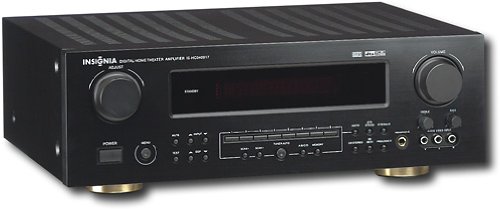
This manual provides essential instructions for the setup, operation, maintenance, and troubleshooting of your Insignia 6.1-Channel 600W Digital Home Theater Receiver, model IS-HC040917. Please read this manual thoroughly before using the receiver to ensure proper and safe operation.
Segurtasun-argibide garrantzitsuak
- Ez blokeatu aireztapen-irekidurak. Instalatu fabrikatzailearen argibideen arabera.
- Ez instalatu bero-iturri inongo ondoan, esate baterako, erradiadoreak, bero-erregistroak, sukaldeak edo beste aparatu batzuk (barne ampberoa sortzen duten argitzaileak).
- Babestu korronte-kablea oinez ibiltzetik edo atxilotzetik, batez ere entxufeetan, erosotasun-harguneetan eta aparatutik irteten diren puntuetan.
- Erabili soilik fabrikatzaileak zehaztutako eranskinak/osagarriak.
- Deskonektatu aparatu hau tximista-ekaitzetan edo denbora luzez erabiltzen ez duzunean.
- Bidali zerbitzu guztiak zerbitzu kualifikatuko langileengana. Aparatuak edozein modutan hondatu direnean mantenimendua egin behar da.
Konfigurazio Gida
1. Deskargatzea
Carefully remove the receiver and all accessories from the packaging. Ensure all components are present:
- Insignia IS-HC040917 Receiver
- Urruneko Kontrola
- AM Loop Antena
- FM Wire Antena
- Erabiltzailearen eskuliburua (dokumentu hau)
2. Bozgorailuak konektatzea
The IS-HC040917 receiver supports a 6.1-channel speaker configuration. Connect your speakers to the corresponding terminals on the rear panel. Ensure correct polarity (+ to + and - to -) for each speaker.
- Front Left/Right: For main stereo sound.
- Zentroa: For dialogue.
- Surround Left/Right: For ambient sound effects.
- Inguruko atzealdea: For additional rear channel effects in 6.1 setups.
- Subwoofer (Pre-out): Connect to a powered subwoofer's LFE input.
Note: The receiver is designed for speakers with an impedance of 8 ohms.
3. Audio/Bideo iturriak konektatzea
Connect your external devices (e.g., DVD player, Blu-ray player, game console, cable box) to the appropriate input jacks on the receiver.
- HDMI: Use HDMI cables for high-definition audio and video signals. The receiver has 3 HDMI input ports.
- Audio digitala (optikoa/koaxiala): For digital audio from devices like CD players or set-top boxes.
- Audio analogikoa (RCA): For standard stereo audio connections from devices like VCRs or older CD players.
- S-bideoa: For video signals from compatible devices.
4. Antena konexioa
Connect the supplied AM loop antenna and FM wire antenna to their respective terminals on the rear panel for radio reception.
5. Energia-konexioa
Once all audio/video and speaker connections are made, plug the receiver's power cord into a standard AC wall outlet.
Irudia: Rear panel of the Insignia IS-HC040917 receiver, showing various input and output connections for speakers, audio/video sources (HDMI, RCA, S-Video, Digital), and antenna terminals. This diagram is crucial for correctly wiring the home theater system.
Funtzionamendu-argibideak
1. Piztu/Itzali
Sakatu BOTEREA aurrealdeko paneleko edo urrutiko aginteko botoia hargailua pizteko edo itzaltzeko.
2. Sarrera hautapena
Erabili SARRERA HAUTATZAILEA knob/buttons on the front panel or the remote control to choose the desired audio/video source (e.g., HDMI 1, DVD, CD, Tuner).
3. Bolumenaren kontrola
Doitu bolumen nagusia botoi handiak erabiliz BOLUMENA aurrealdeko paneleko botoia edo BOLUMENA +/- urrutiko aginteko botoiak.
4. Audio moduak
The receiver supports various audio modes, including 6.1-channel surround sound. Use the MODUA or DSP buttons on the remote to cycle through available sound modes (e.g., Stereo, Dolby Digital, DTS, Pro Logic).
5. Tuner Operation (AM/FM Radio)
Select the "Tuner" input. Use the BANDA button to switch between AM and FM. Use the TUNE +/- buttons to manually tune to stations or AURREZ EZARRI +/- to select stored stations. Refer to the remote control for specific tuner functions.
Mantentzea
1. Garbiketa
Wipe the exterior of the receiver with a soft, dry cloth. Do not use liquid cleaners or aerosol sprays, as they may damage the finish or internal components. Ensure the unit is unplugged before cleaning.
2. Aireztapena
Ensure that the ventilation openings on the top and sides of the receiver are not blocked. Proper airflow is essential to prevent overheating and ensure long-term performance.
3. Kableen kudeaketa
Periodically check all cable connections to ensure they are secure. Loose connections can lead to poor audio or video quality.
Arazoak konpontzea
| Arazoa | Kausa posiblea | Irtenbidea |
|---|---|---|
| Botererik ez | Kable elektrikoa deskonektatuta; entxufea ez dago aktibo. | Egiaztatu kablearen konexioa; saiatu beste entxufe batekin. |
| Soinurik ez | Incorrect input selected; speaker wires loose; volume too low; mute activated. | Hautatu sarrera zuzena; egiaztatu bozgorailuen konexioak; igo bolumena; desaktibatu isilaraztea. |
| Ez dago bideorik | Incorrect input selected; video cables loose or incorrect. | Select correct input; check video cable connections (HDMI, S-Video, RCA). |
| Urruneko kontrola ez dabil | Bateriak agortuta; urrutiko agintearen eta hargailuaren arteko oztopoa; urrutiko agintearen modu okerra. | Replace batteries; remove obstructions; ensure remote is in the correct operating mode. |
Zehaztapenak
- Eredua: IS-HC040917
- Marka: INtsignia
- Irteera potentzia: 600 Watt
- Kanal kopurua: 6.1 kanal
- Audio irteera modua: Inguratu
- HDMI portuak guztira: 3
- Konektore motak: 3.5mm Jack, HDMI, RCA, USB
- Gailu bateragarriak: Hizlaria
- Kontrol-metodoa: Urrunekoa
- Kolorea: Beltza
- UPC: 799530659962
- ASIN: B0075C3DN2
Bermea eta Laguntza
For warranty information and customer support, please refer to the warranty card included with your product or visit the official Insignia webgunea. Gorde erosketa-agiria berme-erreklamazioetarako.
For further assistance, you may contact Insignia customer service. Contact details are typically available on the manufacturer's webgunean edo produktuaren ontzian.