
Olympus LS-100
Olympus LS-100 Voice Recorder Instruction Manual
Eredua: LS-100
Sarrera
This manual provides detailed instructions for the proper use and maintenance of your Olympus LS-100 Voice Recorder. The LS-100 is designed for high-fidelity audio capture, offering features such as 24-bit/96kHz Linear PCM recording, multi-track capabilities, and versatile input options including XLR with phantom power. Please read this manual thoroughly before operating the device to ensure optimal performance and longevity.
Segurtasun Informazioa
- Bateriaren segurtasuna: Use only the specified Lithium Ion battery. Do not expose to extreme temperatures or attempt to disassemble.
- Ura eta hezetasuna: Keep the device away from water and high humidity to prevent damage.
- Garbiketa: Use a soft, dry cloth for cleaning. Avoid liquid cleaners or solvents.
- Xedapena: Dispose of the device and batteries according to local regulations. Do not incinerate.
- Entzumenaren babesa: Saihestu bolumen handietan entzutea denbora luzez, entzumenaren kalteak saihesteko.
Paketearen edukia
Egiaztatu elementu guztiak paketean daudela:
- Olympus LS-100 Digital Voice Recorder
- Litio-ioizko bateria (aurrez instalatuta edo bereizita)
- USB kablea
- Argibide eskuliburua (dokumentu hau)
Piezen identifikazioa
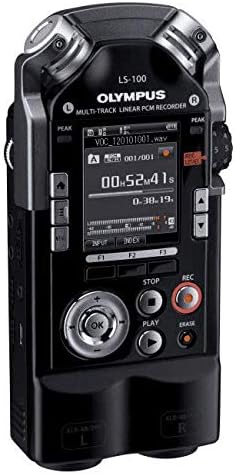
Aurrealdea View

Irudia: Aurrealdea view of the Olympus LS-100 Voice Recorder, showing the display, control buttons, and built-in microphones.
- Mikrofono estereo integratuak: Left and Right 90-degree directional condenser microphones.
- LCD pantaila: Shows recording status, menu options, and file informazioa.
- Peak Level Indicators: LED lights to indicate audio input levels.
- Menuko botoia: Accesses the device's settings and options.
- Function Buttons (F1, F2, F3): Context-sensitive buttons for various operations.
- Navigation/OK Button: Menuetan nabigatzeko eta hautatzeko erabiltzen da.
- Gelditzeko botoia: Grabatzea edo erreproduzitzeari uzten dio.
- Erreproduzitzeko botoia: Erreprodukzioa hasten edo eten egiten du.
- Grabatu botoia: Grabaketari ekiten dio.
- Ezabatu botoia: Ezabatzen du files.
- REC Level Dial: Adjusts recording input sensitivity.
- XLR/Phantom Power Inputs: Connect external microphones requiring XLR or phantom power.
Atzekoa View
Irudia: Atzealdea view of the Olympus LS-100 Voice Recorder, showing the battery compartment and external speaker.
- Bateriaren konpartimendua: Houses the rechargeable Lithium Ion battery.
- Bozgorailu integratua: For basic audio playback.
- Tripodearen muntaia: Standard thread for mounting on a tripod.
Konfigurazioa
Bateria instalatzea eta kargatzea
- Bilatu bateriaren konpartimentua gailuaren atzealdean.
- Ireki konpartimenduaren estalkia.
- Insert the supplied Lithium Ion battery, ensuring correct polarity.
- Itxi bateriaren konpartimenduaren estalkia ondo.
- Connect the device to a power source using the supplied USB cable to charge the battery. The charging indicator will illuminate.
SD txartela sartzea
- Bilatu SD txartelaren zirrikitua gailuaren alboan.
- Insert a compatible SD, SDHC, or SDXC card into the slot until it clicks into place.
- To remove, push the card gently until it ejects.
Piztu/Itzaltzea
- Pizteko: Press and hold the power button (usually located on the side) until the display illuminates.
- Itzaltzeko: Eduki sakatuta pizteko botoia gailua itzali arte.
Hasierako ezarpenak
Upon first power-on, you may be prompted to set the date, time, and language. Use the navigation buttons to select options and the OK button to confirm.
Funtzionamendu-argibideak
Basic Recording (Internal Microphones)
- Ziurtatu gailua piztuta dagoela.
- Select your desired recording mode (e.g., PCM, MP3) and quality settings via the Menu.
- Adjust the REC Level dial to set the input sensitivity. Monitor the peak level indicators to avoid distortion.
- Sakatu Grabatu botoia grabatzen hasteko. Grabazio adierazlea piztuko da.
- Grabaketa eteteko, sakatu Grabatu botoia berriro. Sakatu berriro jarraitzeko.
- Grabaketa gelditzeko, sakatu Gelditu botoia. The file automatikoki gordeko da.
Using External Microphones (XLR/Phantom Power)
The LS-100 features two XLR inputs with switchable phantom power for professional external microphones.
- Connect your XLR microphones to the corresponding L and R XLR inputs.
- If your microphones require phantom power, enable it through the device's menu settings.
- Adjust the individual input levels for each XLR channel using the REC Level dial or menu options.
- Proceed with recording as described in the Basic Recording section.
Erreprodukzioa
- Nabigatu nahi duzunera file using the navigation buttons.
- Sakatu Jolastu botoia erreproduzitzen hasteko.
- Use the navigation buttons to fast-forward or rewind during playback.
- Sakatu Gelditu botoia erreprodukzioa amaitzeko.
File Kudeaketa
- Transferitzea Files: Connect the LS-100 to a computer using the USB cable. The device will appear as a removable storage device, allowing you to drag and drop files.
- Ezabatzen Files: Hautatu file you wish to delete and press the Ezabatu botoia. Berretsi ezabatzea eskatzen zaizunean.
- Antolatzea Files: Files are typically saved into folders (e.g., Folder A, Folder B). You can manage these folders and move files within the device's menu.
Multi-Track Recording
The LS-100 supports up to eight tracks for multi-track recording. Refer to the on-screen menu for specific instructions on track layering, mixing, and editing functions.
Funtzio bereziak
- Sintonizatzailea: An integrated tuner assists musicians with instrument tuning.
- Metronomoa: Provides a rhythmic click for practice or recording.
- Lissajous Function: A visual tool for analyzing stereo phase relationships.
Mantentzea
- Garbiketa: Garbitu gailuaren kanpoaldea oihal leun eta lehor batekin. Ez erabili garbitzaile edo disolbatzaile urratzailerik.
- Biltegiratzea: Store the recorder in a cool, dry place away from direct sunlight and extreme temperatures. Remove the battery if storing for extended periods.
- Firmware eguneraketak: Periodically check the Olympus support webwebgunea eskuragarri dauden firmware eguneratzeetarako, errendimendu optimoa eta funtzio berrietarako sarbidea bermatzeko.
Arazoak konpontzea
| Arazoa | Kausa posiblea | Irtenbidea |
|---|---|---|
| Gailua ez da pizten. | Bateria agortuta dago edo gaizki sartuta dago. | Kargatu bateria edo sartu berriro behar bezala. |
| Erreprodukzioan ez dago soinurik. | Volume is too low; headphones not connected; file hondatuta. | Increase volume; connect headphones; try playing another file. |
| Recording level is too low or distorted. | REC Level is set too low/high; microphone issue. | Adjust REC Level; check microphone connections and settings. |
| Ezin da gorde fileSD txartelera. | SD card is full or write-protected; card error. | Ezabatu behar ez den files; check write-protect switch; try a different SD card. |
| Gailua blokeatu egiten da edo ez du erantzuten. | Softwarearen aldi baterako akatsa. | Remove and re-insert the battery to perform a hard reset. |
Zehaztapenak
| Ezaugarri | Xehetasuna |
|---|---|
| Produktuaren neurriak | 6.3 x 2.8 x 1.3 hazbete |
| Elementuaren pisua | 9.9 ontza (0.28 kilogramo) |
| Elementuaren eredu-zenbakia | V313020BW000 |
| Pilak | 1 litio ioi bateria behar da (barne) |
| Fabrikatzailea | Olinpoa |
| Gailu bateragarriak | Ordenagailu pertsonala |
| Hardware interfazea | Txartel Digital Segurua |
| Mikrofonoaren forma-faktorea | Eraikitakoa |
| Grabaketa formatua | WAV (up to 24 Bit/96 KHZ Linear PCM), MP3 |
| Aurikularretarako Jack | 3.5 milimetro |
| Memoria Biltegiratzeko Ahalmena | 4 GB (barne) |
| Pantailaren tamaina | 3.5 hazbetekoa |
| Mikrofonoak | 90 degree directional, stereo condenser microphones |
| Sarrerak | XLR/Phantom Power Supply |
| Pistak | Eight Tracks (multi-track recording) |
Bermea eta Laguntza
For warranty information and customer support, please refer to the warranty card included with your product or visit the official Olympus support webgunea. Gorde erosketaren egiaztagiria bermearen erreklamazioetarako.
Sareko baliabideak: For additional support, FAQs, and firmware updates, please visit the Olympus Global Webgunea.
Ask a question about this manual
Ask about setup, troubleshooting, compatibility, parts, safety, or missing instructions. Manuals+ will review the question and use this page’s manual context to help answer it.