
Epson POWERLITE 93 PLUS
Epson POWERLITE 93 Plus LCD Projector User Manual
Model: POWERLITE 93 PLUS
1. Sarrera
This manual provides detailed instructions for the safe and efficient operation of your Epson POWERLITE 93 Plus LCD Projector. Please read this manual thoroughly before using the projector and keep it for future reference.
Ezaugarri nagusiak:
- Brilliant, sharp and engaging multimedia projected with 2600 lumens color, 2600 lumens white light output and native XGA resolution.
- Amazing audio that's sure to fill any classroom with the built-in 16W speaker.
- Great positioning flexibility with 1.2x zoom ratio.
- RJ-45 port connectivity for network monitoring and control.
- Convenient lamp and air filter access for easy maintenance.
2. Segurtasun informazioa
Beti jarraitu segurtasun neurri hauek suteak, deskarga elektrikoak edo lesioak saihesteko.
Abisu garrantzitsuak:
- OHARRA: Turn off and wait until the lamp has cooled down before replacing the lamp. High-pressure lamp lehertu egin daiteke gaizki maneiatzen bada. Ikusi lamp Ordezkapen argibideak. Ordeztu EPSON l berdinarekinamp unitatea.
- OHARRA: Badago lamp may be cracked. Be very careful not to allow such pieces of glass when opening the lamp estalkia.
- KONTUZ: Azalera beroa. Ez ikutu.
- OHARRA: Never look into the lens while the lamp is on. This can cause severe eye damage.
- Lamp in this product contains mercury. Dispose according to local, state or federal laws.

Irudia: Albokoa view of the projector displaying important warning labels regarding lamp handling and hot surfaces.
3. Produktuaren osagaiak eta kontrolak
Aurrealdea View:
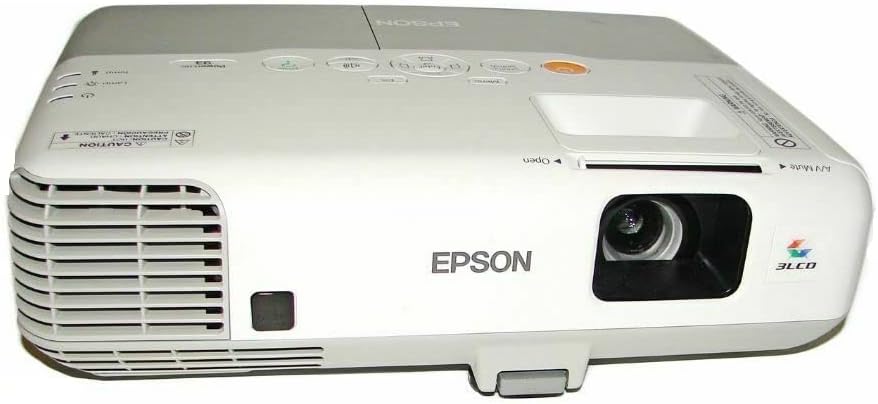
Irudia: Aurrealdea view of the Epson PowerLite 93 Plus projector, showing the lens, ventilation grilles, and front adjustable foot.
Goiko kontrol-panela:
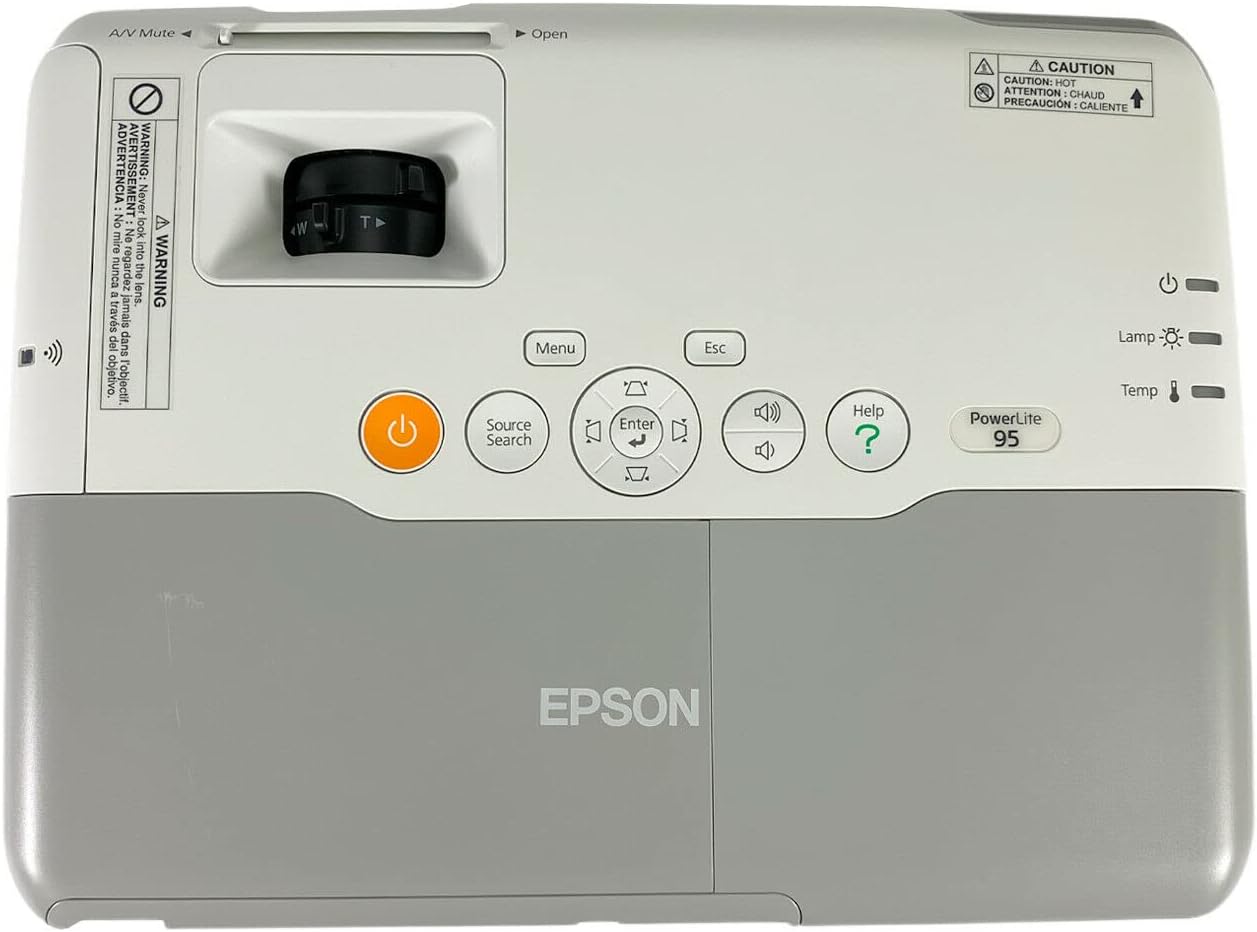
Image: Close-up of the top control panel, featuring power button, menu navigation, source search, volume controls, and indicator lights for lamp eta tenperatura.
Rear Connection Panel:

Irudia: Atzealdea view of the projector displaying various input and output ports, including HDMI, VGA (Computer1, Computer2, Monitor Out), S-Video, Composite Video, Audio In/Out, USB (Type A, Type B), LAN (RJ-45), and RS-232C.
Behean View:
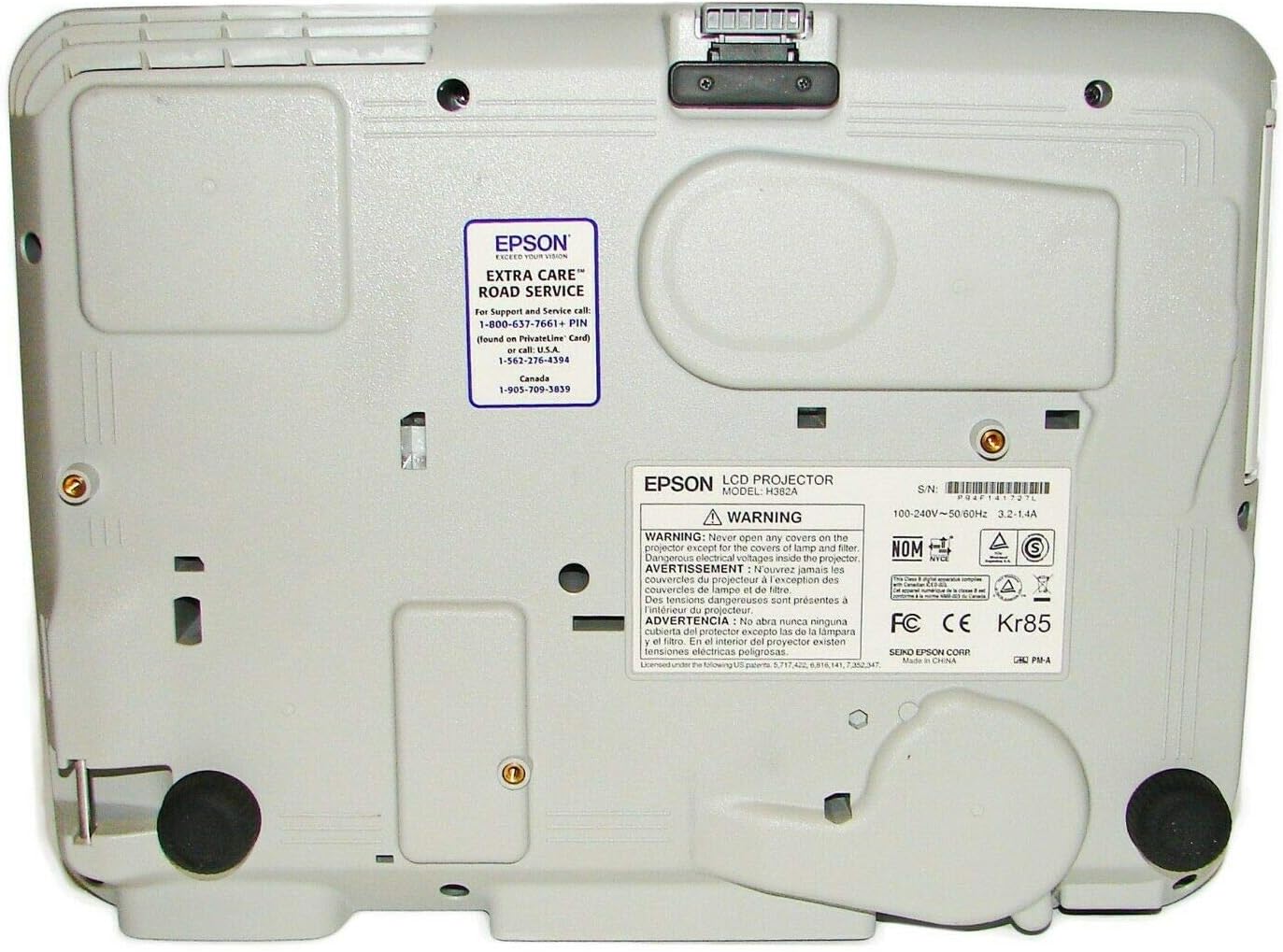
Irudia: Behealdea view of the projector, showing mounting points, adjustable feet, and product information labels including serial number and electrical ratings.
4. Konfigurazioa
4.1 Desontziratzea eta kokatzea
Carefully remove the projector from its packaging. Place the projector on a stable, flat surface. Ensure adequate ventilation around the unit.
4.2 Energia-iturri batera konektatzea
- Konektatu emandako elikatze-kablea proiektorearen korronte alternoko sarrerara.
- Entxufatu korronte-kablearen beste muturra lurreko hartune elektriko batean.
4.3 Sarrerako gailuak konektatzea
The projector supports various input sources. Refer to the rear connection panel image in Section 3.
- HDMI: Definizio handiko bideo eta audio digitalarentzat.
- Ordenagailua (VGA): Connect your computer using a VGA cable to either Computer1 or Computer2 ports.
- Video (Composite/S-Video): Definizio estandarreko bideo iturrietarako.
- USBa: For displaying content from USB devices or for USB display functionality.
- LAN (RJ-45): Sarearen kontrol eta monitorizaziorako.
4.4 Irudia doitzea
- Fokatzeko eraztuna: Rotate the focus ring around the lens to sharpen the image.
- Zoom palanka: Adjust the zoom lever to change the image size.
- Oin erregulagarriak: Use the adjustable feet on the bottom of the projector to tilt the image vertically and correct keystone distortion.
5. Proiektorearen funtzionamendua
5.1 Piztu/Itzaltzea
- Pizteko, sakatu Boterea kontrol panelean edo urrutiko agintean dagoen botoia.
- Itzatzeko, sakatu Boterea button again. A confirmation message may appear; press Power again to confirm shutdown.
5.2 Sarrera iturri bat hautatzea
Sakatu Iturriaren bilaketa button on the control panel or remote control to cycle through available input sources (HDMI, Computer1, Computer2, Video, S-Video, USB).
5.3 Bolumena doitzea
Erabili Bolumena igo eta Bolumena jaitsi buttons on the control panel or remote control to adjust the audio output.
5.4 Using the Menu System
Sakatu Menua botoia proiektorearen pantailan bistaratzeko (OSD) menura sartzeko. Erabili gezi-botoiak nabigatzeko eta Sartu botoia aukerak hautatzeko. Sakatu Esc menu batetik irteteko edo aurreko pantailara itzultzeko.
6. Mantentzea
6.1 Aire-iragazkia garbitzea
Regularly clean the air filter to ensure proper ventilation and prevent overheating.
- Itzali proiektorea eta deskonektatu korronte-kablea.
- Locate the air filter cover (typically on the side or bottom).
- Remove the cover and carefully pull out the air filter.
- Erabili xurgagailu txiki bat edo eskuila leun bat iragazkiko hautsa kentzeko. Ez garbitu iragazkia urarekin.
- Jarri berriro iragazki garbia eta jarri estalkia berriro.
6.2 Replacing the Lamp
Lamp bizitza mugatua du. Noiz lamp adierazle-argia laranja bihurtzen bada edo irudia iluntzen bada, l ordezkatzeko ordua daamp. Always use a genuine Epson replacement lamp (ELPLP60).
- Turn off the projector and unplug the power cord. Allow the projector to cool down for at least an hour.
- Kokatu lamp cover (refer to the warning label image in Section 2 for typical location).
- Askatu lamp estali eta kontu handiz kendu.
- Loosen the screws holding the lamp module in place.
- Kontu handiz atera l zaharra.amp modulua. OHARRA: Lamp may be hot and can shatter if mishandled.
- Sartu l berriaamp modulua, behar bezala kokatuta dagoela ziurtatuz.
- Estu lamp module screws and replace the lamp estalkia.
- Konektatu kablea eta piztu proiektorea. Berrezarri lamp timer through the projector's menu system.

Irudia: Albokoa view of the projector, indicating the location of the lamp access panel for maintenance.
7. Arazoak
| Arazoa | Kausa posiblea | Irtenbidea |
|---|---|---|
| Ez da irudirik proiektatuta | Power cord disconnected; Incorrect input source selected; Lens cap on. | Check power connection; Press Source Search button; Remove lens cap. |
| Irudia lausoa da | Lentea fokutik kanpo; Proiektorea pantailatik gertuegi/urrunegi. | Fokatze-eraztuna doitzea; proiektorearen distantzia edo zooma doitzea. |
| Image has a yellow tint | Lamp nearing end of life or faulty. | Demagun l ordezkatzeaamp. |
| Audiorik ez | Bolumena baxuegia; Audio kablea ez dago konektatuta; Isilarazita. | Increase volume; Ensure audio cable is connected (if not using HDMI); Check mute setting. |
| Proiektorea gehiegi berotu eta itzali egiten da | Blocked air vents; Dirty air filter. | Ensure clear airflow around projector; Clean or replace air filter. |
8. Zehaztapenak
- Eredua: POWERLITE 93 PLUS
- Bistaratzeko teknologia: 3LCD
- Distira: 2600 Lumens (Color and White Light Output)
- Berezko ebazpena: XGA (1024x768)
- Konektibitatea: DisplayPort, HDMI, USB video, VGA (D-sub 15-pin x 2), S-Video, Composite Video, Audio In (RCA x 2, Stereo Mini x 2), Audio Out (Stereo Mini), LAN (RJ-45), RS-232C
- Bozgorailu integratua: 16W
- Lamp Mota: ELPLP60
- Produktuaren neurriak: 19 x 7 x 14 hazbete
- Elementuaren pisua: 7 kilo
- Fabrikatzailea: Epson
- Lehen eskuragarri dagoen data: 2ko apirilaren 2012a
9. Bermea eta Laguntza
Bezeroarentzako laguntza:
For technical assistance, troubleshooting, or service inquiries, please contact Epson Customer Support.
- Epson Extra Care Road Service: For Support and Service call 1-800-637-7661.
- Webgunea: Bisitatu Epson ofiziala website for drivers, FAQs, and additional support resources.
Bermearen informazioa:
This product is covered by Epson's standard limited warranty. Please refer to the warranty card included with your product or visit the Epson website for full terms and conditions. Optional protection plans may be available for extended coverage.
- 2 Urteko Babes Plana (Aukerakoa)
- 3 Urteko Babes Plana (Aukerakoa)
Erlazionatutako dokumentuak - POWERLITE 93 PLUS
 |
Epson proiektoreen laguntza buletinak: konexioa, software eguneraketak eta arazoak konpontzea Arakatu Epson produktuen laguntza buletinak, proiektoreen konexio arazoetarako irtenbideak, EMP NS Connection eta EMP Monitor-erako software eguneraketak, bateragarritasun informazioa eta Epson PowerLite eta Pro serieko hainbat proiektoreren arazoak konpontzeko gidak zehaztuz. |
 |
Epson PowerLite 107/108/109W/970/980W/990U Erabiltzailearen gida Epson PowerLite proiektoreen erabiltzailearen gida osoa, konfigurazioa, funtzionamendua, sareko konexioa, mantentze-lanak, arazoak konpontzea eta zehaztapen teknikoak biltzen dituena. Hainbat gailu konektatzeko, ezarpenak kudeatzeko eta ohiko arazoak konpontzeko argibide zehatzak ematen ditu. |
 |
Epson proiektorearen segurtasuna eta erabiltzaileentzako informazioa Dokumentu honek Epson proiektoreen segurtasun-argibide garrantzitsuak, erabilera-jarraibideak eta zehaztapen teknikoak eskaintzen ditu, modeloaren neurriak eta bideo-formatu bateragarriak barne. Birziklatzeari, manipulatzeari eta lege-informazioari buruzko ohar garrantzitsuak biltzen ditu. |
 |
Epson PowerLite 570/575W/580/585W Erabiltzailearen gida Epson PowerLite 570, 575W, 580 eta 585W proiektoreen erabiltzailearen gida osoa. Ikasi zure Epson proiektorea nola konfiguratu, konektatu, erabili, arazoak konpontzen eta mantendu eskuliburu zehatz honekin, funtzioak, konexioa, sarearen konfigurazioa eta zehaztapen teknikoak azaltzen dituena. |
 |
Epson EX9270, PowerLite FH54+, 1290, 994F Multimedia Proiektorearen Erabiltzailearen Gida Epson EX9270, PowerLite FH54+, PowerLite 1290 eta PowerLite 994F multimedia proiektoreen erabiltzailearen gida. Konfigurazioa, funtzioak, konexioak, sareko proiekzioa, mantentze-lanak eta arazoak konpontzea jorratzen ditu. |
 |
Epson EMP-TW200H Projector: Widescreen Home Cinema Experience Explore the Epson EMP-TW200H projector, designed for an immersive widescreen home cinema experience with 16x9 W-XGA resolution, advanced ColourRealityII™ technology, and a bright 1500 ANSI Lumens output. Features flexible lens shift, powered zoom, and quiet operation. |
Ask a question about this manual
Ask about setup, troubleshooting, compatibility, parts, safety, or missing instructions. Manuals+ will review the question and use this page’s manual context to help answer it.