
1. Sarrera
Eskerrik asko erosketagatik.asing the Medeli M30 61-Key Professional Keyboard. This instrument is designed to provide a rich musical experience with its touch-sensitive keys, extensive voice library, and versatile accompaniment styles. This manual will guide you through the setup, operation, and maintenance of your new keyboard.
Paketearen edukia
- Medeli M30 61-Key Professional Keyboard
- Elikatze-moldagailua
- Musika Atsedenaldia
- Erabiltzailearen eskuliburua (dokumentu hau)
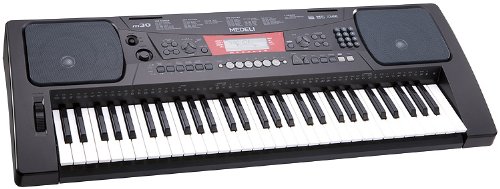
Figure 1: Medeli M30 61-Key Professional Keyboard. This image shows the keyboard from a front-angle view, highlighting its 61 keys, control panel, and display.
2. Segurtasun-argibideak
- Elikatze-iturria: Erabili zehaztutako energia-egokitzailea soilik. Ziurtatu bolumenatage zure tokiko elikadura hornidura bat dator.
- Ura eta hezetasuna: Ez jarri teklatua uraren edo hezetasunaren eraginpean. Saihestu likidoak tresnaren ondoan jartzea.
- Aireztapena: Do not block ventilation openings. Ensure adequate airflow around the keyboard.
- Bero iturriak: Keep the keyboard away from heat sources such as radiators, heat registers, stoves, or other apparatus (including ampberoa sortzen duten argitzaileak).
- Garbiketa: Oihal lehor batekin bakarrik garbitu. Ez erabili garbitzaile likidorik edo aerosolik.
- Zerbitzua: Ez saiatu produktu hau zuk zeuk ematen. Bidali zerbitzu guztiak zerbitzu kualifikatuko langileengana.
3. Konfigurazioa
3.1 Paketatzea
Kontu handiz atera osagai guztiak ontzitik. Gorde ontzia etorkizunean garraiatzeko edo biltegiratzeko.
3.2 Energia-konexioa
- Ensure the keyboard's power switch is in the "OFF" position.
- Connect the power adapter to the DC IN jack on the rear panel of the keyboard.
- Entxufatu korronte-egokitzailea korronte alternoko entxufe estandar batera.
- Turn the power switch to the "ON" position to power on the keyboard.
3.3 Music Rest Installation
Insert the music rest into the designated slots on the top panel of the keyboard. Ensure it is securely seated.
4. Funtzionamendu-argibideak
4.1 Oinarrizko erreprodukzioa
- Piztu: Press the [POWER] button to turn on the keyboard.
- Bolumenaren doikuntza: Use the [MASTER VOLUME] knob to adjust the overall sound level.
- Teklak jotzen: The M30 features 61 touch-sensitive keys. The harder you press, the louder the sound.
4.2 Ahotsak hautatzea
The M30 offers 359 different voices (instrument sounds).
- Sakatu [VOICE] botoia.
- Use the numeric keypad or the [+] / [-] buttons to select a voice number.
- The selected voice name will appear on the display.
4.3 Selecting Styles
The keyboard includes 150 accompaniment styles.
- Sakatu [ESTILO] botoia.
- Use the numeric keypad or the [+] / [-] buttons to select a style number.
- Press [START/STOP] to begin the accompaniment.
- Adjust the style volume using the [ACCOMPANIMENT VOLUME] button (if available, or general volume).
4.4 Playing Songs
The M30 has 100 built-in songs and 2 demo songs.
- Sakatu [SONG] botoia.
- Use the numeric keypad or the [+] / [-] buttons to select a song number.
- Press [PLAY/PAUSE] to start or pause the song.
- Press [STOP] to stop the song.
5. Konektibitatea
5.1 USB konexioa
The Medeli M30 features a USB port for connecting to a computer. This allows for MIDI data transfer, enabling the keyboard to be used as a MIDI controller or to connect with music software.
- Connect a standard USB cable (Type B to Type A, not included) from the keyboard's USB port to your computer's USB port.
- Your computer should automatically recognize the keyboard as a MIDI device.
- Refer to your music software's documentation for instructions on setting up MIDI input devices.
6. Mantentzea
6.1 Garbiketa
- Wipe the keyboard's surface with a soft, dry cloth.
- Zikinkeria egoskorrerako, apur bat lehortuampGarbitu oihal bat urarekin eta detergente leun batekin, eta gero lehortu berehala.
- Ez erabili garbitzaile urratzailerik, argizaririk edo disolbatzailerik.
6.2 Biltegiratzea
- Denbora luzez erabiltzen ez duzunean, deskonektatu korronte-egokitzailea.
- Gorde teklatua leku fresko eta lehor batean, eguzki-argitik eta muturreko tenperaturetatik babestuta.
- Consider using a dust cover to protect the keys and control panel.
7. Arazoak
| Arazoa | Kausa posiblea | Irtenbidea |
|---|---|---|
| Soinurik ez | Bolumena baxuegia edo isilarazita dago. | Increase the [MASTER VOLUME] knob. |
| Teklatua ez da pizten | Energia-egokitzailea ez dago konektatuta edo akastuna. | Ensure power adapter is securely connected and plugged into a working outlet. Check power switch position. |
| Giltzak ez du erantzuten | Keyboard may be in a specific mode (e.g., demo mode). | Try powering off and on again. Refer to the operating section for specific mode exits. |
8. Zehaztapenak
| Ezaugarri | Xehetasuna |
|---|---|
| Giltzak | 61, Touch-Sensitive |
| Ahotsak | 359 |
| Estiloak | 150 |
| Abestiak | 100 (plus 2 Demo Songs) |
| Konektibitatea | USBa (MIDI) |
| Neurriak (L x W x H) | 93.98 x 35.56 x 15.24 cm |
| Pisua | 6.8 kg |
| Modelo zenbakia | M30 |
| UPC/GTIN | 857285003529 |
9. Bermea eta Laguntza
For warranty information and technical support, please refer to the warranty card included with your product or visit the official Medeli webgunea. Gorde erosketaren egiaztagiria berme-erreklamazioetarako.
Fabrikatzailea: Medeli
Webgunea: www.medeli.com (Oharra: Hau leku-markatzailea da URL, please refer to actual product documentation for correct support contact.)