
Sarrera
Thank you for choosing the Medeli MD600 61-Key Professional Keyboard. This manual provides essential information for the safe and efficient use of your instrument. Please read it thoroughly before operating the keyboard and retain it for future reference.
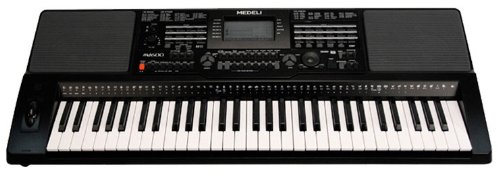
Image: The Medeli MD600 61-Key Professional Keyboard, showcasinbere diseinu trinkoa eta teklaren banaketa esker.
Segurtasun informazio garrantzitsua
- Elikatze-iturria: Erabili zehaztutako energia-egokitzailea soilik. Ziurtatu bolumenatage zure tokiko elikadura hornidura bat dator.
- Hezetasuna: Do not expose the keyboard to rain, moisture, or excessive humidity. Avoid placing liquid containers on the instrument.
- Aireztapena: Ensure adequate ventilation around the keyboard. Do not block ventilation openings.
- Lekua: Place the keyboard on a stable, level surface. Avoid extreme temperatures, direct sunlight, or heat sources.
- Garbiketa: Deskonektatu korrontea garbitu aurretik. Erabili zapi leun eta lehor bat. Ez erabili garbitzaile likidorik edo aerosolik.
- Zerbitzua: Do not attempt to service the instrument yourself. Refer all servicing to qualified personnel.
Paketearen edukia
Mesedez, egiaztatu elementu guztiak paketean daudela:
- Medeli MD600 61-Key Professional Keyboard
- Elikatze-moldagailua
- Musika Atsedenaldia
- Erabiltzailearen eskuliburua (dokumentu hau)
Konfigurazioa
1. Energia-konexioa
- Ziurtatu teklatuaren pizteko etengailua posizioan dagoela OFF posizioa.
- Connect the power adapter cable to the DC IN jack on the rear panel of the keyboard.
- Plug the power adapter into a standard AC wall outlet.
2. Musika-atsedenaren instalazioa
Insert the tabs of the music rest into the slots located on the top panel of the keyboard, behind the control panel.
3. Periferikoak konektatzea
- Entzungailuak: Connect standard stereo headphones to the TELEFONOAK jack for private practice. This will mute the internal speakers.
- USB konexioa: The MD600 features USB connectivity. Connect a USB cable (not included) from the keyboard's USB port to your computer for MIDI data transfer. Refer to your computer's operating system and music software documentation for specific setup instructions.
Funtzionamendu-argibideak
1. Piztu/Itzali
- Pizteko: Sakatu tekla BOTEREA button located on the control panel. The display will illuminate.
- Itzaltzeko: Sakatu tekla BOTEREA botoia berriro.
2. Bolumenaren kontrola
Doitu irteerako bolumen orokorra erabiliz MASTER BOLUMENA knob or buttons on the control panel. Start with a low volume and increase gradually.
3. Selecting Voices (Tones)
The MD600 offers 559 different voices. To select a voice:
- Sakatu AHOTSA botoia.
- Erabili zenbakizko teklatua edo +/- buttons to enter the desired voice number. Voice categories and numbers are listed in the Voice List appendix (not included in this manual, refer to full product documentation).
- Sakatu SARTU hautapena berresteko.
4. Selecting Styles (Accompaniment)
The MD600 includes 203 accompaniment styles. To select a style:
- Sakatu ESTILOA botoia.
- Erabili zenbakizko teklatua edo +/- buttons to enter the desired style number. Style categories and numbers are listed in the Style List appendix.
- Sakatu SARTU hautapena berresteko.
- Sakatu HASI/GELDITU to begin or end the accompaniment.
5. Touch Response
The keyboard features touch-sensitive keys, meaning the volume and timbre of the sound change based on how hard you strike the keys. This allows for expressive playing. The touch response sensitivity can often be adjusted in the keyboard's settings menu (refer to the full manual for detailed instructions).
Mantentzea
Garbiketa
To clean the keyboard, first disconnect the power adapter. Use a soft, dry, lint-free cloth to wipe the surfaces. Do not use abrasive cleaners, waxes, or solvents, as these can damage the finish. For stubborn dirt, a slightly damp cloth followed by a dry cloth may be used, ensuring no moisture enters any openings.
Biltegiratzea
When not in use for extended periods, store the keyboard in a cool, dry place away from direct sunlight and extreme temperatures. If possible, cover the keyboard with a dust cover to prevent dust accumulation.
Arazoak konpontzea
| Arazoa | Kausa posiblea | Irtenbidea |
|---|---|---|
| Ez da soinurik ateratzen bozgorailuetatik/entzungailuetatik. |
|
|
| Keys do not respond or sound incorrect. |
|
|
| Accompaniment not starting. |
|
|
If the problem persists after trying these solutions, please contact Medeli customer support or refer to the full product manual for more detailed troubleshooting.
Zehaztapenak
- Eredua: Medeli MD600
- Gakoak: 61, Touch Response
- Ahotsak: 559
- Estiloak: 203
- Konektibitatea: USBa
- Neurriak (L x W x H): Gutxi gorabehera 37 x 14 x 6 hazbete (94 x 35.5 x 15.2 cm)
- Pisua: Gutxi gorabehera 15 libera (6.8 kg)
- Elikatze-iturria: DC 12V (via included AC adapter)
- Fabrikatzailea: Medeli
Specifications are subject to change without notice for product improvement.
Bermea eta Laguntza
The Medeli MD600 61-Key Professional Keyboard comes with a One year warranty from date of purchase against manufacturer defects. Mesedez, gorde zure erosketa-froga berme-erreklamazioetarako.
For technical support, service, or further inquiries, please contact your authorized Medeli dealer or visit the official Medeli webharremanetarako informazioa lortzeko gunea.