
Sarrera
This manual provides detailed instructions for the operation and maintenance of your TIMEX Expedition Analog-Digital Watch, model MF46. Please read this manual thoroughly to ensure proper use and to maximize the lifespan of your timepiece.
Watch Overview
The TIMEX Expedition Analog-Digital Watch MF46 combines traditional analog timekeeping with digital functionalities. It features a durable design suitable for various activities, including water resistance up to 50 meters.
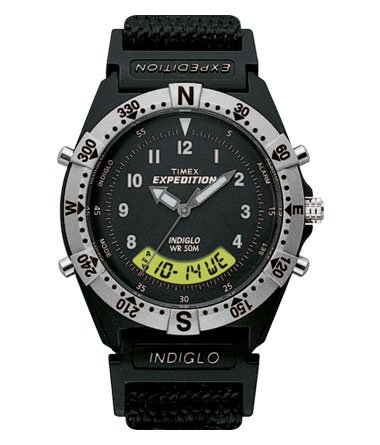
1. irudia: Aurrealdea view of the TIMEX Expedition Analog-Digital Watch MF46. This image displays the TIMEX Expedition Analog-Digital Watch MF46. It features a black dial with white hour markers and hands, a digital display showing date and day, and a silver-toned bezel with compass markings (N, E, S, W) and degree indicators. The watch has multiple pushers on the sides and a crown for adjustments. The strap is black fabric.
Konfigurazioa
1. Ordu analogikoa ezartzea
- Pull the crown (located on the right side of the watch case) out to the first position.
- Biratu koroa erlojuaren orratzen noranzkoan edo kontrako noranzkoan orduko eta minutuko orratzak nahi duzun orduan jartzeko.
- Push the crown back into its original position to start the analog timekeeping.
2. Ordu eta data digitala ezartzea
The digital display can be adjusted using the pushers located on the sides of the watch case. Refer to the watch diagram (Figure 1) for pusher locations.
- Press the "MODE" pusher (typically on the bottom left) repeatedly to cycle through different digital display modes (e.g., Time, Date, Alarm, Stopwatch).
- When in the desired setting mode (e.g., Time/Date), press and hold the "SET" pusher (typically on the bottom right) until the digits begin to flash.
- Use the "ADJUST" or "START/STOP" pushers (typically top left/right) to increment or decrement the flashing digits.
- Press the "MODE" pusher to move to the next setting field (e.g., hours, minutes, month, day, year).
- Once all settings are complete, press the "SET" pusher again to exit the setting mode.
Funtzionamendu-argibideak
1. Pantaila digitalen moduak
Press the "MODE" pusher to cycle through the following functions:
- Denbora modua: Displays current digital time (hours, minutes, seconds) and often the day of the week.
- Data modua: Displays the current month, day, and year.
- Alarma modua: Allows setting and activating an audible alarm.
- Kronometroaren modua: Functions as a timer for measuring elapsed time.
2. INDIGLO Night-Light
To illuminate the watch face in low-light conditions, press the INDIGLO pusher (typically the top right pusher or the crown itself, depending on the model). The entire dial will glow for a few seconds.
3. Urarekiko erresistentzia
This watch is water resistant to 50 meters (164 feet). This rating means it is suitable for short periods of recreational swimming, but not for diving or snorkeling. Do not operate pushers or the crown while the watch is wet or submerged, as this can compromise the water resistance seal.
Mantentzea
1. Garbiketa
Garbitu zure erlojua aldizka zapi leun eta lehor batekinamp cloth. For the fabric strap, a mild soap solution can be used, followed by thorough rinsing and air drying. Avoid harsh chemicals or abrasive materials.
2. Bateria ordezkatzea
The watch is powered by a quartz movement, which requires a battery. When the watch stops or the INDIGLO light dims significantly, the battery may need replacement. It is recommended to have the battery replaced by a qualified watch technician to ensure proper sealing and maintain water resistance.
3. Biltegiratzea
When not in use, store your watch in a cool, dry place away from direct sunlight and extreme temperatures. Avoid exposing the watch to strong magnetic fields.
Arazoak konpontzea
- Ikusi korrika ez egitea: Check if the crown is pushed in completely. If the watch still does not run, the battery may need replacement.
- Pantaila digitala hutsik edo ahul: This typically indicates a low battery.
- Barruko urari buruzko zaintza: If moisture appears inside the watch, have it inspected by a professional immediately to prevent damage.
- Ordu/data okerra: Refer to the "Setting Analog Time" and "Setting Digital Time and Date" sections for adjustment procedures.
Zehaztapenak
| Modelo zenbakia | MF46 |
| Markaren kolorea | Grisa |
| Kasu forma | Biribila |
| Bandaren kolorea | Beltza |
| Banda Materiala | Ehuna |
| Mugimendu Mota | Kuartzoa |
| Bistaratzeko mota | Analog-Digital |
| Urarekiko erresistentzia sakonera | 50 metro (164 oin) |
| Kasu Materiala | Plastikoa |
| Elementuaren pisua | 140 g |
Bermea eta Laguntza
1. Bermearen informazioa
This TIMEX Expedition Analog-Digital Watch MF46 comes with a 1 urteko fabrikatzailearen bermea. This warranty covers manufacturing defects under normal use. It does not cover damage resulting from improper handling, accidents, unauthorized repairs, or normal wear and tear.
2. Bezeroarentzako arreta
For warranty claims, service, or technical assistance, please contact TIMEX customer support. Refer to the official TIMEX webzure eskualdeko harremanetarako datuak lortzeko, jo ezazu zure webgunera edo erosketa-dokumentura.