Produktua amaituview
The Targus Presenter AMP09AP is a multimedia presentation remote designed for ease of use during presentations. It features a laser pointer for highlighting content, backlit buttons for low-light environments, and an ergonomic design for comfortable handling. This remote also offers cursor control for remote program access and volume adjustment for media. Its wireless technology provides a range of up to 50 feet, and the USB receiver conveniently stores within the presenter.
Konfigurazio Gida
1. Deskargatzea
Carefully remove the Targus Presenter AMP09AP and its components from the packaging. The box should contain:
- One Targus Presentation Remote
- One USB Receiver
2. Bateriaren instalazioa
The Targus Presenter AMP09AP requires batteries (not included). Use alkaline batteries for optimal performance.
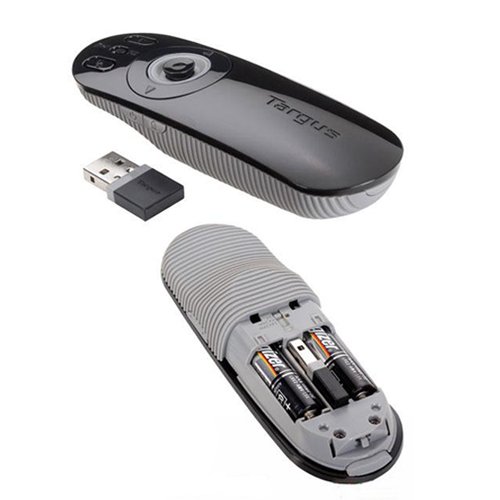
- Bilatu bateriaren konpartimentua aurkezlearen atzealdean.
- Ireki bateriaren konpartimenduaren estalkia.
- Sartu beharrezko bateriak, polaritate zuzena (+/-) ziurtatuz.
- Itxi bateriaren konpartimenduaren estalkia ondo.
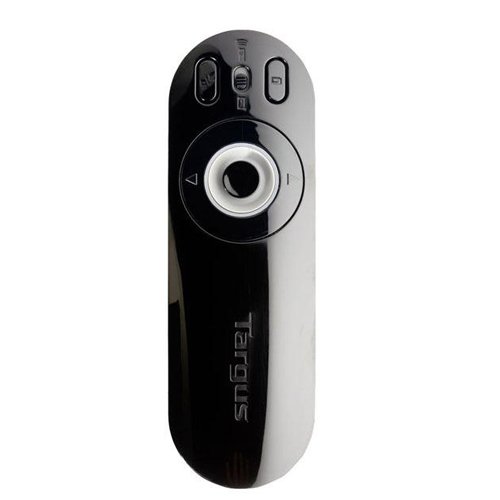
Image: The Targus Presenter AMP09AP, its USB receiver, and the open battery compartment revealing two AAA batteries.
3. USB hargailua konektatzea
- Remove the USB receiver from its storage slot within the presenter.
- Konektatu USB hargailua zure ordenagailuko USB ataka erabilgarri batean.
- Ordenagailuak automatikoki detektatu eta instalatu beharko lituzke beharrezko kontrolatzaileak.
The remote is now ready for use.
Funtzionamendu-argibideak
Aurkezpen modua
The presenter's simplistic layout allows for easy navigation during presentations.
Irudia: Goian view of the Targus Presenter AMP09AP, highlighting the laser pointer button, slide navigation buttons, and the mode switch.
- Laser erakuslea: Press and hold the dedicated laser button to activate the laser pointer for highlighting content.
- Next Slide: Press the forward arrow button to advance to the next slide.
- Previous Slide: Press the backward arrow button to return to the previous slide.
- Atzeko argiztatutako botoiak: Buttons are backlit for visibility in dimly lit rooms.
Cursor Control Mode
The presenter features cursor control for remote access to programs and media functions.
- Activating Cursor Control: Use the mode switch (located at the top right of the remote) to toggle between presentation and cursor control modes.
- Moving Cursor: Use the central circular button (joystick/directional pad) to move the mouse cursor on the screen.
- Klik eginez: Press the center of the circular button to perform a left-click action.
- Bolumen kontrola: Adjust the volume for music and videos remotely using the designated volume controls (if available on your specific model).
Wireless Range
The wireless technology allows operation up to 50 feet (approximately 15 meters) from the computer, providing flexibility during presentations.
Mantentzea
- Garbiketa: Wipe the presenter with a soft, dry cloth. Avoid using harsh chemicals or abrasive cleaners.
- Bateria ordezkatzea: Replace batteries when the indicator light (if present) signals low power, or when performance degrades. Ensure correct polarity during replacement.
- Biltegiratzea: When not in use, store the USB receiver inside the presenter's dedicated slot to prevent loss. Store the presenter in a cool, dry place.
Arazoak konpontzea
| Arazoa | Kausa posiblea | Irtenbidea |
|---|---|---|
| Aurkezleak ez du erantzuten | Bateria gutxi edo agortuta | Ordeztu bateriak bateria alkalino berriekin. |
| Aurkezleak ez du erantzuten | USB hargailua ez dago behar bezala konektatuta | Ziurtatu USB hargailua ondo konektatuta dagoela ordenagailuko USB ataka funtzional batean. Saiatu beste USB ataka batekin. |
| Aurkezleak ez du erantzuten | Eremutik kanpo | Move closer to the computer (within 50 feet / 15 meters). |
| Laser erakusleak ez du funtzionatzen | Bateria baxua | Ordeztu bateriak. |
| Cursor control erratic or not working | Interference or mode not activated | Ensure no obstructions between presenter and receiver. Check if cursor control mode is active using the mode switch. |
Zehaztapenak
| Ezaugarri | Xehetasuna |
|---|---|
| Marka | Targus |
| Modelo zenbakia | AMP09AP-51 |
| Kolorea | Beltza eta Grisa |
| Neurriak (LxWxH) | 12.1 x 3.8 x 2.5 cm |
| Elementuaren pisua | 140 g |
| Konektibitate Teknologia | Haririk gabekoa |
| Wireless Range | Gehienez 50 oin (gutxi gorabehera 15 metro) |
| Bateria mota | Alkalinoa (ez dago barne) |
| Dakarten osagaiak | Presentation Remote, USB Receiver |
| Ezaugarri bereziak | Ergonomic design, Laser pointer, Cursor control, Backlit buttons |
Bermea eta Laguntza
For warranty information and technical support, please refer to the documentation provided with your purchase or visit the official Targus webgunea. Gorde erosketaren egiaztagiria bermearen erreklamazioetarako.