
Sarrera
Eskerrik asko erosketagatik.asing the RCA 32LB45RQ 32-Inch Full 1080p 60Hz LCD HDTV. This manual provides essential information for the safe and efficient operation of your television. Please read it thoroughly before using the product and retain it for future reference.
Segurtasun Informazioa
Kalteak saihesteko eta funtzionamendu segurua bermatzeko, jarraitu segurtasun neurri hauek:
- Energia iturria: Konektatu telebista zehaztutako elikatze-iturrira soilik.
- Aireztapena: Ziurtatu telebistaren inguruan aireztapen egokia dagoela. Ez blokeatu aireztapen-irekidurak.
- Likidoak: Keep the TV away from water and moisture. Do not place liquid-filled objects on the TV.
- Garbiketa: Deskonektatu telebista garbitu aurretik. Erabili zapi leun eta lehor bat. Saihestu garbitzaile likidoak.
- Lekua: Jarri telebista gainazal egonkor eta lau batean edo muntatu ondo horman.
- Zerbitzua: Ez saiatu telebista zeuk konpontzen. Konponketa guztiak langile kualifikatuei eskatu.
Kutxan dagoena
Egiaztatu osagai guztiak daudela:
- RCA 32LB45RQ 32-Inch LCD HDTV
- Zutik
- Urruneko Kontrola
- 2 AA bateria
- Elikatze kablea
- Erabiltzailearen eskuliburua (dokumentu hau)
Konfigurazioa
Standa eranstea
To attach the included stand, carefully place the TV screen-down on a soft, clean surface to prevent scratches. Align the stand with the mounting holes on the bottom of the TV and secure it using the provided screws. Ensure the stand is firmly attached before placing the TV upright.

Aurrealdea view of the RCA 32LB45RQ HDTV with its stand attached.
Horman Muntatzea
The RCA 32LB45RQ is wall mountable. A VESA-compatible wall mount kit (sold separately) is required. Refer to the wall mount kit's instructions for proper installation. Ensure the wall can support the weight of the TV and the mount.
Periferikoak konektatzea
Your TV offers various input ports for connecting external devices:
- HDMI: Connect Blu-ray players, game consoles, cable/satellite boxes, and other HD devices. The TV has 3 HDMI ports.
- USBa: Connect USB storage devices for media playback. The TV has 1 USB port.
- Osagaia (YPbPr): Connect older video devices using component video and stereo audio cables. The TV has 1 component input.
- VGA: Connect a computer. The TV has 1 VGA input.
- Antena/Kablea: Konektatu antena bat aireko emankizunetarako edo kable bidezko telebistarako konexiorako.

Atzekoa view of the RCA 32LB45RQ HDTV, highlighting the various input ports for external devices.
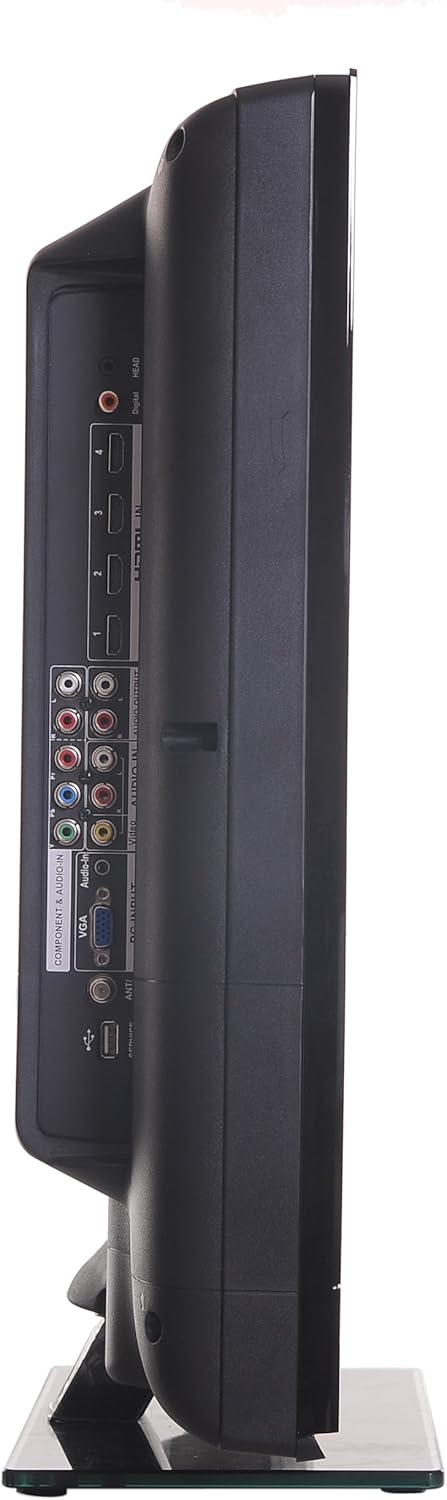
Aldea view of the RCA 32LB45RQ HDTV, showing additional input ports for convenient access.
Piztea eta hasierako konfigurazioa
After connecting all desired devices and the power cord, press the power button on the TV or remote control. Follow the on-screen prompts for initial setup, including language selection, time zone, and channel scanning for over-the-air or cable channels.
Funtzionamendua
Urruneko kontrola amaitu daview
The included remote control allows you to access all TV functions. Insert the two AA batteries (included) into the remote control, observing polarity.
Oinarrizko Funtzioak
- Potentzia: Sakatu telebista pizteko edo itzaltzeko.
- Bolumena igo/behera: Doitu audio-maila.
- Kanal gora/behera: Aldatu telebistako kateak.
- Ezkutatu: Silence the TV audio.
- Sarrera: Cycle through available input sources (HDMI 1, HDMI 2, Component, VGA, TV).
Menu Nabigazioa
Press the 'Menu' button on your remote to access the TV's settings. Use the arrow keys to navigate and 'OK' or 'Enter' to select options.
- Irudiaren ezarpenak: Doitu distira, kontrastea, kolorea, tonua, zorroztasuna eta hautatu irudi moduak (adibidez, Estandarra, Dinamikoa, Filma).
- Soinu ezarpenak: Adjust bass, treble, balance, and select sound modes (e.g., Standard, Music, Movie).
- Settings/Setup: Access general TV settings such as language, time, parental controls (V-Chip), and software updates.
Internet Zerbitzuak
The TV supports a built-in browser for basic internet access. Use the remote control to navigate web orrialdeak.
Mantentzea
Pantaila garbitzea
Garbitu pantaila astiro-astiro zapi leun eta pelusik gabeko batekin. Orba egoskorrak izanez gero, garbitu apur batampen the cloth with water or a specialized screen cleaner (ensure it is safe for LCD screens) and wipe gently. Do not spray liquid directly onto the screen.
Zaintza Orokorra
- Saihestu telebista eguzki-argiaren edo tenperatura altuen eraginpean jartzea.
- Ez jarri objektu astunak telebistaren gainean.
- Deskonektatu telebista tximista-ekaitzetan edo denbora luzez erabili gabe egongo denean.
Arazoak konpontzea
If you encounter issues with your TV, refer to the following table for common problems and solutions:
| Arazoa | Balizko Kausa / Irtenbidea |
|---|---|
| Botererik ez | Ensure the power cord is securely plugged into the TV and a working electrical outlet. Check the power indicator light. |
| Ez dago irudirik, baina soinua badago | Check the input source selection. Ensure the connected device is powered on and sending a signal. |
| Soinurik ez, baina irudia badago | Egiaztatu bolumen maila eta ziurtatu telebista ez dagoela isilarazita. Egiaztatu kanpoko gailuen audio kableen konexioak. |
| Irudiaren kalitate eskasa | Adjust picture settings (brightness, contrast, sharpness). Check antenna or cable connections. Ensure the input source is providing a high-quality signal. |
| Urruneko kontrola ez dabil | Egiaztatu eta aldatu bateriak. Ziurtatu ez dagoela oztoporik urrutiko agintearen eta telebistaren IR sentsorearen artean. |
Zehaztapenak
Detailed technical specifications for the RCA 32LB45RQ HDTV:
| Ezaugarri | Zehaztapena |
|---|---|
| Ereduaren izena | 32LB45RQ |
| Pantailaren tamaina | 32 hazbete |
| Bistaratzeko Teknologia | LCDa |
| Ebazpena | 1080p (1920 x 1080) |
| Freskatze tasa | 60Hz |
| Aspektu-erlazioa | 16:9 |
| Kontraste-erlazioa | 5000:1 |
| Erantzun Denbora | 8 milisegundo |
| Sintonizatzaile mota | ATSC, NTSC |
| HDMI portuak guztira | 3 |
| USB portuak guztira | 1 |
| Component Inputs | 1 |
| VGA sarrerak | 1 |
| Konektibitate Teknologia | HDMI, USB |
| Onartutako Interneteko zerbitzuak | Arakatzailea |
| Muntatze Mota | Hormako Muntaia |
| Kolorea | Beltza |
| Elementuaren pisua | 17.4 kilo |
| Dakarten osagaiak | Zutik, telebista |
| Gurasoen Kontrol Teknologia | V-Txipa |
| Eredu Urtea | 2017 |

Energy Guide label for the RCA 32LB45RQ HDTV, showing estimated yearly energy cost.
Bermea eta Laguntza
Bermearen informazioa
This RCA 32LB45RQ HDTV comes with a Limited 1 year parts and labor warranty. Please retain your proof of purchase for warranty claims. For specific terms and conditions, refer to the warranty card included with your product or contact RCA customer support.
Bezeroarentzako Arreta
For technical assistance, troubleshooting beyond this manual, or warranty service, please contact RCA customer support. Contact information can typically be found on the RCA official webgunean edo produktuaren ontzian.