
Sarrera
The Jabra Music Street2 Bluetooth Stereo Headset is designed to provide high-quality audio and hands-free communication. This manual provides essential information for the proper use, maintenance, and troubleshooting of your device. Please read it carefully before use.
Konfigurazioa
1. Entzungailua kargatzea
Before first use, fully charge the headset. Connect the micro-USB charging cable to the charging port on the headset and the other end to a USB power source.
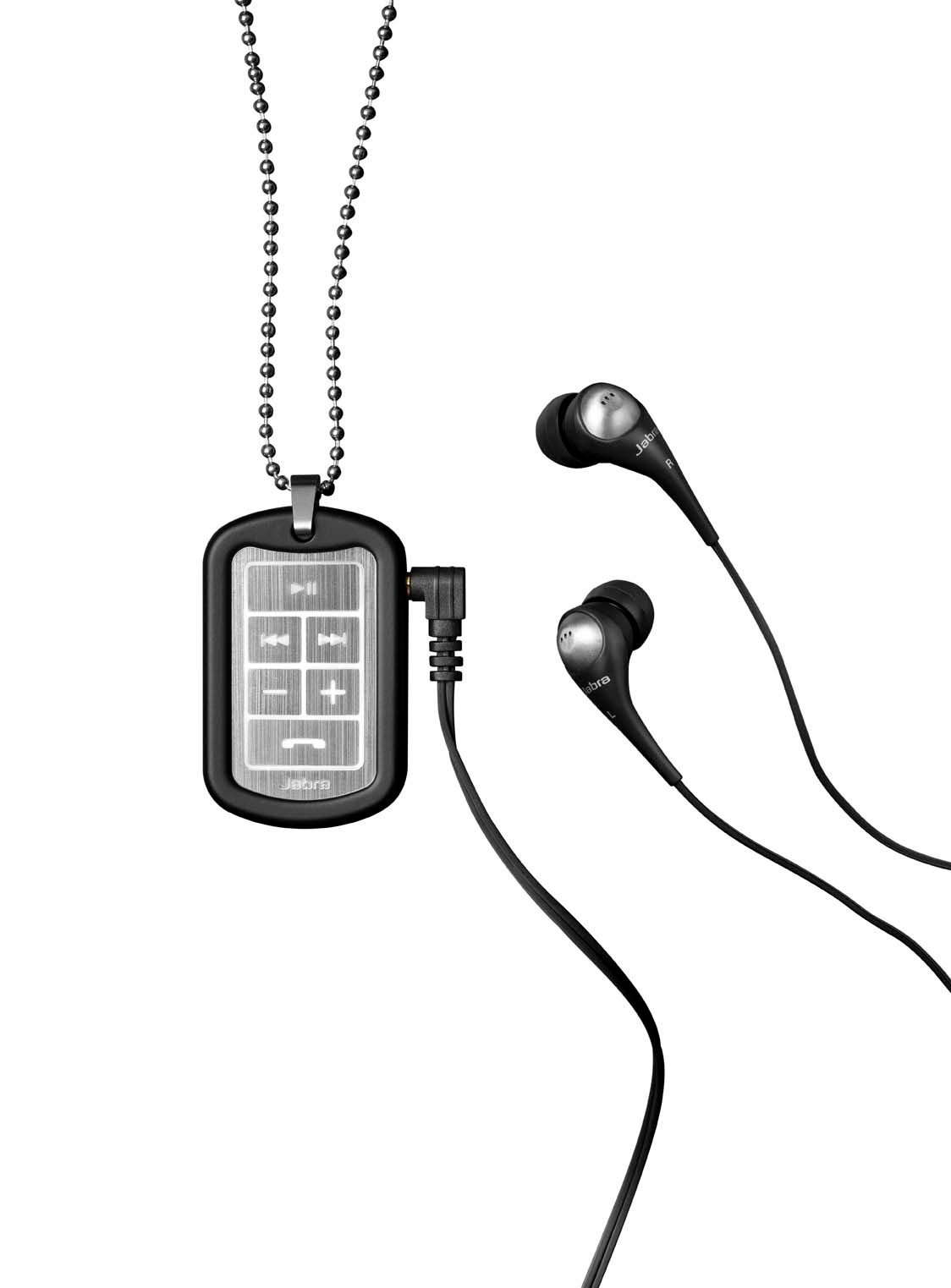
Image: The Jabra Music Street2 headset, highlighting the micro-USB charging port located on the side of the control unit.
- Karga oso batek normalean 2 ordu inguru behar ditu.
- LED adierazleak kargatze-egoera erakutsiko du (adibidez, gorria kargatzen ari bada, urdina guztiz kargatuta dagoenean).
2. Bluetooth Gailu batekin parekatzea
- Ziurtatu entzungailuak itzalita daudela.
- Press and hold the Multi-function button (usually the play/pause button) for approximately 5-7 seconds until the LED indicator flashes blue rapidly. This indicates pairing mode.
- Bluetooth gaitutako gailuan (smartphone-a, tableta, etab.), joan Bluetooth ezarpenetara eta gaitu Bluetooth.
- Bilatu available devices. "Jabra Street2" should appear in the list.
- Select "Jabra Street2" to connect. If prompted for a passcode, enter "0000" (four zeros).
- Behin parekatuta, LED adierazlea urdinez keinuka hasiko da poliki.
The headset can remember multiple paired devices but can only be connected to one at a time.
Funtzionamendu-argibideak
Piztu/Itzali
- Piztu: Sakatu eta eutsi funtzio anitzeko botoia LEDa urdin keinuka hasi arte.
- Itzali: Sakatu eta eutsi funtzio anitzeko botoia LEDa gorri keinuka hasi eta gero itzali arte.
Musika Kontrola
- Erreproduzitu/Pausatu: Sakatu funtzio anitzeko botoia behin.
- Hurrengo ibilbidea: Press the "Next Track" button (usually marked with a forward arrow).
- Aurreko pista: Press the "Previous Track" button (usually marked with a backward arrow).
- Bolumena igo: Sakatu "+" botoia.
- Bolumena jaitsi: Sakatu "-" botoia.
Deien Kudeaketa
- Erantzun deia: Sakatu funtzio anitzeko botoia behin.
- Amaitu deia: Sakatu funtzio anitzeko botoia behin dei batean zehar.
- Deia baztertu: Eduki sakatuta funtzio anitzeko botoia 2 segundoz.
- Berriz markatu azken zenbakia: Dei batean ez zaudenean, sakatu bi aldiz funtzio anitzeko botoia.
- Ahots bidezko markaketa: Press the Multi-function button once when not on a call (if supported by your phone).
The headset automatically switches between music and calls.
Mantentzea
- Keep the headset dry. Moisture can damage the electronic circuits.
- Saihestu muturreko tenperaturak. Tenperatura altuek gailu elektronikoen iraupena laburtu, bateriak kaltetu eta plastiko batzuk deformatu edo urtu ditzakete.
- Do not attempt to open the headset. Unauthorized modifications can damage the unit and void your warranty.
- Clean the headset with a soft, dry cloth. Do not use harsh chemicals or detergents.
- Gorde entzungailuak leku fresko eta lehor batean denbora luzez erabiltzen ez dituzunean.
Arazoak konpontzea
Botererik ez
- Ensure the headset is fully charged. Connect it to a power source and check the charging indicator.
Ezin da gailuarekin parekatu
- Make sure the headset is in pairing mode (LED flashing blue rapidly).
- Ensure Bluetooth is enabled on your device and it is within range (typically 10 meters or 33 feet).
- Try turning off and on both the headset and your Bluetooth device.
- If previously paired, try deleting "Jabra Street2" from your device's Bluetooth list and re-pairing.
Soinurik ez edo soinu kalitate eskasa
- Egiaztatu entzungailuen eta konektatutako gailuaren bolumen mailak.
- Ziurtatu entzungailuak behar bezala konektatuta daudela zure gailura.
- Hurbildu zure gailura interferentziak saihesteko.
- Ensure the ear buds are correctly inserted and fit snugly to block external noise.
Calls Not Switching Automatically
- Verify that the headset is the active audio device for calls on your phone's Bluetooth settings.
- Some phone models may require manual selection of the audio output during a call.
Zehaztapenak
| Ereduaren izena | Jabra Music Street2 |
| Bluetooth bertsioa | 3.0 + EDR |
| Wireless Range | Gehienez 10 metro (33 oin) |
| Hitzaldi Denbora | Gehienez 8 ordu |
| Egonean Denbora | 9.5 egun arte |
| Kargatzeko Denbora | 2 ordu gutxi gorabehera |
| Konektibitatea | Bluetooth, 3.5 mm Jack (for wired connection if applicable) |
| Ezaugarriak | Virtual surround sound, power bass, noise-blocking ear buds, automatic music/call switching |
Bermea eta laguntza
Jabra products are covered by a limited warranty. For specific warranty terms and conditions, please refer to the warranty card included with your product or visit the official Jabra webgunea.
For technical support, frequently asked questions, or to download the latest software/firmware updates, please visit the official Jabra support page:
You may also contact Jabra customer service directly for assistance.