
beyerdynamic 721360
Beyerdynamic Stegos TB Wireless Boundary Microphone User Manual
Eredua: 721360
Sarrera
This manual provides comprehensive instructions for the setup, operation, and maintenance of your Beyerdynamic Stegos TB Wireless Boundary Microphone. Please read this manual thoroughly before using the device to ensure optimal performance and longevity.
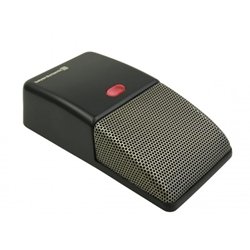
Image: Beyerdynamic Stegos TB Wireless Boundary Microphone. This image displays the compact, black wireless boundary microphone, designed for discreet placement on surfaces like conference tables.
Segurtasun-argibide garrantzitsuak
- Ez jarri gailua uraren edo gehiegizko hezetasunaren eraginpean.
- Saihestu muturreko tenperaturak.
- Ez saiatu gailua irekitzen edo aldatzen. Mantendu konponketa guztiak langile kualifikatuen esku.
- Erabili zehaztutako energia-iturriak eta osagarriak soilik.
- Mantendu haurren eskura.
Paketearen edukia
Egiaztatu elementu guztiak paketean daudela:
- Beyerdynamic Stegos TB Wireless Boundary Microphone
- USB kargatzeko kablea (Mikro USB)
- Erabiltzailearen eskuliburua (dokumentu hau)
Konfigurazioa
1. Mikrofonoa kargatzea
- Connect the Micro USB end of the charging cable to the microphone's charging port.
- Connect the standard USB end of the cable to a powered USB port (e.g., computer, USB wall adapter).
- The LED indicator on the microphone will show charging status.
- Guztiz kargatuta dagoenean, deskonektatu kargatzeko kablea.
2. Gailu batera konektatzea
The Stegos TB microphone connects wirelessly to compatible devices, typically personal computers, for video conferencing applications.
- Ziurtatu mikrofonoa kargatuta eta piztuta dagoela.
- Activate Bluetooth on your personal computer or compatible device.
- Put the microphone into pairing mode (refer to the device's specific button combination, usually holding a power/pairing button). The LED indicator will typically flash to indicate pairing mode.
- On your computer, search for available Bluetooth devices. Select "Beyerdynamic Stegos TB" from the list.
- Once paired, the LED indicator on the microphone will show a solid light, indicating a successful connection.
- In your computer's sound settings or video conferencing software, select the "Beyerdynamic Stegos TB" as the input audio device.
Funtzionamendu-argibideak
Piztu/Itzali
- To power on: Press and hold the power button for approximately 3 seconds. The LED indicator will illuminate.
- To power off: Press and hold the power button for approximately 3 seconds. The LED indicator will turn off.
Mutu funtzioa
The microphone features a mute function for privacy during calls.
- To mute: Press the mute button once. The LED indicator may change color or flash to indicate mute status.
- To unmute: Press the mute button again. The LED indicator will return to its normal operating state.
Placement for Optimal Performance
For best audio pickup, place the Stegos TB microphone on a flat surface in the center of the participants. Its omnidirectional polar pattern ensures 360-degree sound capture.
Mantentzea
Garbiketa
- Wipe the microphone's exterior with a soft, dry, or slightly damp oihal.
- Ez erabili produktu kimiko gogorrik, disolbatzailerik edo garbitzaile urratzailerik.
- Ensure no liquid enters the microphone grille or ports.
Biltegiratzea
When not in use for extended periods, store the microphone in a cool, dry place, away from direct sunlight and extreme temperatures. It is recommended to fully charge the battery before long-term storage and recharge it every few months to maintain battery health.
Arazoak konpontzea
| Arazoa | Kausa posiblea | Irtenbidea |
|---|---|---|
| Mikrofonoa ez da pizten. | Bateria baxua edo agortuta. | Kargatu mikrofonoa emandako USB kablea erabiliz. |
| Ezin da haririk gabe konektatu. | Bluetooth is off on the device; microphone not in pairing mode; out of range. | Ensure Bluetooth is enabled. Put microphone into pairing mode. Move microphone closer to the device. |
| Ez dago mikrofonotik audio sarrerarik. | Microphone is muted; incorrect audio input selected on computer/software. | Unmute the microphone. Select "Beyerdynamic Stegos TB" as the input device in your system settings or application. |
| Audio kalitate eskasa. | Microphone too far from speaker; environmental noise; interference. | Place microphone closer to speakers. Reduce background noise. Ensure no obstructions between microphone and receiving device. |
Zehaztapenak
- Marka: Beyerdinamikoa
- Eredua: Stegos TB (721360)
- Konektibitate Teknologia: Wireless (USB for charging)
- Konektore mota: Mikro USB (kargatzeko)
- Ezaugarri berezia: Haririk gabekoa
- Gailu bateragarriak: Ordenagailu pertsonala
- Kolorea: Beltza
- Eredu polarra: Norabide orotarikoa
- Energia iturria: Bateriaren bidez
- Gomendatutako erabilerak: Bideo Jardunaldia
Bermearen informazioa
Beyerdynamic products are covered by a limited warranty. For specific warranty terms and conditions, please refer to the warranty card included with your product or visit the official Beyerdynamic webgunea. Gorde erosketaren egiaztagiria bermearen erreklamazioetarako.
Note: Warranty details are subject to change and may vary by region.
Laguntza eta Harremana
For further assistance, technical support, or service inquiries, please contact Beyerdynamic customer support through their official webgunea edo zure produktuaren ontzian emandako harremanetarako informazioa.
Ofiziala Webgunea: www.beyerdynamic.com
Laguntza-zerbitzura deitzean, izan prest modelo zenbakia (721360) eta serie zenbakia.
Ask a question about this manual
Ask about setup, troubleshooting, compatibility, parts, safety, or missing instructions. Manuals+ will review the question and use this page’s manual context to help answer it.