
Sarrera
The D-Link DGS-1210-52 is a 52-Port Gigabit Web Smart Switch designed for small and medium-sized businesses. It integrates D-Link Green 3.0 technology and complies with IEEE 802.3az Energy Efficient Ethernet standards. This switch offers advanced Layer 2 features, IPv6 management, and comprehensive security functions to ensure network protection and efficient operation. This manual provides essential information for setting up, operating, maintaining, and troubleshooting your DGS-1210-52 switch.
Kutxan dagoena
Egiaztatu zure paketeak elementu hauek dituela:
- D-Link DGS-1210-52 52-Port Gigabit Web Etengailu adimenduna
- Power Cord and Retainer
- Rack-muntatzeko kit
- Gomazko Oinak
- Instalazio azkarraren gida
Produktuaren Ezaugarriak
The DGS-1210-52 switch offers a robust set of features for enhanced network performance and security:
- 48 Gigabit Ports: Provides high-speed connectivity for a wide range of network devices.
- 4 Gigabit Optical SFP Ports: Enables high-speed uplinks and long-distance fiber connectivity, enhancing network flexibility and scalability.
- Advanced Traffic Management: Includes bandwidth control, Quality of Service (QoS), VLAN support, Port Mirroring, Link Aggregation Control Protocol (LACP), Spanning Tree Protocol, and IGMP Snooping to optimize network performance.
- Segurtasun Integrala: Features Access Control List (ACL), 802.1X port-based authentication, RADIUS support, ARP Spoofing Prevention, and D-Link Safeguard Engine.
- Surveillance Mode with ONVIF Support: Streamlines IP surveillance network deployment and management by automatically detecting ONVIF-compliant devices and optimizing video traffic.
- Eragiketa energetiko eraginkorra: Complies with IEEE 802.3az Energy Efficient Ethernet standard and features a fan-less design for silent running and reduced power consumption.
- NDAArekin bat datorrena: Meets strict regulatory standards for government and high-security enterprise projects.

1 Irudia: Gainetikview of DGS-1210-52 features.
Konfigurazio Argibideak
Follow these steps to set up your DGS-1210-52 switch:
- Kokapen fisikoa: Place the switch on a stable, flat surface or mount it in a standard 19-inch equipment rack using the provided rack-mount kit. Ensure adequate ventilation around the device.
- Konektatu energia: Connect the power cord to the switch's power inlet and then to a suitable power outlet. Use the power cord retainer to secure the connection.
- Sareko gailuak konektatu: Connect your network devices (e.g., computers, servers, printers, IP cameras) to the 48 Gigabit Ethernet ports using standard Ethernet cables. For high-speed uplinks or fiber connections, use the 4 Gigabit SFP ports with compatible SFP transceivers.
- Hasierako konfigurazioa (Web-based Management):
- Connect a computer directly to any Ethernet port on the switch.
- Configure your computer's IP address to be in the same subnet as the switch's default IP address (refer to the Quick Installation Guide for default IP).
- Ireki a web browser and enter the switch's default IP address.
- Log in using the default credentials (refer to the Quick Installation Guide).
- Once logged in, you can configure various network settings, including IP address, VLANs, QoS, and security features.
- Surveillance Mode Activation: If deploying an IP surveillance network, navigate to the Surveillance Mode section in the web user interface. Activating this mode will automatically detect ONVIF-compliant devices and segment them into a dedicated Auto Surveillance VLAN for optimized video traffic management.
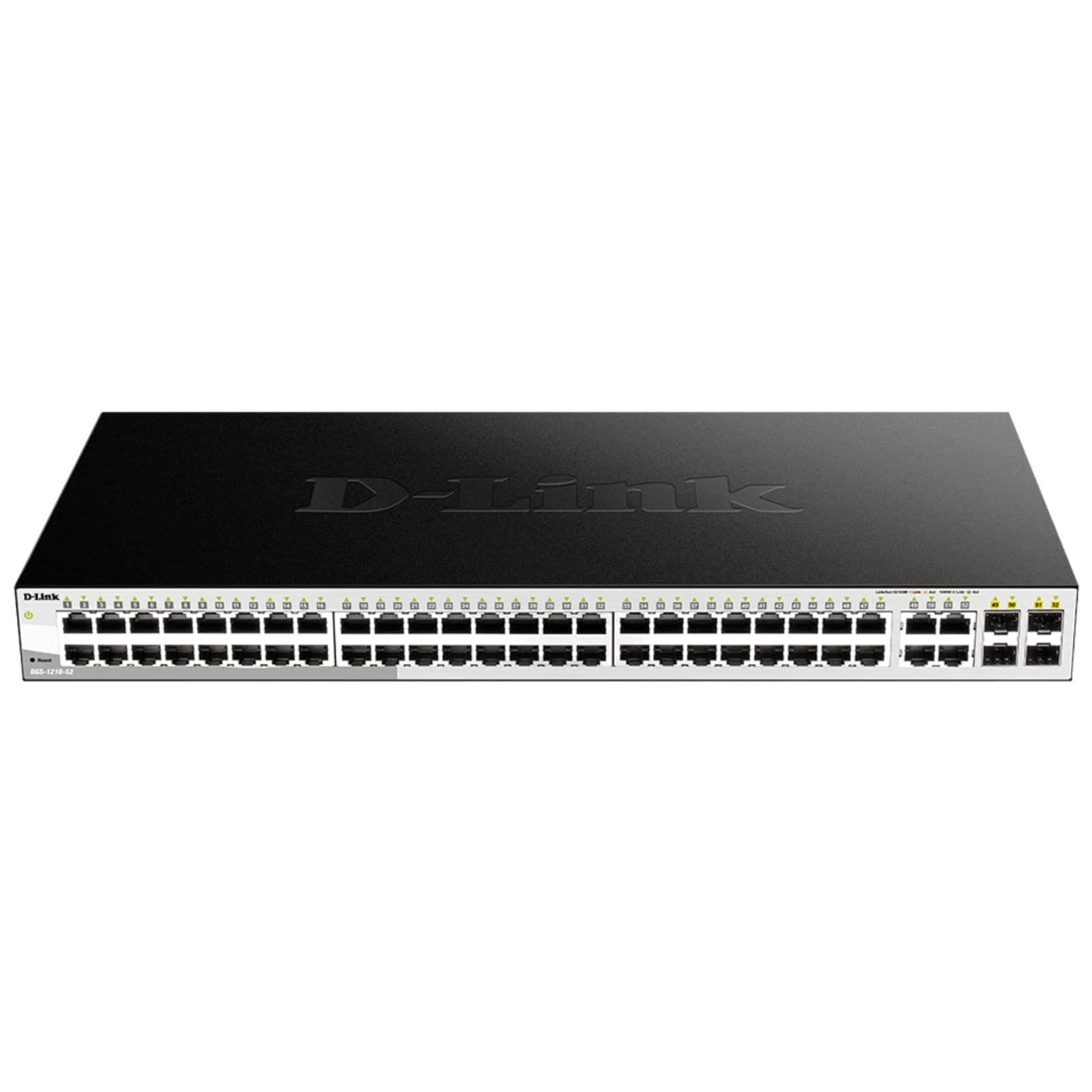
Figure 2: Front panel of the DGS-1210-52 switch showing Ethernet and SFP ports.

Figure 3: Rear panel of the DGS-1210-52 switch.
Funtzionamendu-argibideak
The DGS-1210-52 switch provides extensive management capabilities through its intuitive web- oinarritutako interfazea.
Sarearen kudeaketa
- VLAN konfigurazioa: Create and manage Virtual Local Area Networks (VLANs) to segment your network, improving security and performance.
- Zerbitzuaren kalitatea (QoS): Prioritize critical network traffic (e.g., VoIP, video streaming) to ensure consistent performance.
- Lotura Agregazioa (LACP): Konbinatu hainbat lotura fisiko lotura logiko bakarrean banda-zabalera handitzeko eta lotura-erredundantzia emateko.
- Zuhaitz Hedatzaile Protokoloa (STP): Saihestu sareko begiztak eta bermatu sarearen egonkortasuna.
- IGMP Snooping: Multicast trafikoaren bidalketa optimizatu, batez ere IPTV aplikazioetarako erabilgarria.
- Bideratze estatikoa: Configure static routes for basic Layer 3 functionality, directing traffic between different IP subnets.
Segurtasun Ezaugarriak
- Sarbide Kontrol Zerrenda (ACL): Filter network traffic based on MAC or IP addresses, port numbers, and other criteria to enhance security.
- 802.1X Authentication: Authenticate network clients through external RADIUS servers for secure network access.
- ARP Spoofing Prevention: Protect against malicious intruders sending fake ARP messages.
- D-Link Safeguard Engine: Protects the switch from traffic flooding caused by virus attacks.
- DHCP Server Screening: Blocks rogue DHCP server packets from user ports to prevent unauthorized IP assignment.
Nuclias Connect Management (Optional)
The DGS-1210-52 can be optionally managed via D-Link's Nuclias Connect software. This free software provides scalable, flexible control and insightful reporting for up to 1,500 D-Link access points and DGS-1210 Smart Switches, offering centralized management for your network infrastructure.

Figure 4: Nuclias Connect for centralized network management.
Mantentzea
Proper maintenance ensures the longevity and optimal performance of your DGS-1210-52 switch.
- Energia-eraginkortasuna: The switch's compliance with IEEE 802.3az Energy Efficient Ethernet helps reduce power consumption during periods of low network utilization.
- Funtzionamendu isila: The fan-less design eliminates noise and reduces potential points of failure, contributing to a longer lifespan.
- Konfigurazioa gordetzea: Always save the running configuration to the switch's non-volatile memory (NVRAM) after making changes. Changes take effect immediately but will be lost upon reboot or power cycle if not explicitly saved.
- Firmware eguneraketak: Aldian-aldian egiaztatu D-Link euskarria webfirmware eguneratzeetarako gunea, zure etengailuak azken funtzioak eta segurtasun hobekuntzak dituela ziurtatzeko.
- Ingurumen-baldintzak: Operate the switch within the specified temperature range (23 to 122 Degrees Fahrenheit) and ensure proper airflow to prevent overheating.
Arazoak konpontzea
If you encounter issues with your DGS-1210-52 switch, consider the following:
- Potentziarik gabe: Ziurtatu elikatze-kablea ondo konektatuta dagoela etengailura eta entxufearekin. Egiaztatu entxufea funtzionatzen duela.
- Esteka-argirik ez: Check the Ethernet cable connections between the switch and the connected device. Try a different cable or port. Ensure the connected device is powered on and functioning correctly.
- Sarearen errendimendu arazoak:
- Loopback hautematea: The switch features loopback detection to identify and resolve network loops that can cause performance degradation. Check the switch logs for loop detection events.
- Kableen diagnostikoa: Use the cable diagnostics feature in the web interface to test the integrity of connected Ethernet cables.
- Verify QoS settings are correctly configured if specific traffic types are experiencing issues.
- Sartzea Web Interfazea: Ensure your computer's IP address is in the same subnet as the switch. Clear your browser's cache or try a different browser. If the password is unknown, a factory reset may be required (refer to the Quick Installation Guide for reset procedures).
- Fabrikaren berrezarpena: If configuration issues persist or you forget the password, perform a factory reset. This will revert all settings to their default values. Consult the Quick Installation Guide for specific instructions on performing a factory reset.
Zehaztapenak
| Ezaugarri | Zehaztapena |
|---|---|
| Marka | D-Link |
| Modelo zenbakia | DGS-1210-52 |
| Portu kopurua | 52 (48 Gigabit Ethernet, 4 Gigabit SFP) |
| Interfazea | RJ45, SFP |
| Datuen transferentzia-tasa | 104 Gigabit segundoko (kommutazio-ahalmena) |
| Aldatu mota | Metal, Smart Managed Layer 2+ |
| Geruza kopurua | 2 |
| Kaxa material mota | Metala |
| Elementuaren neurriak (L x W x H) | 17.25"L x 8.21"Z x 1.73"A |
| Elementuaren pisua | 7.65 kilo |
| liburukiatage | 120 Volt |
| Egungo balorazioa | 0.01 Amps |
| Funtzionamendu-tenperatura | 23 to 122 Degrees Fahrenheit (-5 to 50 Degrees Celsius) |
| Gailu bateragarriak | Desktop, Laptop, Printer, Router |
Bermearen informazioa
The D-Link DGS-1210-52 switch is backed by a Bizi osorako berme mugatua. This warranty provides long-term confidence in the quality and reliability of your network infrastructure. For detailed terms and conditions, please refer to the warranty documentation included with your product or visit the official D-Link webgunea.
Laguntza
For technical assistance, product documentation, or further information, please visit the official D-Link support website. You can also find resources related to Nuclias Connect management software and other D-Link business solutions.
D-Link is a business solutions provider with over 35 years of experience in networking, committed to providing reliable and secure products.
Produktuen Bideoa
1. bideoa: Over batview of D-Link Gigabit Smart Managed and Surveillance Switches, highlighting their features and applications.


