
1. Sarrera
Eskerrik asko erosketagatik.asing the KLH R5100 Surround Sound Receiver. This receiver is designed to provide high-quality audio and video performance for your home entertainment system. It features multiple audio and video inputs, surround sound processing, and a powerful amplifier to deliver an immersive listening experience. Please read this manual thoroughly before operating the unit to ensure proper setup and optimal performance.
2. Segurtasun informazio garrantzitsua
Deskarga elektriko, sute edo unitateari kalte egiteko arriskua murrizteko, jarraitu segurtasun neurri hauek:
- Energia iturria: Konektatu unitatea 120 V-ko eta 60 Hz-ko korronte-iturri batera soilik.
- Aireztapena: Ziurtatu aireztapen egokia dagoela. Ez blokeatu aireztapen-irekidurak. Utzi nahikoa leku unitatearen inguruan aire-fluxu egokia lortzeko.
- Ura eta hezetasuna: Ez jarri unitatea euripean, hezetasunean edo gehiegizko hezetasunean. Ez jarri likidoz betetako objekturik, hala nola loreontziak, unitatearen gainean.
- Beroa: Mantendu unitatea bero-iturrietatik urrun, hala nola erradiadoreetatik, bero-erregistroetatik, sukaldeetatik edo beste aparatu batzuetatik (adibidez, ampberoa sortzen duten argitzaileak).
- Garbiketa: Garbitu aurretik, deskonektatu unitatea hormako entxufetik. Erabili zapi lehor bat garbitzeko.
- Zerbitzua: Ez saiatu unitate hau zeuk konpontzen. Konponketa guztiak zerbitzu-langile kualifikatuei eskatu.
- Kableak: Babestu korronte-kablea ibiltzetik edo atxilotzetik, batez ere entxufeetan, erosotasun-harguneetan eta unitatetik irteteko puntuan.
3. Paketearen edukia
Mesedez, egiaztatu zure paketeak elementu hauek dituela:
- KLH R5100 Surround Sound Receiver
- Urruneko Aginte Unitatea
- Erabiltzailearen eskuliburua
- Audio/Bideo Kableak (RCA motakoak)
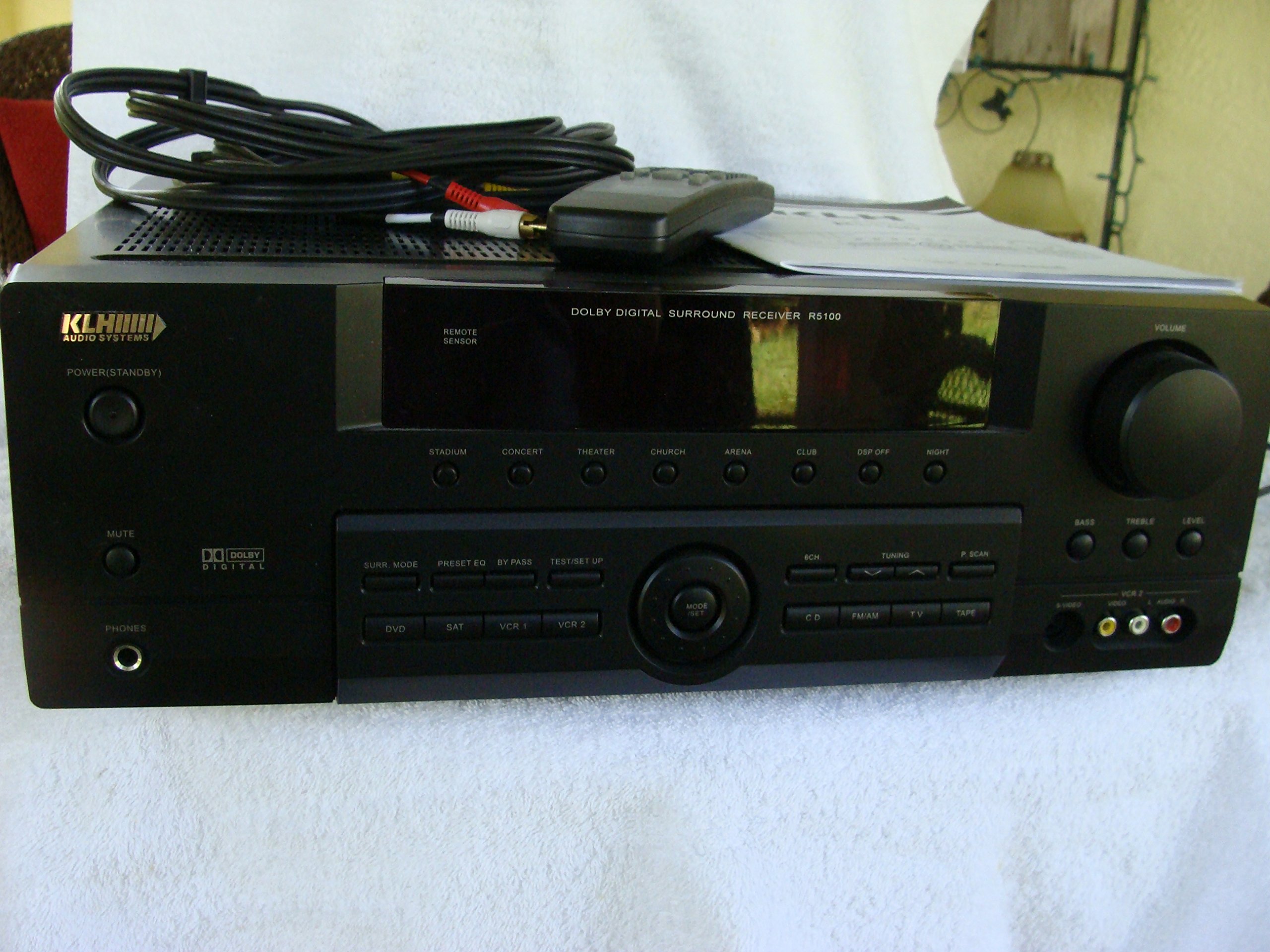
Image: The KLH R5100 receiver, its remote control, user manual, and included audio/video cables.
4. Produktua amaitu daview
4.1 Aurrealdeko panelaren kontrolak
The front panel provides access to essential controls and indicators for daily operation.

Irudia: Xehetasun zehatza view of the receiver's front panel, highlighting the display, volume control, and input selection buttons.
- Pizteko botoia: Hargailua pizten edo itzaltzen du.
- Sarrera hautatzaileak: Buttons for DVD, SAT, VCR 1, VCR 2, CD, FM/AM, TV, TAPE to choose your audio/video source.
- Bolumen-eskulekua: Irteerako bolumen orokorra doitzen du.
- Surround Mode Buttons: Select various sound fields like Stadium, Concert, Theater, Church, Arena, Club, DSP Off, Night.
- Bass/Treble/Level: Controls for adjusting audio tone and individual channel levels.
- Aurikularrak Jack: Entzun pribaturako.
4.2 Atzeko panelaren konexioak
The rear panel houses all input and output terminals for connecting your audio and video components, as well as speakers.

Image: The full rear panel of the receiver, displaying all connection ports for audio, video, and speakers.
- Hizlariaren terminalak: Connections for Main (Front Left/Right), Center, and Rear (Surround Left/Right) speakers.
- Audio Inputs (RCA): For connecting CD players, tape decks, VCRs, TVs, and other stereo audio sources.
- Video Inputs/Outputs (RCA/S-Video): For connecting video sources like DVD players, VCRs, and TVs.
- Audio sarrera digitalak (optikoak/koaxialak): For connecting digital audio sources like DVD players or set-top boxes.
- 6CH Direct Input: For connecting external multi-channel decoders or players with 5.1 analog outputs.
- Subwoofer irteera: RCA irteera subwoofer aktibo bat konektatzeko.
- Antena terminalak: For FM and AM antennas.
4.3 Urruneko Aginte Unitatea
The remote control provides convenient access to all receiver functions from your listening position.

Irudia: Gertutik view of the remote control unit, detailing its buttons for various functions.
- Piztu/Itzali: Hargailua pizten edo itzaltzen du.
- Sarrera hautatzaileak: Dedicated buttons for each input source (DVD, CD, TV, etc.).
- Bolumena igo/behera: Master bolumena doitzen du.
- Ezkutatu: Audio irteera aldi baterako isilarazten du.
- Surround modua: Cycles through available surround sound modes.
- Level/Test: For adjusting individual speaker levels and running a test tone.
- Sintonizagailuaren kontrolak: For FM/AM station tuning and memory functions.
5. Konfigurazioa
5.1 Bozgorailuak konektatzea
Ziurtatu hartzailea korronte-hartunetik deskonektatuta dagoela konexiorik egin aurretik.
- Aurrealdeko bozgorailuak: Connect your main left and right speakers to the 'MAIN SPEAKERS (8Ω)' terminals. Ensure correct polarity (+ to + and - to -).
- Zentroko Hizlaria: Connect your center channel speaker to the 'CENTER SPEAKER (8Ω)' terminals.
- Atzeko bozgorailuak: Connect your surround left and right speakers to the 'REAR SPEAKERS (8Ω)' terminals.
- Subwoofer-a: Connect an active subwoofer to the 'SUBWOOFER OUT' RCA jack using a single RCA cable.

Irudia: Xehetasun handikoa view of the speaker connection terminals on the rear panel.
5.2 Audio/Bideo iturriak konektatzea
Use appropriate cables (RCA, Optical, Coaxial) to connect your source components to the receiver.
- DVD erreproduzitzailea: Connect the audio output of your DVD player to the 'DVD' audio input jacks (RCA) on the receiver. For digital audio, use either the 'DIGITAL IN OPTICAL' or 'DIGITAL IN COAXIAL' input. Connect the video output to the 'DVD' video input.
- CD erreproduzitzailea: Connect the audio output of your CD player to the 'CD' audio input jacks (RCA).
- TV/Cable Box: Connect the audio output of your TV or cable box to the 'TV' audio input jacks (RCA). Connect video output to the 'TV' video input.
- Beste gailu batzuk: Use 'SAT', 'VCR 1', 'VCR 2', or 'TAPE' inputs for other audio/video components as needed.

Image: A close-up of the digital audio inputs (Coaxial, Optical) and the 6-channel direct input section on the rear panel.
5.3 Antena-konexioa
Connect the supplied FM and AM antennas to their respective terminals on the rear panel for radio reception.
6. Funtzionamendu-argibideak
6.1 Oinarrizko funtzionamendua
- Piztu: Sakatu aurrealdeko panelean edo urrutiko agintean dagoen pizteko botoia.
- Hautatu Sarrera: Press the desired input selector button (e.g., 'DVD', 'CD') on the front panel or remote control to choose your source.
- Doitu bolumena: Turn the Volume knob on the front panel or use the Volume Up/Down buttons on the remote control.
6.2 Surround Sound Modes
The R5100 offers various sound modes to enhance your listening experience:
- Estadioa: Simulates the acoustics of a large stadium.
- Kontzertua: Creates a concert hall ambiance.
- Antzerkia: Optimized for movie playback, enhancing dialogue and effects.
- Eliza: Replicates the spaciousness of a church.
- Arena: Provides a wide, open sound field.
- Kluba: Simulates a lively club environment.
- DSP Off: Disables digital sound processing for a direct stereo signal.
- Gaua: Reduces dynamic range for late-night listening without disturbing others.
Press the 'SURR. MODE' button on the remote or front panel to cycle through these modes.
6.3 Tonu kontrola
Use the BASS and TREBLE controls on the front panel or remote to adjust the low and high frequency response. The LEVEL controls allow for fine-tuning of individual speaker output levels.
6.4 Sintonizatzailearen funtzionamendua
To listen to radio:
- Press the 'FM/AM' input selector.
- Use the 'TUNING' buttons on the front panel or remote to find stations.
- Press 'MEMORY' to store favorite stations, and 'P.SCAN' to scan through presets.
7. Mantentzea
To ensure the longevity and optimal performance of your KLH R5100 receiver, follow these maintenance guidelines:
- Garbiketa: Wipe the exterior surfaces with a soft, dry cloth. Do not use abrasive cleaners, waxes, or solvents as they may damage the finish.
- Aireztapena: Regularly check that the ventilation openings are not obstructed by dust or debris. Use a soft brush or vacuum cleaner to gently remove any build-up.
- Elikatze kablea: Inspect the power cord periodically for any signs of damage. If damaged, discontinue use and contact qualified service personnel.
- Biltegiratzea: Unitatea denbora luzez gordetzen baduzu, deskonektatu entxufetik eta estali hautsaren aurka babesteko.
8. Arazoak
If you encounter problems with your receiver, refer to the following common issues and solutions before seeking professional service.
| Arazoa | Kausa posiblea | Irtenbidea |
|---|---|---|
| Botererik ez | Kable elektrikoa deskonektatuta; Entxufea ez dago aktibo | Ziurtatu kablea ondo konektatuta dagoela; egiaztatu entxufea beste gailu batekin |
| Soinurik ez | Incorrect input selected; Speakers not connected properly; Volume too low; Mute function active | Select correct input source; Check speaker connections and polarity; Increase volume; Deactivate Mute |
| Urruneko kontrola ez dabil | Batteries depleted; Obstruction between remote and receiver; Remote sensor blocked | Replace batteries; Remove any obstructions; Ensure remote sensor on receiver is clear |
| Irrati-harrera eskasa | Antena ez dago konektatuta edo gaizki kokatuta | Connect antennas securely; Adjust antenna position for better reception |
| Soinu distortsionatua | Input signal too high; Speaker impedance mismatch; Damaged cables | Reduce source volume; Ensure speakers match 8Ω impedance; Check and replace damaged cables |
9. Zehaztapenak
The following are the technical specifications for the KLH R5100 Surround Sound Receiver:
- Modelo zenbakia: R5100
- Produktuaren neurriak: 16.88 x 6.88 x 15.75 hazbete
- Elementuaren pisua: 24.2 kilo
- Energia iturria: AC 120V, 60Hz
- Energia-kontsumoa: 320W
- Audio irteera modua: Inguratu
- Inguruko soinu-kanalaren konfigurazioa: 5.1
- Konektibitate Teknologia: RCA, 3.5mm Jack, Optical, Coaxial
- Gailu bateragarriak: Hizlariak
- Kontroladore mota: Urrunekoa
- Ezaugarri berezia: Advanced Room Calibration (as per product listing, though specific details may vary)
- Kolorea: Beltza
10. Bermea eta Laguntza
For warranty information and customer support, please refer to the documentation included with your purchase or contact KLH customer service directly. Keep your proof of purchase for any warranty claims.