
1. Sarrera
This manual provides instructions for the OEM RMT-B119A remote control, designed as a replacement or secondary remote for various Sony Blu-ray player models. This remote offers full functionality for controlling your Blu-ray player's features.
Compatible Sony Blu-ray Player Models:
- BDP-BX59
- BDP-S390
- BDP-S590
- BDP-BX110
- BDP-S1100
- BDP-S3100
- BDP-BX310
2. Konfigurazioa
2.1 Bateriaren instalazioa
Urrutiko agintea bi (2) AAA bateria behar ditu (ez daude barne). Jarraitu urrats hauek bateriak instalatzeko:
- Kokatu bateriaren konpartimentuaren estalkia urrutiko agintearen atzealdean.
- Sakatu fitxa behera eta irristatu estalkia behera konpartimentua irekitzeko.
- Sartu bi AAA pila, ziurtatuz terminal positiboa (+) eta negatiboa (-) konpartimentuaren barruko markekin behar bezala lerrokatuta daudela.
- Irristatu bateriaren konpartimentuaren estalkia berriro bere lekuan klik egin arte.
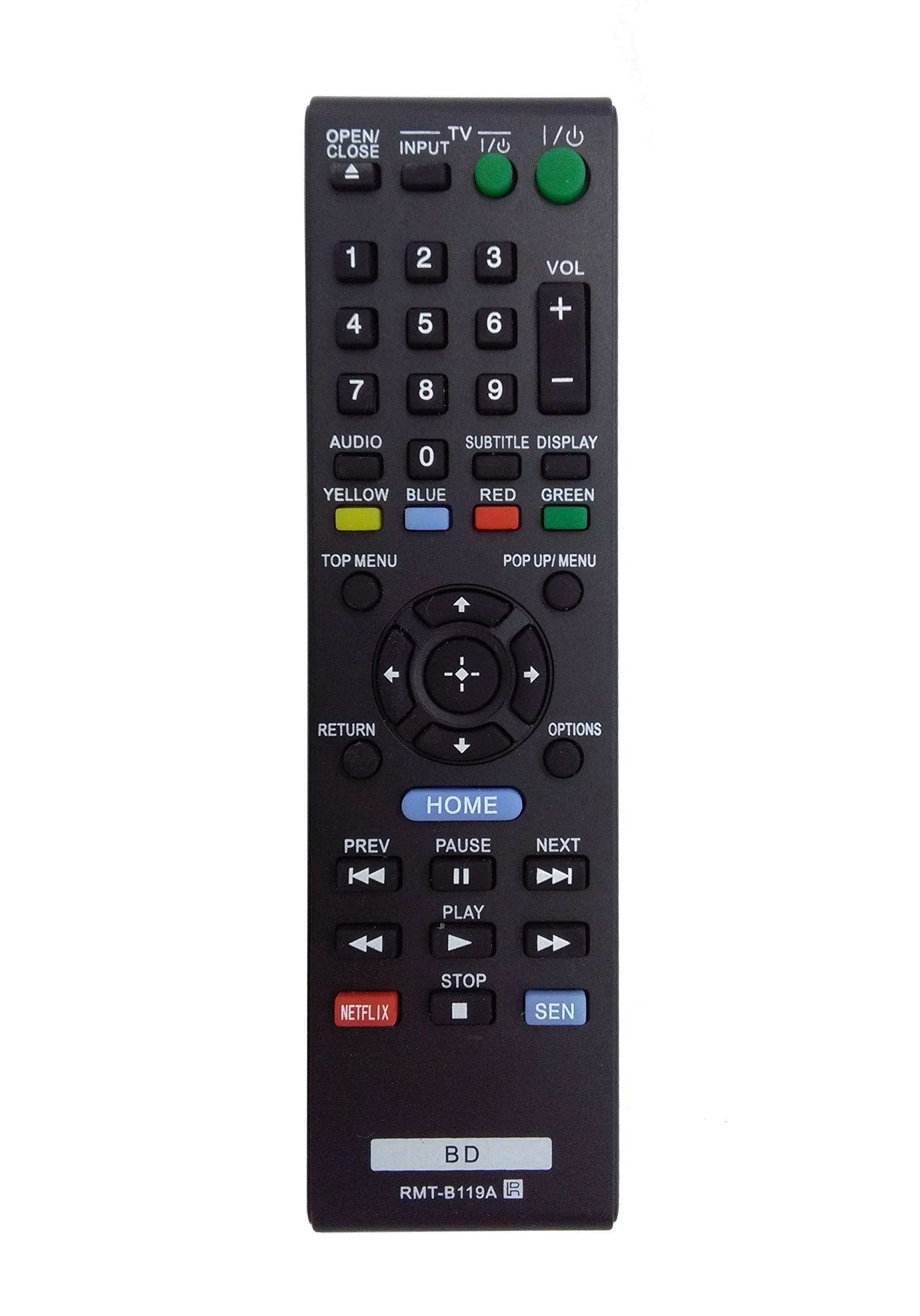
Image: The OEM RMT-B119A remote control, showing the full button layout on the front and a partial view of the open battery compartment on the back, revealing the battery terminals.
3. Funtzionamendu-argibideak
3.1 Remote Control Layout and Button Functions
Familiarize yourself with the buttons on your RMT-B119A remote control. Below is a description of each button's primary function.
Image: The OEM RMT-B119A remote control, displaying all buttons and their labels.
- Energia (S/I): Blu-ray erreproduzitzailea piztu edo itzaltzen du.
- OPEN/CLOSE (▲): Diskoaren erretilua ireki edo ixten du.
- Sarrera: Switches the input source on the connected TV (if programmed).
- Telebista: Switches the remote to TV control mode (if programmed).
- Zenbaki-teklatua (0-9): Used for direct track selection, chapter selection, or entering numerical data.
- VOL (+/-): Adjusts the volume level (typically for the connected TV, if programmed).
- AUDIOA: Changes the audio track or language during playback.
- SUBTITLE DISPLAY: Toggles subtitle display on or off, or cycles through available subtitle languages.
- YELLOW, BLUE, RED, GREEN: Color-coded function buttons, typically used for specific features within menus or interactive content. Their function varies depending on the disc or menu.
- GOIEN MENUA: Accesses the main menu of the Blu-ray disc.
- POP UP/MENU: Displays the pop-up menu during disc playback.
- Directional Pad (↑↓←→): Menuetan eta aukeretan nabigatzen du.
- Center Button (Enter/Select): Hautaketa bat berresten du edo menu-elementu bat sartzen du.
- ITZULERA: Aurreko pantailara edo menura itzultzen da.
- AUKERAK: Displays context-sensitive options or settings.
- ETXEA: Accesses the Blu-ray player's home menu.
- PREV (◀◀): Skips to the beginning of the current track/chapter or the previous track/chapter.
- PAUSE (▌▌): Erreprodukzioa pausatzen du.
- NEXT (▶▶): Skips to the next track or chapter.
- PLAY (▶): Erreprodukzioa abiarazten edo berresten du.
- GELDITU (■): Erreprodukzioa geldiarazten du.
- NETFLIX: Netflix streaming zerbitzurako sarbide zuzena botoia.
- SEN: Direct access button for the Sony Entertainment Network (now PlayStation Video/Music).
- BD: Likely a dedicated button for Blu-ray Disc functions or to switch to Blu-ray mode.
4. Mantentzea
Zure urrutiko agintearen iraupena eta funtzionamendu egokia bermatzeko, jarraitu mantentze-jarraibide hauek:
- Garbiketa: Garbitu urrutiko agintea oihal leun eta lehor batekin. Zikinkeria egoskorra bada, garbitu pixka bat.ampGarbitu oihalak urarekin edo garbitzaile leun eta ez-urratzaile batekin. Saihestu produktu kimiko edo disolbatzaile gogorrak erabiltzea.
- Bateria ordezkatzea: Ordeztu pilak urrutiko agintearen erantzuna motela denean edo funtzionatzeari uzten dionean. Ordeztu beti bi pilak aldi berean mota bereko berriekin.
- Biltegiratzea: Gorde urrutiko agintea leku fresko eta lehor batean, eguzki-argitik, tenperatura altuetatik eta hezetasun handitik babestuta. Urrutiko agintea denbora luzez erabiliko ez baduzu, kendu pilak isuriak saihesteko.
- Saihestu tantoak: Babestu urrutiko agintea kolpe fisikoetatik, erorketek barneko osagaiak kaltetu baititzakete.
5. Arazoak
If you experience issues with your remote control, refer to the following table for common problems and solutions:
| Arazoa | Kausa posiblea | Irtenbidea |
|---|---|---|
| Urruneko kontrolak ez du funtzionatzen. | Pila hilak edo gaizki sartutakoak. | Ordeztu bateriak berriekin, polaritate zuzena ziurtatuz (+/-). |
| Urrutiko agintea tarteka funtzionatzen du. | Low battery power or obstruction. | Replace batteries. Ensure no objects are blocking the remote's signal path to the Blu-ray player. |
| Urrutiko agintea ez da telebistaren kontrolatzailea. | Remote not programmed for TV or TV mode not selected. | This remote is primarily for Blu-ray players. TV control functionality may require specific programming not covered by this manual, or may not be supported by this OEM model. |
| Botoiek ez dute erantzuten edo itsaskorrak dira. | Zikinkeria edo hondakinak botoien azpian. | Clean the remote control surface. Avoid spilling liquids on the remote. |
6. Zehaztapenak
- Marka: OEMa
- Modelo zenbakia: RMT-B119A
- Konektibitate Teknologia: Infragorriak (IR)
- Gailu bateragarriak: Sony Blu-ray Players (specific models listed in Introduction)
- Energia iturria: 2 x AAA bateria (ez daude barne)
- Gehienezko barrutia: Gutxi gorabehera 10 metro (33 oin)
- Ezaugarri berezia: Diseinu ergonomikoa
7. Bermea eta Laguntza
This OEM RMT-B119A remote control comes with a 30 eguneko bermea erosketa-datatik aurrera, fabrikazio-akatsak estaliz. Gorde erosketaren egiaztagiria berme-erreklamazioetarako.
For technical support or warranty inquiries, please contact the retailer or manufacturer directly. Refer to your purchase documentation for specific contact information.


