Sarrera
The JENSEN CD-490 is a portable stereo CD player equipped with an AM/FM stereo radio and an auxiliary line-in. It features a top-loading CD player with an LED track display, skip/search/repeat functions, and programmable memory. The unit includes a telescopic antenna for radio reception, a foldable carrying handle for portability, and a stereo headphone jack. An auxiliary input allows connection of external audio devices such as MP3 players.
Segurtasun informazio garrantzitsua
KONTUZ: Produktu honek Kaliforniako estatuak minbizia eta jaiotzako akatsak edo ugalketa beste kalteak eragiten dituela ezagutzen dituen produktu kimikoak ditu.
Always follow basic safety precautions when using electrical appliances to reduce the risk of fire, electric shock, and personal injury. Keep this manual for future reference.
Zer sartzen da
- JENSEN CD-490 Portable Stereo CD Player with AM/FM Radio
- AC korronte kablea
- Jabearen eskuliburua
Produktua amaituview
Familiarize yourself with the controls and features of your JENSEN CD-490 unit.
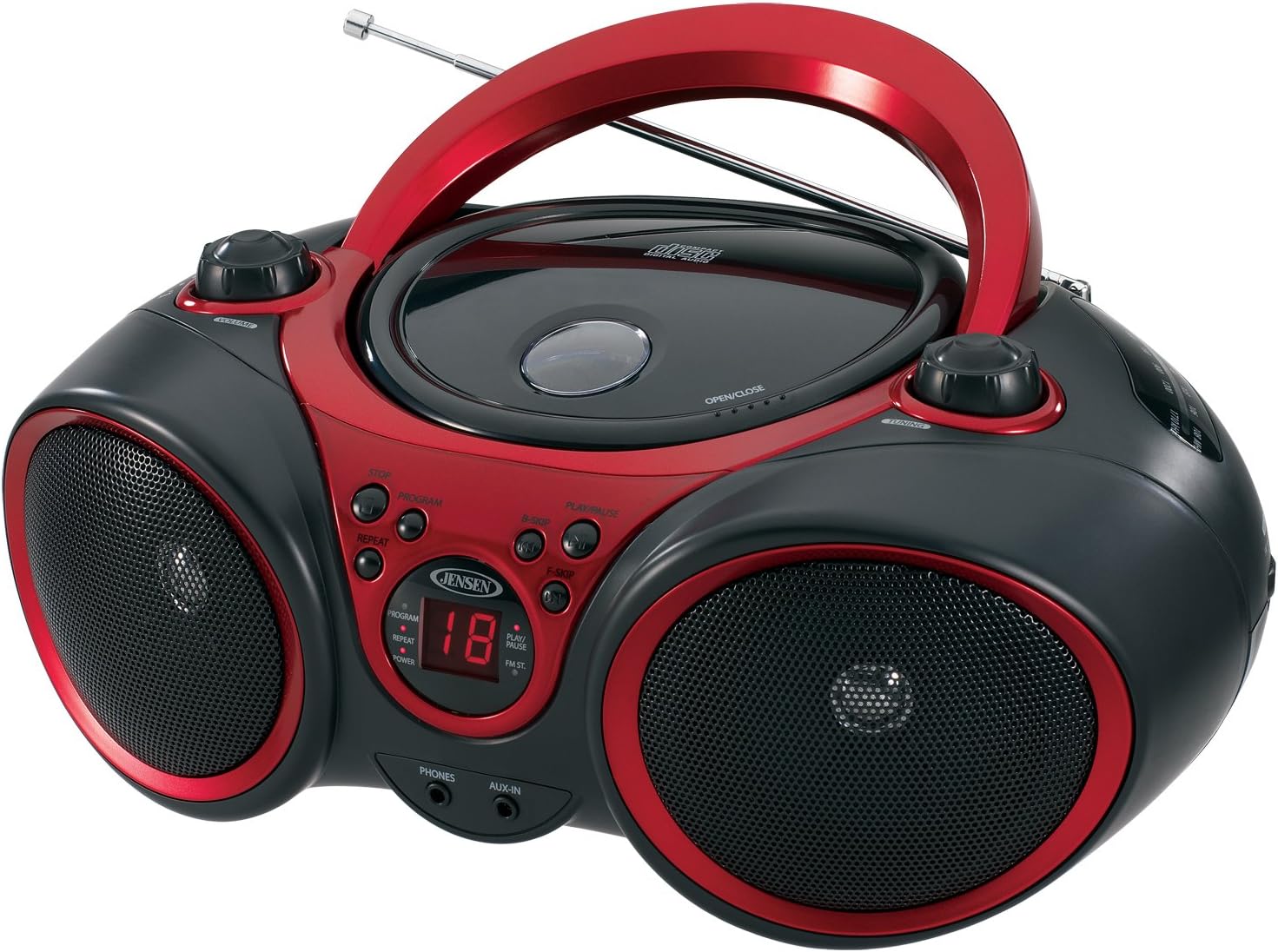
Irudia: Aurrealdea view of the JENSEN CD-490 unit, showing the CD compartment, speakers, control buttons, and display.
Aurreko paneleko kontrolak:
- BOLUMENaren botoia: Audio irteera-maila doitzen du.
- STOP botoia: CDaren erreprodukzioa geldiarazten du.
- PROGRAMAZIOA botoia: CD pistak programatzeko erabiltzen da.
- ERREPIKATU botoia: Uneko pista edo pista guztiak errepikatzen ditu.
- B-SKIP Button: Skips backward through CD tracks.
- PLAY/PAUSE botoia: CDaren erreprodukzioa abiarazten edo pausatzen du.
- F-SKIP Button: Skips forward through CD tracks.
- LED pantaila: Shows CD track number and function indicators (PROGRAM, REPEAT, POWER, PLAY/PAUSE, FM ST).
- TELEFONOAK Jack: Entzungailu estereoa konektatzeko.
- AUX-IN Jack: Kanpoko audio gailuak konektatzeko.
Goiko paneleko kontrolak:
- CD konpartimentua: Top-loading area for compact discs.
- OPEN/CLOSE Latch: CD konpartimentuaren tapa askatzen du.
- DOINU-botoia: Adjusts AM/FM radio frequency.
Alboko paneleko kontrolak:
- FUNCTION Switch: Selects between RADIO, CD/AUX IN, and OFF modes.
- AM/FM banda hautatzailea: AM eta FM irrati-banden artean hautatzen du.
Atzeko panelaren Ezaugarriak:
- CA potentzia sarrera: Korronte alternoko elikatze-kablea konektatzeko.
- Bateriaren konpartimendua: 8 'C' (UM-2) bateria ditu eramangarriki erabiltzeko.
- Antena teleskopikoa: FM irratia jasotzeko antena luzagarria.
Konfigurazioa
Unitatea elikatzea:
The CD-490 can be powered by either AC power or batteries.
AC potentzia:
- Ensure the unit is in the OFF position using the FUNCTION switch.
- Connect the AC power cord to the AC power input on the rear of the unit.
- Plug the other end of the AC power cord into a standard AC 120V/60Hz wall outlet.
Bateria Potentzia:
- Ensure the unit is in the OFF position.
- Ireki bateriaren konpartimentuaren estalkia unitatearen behealdean.
- Insert 8 'C' (UM-2) size batteries (not included), ensuring correct polarity (+/-).
- Itxi bateriaren konpartimenduaren estalkia ondo.
Antenaren konfigurazioa:
For optimal FM radio reception, fully extend the telescopic antenna. For AM reception, the unit has a built-in antenna, so no adjustment is typically needed.
Operating the CD Player
The CD-490 supports standard audio CDs and CD-R/RW discs.
- Set the FUNCTION switch to the 'CD/AUX IN' position.
- Press the 'OPEN/CLOSE' latch to open the CD compartment lid.
- Place an audio CD into the compartment with the label side facing up.
- Close the CD compartment lid firmly until it clicks. The LED display will show the total number of tracks on the CD.
- Press the 'PLAY/PAUSE' button to begin playback. The current track number will appear on the LED display.
- Adjust the 'VOLUME' knob to your desired listening level.
- To pause playback, press the 'PLAY/PAUSE' button. Press it again to resume.
- To skip to the next track, press the 'F-SKIP' button. To go back to the beginning of the current track or the previous track, press the 'B-SKIP' button.
- To stop playback, press the 'STOP' button.
Errepikatu funtzioa:
- During playback, press the 'REPEAT' button once to repeat the current track. The 'REPEAT' indicator will light up.
- Press the 'REPEAT' button a second time to repeat all tracks on the CD. The 'REPEAT' indicator will flash.
- Press the 'REPEAT' button a third time to cancel the repeat function.
Erreprodukzio programatua:
- In STOP mode, press the 'PROGRAM' button. The 'PROGRAM' indicator will light up and '00' will flash on the display.
- Use the 'F-SKIP' or 'B-SKIP' buttons to select your desired track.
- Press the 'PROGRAM' button again to confirm the track. The display will show the next program number.
- Errepikatu 2 eta 3 urratsak gehienez 20 pista programatzeko.
- After programming, press the 'PLAY/PAUSE' button to start programmed playback.
- To cancel programmed playback, press the 'STOP' button twice.
Operating the AM/FM Radio
- Set the FUNCTION switch to the 'RADIO' position.
- Select either 'AM' or 'FM' using the AM/FM band selector switch.
- Extend the telescopic antenna for FM reception. Adjust its position for best reception.
- Rotate the 'TUNING' knob to select your desired radio station.
- Adjust the 'VOLUME' knob to your desired listening level.
Sarrera osagarria erabiltzea
The AUX-IN jack allows you to connect an external audio device (e.g., MP3 player, smartphone) to play through the CD-490's speakers.
- Set the FUNCTION switch to the 'CD/AUX IN' position.
- Connect one end of a 3.5mm audio cable (not included) to the AUX-IN jack on the front of the CD-490.
- Connect the other end of the audio cable to the headphone jack or line-out jack of your external audio device.
- Turn on your external audio device and start playback.
- Adjust the volume on both your external device and the CD-490's 'VOLUME' knob for optimal sound.
Mantentzea eta zaintzea
- Mantendu unitatea eguzki-argitik, bero-iturrietatik eta hauts edo hezetasun gehiegizkoetatik urrun.
- Garbitu unitatea zapi leun eta lehor batekin. Ez erabili garbitzaile edo disolbatzaile urratzailerik.
- To clean the CD lens, use a commercially available CD lens cleaner.
- Bateriak erabiltzen badituzu, kendu itzazu unitatea denbora luzez erabiliko ez baduzu, isuriak saihesteko.
Arazoak konpontzea
| Arazoa | Kausa posiblea | Irtenbidea |
|---|---|---|
| Botererik ez | Korronte alternoko kablea ez dago konektatuta; Bateriak agortuta edo gaizki sartuta. | Egiaztatu korronte alternoko kablearen konexioa; Ordeztu bateriak edo ziurtatu polaritate zuzena dagoela. |
| CD does not play / 'NO DISC' error | CD inserted incorrectly; CD is dirty or scratched; Unit in wrong function mode. | Re-insert CD with label side up; Clean or replace CD; Set FUNCTION switch to 'CD/AUX IN'. |
| Irrati-harrera eskasa | Antenna not extended/adjusted; Weak signal. | Extend and adjust FM telescopic antenna; Reposition the unit for better signal. |
| No sound from AUX-IN | Audio cable not connected; Volume too low on external device or unit. | Ensure audio cable is securely connected; Increase volume on both devices. |
Zehaztapenak
- Eredua: CD-490
- Energia iturria: AC 120V/60Hz or 8 x 'C' (UM-2) batteries (not included)
- Irteera potentzia: 2 x 1.5 W RMS
- CD bateragarritasuna: CDa, CD-R / RW
- Irrati Taldeak: AM/FM Stereo
- Konektibitatea: Auxiliary Input Jack, Stereo Headphone Jack
- Neurriak (L x W x H): 12.7 x 9.1 x 5.8 hazbete
- Pisua: 3.4 kilo
- Fabrikatzailea: Spectra Merchandising International, Inc.
- Lehenengo eskuragarri: 14ko maiatzaren 2003a
Bermea eta Laguntza
Specific warranty information and customer support contact details are typically provided with your product packaging or on the manufacturer's official webgunea. Mesedez, jo ezazu baliabide horietara informazio zehatzena eta eguneratuena lortzeko.
Produktuen Bideoa
Ikusi produktuaren bideo ofizial hau ikuspegi orokorra lortzekoview of the JENSEN CD-490 Stereo.
Bideoa: Amaiera batview of the JENSEN CD-490 Portable Stereo CD Player, highlighting its features and design.