
1. Sarrera eta Overview
This manual provides comprehensive instructions for the setup, operation, maintenance, and troubleshooting of your InFocus IN3124 Projector. Designed for clarity and ease of use, this guide will help you maximize your projector's performance and longevity.
The InFocus IN3124 is a high-performance projector featuring XGA (1024 x 868) native resolution, 4800 lumens of brightness, and a 3000:1 contrast ratio, making it suitable for various presentation environments. Its portable design allows for flexible placement and usage.
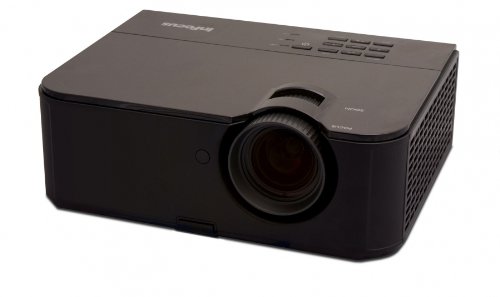
1. irudia: Aurrealdea view of the InFocus IN3124 Projector, highlighting the main lens and the top-mounted control panel.
2. Konfigurazioa
2.1 Paketatzea
Carefully remove the projector and all accessories from the packaging. Verify that all components listed in the packing list are present. Retain the original packaging for future transport or storage.
2.2 Jartzea
Position the projector on a stable, level surface. Ensure adequate ventilation around the unit to prevent overheating. Maintain a clear path between the projector lens and the projection screen or surface. The optimal projection distance will vary based on the desired screen size.
2.3 Potentzia konektatzea
- Konektatu elikatze-kablea proiektorearen elikatze-sarrerara.
- Entxufatu korronte-kablearen beste muturra lurreko hartune elektriko batean.
2.4 Sarrera iturriak konektatzea
The IN3124 projector supports various input sources. Connect your video source (e.g., computer, DVD player) to the appropriate input port on the projector. Common ports include VGA and HDMI (if available on your specific model).
- VGA: Use a VGA cable to connect to a computer's video output.
- HDMI: Use an HDMI cable for digital video and audio (check projector for HDMI port availability).
3. Funtzionamendu-argibideak
3.1 Piztu/Itzaltzea
- Pizteko: Sakatu proiektorearen kontrol-paneleko edo urrutiko aginteko pizteko botoia. Pizteko adierazlearen argia piztuko da.
- Itzaltzeko: Press the power button twice. The projector will enter a cooling cycle before shutting down completely. Do not unplug the projector during the cooling cycle.
3.2 Fokua eta zooma doitzea
Rotate the focus ring on the projector lens until the image appears sharp and clear. Use the zoom ring (if present) to adjust the image size to fit your screen.
3.3 Selecting Input Sources
Press the "Source" or "Input" button on the projector's control panel or remote control to cycle through available input sources (e.g., VGA, HDMI). Select the input corresponding to your connected device.
3.4 Menu Navigation and Keystone Correction
Use the menu buttons on the projector or remote to access the On-Screen Display (OSD). Navigate through the menu options to adjust settings such as brightness, contrast, color, and keystone correction. Keystone correction helps to square the image if the projector is not perfectly perpendicular to the screen.
4. Mantentzea
4.1 Lentea garbitzea
Garbitu proiektorearen lentea astiro-astiro gainazal optikoetarako bereziki diseinatutako zapi leun eta lint-gabe batekin. Ez erabili garbitzaile urratzailerik edo indar gehiegirik, lentea urra baitezake.
4.2 Aire-iragazkiak garbitzea
Regularly check and clean the projector's air filters to ensure proper airflow and prevent overheating. Refer to the projector's specific filter access instructions. Use a soft brush or vacuum cleaner to remove dust accumulation.
4.3 lamp Ordezkoa
Proiektorea lamp bizitza mugatua du. Noiz lamp life indicator appears or the image becomes dim, the lamp may need replacement. Consult the full service manual or manufacturer's website for detailed lamp replacement procedures and compatible lamp models. Always allow the projector to cool down completely before attempting lamp ordezkoa.
4.4 Biltegiratzea
Denbora luzez erabiltzen ez baduzu, gorde proiektorea leku fresko eta lehor batean, eguzki-argitik eta muturreko tenperaturetatik babestuta. Erabili jatorrizko ontzia edo babes-zorro bat hautsa eta kalteak saihesteko.
5. Arazoak
This section addresses common issues you might encounter with your InFocus IN3124 Projector. For more complex problems, contact customer support.
- Ez dago irudirik bistaratzen:
- Ziurtatu proiektorea piztuta dagoela eta pizteko adierazlea finko dagoela.
- Verify that the input source cable (VGA, HDMI) is securely connected to both the projector and the source device.
- Hautatu sarrera-iturri zuzena "Iturria" botoia erabiliz.
- Check if the source device is outputting a signal.
- Irudi iluna edo desagerrarazia:
- Adjust brightness and contrast settings in the OSD menu.
- Ziurtatu lamp is not nearing the end of its lifespan.
- Clean the projector lens and air filters.
- Check the projection mode (e.g., Eco mode might reduce brightness).
- Irudia lausoa da:
- Doitu fokatze-eraztuna proiektorearen lentean.
- Ziurtatu proiekzio-gainazala laua dela eta proiektorea egonkorra dela.
- Check the resolution settings of your source device to match the projector's native resolution.
- Urruneko kontrola ez dabil:
- Ordeztu bateriak urrutiko agintean.
- Ziurtatu ez dagoela oztoporik urrutiko agintearen eta proiektorearen IR hargailuaren artean.
- Zuzendu urrutiko agintea zuzenean proiektorerantz.
6. Zehaztapenak
The following table outlines the key technical specifications for the InFocus IN3124 Projector:
| Ezaugarri | Zehaztapena |
|---|---|
| Modelo zenbakia | IN3124 |
| Pantailaren bereizmena (bertakoa) | XGA (1024 x 868) |
| Distira | 4800 lumen |
| Kontraste-erlazioa | 3000:1 |
| Bistaratzeko mota | LCD, LCoS |
| Elementuaren pisua | 8.16 libra (3.7 kg) |
| Produktuaren neurriak (L x W x H) | 12.83 x 10.43 x 4.8 hazbete (32.59 x 26.49 x 12.19 cm) |
| Ezaugarri Berezia | Eramangarria |
7. Bermea eta Laguntza
For detailed warranty information, please refer to the warranty card included with your product packaging or visit the official InFocus webgunea. Bermeak normalean fabrikazio akatsak estaltzen ditu erosketa-datatik aurrerako denbora-tarte jakin batean.
If you encounter issues that cannot be resolved using the troubleshooting guide, or require technical assistance, please contact InFocus customer support. Contact details can usually be found on the manufacturer's webgunean edo zure produktuaren dokumentazioan.