
Pioneer VSX-523
Pioneer VSX-523 5.1-Channel A/V Receiver User Manual
Eredua: VSX-523
1. Produktua amaitu daview
The Pioneer VSX-523 is a 5.1-channel A/V receiver designed to enhance your home entertainment experience. It features advanced connectivity options and sound technologies to deliver clear audio reproduction and versatile integration with various devices.

1.1. irudia: Aurrealdea view of the Pioneer VSX-523 A/V Receiver, showcasing its sleek black design and control knobs.
This receiver supports HDMI with 3D and 4K Ultra HD pass-through, ensuring compatibility with the latest display technologies. It also offers "Made for iPhone" compatibility and Pioneer's proprietary sound enhancements like Phase Control, Advanced Sound Retriever, and Auto Level Control for optimized audio performance.
1.1 Produktuaren bideo ofiziala
1.1. bideoa: Bat baino gehiagoview of the Pioneer VSX-523 5.1 Channel AV Receiver, highlighting its key features and benefits. This video demonstrates the receiver's design, connectivity options, and compatibility with various devices.
2. Konfigurazio gida
This section guides you through the initial setup of your Pioneer VSX-523 A/V Receiver.
2.1 Kutxatik ateratzea eta kokapena
- Kontu handiz atera hargailua eta osagarri guztiak paketetik.
- Place the receiver on a stable, flat surface with adequate ventilation to prevent overheating. Ensure there is sufficient space around the unit for airflow.
2.2 Bozgorailuak konektatzea
The VSX-523 supports a 5.1 channel speaker configuration. Connect your speakers to the corresponding terminals on the rear panel of the receiver.
- Aurreko bozgorailuak (E/E): Connect your left and right front speakers.
- Zentroko Hizlaria: Konektatu erdiko kanaleko bozgorailua.
- Inguruko bozgorailuak (E/E): Konektatu ezkerreko eta eskuineko inguratzaile-bozgorailuak.
- Subwoofer-a: Connect your powered subwoofer to the "SUBWOOFER PRE OUT" port.

2.1. irudia: Rear panel of the Pioneer VSX-523, showing speaker terminals and various input/output ports, including HDMI.
2.3 Audio/Bideo Gailuak konektatzea (HDMI)
The VSX-523 features four HDMI inputs for connecting your Blu-ray players, cable boxes, gaming consoles, and other HDMI-enabled devices. Connect your TV to the HDMI OUT port.
- Connect your Blu-ray player to the BD HDMI sarrera.
- Connect your cable/satellite box to the SAT/CBL HDMI sarrera.
- Connect your gaming console to the JOKOA HDMI sarrera.
- Connect your DVD player or other device to the DVDa HDMI sarrera.
- Konektatu HDMI OUT from the receiver to an HDMI input on your television.
2.4 MCACC Auto Room Calibration
Pioneer's Multi-Channel Acoustic Calibration System (MCACC) optimizes your speaker settings for your specific room environment. This ensures the best possible sound performance.
- Plug the included MCACC setup microphone into the dedicated port on the front panel of the receiver.
- Place the microphone at your primary listening position (e.g., on a tripod or cushion at ear level).
- Follow the on-screen instructions (if available via composite video output) or the receiver's front panel display to initiate the MCACC calibration process. The receiver will emit test tones to measure speaker distances, levels, and equalization.
- Once calibration is complete, remove the microphone.
3. Funtzionamendu-argibideak
Learn how to operate your Pioneer VSX-523 A/V Receiver for daily use.
3.1 Piztea/Itzaltzea eta Sarrera Hautatzea
- Sakatu ETEN/PIZTU button on the front panel or remote control to power the receiver on or off.
- Erabili SARRERA HAUTATZAILEA knob on the front panel or the dedicated input buttons on the remote control (e.g., BD, SAT/CBL, GAME, DVD) to switch between connected devices.
3.2 Bolumen kontrola
- Doitu bolumen nagusia botoi handiak erabiliz MASTER BOLUMENA aurrealdeko paneleko botoia edo BOLUMENA +/- urrutiko aginteko botoiak.
3.3 Smartphone and USB Connectivity
The front USB port allows for direct digital connection and playback from compatible Apple devices and USB storage devices.
- "Made for iPhone" Compatibility: Connect your iPhone 5, iPad mini, or other compatible iPod/iPhone models using a USB cable to the front USB port. You can play music directly through the receiver, and your device will charge simultaneously.
- USB multimedia erreprodukzioa: Insert a USB thumb drive containing MP3, WMA, or AAC audio files into the front USB port. The receiver will automatically detect the device and allow you to browse and play your music files.
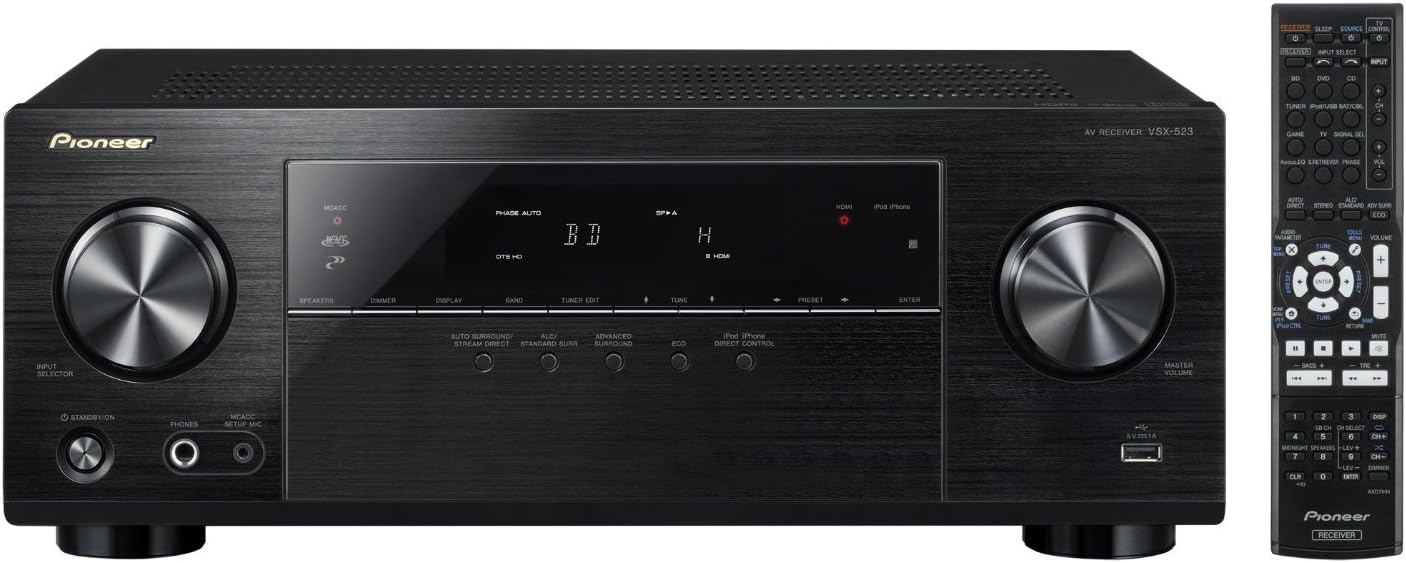
3.1. irudia: Aurrealdea view of the Pioneer VSX-523 with its remote control, illustrating the accessible front USB port for device connectivity.
3.4 HDMI Features (3D and 4K Ultra HD Pass-Through)
The VSX-523 supports advanced HDMI features, allowing it to pass through high-quality video signals to your display.
- 3D Pass-Through: Enjoy 3D content from compatible sources (e.g., 3D Blu-ray players) when connected through the receiver to a 3D-compatible TV.
- 4K Ultra HD Pass-Through: The receiver can pass through 4K Ultra HD video signals (4096 x 2160 resolution) from 4K sources to a 4K-compatible display. This ensures future-readiness for higher resolution content.
- HDMI Audio itzulera kanala (ARC): If your TV supports ARC, audio from your TV's built-in tuner or smart apps can be sent back to the receiver via the HDMI cable, eliminating the need for a separate optical audio cable. Ensure the receiver is powered on before the TV for optimal ARC functionality.
3.5 EKO modua
The energy-saving ECO Mode reduces power consumption in both on and standby modes without sacrificing performance or features.
- Activate ECO Mode via the remote control or front panel button (refer to your remote's specific button layout). This intelligent mode analyzes your sources in real-time and adjusts power consumption accordingly.
4. Mantentzea
Proper care and maintenance will ensure the longevity and optimal performance of your Pioneer VSX-523 A/V Receiver.
4.1 Garbiketa
- Before cleaning, ensure the receiver is powered off and unplugged from the wall outlet.
- Wipe the exterior surfaces with a soft, dry cloth. For stubborn smudges, slightly dampBusti oihal bat urarekin eta gero berehala lehortu.
- Do not use abrasive cloths, waxes, benzene, paint thinner, or other chemical solvents, as these may damage the finish.
- Avoid spraying cleaning solutions directly onto the unit.
4.2 Aireztapena
- Ensure that the ventilation openings on the top, sides, and rear of the receiver are not blocked. Proper ventilation is crucial to prevent internal heat buildup.
- Do not place the receiver in an enclosed cabinet without adequate airflow.
5. Arazoak
If you encounter issues with your receiver, refer to the following common problems and solutions before seeking professional assistance.
5.1 Potentziarik gabe
- Ziurtatu elikatze-kablea ondo konektatuta dagoela hargailuan eta funtzionatzen duen hormako entxufe batean.
- Egiaztatu entxufea aktibo dagoen beste gailu bat konektatuz.
5.2 Soinurik ez edo audio distortsionatua
- Bolumen maila: Increase the master volume. Ensure the mute function is not active.
- Sarrera hautatzea: Verify that the correct input source is selected on the receiver (e.g., "BD" for your Blu-ray player).
- Bozgorailu konexioak: Check all speaker wire connections at both the receiver and the speakers. Ensure positive (+) and negative (-) terminals are correctly matched.
- HDMI audioa: If using HDMI, ensure your source device is configured to output audio via HDMI. For ARC, ensure the receiver is powered on before the TV.
- Bozgorailuaren ezarpenak: Run the MCACC Auto Room Calibration again to ensure optimal speaker settings.
5.3 Bideo irteerarik ez
- HDMI konexioak: Ensure all HDMI cables are securely connected between your source device, the receiver's HDMI input, and the receiver's HDMI OUT to your TV.
- Telebistako sarrera: Verify that your TV is set to the correct HDMI input that the receiver is connected to.
- Iturburu gailua: Ensure your source device (e.g., Blu-ray player) is powered on and outputting video.
- Power-On Order: Some users report that the receiver can be finicky about the power-on order. Try powering on the receiver first, then the TV, and then the source device.
5.4 On-Screen Display (OSD) Not Appearing on TV
- The VSX-523's on-screen configuration guide (OSG) is designed to display only via composite video output (yellow RCA cable), not via HDMI. If your TV does not have a composite video input, you will need to use the receiver's front panel display for menu navigation and settings adjustments.
6. Zehaztapenak
| Ezaugarri | Xehetasuna |
|---|---|
| Modelo zenbakia | VSX-523 |
| Marka | Aitzindaria |
| Kanalak | 5.1 Kanala |
| Potentzia Irteera | 140W/ch (1kHz, THD 1% @ 6 ohms 1ch driven) / 80W/ch (20Hz-20kHz, THD 0.08% @ 8 ohms FTC) |
| HDMI Sarrera/Irteerak | 4 Sartu / 1 Irteera |
| Video Pass-Through | 3D, 4K Ultra HD |
| Audio Deskodetzea | Dolby TrueHD, Dolby Pro Logic IIz, Dolby Digital Plus, DTS-HD Master Audio |
| Gelaren Kalibrazioa | Pioneer Auto MCACC Room Calibration |
| Aurreko USB ataka | Yes (for iPod/iPhone digital transmission, MP3/WMA/AAC playback) |
| Konektibitate Teknologia | HDMI |
| Kontrolagailu mota | iOS, Android (via ControlApp) |
| Produktuaren neurriak | 13.06 x 17.13 x 6.63 hazbete |
| Elementuaren pisua | 18.25 kilo |
| Ezaugarri bereziak | Digital Core Engine with Texas Instruments Aureus DSP, HDMI Audio Return Channel (ARC), ECO Mode |
7. Bermea eta Laguntza
Bermeari buruzko informazio zehatza lortzeko, kontsultatu zure produktuarekin batera datorren berme-txartela edo bisitatu Pioneer-en webgune ofiziala. webgunea. Gorde erosketaren egiaztagiria bermearen erreklamazioetarako.
Ohar garrantzitsua: This product manual provides essential setup and operating instructions. For comprehensive details, advanced settings, and a full list of features, please refer to the complete user manual provided on the included CD-ROM or available for download from the official Pioneer support webgunea.
For technical support, service, or additional inquiries, please contact Pioneer customer support through their official channels.
Lege-oharra: Must be at least 18 & over to purchase this product.
Ask a question about this manual
Ask about setup, troubleshooting, compatibility, parts, safety, or missing instructions. Manuals+ will review the question and use this page’s manual context to help answer it.