
Supersonikoa SC-25
SuperSonic SC-25 2.0 Channel DVD Player with USB Input User Manual
Eredua: SC-25
Sarrera
Eskerrik asko erosketagatik.asing the SuperSonic SC-25 2.0 Channel DVD Player with USB Input. This manual provides essential information for the safe and efficient operation of your new device. Please read it thoroughly before use and retain it for future reference.
Segurtasun-neurriak
- Ez jarri unitatea euripean edo hezetasunean, suteak edo deskarga elektrikoak saihesteko.
- Ez ireki c-a.asing. Konponketa guztiak langile kualifikatuen esku utzi.
- Ziurtatu aireztapen egokia unitatearen inguruan.
- Saihestu unitatea gainazal ezegonkorretan jartzea.
- Deskonektatu korronte-kablea tximista-ekaitzetan edo denbora luzez erabili gabe dagoenean.
Paketearen edukia
Before setup, please verify that all items are present:
- 1 SuperSonic SC-25 DVD Player Unit
- 1 Urruneko kontrola
- 1 Erabiltzailearen eskuliburua (dokumentu hau)
- Elikatze-kablea
- Audio/Video (AV) Cable
Konfigurazio Argibideak
1. Telebistara konektatzea
- Ziurtatu DVD erreproduzitzailea eta telebista itzalita daudela.
- Connect one end of the AV cable (red, white, yellow connectors) to the corresponding output jacks on the back of the DVD player.
- Connect the other end of the AV cable to the corresponding input jacks on your television.
- For optimal video quality, ensure the television input is set to the correct AV channel (e.g., Video 1, AV1). The player supports NTSC video format.
2. Energia-konexioa
- Plug the power cable into the AC IN port on the back of the DVD player.
- Entxufatu kablearen beste muturra entxufe elektriko estandar batera.
3. Hasierako piztea
- Press the Power button on the front panel of the DVD player or on the remote control.
- Turn on your television and select the correct input source (e.g., AV1, Video 1) to see the DVD player's display.
Funtzionamendu-argibideak
1. Diskoaren erreprodukzioa
- Press the OPEN/CLOSE button on the front panel or remote control to open the disc tray.
- Place a compatible disc (DVD, CD, VCD, SVCD, MP3, Picture CD, CD-R, CD-RW) onto the disc tray with the label side facing up.
- Press the OPEN/CLOSE button again to close the disc tray. The player will automatically begin reading the disc.
- Erabili urrutiko agintearen PLAY, PAUSE, STOP, FAST FORWARD eta WIND botoiak erreprodukzioa kudeatzeko.
- The player supports multi-level fast forward and backward scan functionalities.
2. USB erreprodukzioa
- Insert a USB flash drive into the USB input port on the front of the DVD player.
- The player should automatically detect the USB device and display its contents. If not, use the SOURCE or USB button on the remote to switch to USB mode.
- Nabigatu zure bidez files using the arrow keys and SELECT/ENTER button on the remote.
- The player supports MP3 file format for audio playback.
3. Language and Subtitle Settings
- During DVD playback, press the AUDIO button on the remote to cycle through available audio languages (up to 8 languages supported).
- Press the SUBTITLE button on the remote to cycle through available subtitle languages (up to 32 subtitles supported).
Mantentzea
1. Unitatea garbitzea
- Wipe the exterior of the DVD player with a soft, dry cloth.
- Ez erabili garbitzaile likidorik edo aerosol-sprayrik, akabera edo barneko osagaiak kaltetu ditzaketelako.
2. Diskoak garbitzea
- Hatz-markak saihesteko, heldu diskoak ertzetik.
- If a disc is dirty, wipe it gently from the center outwards with a soft, lint-free cloth.
- Do not use abrasive cleaners or solvents on discs.
3. Biltegiratzea
- Store the DVD player in a cool, dry place away from direct sunlight and extreme temperatures.
- When not in use, store discs in their cases to protect them from dust and scratches.
Arazoak konpontzea
| Arazoa | Kausa posiblea | Irtenbidea |
|---|---|---|
| Botererik ez | Kable elektrikoa ez dago konektatuta; Entxufea ez dago aktibo. | Ziurtatu kablea ondo konektatuta dagoela. Probatu entxufea beste gailu batekin. |
| Ez dago irudi edo soinurik | AV cables incorrectly connected; Incorrect TV input selected. | Check AV cable connections. Select the correct input source on your TV. |
| Diskoa ez da erreproduzitzen | Disc is dirty or scratched; Disc is incompatible; Disc inserted incorrectly. | Clean the disc. Ensure the disc type is supported. Insert disc with label side up. |
| USB gailua ez da ezagutzen | USB device not properly inserted; Unsupported file format on USB. | Re-insert the USB device. Ensure fileMP3 formatuan daude. |
Zehaztapenak
- Marka: Supersonikoa
- Modelo zenbakia: SC-25
- Media mota: CD, DVD (Compatible with DVD/CD/VCD/SVCD/MP3/Picture/CD-R/CD-RW)
- Konektibitate Teknologia: Powerline (Implies standard AC power connection)
- Kolorea: Beltza
- Elementuaren pisua: 1.9 kilo
- Gailu bateragarriak: Telebista
- Input Video Compatibility: NTSC
- Kanal kopurua: 2
- Bideo formatu analogikoa: NTSC
- Kontroladore mota: Urruneko Kontrola
- File Format (USB): MP3
- UPC: 639131000254
- Fabrikatzailea: SUPERSONIC INC.
- Paketearen neurriak: 7.874 H x 24.13 L x 24.13 W (zentimetro)
- Paketearen pisua: 2.160 kilo
- Jatorrizko herrialdea: Txina
Bermea eta Laguntza
This SuperSonic SC-25 DVD Player is covered by a Fabrikatzailearen Bermea. For specific details regarding warranty terms and conditions, please refer to the documentation included with your purchase or contact SuperSonic customer support.
For technical assistance or customer service inquiries, please visit the official SuperSonic website or contact their support channels. Keep your purchase receipt for warranty claims.
Produktua amaituview
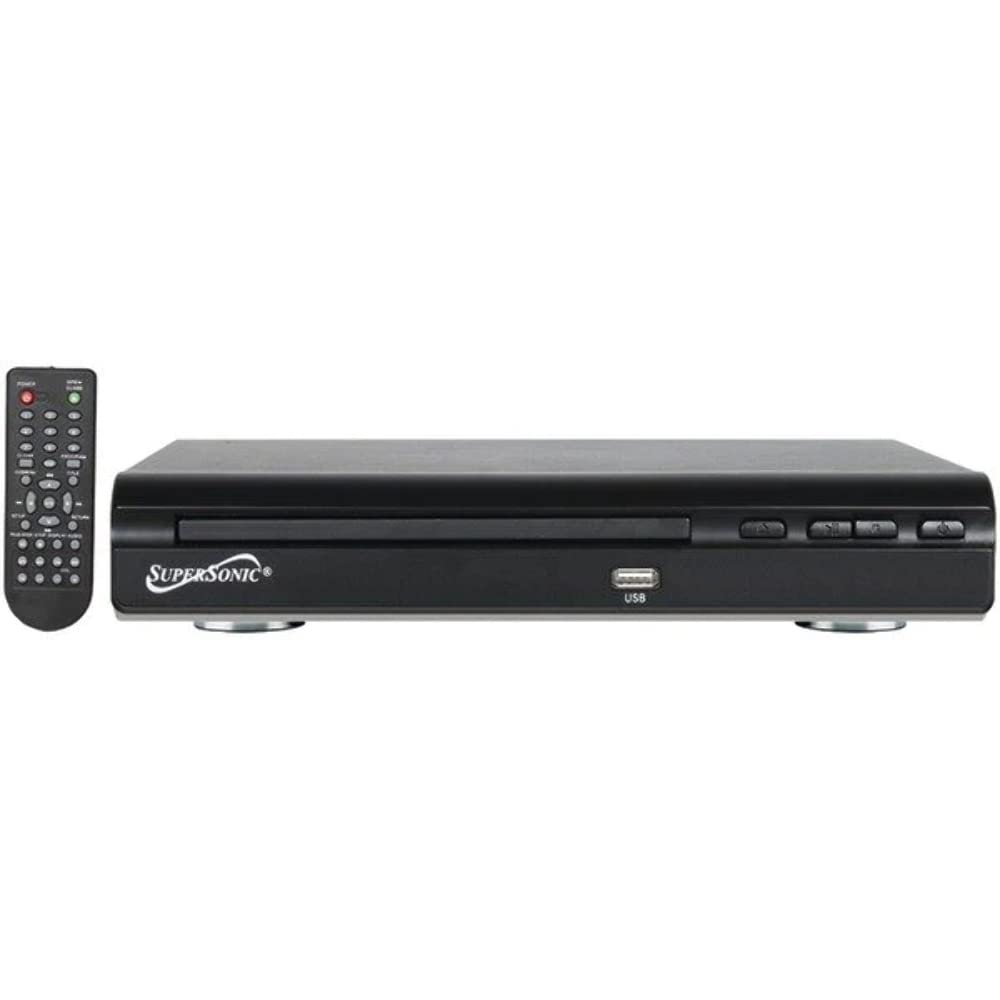
Aurrealdea view of the SuperSonic SC-25 DVD player, showing the disc tray, USB port, and control buttons.
Lotutako dokumentuakSC-25


Ask a question about this manual
Ask about setup, troubleshooting, compatibility, parts, safety, or missing instructions. Manuals+ will review the question and use this page’s manual context to help answer it.