
Sarrera
This manual provides detailed instructions for the operation and maintenance of your Calypso K5609/3 Digital Quartz Watch. Please read this manual thoroughly before using your watch to ensure proper function and longevity. Keep this manual for future reference.
Segurtasun Informazioa
- Saihestu erlojua denbora luzez tenperatura altuetan (beroan edo hotzean) jartzea.
- Do not attempt to open the watch case or replace the battery yourself, as this may void the warranty and compromise water resistance. Contact a qualified technician.
- Garbitu erlojua zapi leun eta lehor batekin. Saihestu garbitzaile kimikoak erabiltzea.
- While the watch is water-resistant up to 100 meters, avoid operating buttons underwater to prevent water ingress.
Paketearen edukia
- Calypso K5609/3 Digital Quartz Watch
- Erabiltzailearen eskuliburua (dokumentu hau)
Watch Overview
Your Calypso K5609/3 watch features a digital display with various functions. Familiarize yourself with the buttons and display layout.
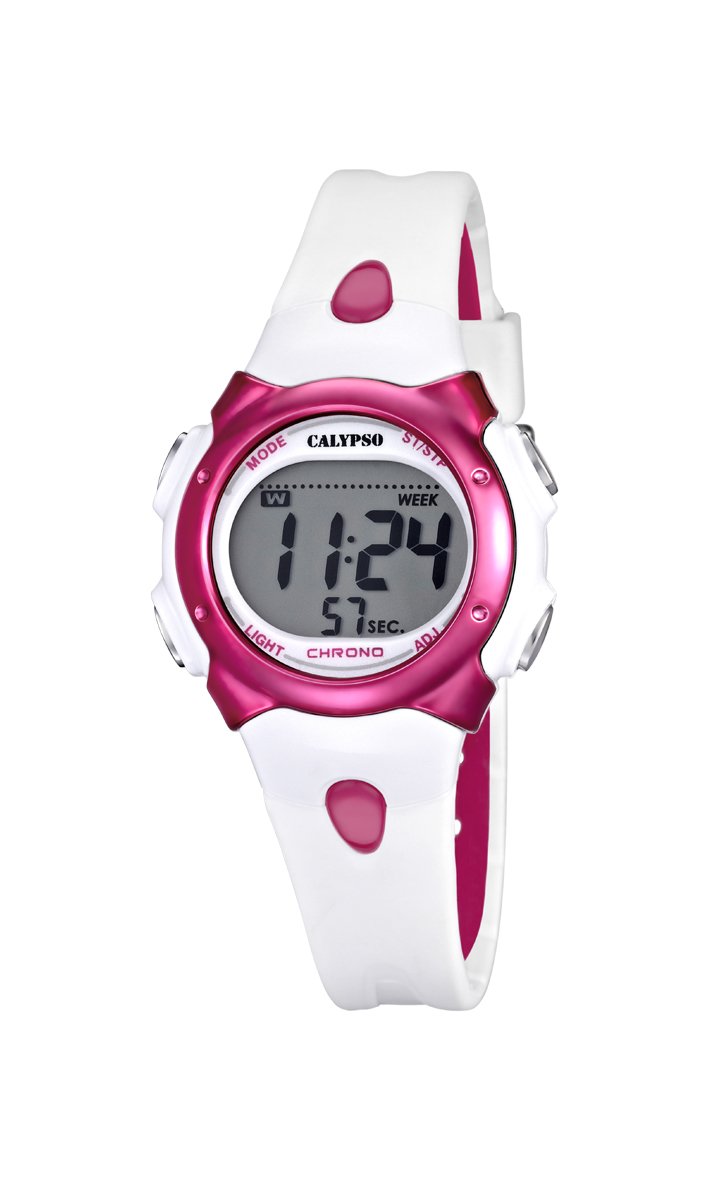
1. irudia: Aurrealdea view of the Calypso K5609/3 Digital Quartz Watch. This image shows the watch face with its digital display and the overall design of the watch, including the white plastic strap.

2. irudia: Angelukoa view of the Calypso K5609/3 Digital Quartz Watch. This image provides a different perspective of the watch, highlighting its round case shape and the texture of the plastic strap.
Button Functions (Typical Digital Watch Layout)
While specific button labels may vary, most digital watches follow a similar pattern:
- MODE botoia: Cycles through different modes (Time, Alarm, Chronograph).
- SET/ADJUST Button: Used to enter setting mode and confirm selections.
- START/STOP botoia: Used to start/stop chronograph, adjust values upwards.
- ARGI botoia: Atzeko argia aktibatzen du argiztatzeko.
Refer to the markings on your specific watch for exact button identification.
Konfigurazioa
Ordua eta data ezartzea
- Sakatu MODUA button repeatedly until the time display starts flashing or you enter the time setting mode.
- Sakatu SET/ADJUST button to select the digit you wish to change (e.g., hours, minutes, year, month, day).
- Erabili HASI/GELDITU button to increase the selected value. Hold it down for faster adjustment.
- Jarraitu sakatzen SET/ADJUST eta HASI/GELDITU until all time and date settings are correct.
- Sakatu MODUA botoia ezarpen modutik irteteko eta orduaren bistaratzea normala itzultzeko.
Alarma ezartzea
- Sakatu MODUA button until you reach the Alarm mode (often indicated by "AL" or a bell icon).
- Sakatu SET/ADJUST button to select the alarm hour.
- Erabili HASI/GELDITU botoia nahi duzun alarmaren ordua ezartzeko.
- Sakatu SET/ADJUST again to select the alarm minute.
- Erabili HASI/GELDITU botoia nahi duzun alarma minutua ezartzeko.
- Sakatu MODUA alarma ezarpen modutik irteteko.
- To activate/deactivate the alarm, typically press the HASI/GELDITU button while in Alarm mode. An alarm icon will appear/disappear on the display.
Funtzionamendua
Kronografoa (kronometroa) erabiltzea
- Sakatu MODUA button until you reach the Chronograph mode (often indicated by "ST" or "CH"). The display should show "00:00:00".
- Sakatu HASI/GELDITU botoia sakatu kronografoa abiarazteko.
- Sakatu HASI/GELDITU botoia berriro sakatu kronografoa gelditzeko.
- To reset the chronograph, press the SET/ADJUST botoia kronografoa geldituta dagoenean.
- Sakatu MODUA to exit the chronograph mode.
Atzeko argiaren funtzioa
Argi gutxiko baldintzetan pantaila argiztatzeko, sakatu ARGIA botoia. Atzeko argia normalean segundo batzuetan piztuta egongo da.
Uraren Erresistentzia
Your Calypso K5609/3 watch is water-resistant up to 100 meters (10 ATM). This means it is suitable for swimming and snorkeling. However, it is not recommended for scuba diving. Do not operate any buttons while the watch is submerged in water, as this can compromise the water seal.
Mantentzea
Erlojua garbitzea
Regularly clean your watch to maintain its appearance and function. Use a soft, slightly damp cloth to wipe the case and strap. For the plastic strap, mild soap and water can be used, but ensure no soap residue remains. Avoid harsh chemicals or abrasive materials.
Bateria ordezkatzea
The watch is powered by a quartz battery. When the display becomes dim or the watch stops functioning, the battery may need replacement. Battery life varies depending on usage, especially backlight and alarm functions. It is recommended to have the battery replaced by a qualified watch technician to ensure the water resistance seal is properly maintained.
Arazoak konpontzea
| Arazoa | Kausa posiblea | Irtenbidea |
|---|---|---|
| Erlojuaren pantaila hutsik edo ilun dago. | Bateria baxua edo hilda. | Ordeztu bateria (profesional batek gomendatua). |
| Ordua ez da zuzena. | Ordua ez da behar bezala ezarri edo nahi gabe doikuntza egin da. | Ikusi "Ordua eta data ezartzea" atala ordua berrezartzeko. |
| Alarmak ez du jotzen. | Alarma ez dago aktibatuta edo gaizki konfiguratuta. | Ensure alarm is activated and set to the correct time. |
| Ura erlojuaren barruan. | Ur azpian funtzionatzen zuten botoiak edo zigilua hondatuta zegoen. | Eraman erlojua berehala profesional batengana ikuskatu eta konpontzeko, kalte gehiago saihesteko. |
Zehaztapenak
- Eredua: K5609/3
- Marka: Kalipsoa
- Bistaratzeko mota: Digitala
- Mugimendua: Kuartzoa
- Kasuaren materiala: Plastikoa
- Kasuaren diametroa: 33 mm
- Kasuen lodiera: 8 mm
- Bandaren materiala: Plastikoa
- Bandaren zabalera: 14 mm
- Lotura mota: Pin Buckle (Boucle Ardillon)
- Leihoaren markagailuaren materiala: Akrilikoa
- Uraren erresistentzia: 100 metro (10 kutxazain automatiko)
- Ezaugarri bereziak: Alarm, Chronograph, Day-Date-Month Calendar
- Energia iturria: Bateriaren bidez
- Produktuaren neurriak: 20 x 20 x 20 cm; 50 grams (packaging dimensions, watch itself is smaller)
Bermea eta Laguntza
For warranty information and customer support, please refer to the official Calypso webwebgunera edo jarri harremanetan zure baimendutako saltzailearekin. Gorde erosketa-agiria erosketaren frogagiri gisa berme-erreklamazioetarako.
Laguntza gehiago lortzeko, mesedez bisitatu: www.calypsowatches.com