
Sarrera
This manual provides essential instructions for the safe and effective use of your Sony H400 Digital Camera. Please read this manual thoroughly before operating the camera and retain it for future reference.
Kutxan dagoena
Egiaztatu elementu guztiak paketean daudela:
- Sony Cyber-shot DSC-H400 Digital Camera
- Sony NP-BX1 Rechargeable Lithium Ion Battery
- AC Adaptor AC-UB10C
- USB anitzeko kablea
- Sorbalda-uhal
- Lentearen kapela
- Argibide eskuliburua (dokumentu hau)
- Bermearen informazioa
Konfigurazioa
1. Sorbaldako uhala lotzea
Attach the provided shoulder strap to the camera's strap lugs. Ensure it is securely fastened to prevent accidental drops.
2. Bateria sartzea
- Ireki kameraren behealdean dagoen bateriaren/memoria txartelaren estalkia.
- Insert the NP-BX1 rechargeable battery with the correct orientation, ensuring the terminal matches the camera's battery compartment. Push until it clicks into place.
- Itxi bateriaren/memoria txartelaren estalkia ondo itxita.
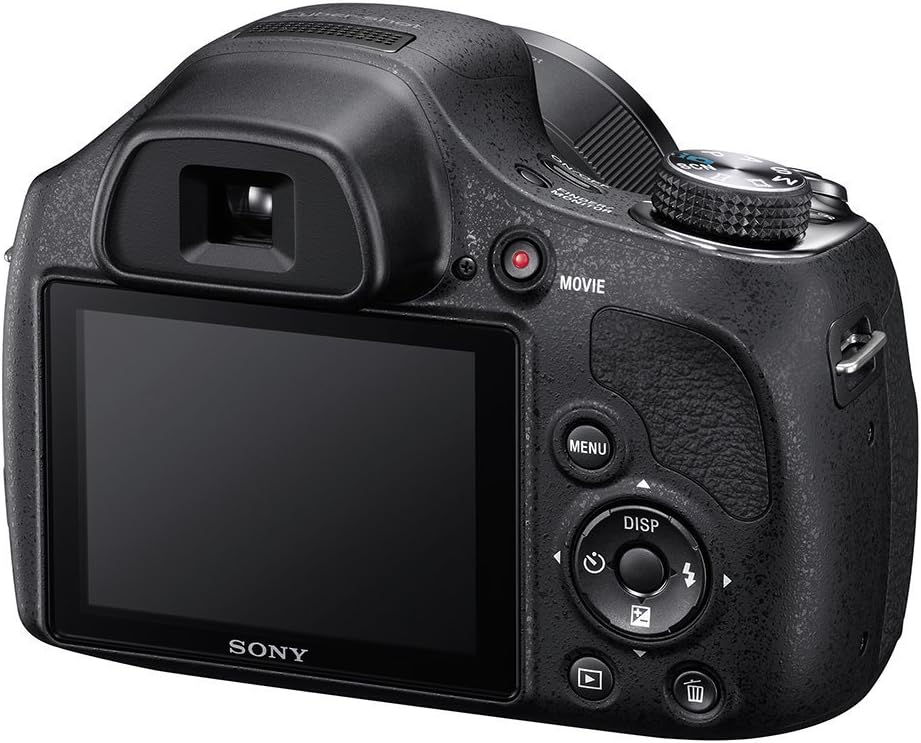
Irudia: Atzealdea view of the camera, illustrating the battery/memory card compartment location (bottom, not visible in this specific image but implied by general camera design) and main controls.
3. Memoria Txartela sartzea
The camera supports SD, SDHC, SDXC, Memory Stick PRO Duo, and Memory Stick PRO-HG Duo cards.
- Ireki bateriaren/memoria txartelaren estalkia.
- Sartu memoria txartela zirrikituan orientazio zuzenarekin klik egin arte.
- Itxi bateriaren/memoria txartelaren estalkia ondo itxita.
4. Bateria kargatzea
Use the supplied AC Adaptor AC-UB10C and Multi USB Cable to charge the NP-BX1 battery while it is in the camera.
- Connect the Multi USB Cable to the camera's USB port.
- Connect the other end of the USB cable to the AC Adaptor.
- Konektatu korronte-egokitzailea hormako entxufe batera. Kargatzeko funtzioaamp piztuko da.
- Charging is complete when the charge lamp itzaltzen da.
Kameraren funtzionamendua
Piztu/Itzali
Sakatu ON/OFF button to power the camera on or off.
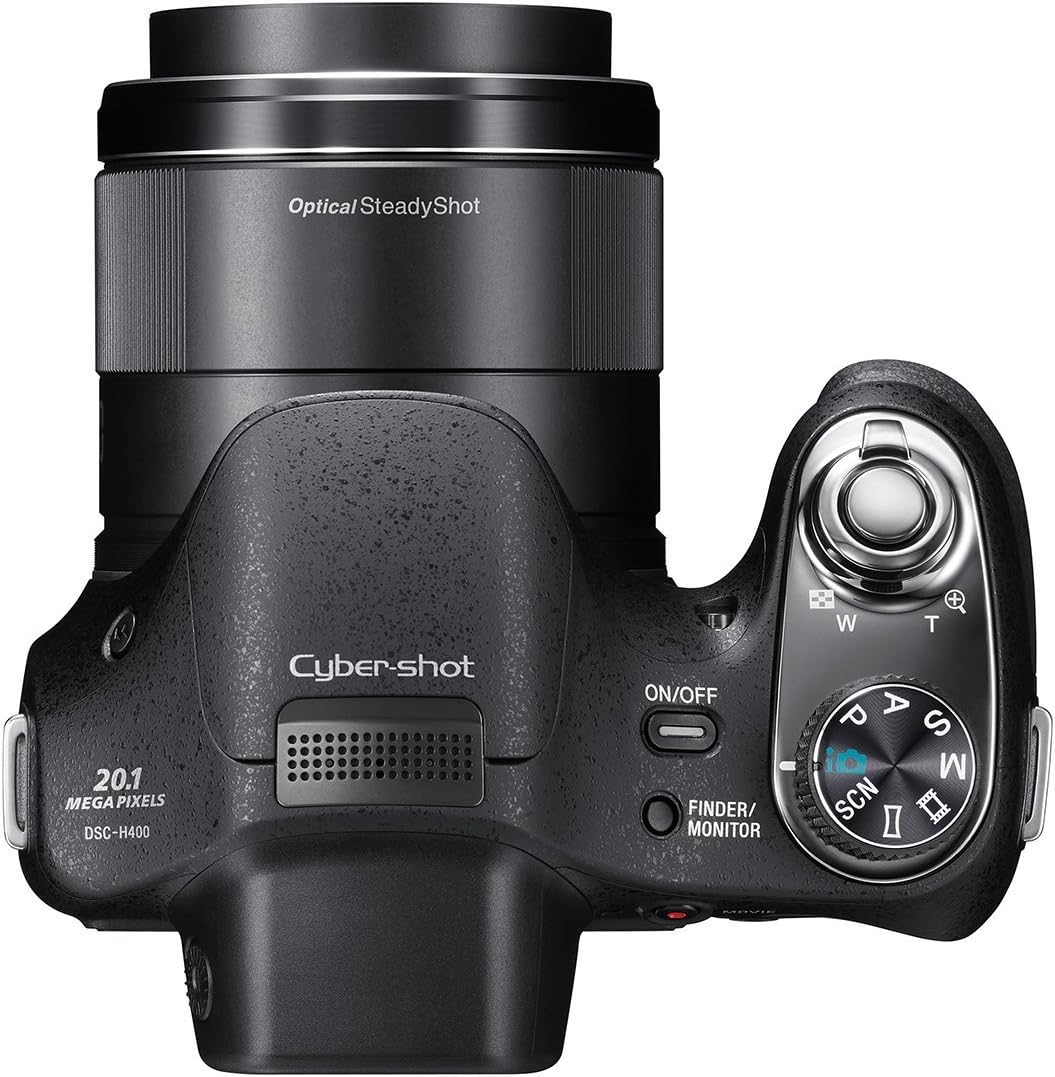
Irudia: Goian view of the camera, highlighting the ON/OFF button, shutter button with zoom lever, and mode dial.
Irudi finkoak filmatzea
- Hautatu argazki modu bat: Rotate the mode dial to select your desired shooting mode (e.g., Intelligent Auto, Program Auto, Manual, Scene Selection).
- Marraztu zure planoa: Use the LCD monitor or electronic viewbilatzailea zure irudia konposatzeko.
- Zooma: Erabili obturadore-botoiaren inguruko zoom-palanka 63x zoom optikoa doitzeko.
- Fokua: Press the shutter button halfway down to autofocus. The camera will confirm focus.
- Harrapatzea: Sakatu obturadorearen botoia guztiz argazkia ateratzeko.

Irudia: Aurrealdea view of the camera, showcasing the lens with "63x Optical Zoom" text.
Filmak grabatzen
The camera can record movies in HD 720p resolution.
- Sakatu ZINEA botoia grabatzen hasteko.
- Sakatu ZINEA botoia berriro grabaketa gelditzeko.
Irudia: Atzealdea view of the camera, indicating the location of the dedicated MOVIE record button.
Flasha erabiliz
The built-in flash operates in automatic mode. The camera will determine if flash is needed based on lighting conditions.
Erreprodukzioa
Sakatu Erreprodukzioa botoia (normalean triangelu baten ikonoarekin adierazten da) view your captured images and videos.
Ordenagailu batera konektatzea
Use the Multi USB Cable to connect the camera to your computer for transferring photos and videos.
- Konektatu kamera ordenagailura USB kablea erabiliz.
- Kamera unitate aldagarri gisa agertuko da zure ordenagailuan.
- Arrastatu eta jaregin files transferitzeko.
Mantentzea
Kamera garbitzea
- Kameraren gorputza: Garbitu zapi leun eta lehor batekin. Zikinkeria egoskorra bada, erabili zapi leun bat.ampened with water and then wipe dry.
- Lentea: Erabili lenteen eskuila hautsa kentzeko, eta ondoren, garbitu astiro-astiro lenteak garbitzeko zapi batekin. Saihestu lentearen gainazala hatzekin ukitzea.
- LCD pantaila: Garbitu astiro-astiro zapi leun eta lehor batekin.
Bateria zaintzea
- Gorde bateria leku fresko eta lehor batean erabiltzen ez duzunean.
- Saihestu bateria muturreko tenperaturetara ez jartzea.
- Charge the battery fully before extended storage and periodically during storage to maintain its life.
Biltegiratzea
When storing the camera for an extended period, remove the battery and memory card. Store the camera in a dry, dust-free environment, preferably in a camera bag or case.
Arazoak konpontzea
Kamera ez da pizten
- Ziurtatu bateria behar bezala sartuta eta guztiz kargatuta dagoela.
- Egiaztatu bateriaren terminalak garbi dauden.
Irudiak lausoak dira
- Ziurtatu lentea garbi dagoela eta zikinkeriarik gabe.
- Press the shutter button halfway to allow the camera to focus before fully pressing it.
- Use Optical SteadyShot image stabilization, especially when zooming or in low light.
- Check your shooting mode; some modes may have different focusing characteristics.
Shutter Lag
- In some shooting conditions, there might be a slight delay. Try anticipating the moment you want to capture.
- Ensure sufficient lighting for faster autofocus.
LCD Screen Too Bright/Dim
- Adjust the brightness settings in the camera's menu.
- Erabili elektronikoa. viewfinder in bright outdoor conditions if the LCD is difficult to see.
Ezin da transferitu Files Ordenagailura
- Ziurtatu USB kablea kamerara eta ordenagailura ondo konektatuta dagoela.
- Probatu beste USB ataka bat zure ordenagailuan.
- Restart both the camera and the computer.
Zehaztapenak
| Marka | Sony |
| Ereduaren izena | Sony H400 |
| Modelo zenbakia | DSCH400/B |
| Argazki sentsorearen bereizmena | 20 MP |
| Zoom optikoa | 63x |
| Irudi Egonkortzea | Optikoa |
| Pantailaren tamaina | 3 hazbete |
| Bideo Ebazpena | HD 720p |
| Konektibitate Teknologia | USBa |
| Onartua File Formatua | JPEG (Stills), MPEG-4, H.264 (Video) |
| Compatible Flash Memory Type | SD/SDHC/SDXC/Memory Stick PRO Duo/Pro-HG Duo |
| Elementuaren pisua | 1.4 kilo |
| Viewaurkitzailea | Elektronikoa |
| Fokuaren Gehienezko Luzera | 1550 milimetro |
| Gutxieneko Fokua | 25 milimetro |
| Gehieneko irekiera | 3.4 f |
Bermearen informazioa
Produktu hau a 90-day Limited Hardware Warranty. Please refer to the provided warranty document for full terms and conditions.
Laguntza
For further assistance, please visit the official Sony support website or contact their customer service. Keep your model number (DSCH400/B) and serial number ready when seeking support.